• Home
  • Tools dropdown img
    • Spreadsheet Charts

      • ChartExpo for Google Sheets
      • ChartExpo for Microsoft Excel
    • Power BI Charts

      • Power BI Custom Visuals by ChartExpo
    • Word Cloud

  • Charts dropdown img
    • Chart Category

      • Bar Charts
      • Circle Graphs
      • Column Charts
      • Combo Charts
      • Comparison Charts
      • Line Graphs
      • PPC Charts
      • Sentiment Analysis Charts
      • Survey Charts
    • Chart Type

      • Box and Whisker Plot
      • Clustered Bar Chart
      • Clustered Column Chart
      • Comparison Bar Chart
      • Control Chart
      • CSAT Survey Bar Chart
      • CSAT Survey Chart
      • Dot Plot Chart
      • Double Bar Graph
      • Funnel Chart
      • Gauge Chart
      • Likert Scale Chart
      • Matrix Chart
      • Multi Axis Line Chart
      • Overlapping Bar Chart
      • Pareto Chart
      • Radar Chart
      • Radial Bar Chart
      • Sankey Diagram
      • Scatter Plot Chart
      • Slope Chart
      • Sunburst Chart
      • Tornado Chart
      • Waterfall Chart
      • Word Cloud
    • Google Sheets
      Microsoft Excel
  • Services
  • Pricing
  • Contact us
  • Blog
  • Support dropdown img
      • Gallery
      • Videos
      • Contact us
      • FAQs
      • Resources
    • Please feel free to contact us

      atsupport@chartexpo.com

Categories
All Data Visualizations Data Analytics Surveys
Add-ons/
  • Google Sheets
  • Microsoft Excel
  • Power BI
All Data Visualizations Data Analytics Surveys
Add-ons
  • Google Sheets
  • Microsoft Excel
  • Power BI

We use cookies

This website uses cookies to provide better user experience and user's session management.
By continuing visiting this website you consent the use of these cookies.

Ok

ChartExpo Survey


Home > Blog > Data Analytics

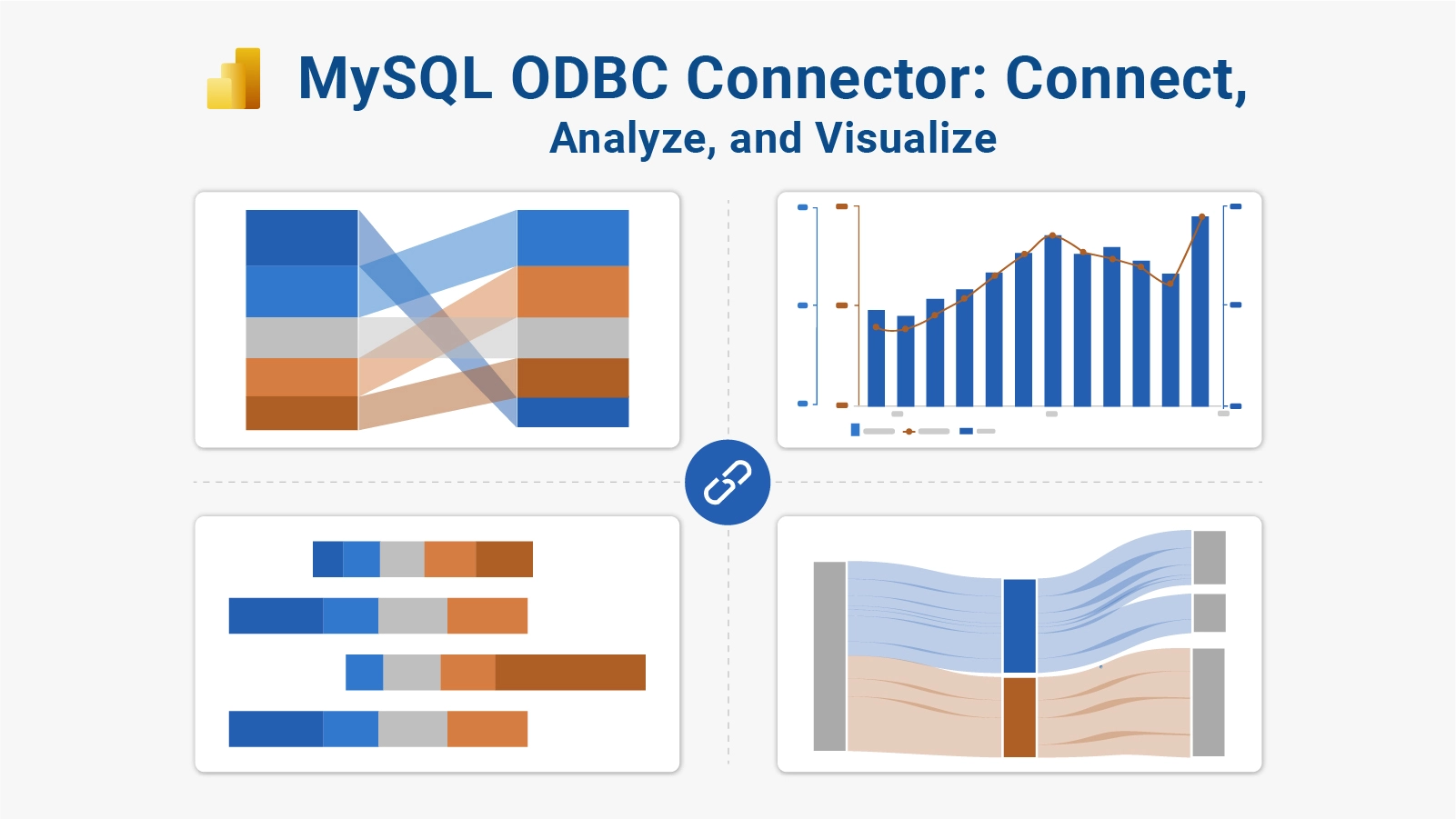
MySQL ODBC Connector: Connect, Analyze, and Visualize

Reliable database connectivity is the foundation of every modern analytics workflow. Without a stable, standardized way to reach MySQL data, reporting tools stall, dashboards go stale, and data teams lose time troubleshooting driver conflicts instead of building insights.
MySQL ODBC Connector

A dedicated driver closes that gap, and the MySQL ODBC connector is the most widely adopted solution for exactly this purpose.

Serving as a bridge between MySQL and any ODBC-compliant application, the MySQL connector ODBC driver eliminates custom integration code and makes structured data instantly accessible to BI tools, ETL pipelines, and reporting platforms.

Regardless of operating system or software stack, this connector delivers consistent, secure, and efficient access to live database content.

What is MySQL ODBC Connector?

Definition: The MySQL ODBC connector is a driver that enables ODBC-compliant applications to communicate directly with MySQL databases.

It receives queries from client software, translates them into commands the MySQL server recognizes, and returns formatted result sets to the requesting application.

Businesses rely on the MySQL connector ODBC driver because it standardizes database access across every tool in the stack, from business intelligence platforms to enterprise reporting software, without requiring custom connection code.

It is particularly valuable in multi-source environments where consistent, cross-platform connectivity is a technical requirement rather than a convenience.

Key Reasons for MySQL ODBC Connector Importance

MySQL ODBC connector adoption is driven by concrete operational needs. Key reasons organizations depend on it include:

  • Cross-platform database connectivity: Runs without compatibility issues on Windows, macOS, and Linux environments.
  • Standardized data access via ODBC protocol: Lets every tool query MySQL through a single, consistent interface.
  • Integration with BI and reporting tools: Works with Power BI connectors and other analytics platforms out of the box.
  • Secure and authenticated connections: Uses encryption and credential validation to keep data transfers protected.
  • Real-time data retrieval capabilities: Pulls live records from MySQL so dashboards and reports always reflect current information.
  • Enterprise application compatibility: Supports large-scale architectures, including database versus data warehouse scenarios.
  • Simplified database management and querying: Reduces friction when executing SQL queries or accessing external data through applications.

Key Features of MySQL ODBC Connector

This driver ships with a feature set built for both lightweight projects and large enterprise deployments. Key features include:

  • ODBC 3.8 compliance: Guarantees consistent performance across analytics platforms, including connecting Power BI to SQL Server workflows.
  • Unicode and ANSI driver support: Processes diverse character sets accurately, preserving data fidelity across formats.
  • SSL/TLS encrypted connections: Wraps every transmission in industry-standard encryption to prevent unauthorized access.
  • Connection pooling capability: Reuses existing database connections to reduce overhead and improve throughput.
  • Parameterized query execution: Separates query logic from user input, improving both efficiency and resistance to injection attacks.
  • Support for stored procedures: Executes complex database logic directly, including operations required for Power BI data model integration.
  • Compatibility with Windows, macOS, and Linux: Delivers uniform behavior across all three major operating systems.

MySQL ODBC Connector Installation Process

Executing the download connector MySQL process from the official source ensures you get a verified, stable driver. Follow each step in sequence to avoid configuration errors and connectivity issues.

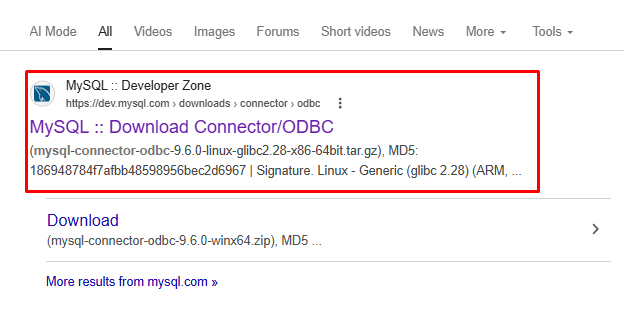
Step 1: Download the correct driver version from the official site

Visit the official MySQL site and download the MySQL Connector/ODBC driver for your operating system.
MySQL ODBC Connector

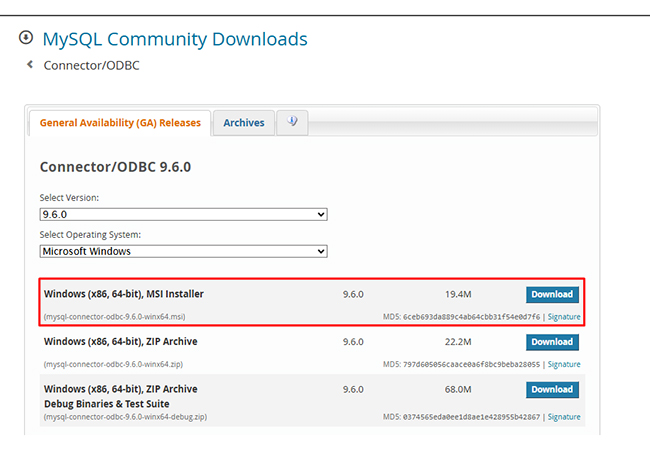
Step 2: Choose a 32-bit or 64-bit architecture based on your system

Check your system type and install the same 32-bit or 64-bit version to avoid compatibility issues.
MySQL ODBC Connector

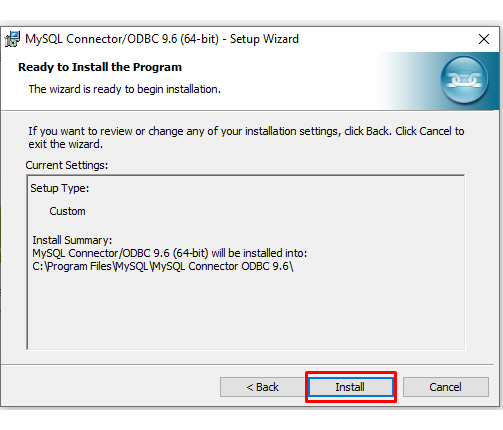
Step 3: Run the installer package

Open the downloaded file and complete the installation using the setup wizard.
MySQL ODBC Connector

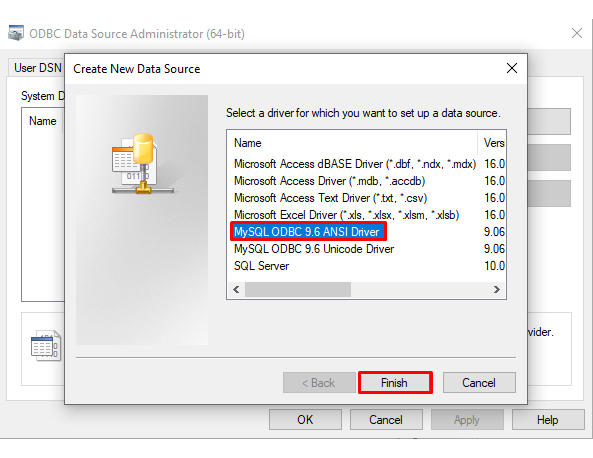
Step 4: Configure DSN in ODBC Data Source Administrator

Open ODBC Data Source Administrator, go to System DSN → Add, and select the MySQL ODBC driver.
MySQL ODBC Connector

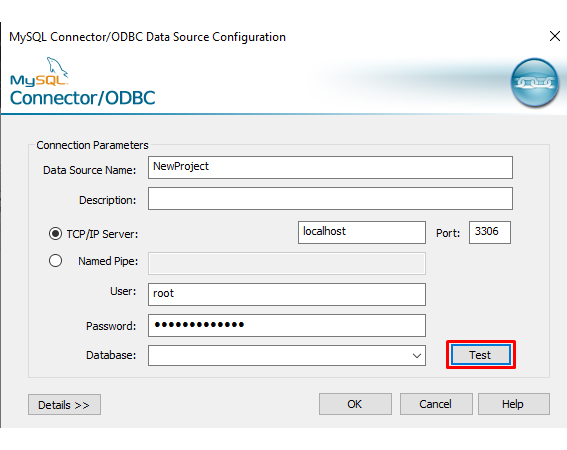
Step 5: Enter MySQL server credentials

In the DSN setup window, enter:

  • Data Source Name
  • MySQL Server address
  • Port (default 3306)
  • Username
  • Password
  • Database name
MySQL ODBC Connector

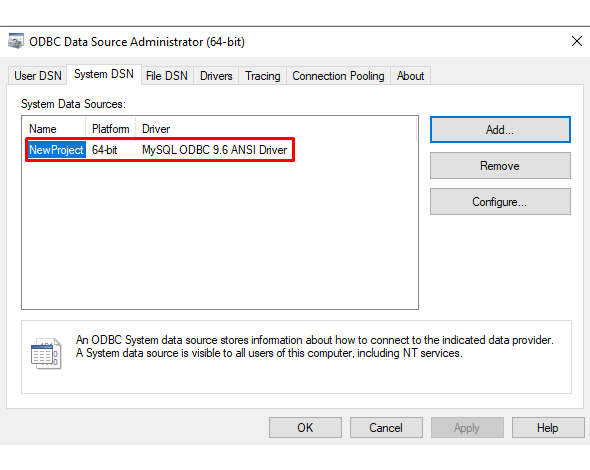
Step 6: Test and validate the connection

Click Test Connection.
If the test is successful, save the DSN.
MySQL ODBC Connector

Once installed, the connector becomes available to reporting tools, ETL pipelines, and BI platforms immediately. Completing this setup is a prerequisite before learning how to use Power BI with external MySQL databases, since Power BI requires properly installed drivers to establish source connections.

How does the MySQL ODBC Connector Work?

The MySQL ODBC connector functions as an intermediary that translates requests between client applications and the MySQL database, ensuring queries are correctly formed and results arrive in a consumable format.

  • Establishes ODBC API communication: Opens a standardized channel that tools like Power BI report builder use to reach the database.
  • Translates SQL queries into MySQL-compatible commands: Reformats client requests so the MySQL server can parse and execute them.
  • Sends requests to the MySQL server: Routes the formatted query across the connection from the client application to the database engine.
  • Retrieves and formats result sets: Structures returned rows into a format suited for Power BI advanced analysis and reporting.
  • Returns processed data to client application: Delivers the organized result set back to the requesting tool for visualization or further processing.

How to Connect MySQL ODBC Connector with Power BI?

Linking the ODBC connector to Power BI gives analysts direct access to MySQL data inside dashboards and reports. This connection is standard practice in high-volume reporting environments.

Step 1: Install the MySQL ODBC driver

Download and install MySQL Connector/ODBC 8.x from the official site, matching your Power BI version (32-bit or 64-bit). Then open ODBC Data Source Administrator and create a DSN using the MySQL ODBC driver.

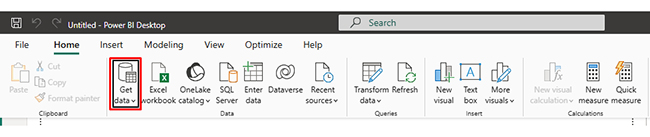
Step 2: Open Power BI Desktop

Launch Power BI Desktop, go to the Home tab, and click Get Data to see available data sources.
MySQL ODBC Connector

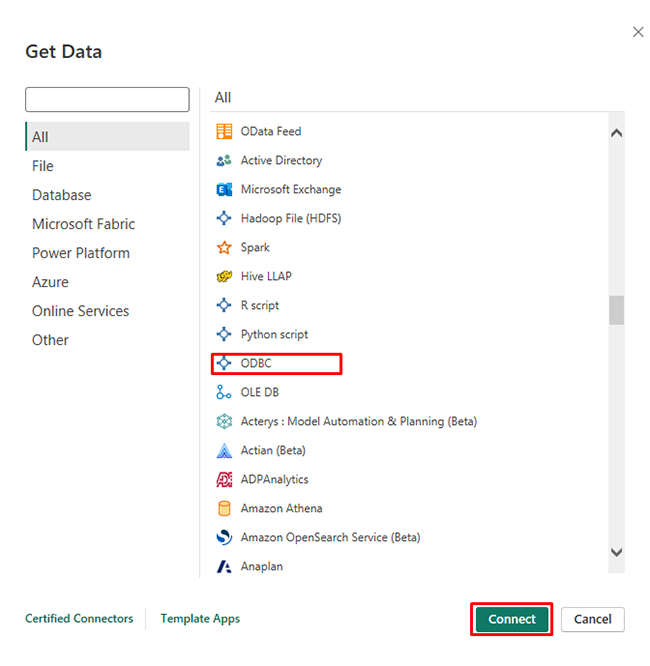
Step 3: Select the ODBC data source option

Search for ODBC in the Get Data window, select it, and click Connect to use the ODBC driver.
MySQL ODBC Connector

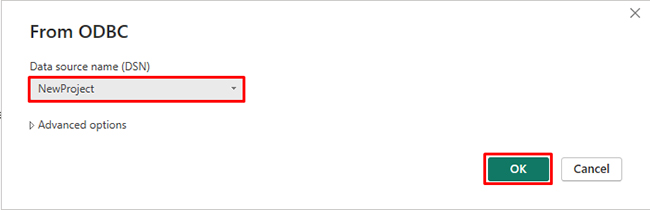
Step 4: Choose a configured DSN

Select the DSN you created for MySQL from the list and click OK to continue.
MySQL ODBC Connector

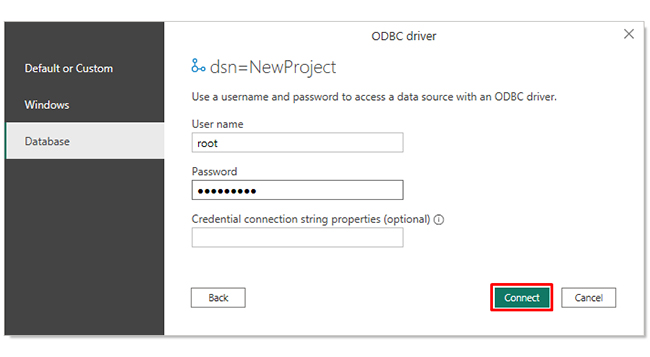
Step 5: Provide authentication credentials

Enter your MySQL username and password, choose the correct authentication type, and click Connect.
MySQL ODBC Connector

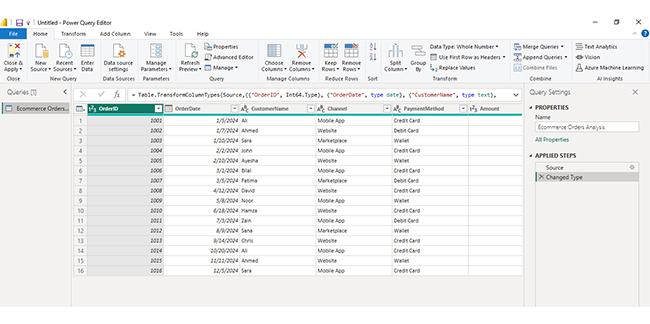
Step 6: Load or transform data in Power Query

Select the required tables, then click Load to import data or Transform Data to edit it in Power Query before creating reports.
MySQL ODBC Connector

How to Analyze Data Using MySQL ODBC Connector in Power BI

With the MySQL ODBC connector active in Power BI, you can move from raw data to actionable insights through a structured analysis process.

1. Connect to MySQL using the configured ODBC DSN

Pull database tables into Power BI directly from the linked MySQL source.

2. Load and prepare data in Power Query

Apply transformations, filter irrelevant rows, and normalize data types before building visuals.

3. Use sample data for testing

Validate report logic with sample data for Power BI before switching to the live production database.

4. Enable secure refresh for live data

Set up a data gateway in Power BI so dashboards refresh automatically from the MySQL source.

5. Create dashboards and visuals

Build charts and publish reports to Power BI for the report server for broader enterprise access.

6. Enhance visuals with tools

Third-party visualization add-ins present MySQL data in formats that standard Power BI visuals cannot produce.

ChartExpo helps create advanced and interactive charts that present MySQL data in a clearer and more professional way.

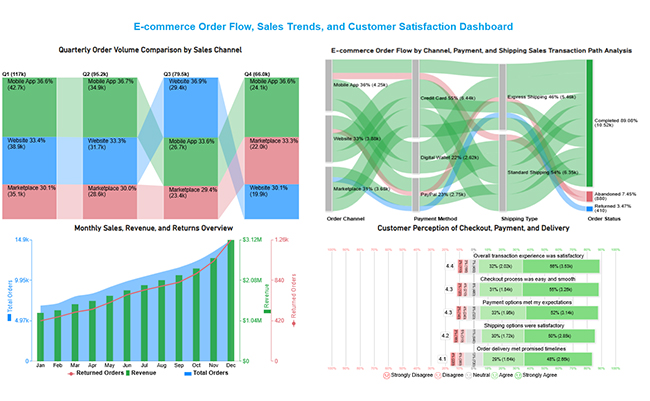
7. Adding Final Dashboard Insights

The dashboard shows e-commerce performance by comparing quarterly order volumes across channels, mapping order flow from channel → payment → shipping → final status, and tracking monthly sales, revenue, and returns trends.

It also highlights customer satisfaction metrics, indicating generally positive experiences in checkout, payment, shipping, and delivery, with most users reporting smooth transactions and timely deliveries.
MySQL ODBC Connector

Key Insights

  • The Sankey Chart reveals that approximately 89% of transactions reach Completed status, with credit card and digital wallet payments generating the highest conversion rates and minimal abandonment.
  • The Comparison Bar Chart shows that the Mobile App records the highest order volume across most quarters, reflecting greater customer engagement compared to other sales channels.
  • The Multi Axis Line Chart indicates that orders and revenue climb throughout the year and reach their peak in December, with returns rising incrementally alongside overall sales growth.
  • The Likert Chart results are predominantly favorable, with the majority of respondents choosing Agree or Strongly Agree across checkout, payment, and delivery experience questions.

Benefits of Using MySQL ODBC Connector

The MySQL ODBC connector delivers measurable value across engineering, analytics, and business teams through several key advantages:

  • Seamless integration with analytics tools: Links MySQL to BI platforms with no custom code, supporting workflows like Power BI vs. SSRS comparisons.
  • Centralized data access: Consolidates database connectivity so multiple applications share a single, consistent data source.
  • Enhanced data security: Applies encryption and authentication protocols to every database interaction.
  • Scalable enterprise deployment: Performs reliably in complex architectures, including cloud environments like Power BI and AWS.
  • Improved reporting efficiency: Grants direct database access to reporting tools, cutting the time between query and output.
  • Reduced data silos: Prevents fragmented data copies by routing all applications through a single shared connection.

FAQs

How to use the MySQL ODBC connector?

Install the driver, configure a DSN in ODBC Data Source Administrator, then connect your application or BI tool to that DSN. Once configured, any ODBC-supported software can run queries against MySQL without additional setup.

How to set up a MySQL connector?

Download the MySQL connector from the official MySQL website, run the installer, open ODBC Data Source Administrator to create a new DSN, enter your MySQL server credentials, and click Test Connection to confirm the setup is working.

What is the MySQL Connector module?

The MySQL Connector module is a category of drivers that let external applications communicate with MySQL databases. The MySQL ODBC connector is one such module, using the ODBC standard to provide structured, authenticated, and secure data access to any compatible application.

Wrap Up

The MySQL ODBC connector removes the friction that slows down data-driven teams. By providing a standardized, secure, and cross-platform pathway between MySQL databases and analytical tools.

It gives analysts, developers, and business users immediate access to the data they need without wrestling with custom integration work.

Whether connecting Power BI for live dashboards, feeding ETL pipelines with fresh records, or querying structured datasets for reporting, the MySQL ODBC connector makes each workflow more reliable and faster to deploy.

Organizations that standardize on this driver gain consistent data access, tighter security, and a foundation that scales as their analytics needs grow.

How much did you enjoy this article?

PBIAd1
Start Free Trial!
160889

Related articles

next previous
Data Analytics8 min read

Vanity Metrics: From Data Noise to Clear Insights

Vanity metrics can mislead teams into tracking numbers that never drive results. Discover what makes a metric truly actionable. Read on!

Data Analytics9 min read

Vertical Analysis and Horizontal Analysis: A Complete Guide

Vertical analysis and horizontal analysis reveal how financial statements shift over time and within a period. Learn both methods now!

Data Analytics9 min read

Performance-Based Budgeting: Examples & Analysis

Performance-based budgeting links spending to measurable results. Explore how it works, see examples, benefits, challenges, and analyze PBB in Excel.

Data Analytics7 min read

LLM Evaluation Metrics: What You Need to Know

LLM evaluation metrics help teams measure AI output quality and guide deployment decisions. Learn which metrics matter most. Read on!

Data Analytics10 min read

Salesforce Data Export: All Options Explained

Salesforce data export gives you control over your CRM records for backup, analysis, and migration. Learn the top methods and best practices. Read on!

ChartExpo logo

Turn Data into Visual
Stories

CHARTEXPO

  • Home
  • Gallery
  • Videos
  • Services
  • Pricing
  • Contact us
  • FAQs
  • Privacy policy
  • Terms of Service
  • Sitemap

TOOLS

  • ChartExpo for Google Sheets
  • ChartExpo for Microsoft Excel
  • Power BI Custom Visuals by ChartExpo
  • Word Cloud

CATEGORIES

  • Bar Charts
  • Circle Graphs
  • Column Charts
  • Combo Charts
  • Comparison Charts
  • Line Graphs
  • PPC Charts
  • Sentiment Analysis Charts
  • Survey Charts

TOP CHARTS

  • Sankey Diagram
  • Likert Scale Chart
  • Comparison Bar Chart
  • Pareto Chart
  • Funnel Chart
  • Gauge Chart
  • Radar Chart
  • Radial Bar Chart
  • Sunburst Chart
  • see more
  • Scatter Plot Chart
  • CSAT Survey Bar Chart
  • CSAT Survey Chart
  • Dot Plot Chart
  • Double Bar Graph
  • Matrix Chart
  • Multi Axis Line Chart
  • Overlapping Bar Chart
  • Control Chart
  • Slope Chart
  • Clustered Bar Chart
  • Clustered Column Chart
  • Box and Whisker Plot
  • Tornado Chart
  • Waterfall Chart
  • Word Cloud
  • see less

RESOURCES

  • Blog
  • Resources
  • YouTube
SIGN UP FOR UPDATES

We wouldn't dream of spamming you or selling your info.

© 2026 ChartExpo, all rights reserved.