Categories

Structured data warehouses depend on thoughtful schema design to remain manageable as data volumes grow. The snowflake data schema addresses this by organizing dimension tables into normalized, layered hierarchies rather than wide, flat structures.
This approach reduces duplication, enforces referential integrity, and allows analytical systems to expand without performance penalties as demand scales across the organization.
For Power BI analysts and data engineers, grasping this schema type leads to more precise models, richer hierarchies, and faster queries across large datasets. This guide covers what the schema is, the benefits it delivers, common real-world applications, and practical steps for applying it.
Definition: The snowflake data schema is a relational database design in which a central fact table connects to multiple dimension tables, and those dimension tables extend further into sub-dimension tables. This hierarchical branching gives the model its name, resembling the branching arms of a snowflake.
Where a star schema keeps dimensions in single, wide tables, the snowflake data schema normalizes each dimension into related layers, eliminating repeated values and enforcing consistency across the warehouse.
Because every level of the hierarchy lives in its own table, the design fits environments that prioritize data integrity and storage efficiency. It has become a standard pattern in large-scale analytical platforms where scalability and the model’s structural discipline matter most.
Choosing the snowflake data schema delivers measurable value across several analytical priorities:
The snowflake data schema structures data into normalized tables connected by well-defined relationships, making complex datasets manageable at scale. Core features include:
Across industries, the snowflake data schema supports large-scale structured analysis where accuracy and consistent relationships matter. Common applications include:
Not every data environment benefits equally from a normalized approach. This model performs best where complex hierarchies, strict data governance, and long-term scalability are primary concerns.
Consider adopting this model in the following situations:
Environments that pull data from several source systems benefit especially from deliberate schema planning. Identifying the correct data source in Power BI early ensures that table relationships remain accurate and that analytical models produce trustworthy results across all connected reports.
Putting the snowflake data schema in Power BI to work requires loading tables in a way that preserves normalized relationships and supports hierarchical navigation. Once configured correctly, the model enables scalable, accurate analysis across complex datasets.
Analyzing a Snowflake data schema in Power BI helps you understand complex relationships between fact and dimension tables while turning raw data into meaningful insights. Follow these steps to perform effective analysis:
Begin by connecting Power BI to your Snowflake database or importing your dataset. Ensure all fact and dimension tables are properly loaded for analysis.
Review how your data is organized. A Snowflake schema consists of a central fact table connected to multiple normalized dimension tables. Understanding these relationships is key to accurate analysis.
Use Power BI’s model view to create relationships between fact and dimension tables. Ensure keys are correctly mapped so data flows seamlessly across related tables.
Use DAX (Data Analysis Expressions) to create measures such as totals, averages, or growth rates. These calculations help you extract meaningful insights from your schema.
Create visuals like bar charts, line charts, and dashboards to analyze trends and performance. For enhanced and advanced visual storytelling, you can also use ChartExpo to simplify complex data visualization.
Interpret your visuals to identify trends, compare performance across dimensions, and uncover hidden patterns within your data.
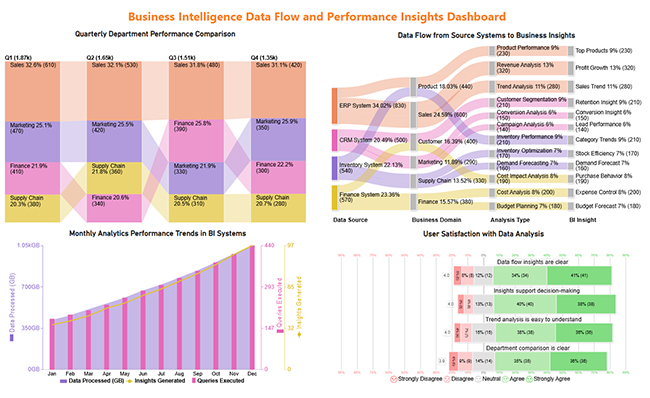
Include a final dashboard image that presents a comprehensive view of your analysis, such as performance trends, data flow insights, and comparisons across departments or metrics. This helps communicate complex Snowflake schema insights in a clear and visually engaging way.
Applying the snowflake data schema brings structural advantages to complex warehousing environments, though certain trade-offs deserve consideration before adoption.
Getting the most from this design depends on consistent decisions and deliberate relationship management throughout the modeling process.
A database in Snowflake is a container that holds schemas, tables, views, and other objects. A schema sits within that database and defines how related tables and views are organized. In the context of the snowflake data schema, the schema layer is where the fact and dimension tables are arranged and connected.
Snowflake supports three main table types: permanent tables, which retain data indefinitely; transient tables, which have limited data retention and no fail-safe storage; and temporary tables, which exist only for the duration of a session. All three types can be used within this layered table structure.
Snowflake is designed primarily for OLAP workloads, meaning it is optimized for complex analytical queries across large datasets rather than high-frequency transactional operations. This makes it a strong fit for the snowflake data schema, where layered dimensions and fact tables support reporting and business intelligence use cases.
The snowflake data schema remains one of the most dependable approaches to organizing complex warehouse data. Its normalized structure controls redundancy, supports hierarchical dimensions, and scales effectively as analytical demands grow.
By separating dimensions into related layers rather than combining everything into wide tables, teams gain cleaner data, stronger governance, and a model built for long-term analytical performance.
Analysts who understand how to configure and query this schema in Power BI can deliver more accurate, drillable reports with less maintenance overhead. Whether the goal is financial reporting, retail analytics, or supply chain visibility, a well-implemented model creates a foundation built for long-term performance.
How much did you enjoy this article?



Calculate accounts receivable turnover ratio to measure credit collection speed, improve cash flow, and strengthen your financial strategy. Read on!

Change Management KPIs are the key to tracking adoption, performance, and ROI during transitions. Find out which metrics matter. Read on!

Data collection methods and techniques determine the quality of every insight you act on. Explore key approaches for gathering reliable data. Read on!




