Categories

A template for a social media marketing plan could save you hours of confusion and endless spreadsheets.
How?
Marketing teams spend nearly 30% of their time organizing data instead of acting on it. That is a lot of wasted opportunity. A clear structure brings clarity, and clarity fuels action.


Think about how fast digital conversations move. Every scroll, share, and comment adds up to signals you cannot afford to ignore. Yet without a plan, those signals scatter. A social media marketing plan template creates order from chaos. It is a single place where strategy, goals, and performance come together.
Marketers today crave speed and insight, and a marketing dashboard enables real-time tracking. Moreover, a marketing analytics platform enables deeper measurement. Together, they bridge the gap between posting content and proving value. Numbers stop being random once you frame them inside a plan.
Google Sheets makes it simple. No heavy software. No expensive subscriptions. Anyone with access can read, update, or share instantly. That makes collaboration seamless across teams and clients. The best part is the flexibility. You can expand it as your marketing funnel grows or shrink it when testing smaller campaigns.
A template for a social media marketing plan in Google Sheets is not just about organization. It is about moving from scattered activity to measurable growth. The difference between guessing and knowing lies in the plan you use. And the right plan starts here.
Definition: A social media marketing plan template in Google Sheets is a structured spreadsheet that organizes campaigns, goals, and results. It gives marketers a simple way to track posts, measure reach, and manage budgets. With built-in formulas, it turns raw numbers into clear insights.
Teams use this template to align strategies and monitor progress in one place. It works well with social media analytics tools to capture performance data. You can also connect it with social media reporting templates to present results to clients or managers. The template makes planning easier, faster, and far more transparent.
Sometimes social media feels like running on a treadmill. You keep moving, but progress is hard to measure. A template for a social media marketing plan changes that. It brings order, clarity, and confidence to every campaign.
Here is why using one makes such a difference:
A social media plan in Google Sheets becomes powerful when it covers the correct elements. Too often, teams post content without a clear strategy, resulting in scattered outcomes. A structured template turns ideas into action, making performance easy to measure and track.
Here is what you should include to make the plan effective:
A social media strategy without structure is like building a house without a foundation. A Google Sheets template brings that foundation. It makes every step of the strategy visible, measurable, and actionable. By pairing it with social media analytics tools and social media reporting templates, the strategy turns from guesswork into clarity.
Here are the core components every template should include:
A good plan becomes even better when you see it in action. Templates in Google Sheets bring ideas to life and make execution smoother. They keep campaigns structured and results measurable. With the proper setup, social media analytics tools and social media reporting templates connect seamlessly to boost efficiency.
Here are examples worth using:
Creating a social media plan in Google Sheets is easier than most people think. It gives structure, clarity, and flexibility all in one place. With the correct format, you can track content, measure results, and share progress instantly. Here are the steps to build it.
Visuals make data easier to understand and more persuasive. Instead of scanning endless rows in a spreadsheet, charts tell the story at a glance. In Google Sheets, ChartExpo offers visuals that transform a basic social media marketing plan into clear insights. Here are the top five examples you can use.
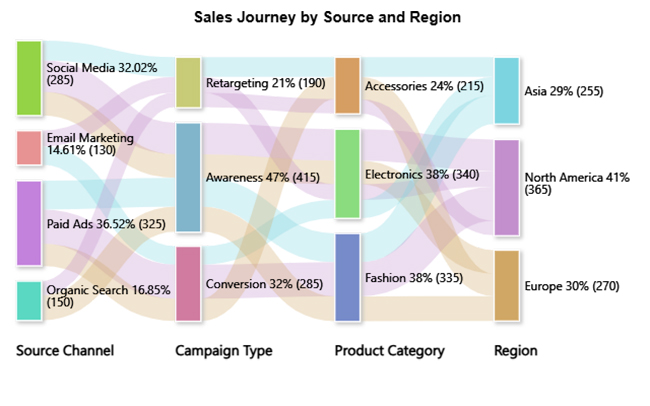
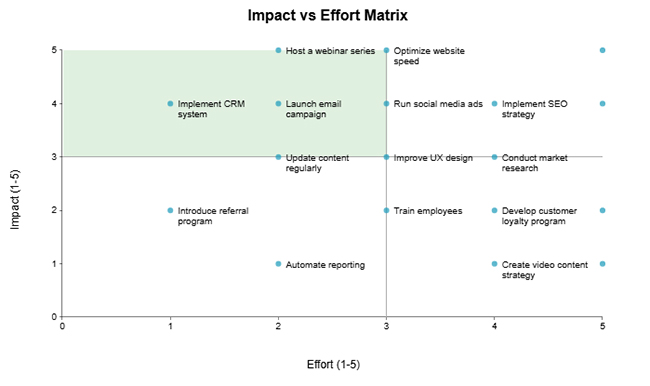
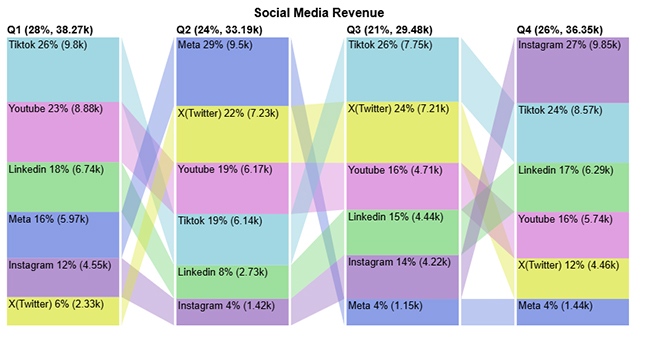
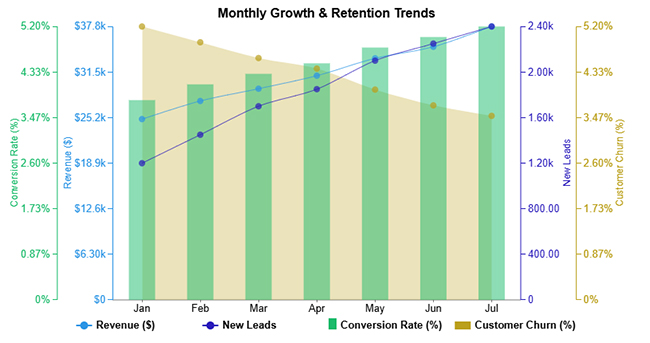
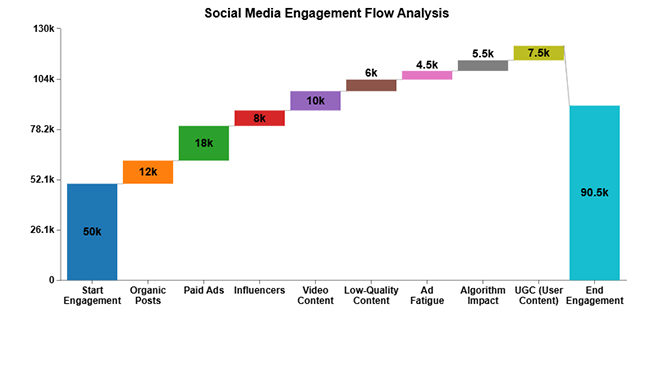
Spreadsheets are great until you try to make them tell a story. Numbers sit neatly in rows and columns, but without visuals, the meaning gets lost. Data visualization is the bridge that turns raw figures into real insight.
Google Sheets does the basics, but its charts often fall short of expectations. They lack the depth and flexibility required for serious data analysis in marketing. This is where ChartExpo steps in. It transforms dull spreadsheets into visuals that speak louder than numbers ever could.
How to Install ChartExpo in Google Sheets?
ChartExpo charts are available both in Google Sheets and Microsoft Excel. Please use the following CTAs to install the tool of your choice and create beautiful visualizations in a few clicks in your favorite tool.
Let’s analyze this sample data in Google Sheets using ChartExpo.
| Quarter | Channel | Revenue |
| Q1 | YouTube | 8879 |
| Q2 | YouTube | 6168 |
| Q3 | YouTube | 4708 |
| Q4 | YouTube | 5739 |
| Q1 | TikTok | 9798 |
| Q2 | TikTok | 6144 |
| Q3 | TikTok | 7750 |
| Q4 | TikTok | 8569 |
| Q1 | X(Twitter) | 2333 |
| Q2 | X(Twitter) | 7233 |
| Q3 | X(Twitter) | 7212 |
| Q4 | X(Twitter) | 4463 |
| Q1 | Meta | 5973 |
| Q2 | Meta | 9504 |
| Q3 | Meta | 1149 |
| Q4 | Meta | 1441 |
| Q1 | 4549 | |
| Q2 | 1419 | |
| Q3 | 4216 | |
| Q4 | 9848 | |
| Q1 | 6743 | |
| Q2 | 2725 | |
| Q3 | 4443 | |
| Q4 | 6289 |
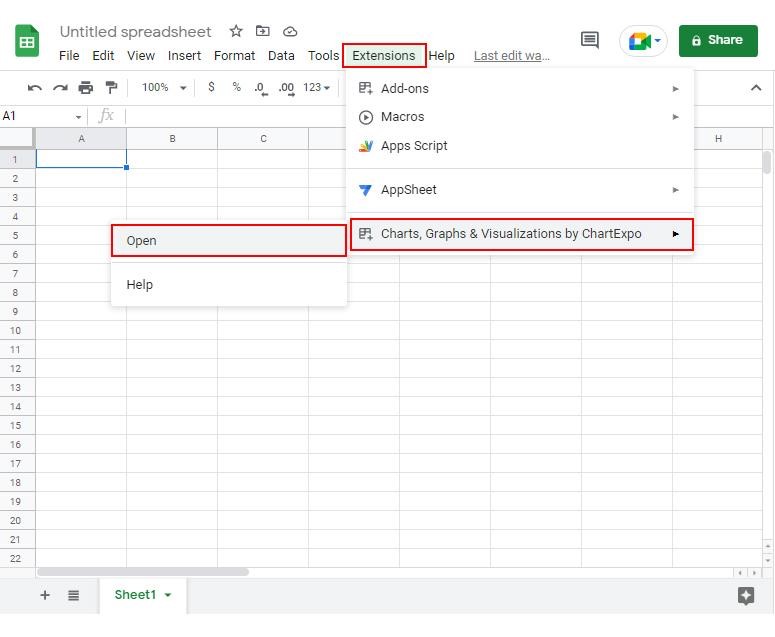
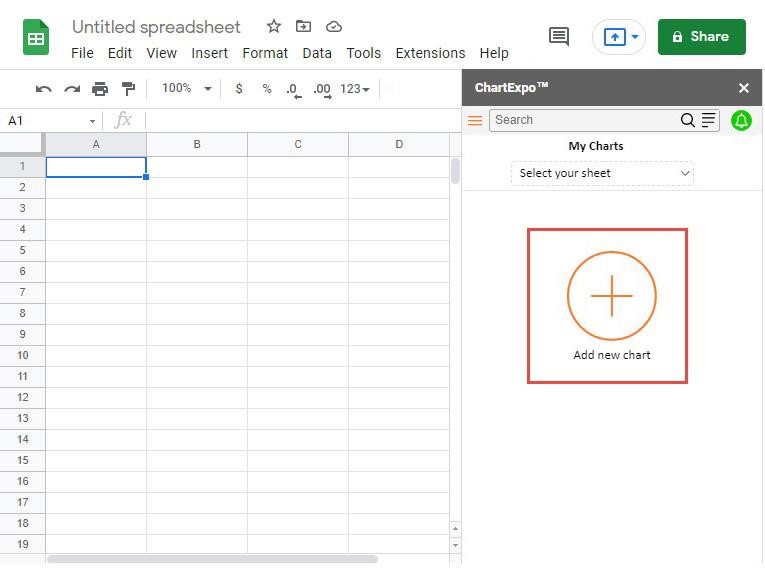
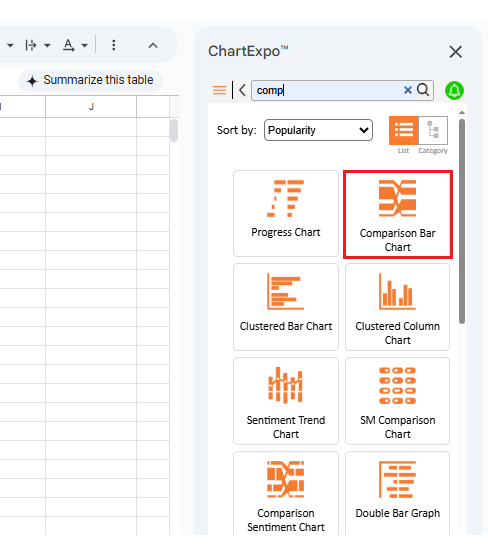
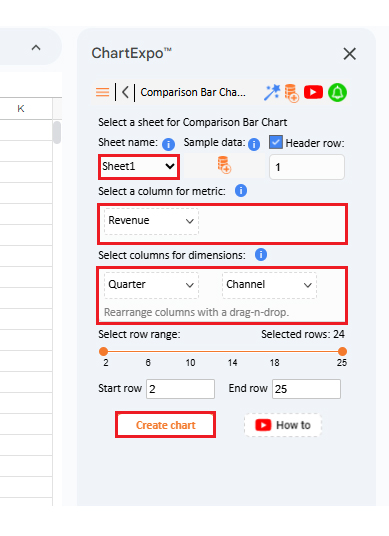
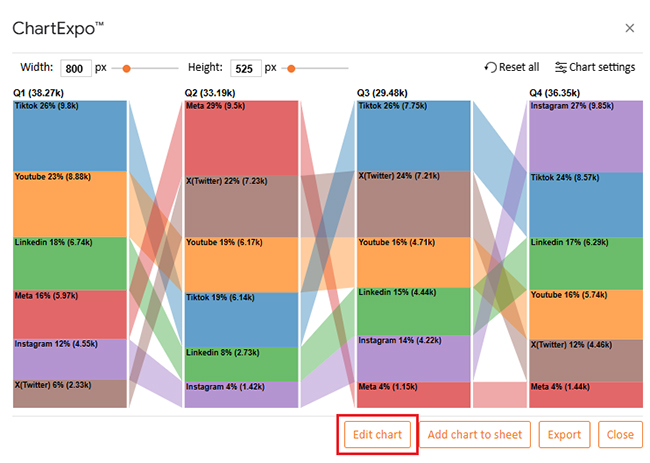
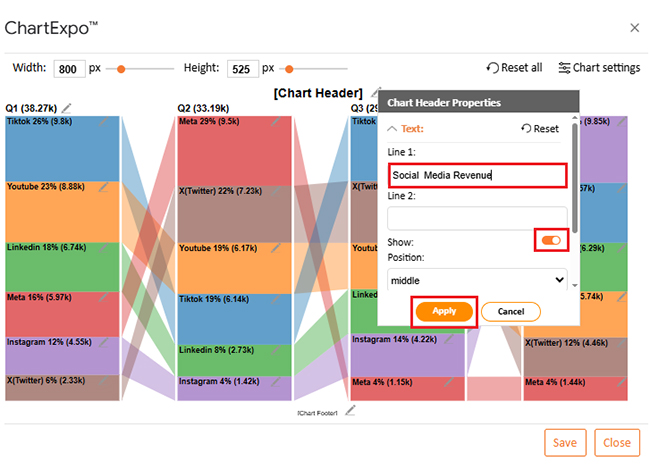
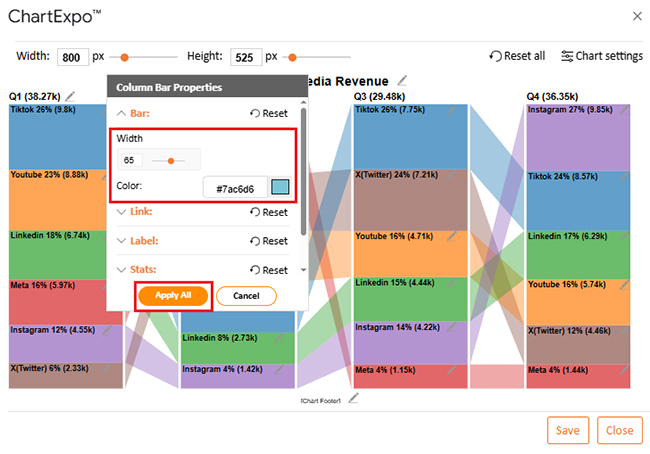
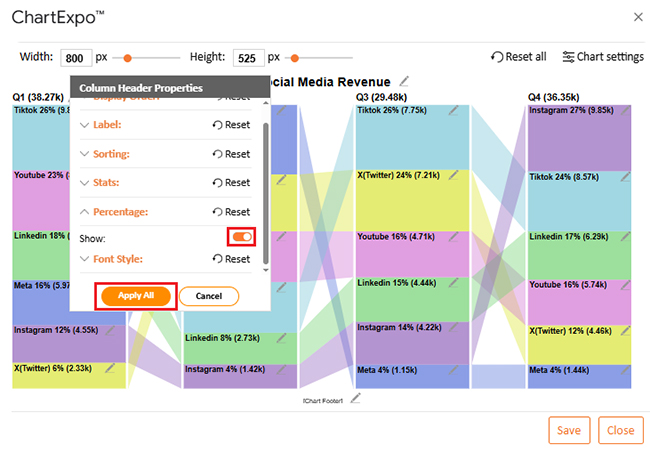
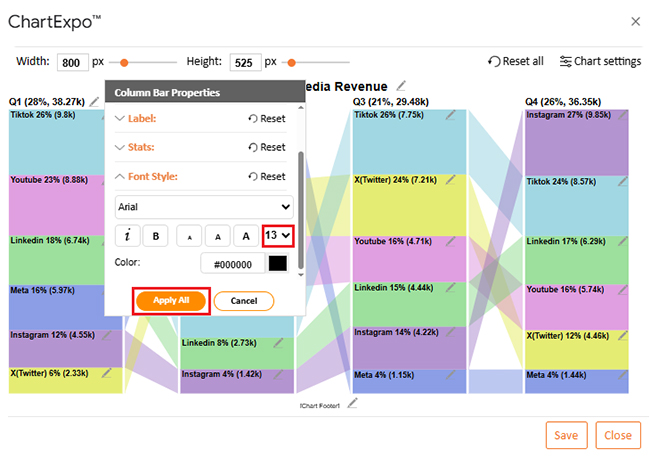
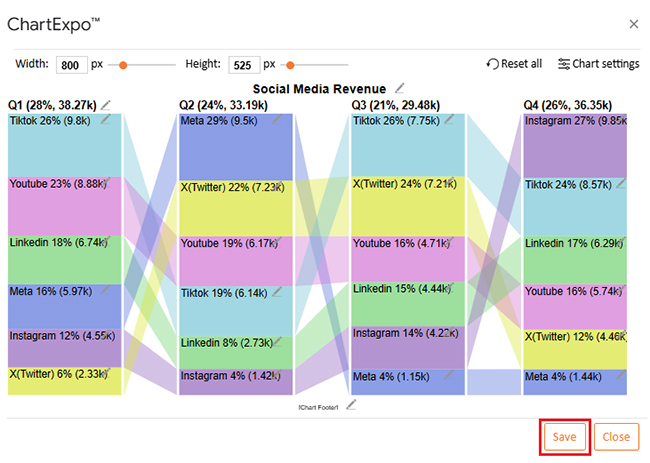
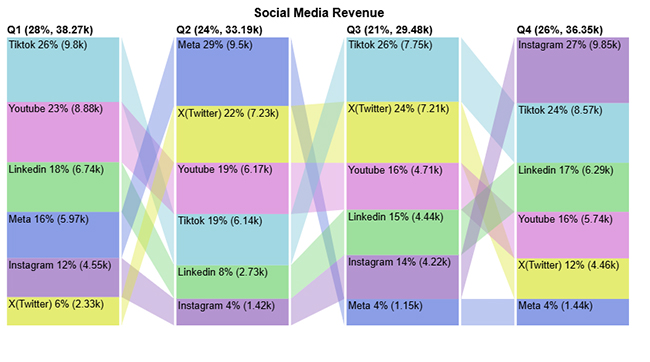
Getting started with a ready-to-use template makes planning smoother and faster. Instead of building everything from scratch, you can download a social media marketing plan template in Google Sheets. Then customize it for your goals. It saves time, keeps campaigns structured, and makes tracking results effortless. Here is how to download and use it:
Planning social media without structure often feels messy and unorganized. A social media marketing plan template solves this by consolidating everything in one place. It simplifies strategy, saves time, and helps teams stay aligned.
Here are the key benefits of using one.
A strong social media plan is not built on guesswork. It is built on structure, clarity, and consistent tracking. A template for a social media marketing plan in Google Sheets makes this possible. It brings order to campaigns and makes goals easier to reach.
Spreadsheets are simple, flexible, and easy to share. Teams can edit together and stay aligned. A plan in Google Sheets ensures every step is visible—no confusion and no missed details.
Adding numbers alone is not enough. You need insights that reveal the true meaning of the data. This is where social media analytics tools and data analysis for marketing come in. They turn plain figures into patterns that guide smart decisions.
Reporting is another key step. With social media reporting templates, presenting results becomes easier. A marketing agency client dashboard adds even more clarity. Clients and managers see the real impact without needing to dig through raw numbers.
But Google Sheets has limits in visualization. Standard charts often fail to convey the story effectively. This is why installing ChartExpo matters. It transforms plain spreadsheets into visuals that explain trends at a glance.
The next step is action. Install ChartExpo today and bring your template to life. Use it to track, analyze, and present your social media strategy with confidence. The right plan, powered by the right visuals, will make your marketing more innovative and more effective.
How much did you enjoy this article?



Calculate accounts receivable turnover ratio to measure credit collection speed, improve cash flow, and strengthen your financial strategy. Read on!

Change Management KPIs are the key to tracking adoption, performance, and ROI during transitions. Find out which metrics matter. Read on!

Data collection methods and techniques determine the quality of every insight you act on. Explore key approaches for gathering reliable data. Read on!




