Categories

It might feel sudden, almost unexpected, but numbers tell their story whether you’re ready or not. Have you ever thought about how powerful a cash flow analysis template can be for your business?


I will help you understand.
Tracking cash movement through a simple sheet can be the difference between growth and collapse. A well-structured cash flow analysis template makes trends visible. It shows if your daily operations are generating enough to cover expenses. It helps you see gaps before they become bigger problems. The question is not whether to analyze your cash flow. The question is whether you can afford not to.
Every finance team knows revenue can look great on paper, but without clarity on cash, trouble brews fast. Learning how to calculate operating cash flow is one of the first steps in spotting financial health. With the power of Google Sheets, your system updates, shares, scales, and grows alongside business success. No costly software. No unnecessary delays.
The smart companies already use structured tools to stay ahead. They review data regularly, adapt based on insights, and measure results in real time. A cash flow analysis template is not just a spreadsheet. It is a signal system for decision-making. If you want to start analyzing cash flow with accuracy and speed, this could be your simplest, smartest move yet.
Let’s get started.
Definition: A cash flow analysis template in Google Sheets allows you to track money in and out with ease. It gives you clarity on whether your business generates enough cash to stay healthy. You can update it daily or weekly without needing any extra software. It also helps you connect short-term numbers with bigger targets.
Many teams use it with a monthly finance report to stay consistent. Others apply it when analyzing company financials for growth decisions. The template offers flexibility, scales as your business grows, while keeping your data organized. Most importantly, it helps you understand your numbers more easily.
Managing money without a clear system can feel messy and uncertain. A cash flow analysis template in Google Sheets brings structure, speed, and insight to the way you review your finances.
Here is how;
Business decisions are easier when you have the right numbers in front of you. A cash flow analysis template in Google Sheets can give you that clarity. It helps you spot strengths, weaknesses, and opportunities at the exact moment you need them.
Use it when:
Sometimes the simplest tools make the biggest difference. A cash flow analysis template in Google Sheets can separate your numbers into clear categories. This structure makes it easier to read, update, and use in decisions. It also gives you a starting point for how to prepare financial statement reviews for your team. Whether you use direct or indirect cash flow, the format remains easy to follow.
Seeing your financial future on a single sheet can change the way you plan. A projected cash flow statement in Google Sheets makes this possible. It helps you anticipate challenges, prepare for growth, and stay in control of your money.
Here’s how to create one:
Cash can easily go unnoticed without careful monitoring. This is where a cash flow analysis Template becomes essential. While tracking numbers provides data, interpreting those figures is the real challenge. This is where data visualization flexes its muscles. It is crucial in analysis, as charts convey insights that numbers alone cannot.
Google Sheets handles basic graphs and charts, but its options are limited and often lack visual impact.
We have a solution: ChartExpo. This tool enhances your cash flow data with powerful, clear, and engaging visuals. Try ChartExpo today to transform your cash flow analysis and see your data in a whole new way.
How to Install ChartExpo in Google Sheets?
ChartExpo charts are available both in Google Sheets and Microsoft Excel. Please use the following CTAs to install the tool of your choice and create beautiful visualizations in a few clicks in your favorite tool.
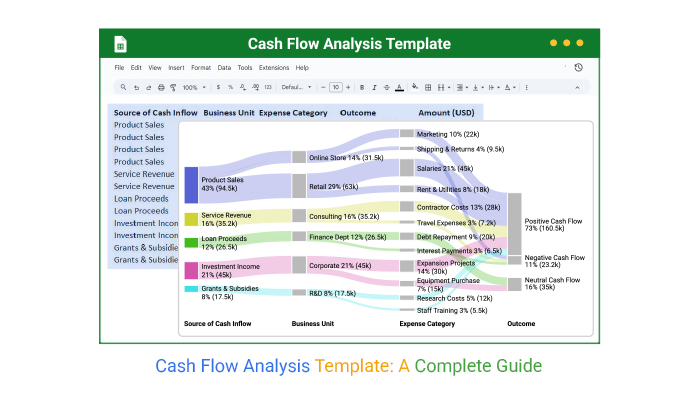
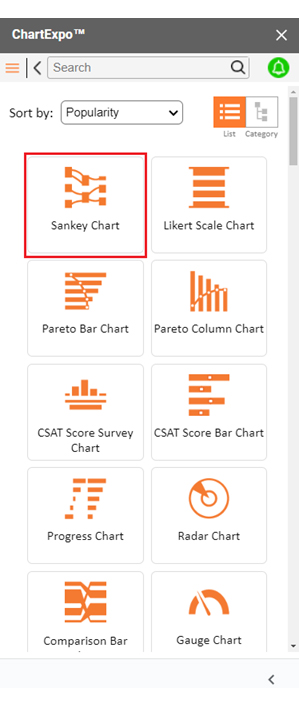
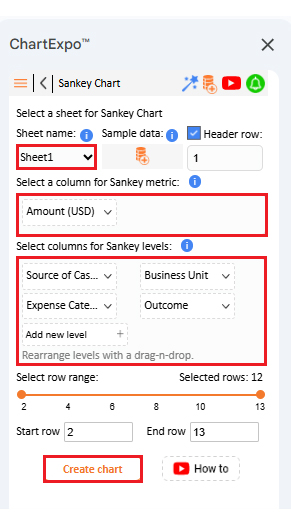
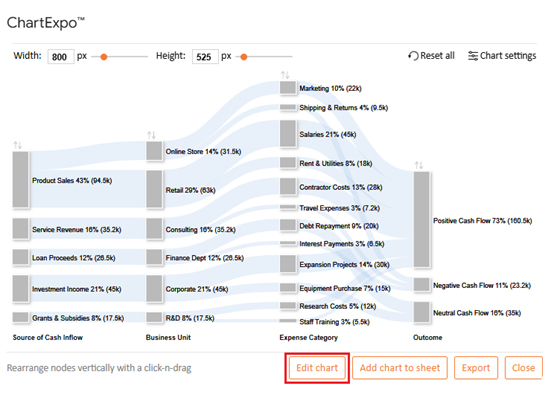
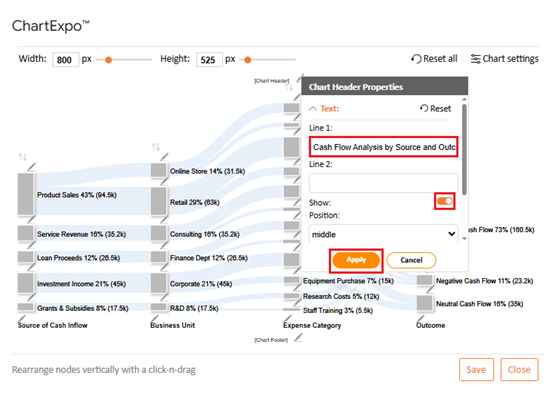
Let’s analyze this sample data in Google Sheets using ChartExpo and visualize the flow with a Sankey chart.
| Source of Cash Inflow | Business Unit | Expense Category | Outcome | Amount (USD) |
| Product Sales | Retail | Salaries | Positive Cash Flow | 45,000 |
| Product Sales | Retail | Rent & Utilities | Positive Cash Flow | 18,000 |
| Product Sales | Online Store | Marketing | Positive Cash Flow | 22,000 |
| Product Sales | Online Store | Shipping & Returns | Negative Cash Flow | 9,500 |
| Service Revenue | Consulting | Contractor Costs | Positive Cash Flow | 28,000 |
| Service Revenue | Consulting | Travel Expenses | Negative Cash Flow | 7,200 |
| Loan Proceeds | Finance Dept | Debt Repayment | Neutral Cash Flow | 20,000 |
| Loan Proceeds | Finance Dept | Interest Payments | Negative Cash Flow | 6,500 |
| Investment Income | Corporate | Expansion Projects | Positive Cash Flow | 30,000 |
| Investment Income | Corporate | Equipment Purchase | Neutral Cash Flow | 15,000 |
| Grants & Subsidies | R&D | Research Costs | Positive Cash Flow | 12,000 |
| Grants & Subsidies | R&D | Staff Training | Positive Cash Flow | 5,500 |
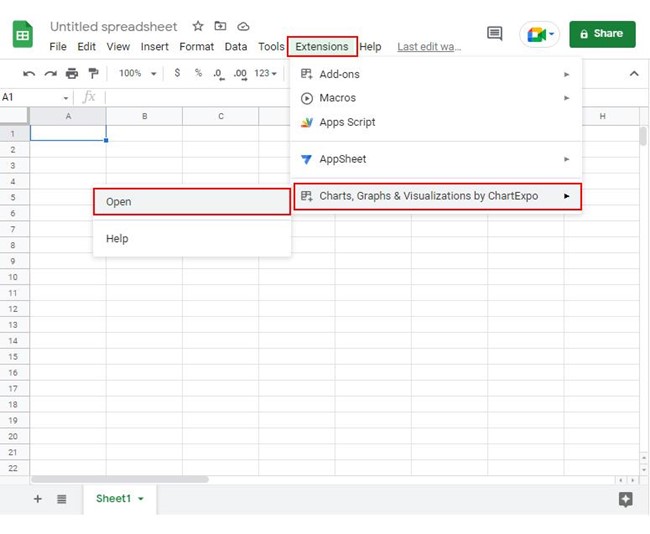
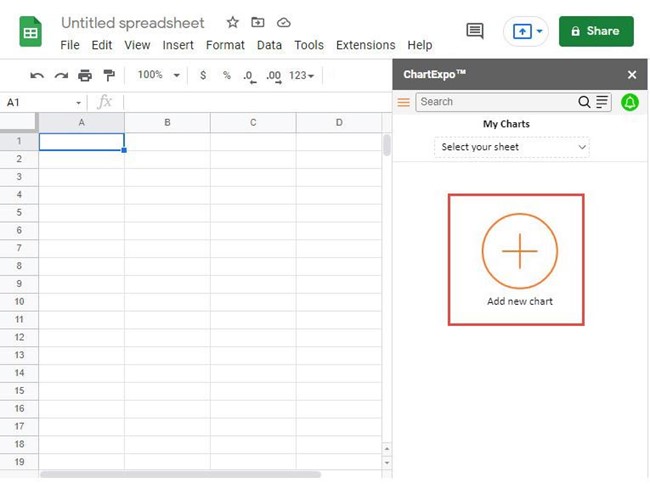
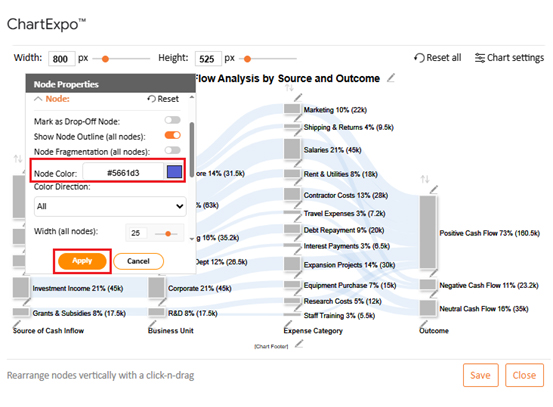
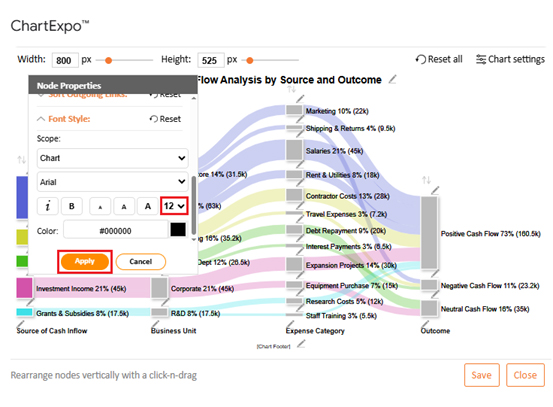
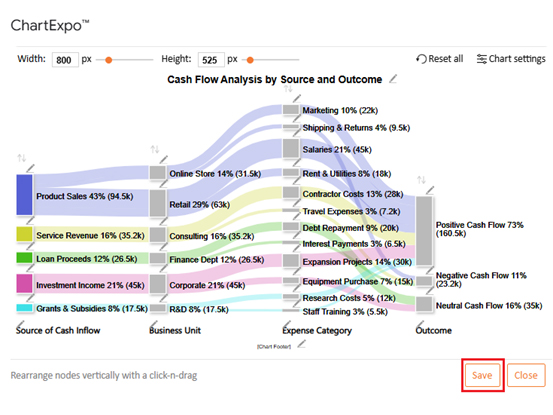

Manage your money more easily with the right tools. Use a cash flow analysis template to save time, reduce errors, and get instant clarity. Download and start using one in Google Sheets in just a few steps:
Numbers can be overwhelming until they are organized into something meaningful. That is exactly what a cash flow statement analysis in Google Sheets does. It takes raw figures and turns them into insights that guide smarter business choices.
Good cash flow management is less about luck and more about discipline. A cash flow analysis template in Google Sheets becomes far more powerful when you follow the best practices. With the right habits, your sheet turns into a decision-making tool rather than a static report:
Yes, Google Sheets offers free templates. You can find them in the template gallery. They include simple cash flow formats that are customizable. A cash flow analysis template helps in analyzing cash flow quickly.
Cash flow reveals the true story behind your numbers. A cash flow analysis template in Google Sheets makes that story clear by organizing data into actionable insights.
This organization goes beyond clarity. Templates simplify tracking, saving time and reducing mistakes. They also help you compare direct vs. indirect cash flow for a clearer understanding of both methods.
To make data even clearer, visualization matters. Rows of numbers can feel flat and confusing. That is why charts help bring the data to life. Clear visuals make a financial performance analysis example easier to explain to your team.
Beyond immediate tracking and insight, templates also connect to bigger goals. They give you the first step in learning how to prepare financial statement reviews. With consistent tracking, you can connect short-term results with long-term strategies.
However, while Google Sheets is a great starting point, it has limits. Its charts are basic and do not always show the depth you need. That is where ChartExpo becomes important—it adds professional visuals that tell the story quickly and clearly.
With these tools in mind, now is the best time to take action. Start with a template in Google Sheets. Then install ChartExpo to bring your analysis to life. Your numbers are waiting to be seen in full color.
How much did you enjoy this article?



Calculate accounts receivable turnover ratio to measure credit collection speed, improve cash flow, and strengthen your financial strategy. Read on!

Change Management KPIs are the key to tracking adoption, performance, and ROI during transitions. Find out which metrics matter. Read on!

Data collection methods and techniques determine the quality of every insight you act on. Explore key approaches for gathering reliable data. Read on!