• Home
  • Tools dropdown img
    • Spreadsheet Charts

      • ChartExpo for Google Sheets
      • ChartExpo for Microsoft Excel
    • Power BI Charts

      • Power BI Custom Visuals by ChartExpo
    • Word Cloud

  • Charts dropdown img
    • Chart Category

      • Bar Charts
      • Circle Graphs
      • Column Charts
      • Combo Charts
      • Comparison Charts
      • Line Graphs
      • PPC Charts
      • Sentiment Analysis Charts
      • Survey Charts
    • Chart Type

      • Box and Whisker Plot
      • Clustered Bar Chart
      • Clustered Column Chart
      • Comparison Bar Chart
      • Control Chart
      • CSAT Survey Bar Chart
      • CSAT Survey Chart
      • Dot Plot Chart
      • Double Bar Graph
      • Funnel Chart
      • Gauge Chart
      • Likert Scale Chart
      • Matrix Chart
      • Multi Axis Line Chart
      • Overlapping Bar Chart
      • Pareto Chart
      • Radar Chart
      • Radial Bar Chart
      • Sankey Diagram
      • Scatter Plot Chart
      • Slope Chart
      • Sunburst Chart
      • Tornado Chart
      • Waterfall Chart
      • Word Cloud
    • Google Sheets
      Microsoft Excel
  • Services
  • Pricing
  • Contact us
  • Blog
  • Support dropdown img
      • Gallery
      • Videos
      • Contact us
      • FAQs
      • Resources
    • Please feel free to contact us

      atsupport@chartexpo.com

Categories
All Data Visualizations Data Analytics Surveys
Add-ons/
  • Google Sheets
  • Microsoft Excel
  • Power BI
All Data Visualizations Data Analytics Surveys
Add-ons
  • Google Sheets
  • Microsoft Excel
  • Power BI

We use cookies

This website uses cookies to provide better user experience and user's session management.
By continuing visiting this website you consent the use of these cookies.

Ok

ChartExpo Survey


Home > Blog > Data Analytics

Board Report Template: A Complete Walkthrough

Board members don’t have time for noise. They need actionable intelligence delivered in a format that cuts through complexity.
Board Report Template

That’s where a Board Report Template earns its keep—giving leadership teams a repeatable structure for presenting performance data, strategic updates, and risk assessments without burying decision-makers in operational minutiae.

When governance conversations veer off track, it’s often because the reporting format itself creates confusion. A solid template fixes this by establishing what gets reported, how it’s organized, and where attention should focus. The result? Faster decisions, clearer accountability, and board meetings that actually move the organization forward instead of rehashing yesterday’s data.

Table of Contents:

  1. What is a Board Report Template?
  2. Purpose of a Board Report Template
  3. Different Types of a Board Report Template
  4. What to Include in a Board Report Format?
  5. Board Report Template Examples
  6. How to Create a Board Report Template?
  7. Top 10 Board Report Template Examples Using ChartExpo in Google Sheets
  8. How to Analyze a Board Report Template in Google Sheets?
  9. Benefits of a Board Report Template
  10. Best Practices of a Board Report Format
  11. Common Mistakes to Avoid When Designing a Board Report Template
  12. FAQs
  13. Wrap Up

What is a Board Report Template?

Definition: Think of a Board Report Template as the architectural blueprint for how you package critical business intelligence. It’s a predefined structure that dictates where financial summaries go, how risk indicators appear, and what strategic commentary looks like—all before anyone starts writing.

The distinction matters: operational reports track daily execution, while board-level reports focus on outcomes and directional choices.

A properly constructed template ensures every report follows the same logic, making it easier for board members to spot trends, compare periods, and understand what actually requires their input versus what’s simply informational background.

Purpose of a Board Report Template

Effective governance relies on information that’s both relevant and digestible. A Board Report Template serves this need by creating a standardized pathway for intelligence to flow from operations to oversight. Here’s what this standardization delivers:

  • Enables informed approvals by surfacing decision-critical data without forcing board members to excavate it from dense reports.
  • Distills organizational performance into executive-level snapshots that highlight what’s working and what isn’t.
  • Keeps leadership teams aligned on strategic priorities through consistent metric definitions and reporting cadence.
  • Builds governance credibility by demonstrating that reporting processes are disciplined and repeatable.
  • Creates apples-to-apples comparisons across reporting cycles so trends become visible instead of buried.
  • Eliminates wasted preparation time by giving report authors a proven structure to work from.

Different Types of a Board Report Template

Board reporting isn’t one-size-fits-all. The template you choose depends on what kind of oversight your board provides, what industry dynamics you’re navigating, and where governance attention needs to land. Matching template type to governance role prevents the classic mistake of reporting everything while clarifying nothing.

  • Financial Board Report Template.
  • Operational performance report.
  • Strategic planning board report.
  • Risk and compliance report.
  • Executive summary Board Report Template.

What to Include in a Board Report Format?

An effective board report format sequences information to match how decision-makers actually consume it. Start with conclusions, layer in supporting evidence, then provide context. Skip this logic, and you’ll watch board members flip pages hunting for the point. Here’s what belongs:

  • Executive summary section.
  • Key performance indicators.
  • Financial highlights.
  • Strategic updates.
  • Risks and challenges.
  • Action items and decisions.
  • Supporting charts or tables.
  • Board Report Template Appendix.

Including these components ensures your report to the board template stays focused, complete, and geared toward action rather than passive review.

Board Report Template Examples

Seeing how templates adapt to different reporting rhythms clarifies what actually works in practice. Here’s how board reporting shifts based on whether you’re reviewing monthly operations, quarterly trajectories, or annual performance.

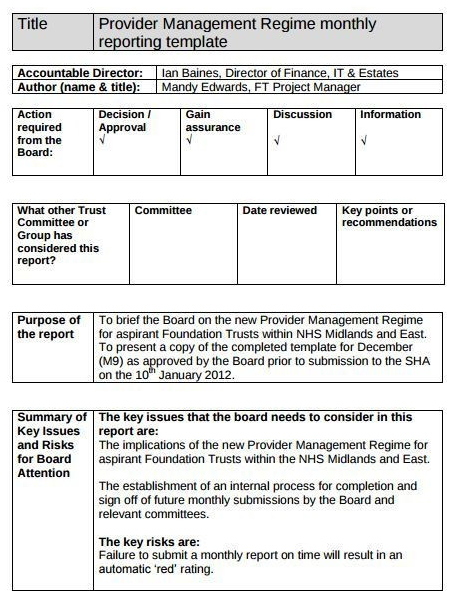
Monthly Board Report

The monthly board report example zeros in on near-term liquidity and operational velocity. This format typically draws from a monthly finance report that tracks cash positioning and immediate spending patterns.
Board Report Template

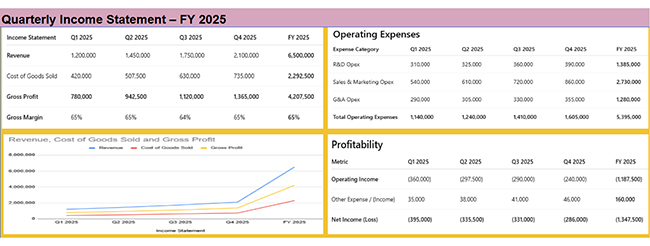
Quarterly Performance Report

This quarterly performance board report example shows steady revenue growth and stable margins, with investment-driven operating losses gradually improving toward Q4.
Board Report Template

Annual Board Report Template

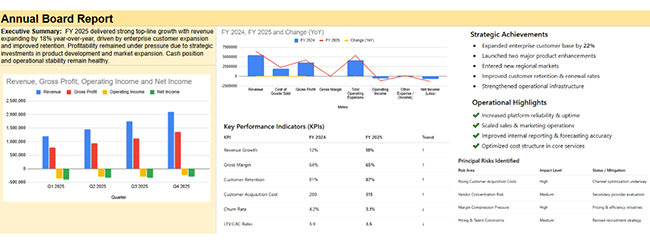
The annual board report template delivers a comprehensive review of performance outcomes, revenue growth, improved retention, and implementation progress for full-year board accountability and strategic assessment.
Board Report Template

How to Create a Board Report Template?

Building a reusable Board Report Template begins with understanding what your board actually needs to make informed choices. Start there, then work backward to structure the information flow. Here’s the creation sequence:

  • Define reporting scope by identifying what information genuinely drives board-level decisions.
  • Choose a board report structure that sequences insights logically instead of chronologically.
  • Select key metrics tied directly to strategic goals and measurable outcomes.
  • Design a visual layout to surface trends and anomalies without forcing interpretation work.
  • Build reusable sections that carry forward across reporting cycles with minimal rework.
  • Finalize template by confirming accuracy, strategic alignment, and distribution readiness.

This approach mirrors best practices in management reporting, where executive clarity and format consistency prevent governance confusion.

Top 10 Board Report Template Examples Using ChartExpo in Google Sheets

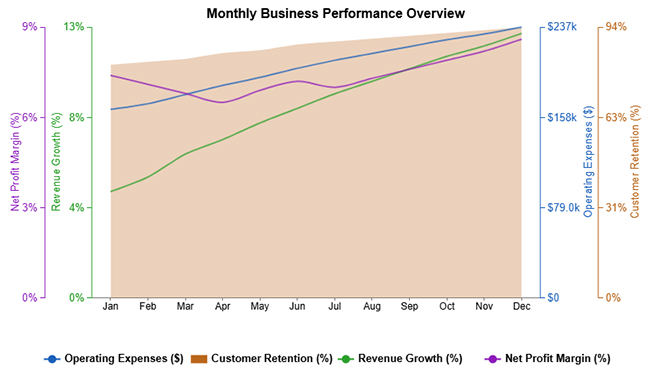
  1. Monthly Business Performance Overview:

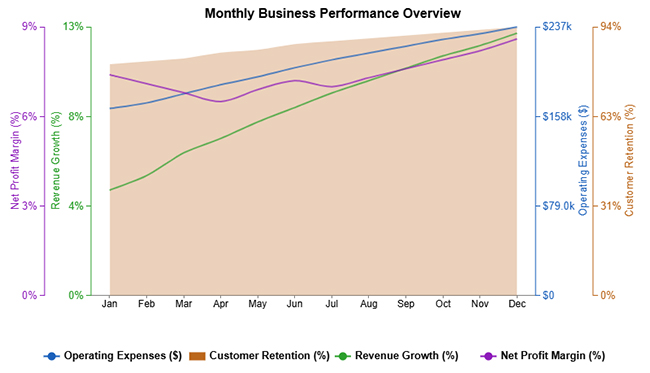
This monthly business performance example tracks revenue expansion and customer retention alongside climbing operational costs and a rebounding net profit margin throughout the reporting period.
Board Report Template
  1. Quarterly Open Compliance Issue by Department:

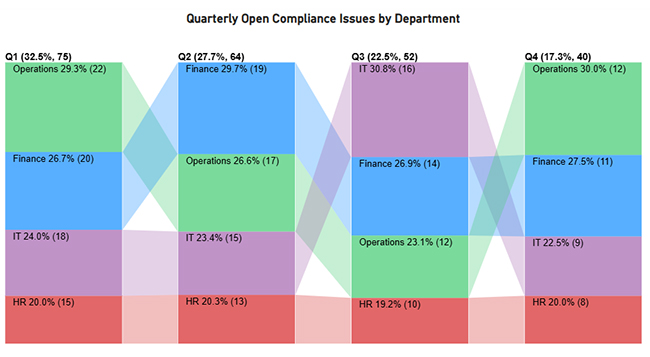
The quarterly open compliance issue example demonstrates how unresolved compliance items fluctuate across departments and quarters, giving boards immediate visibility into risk concentration and accountability for ownership.
Board Report Template
  1. Monthly Revenue vs Expense Trend:

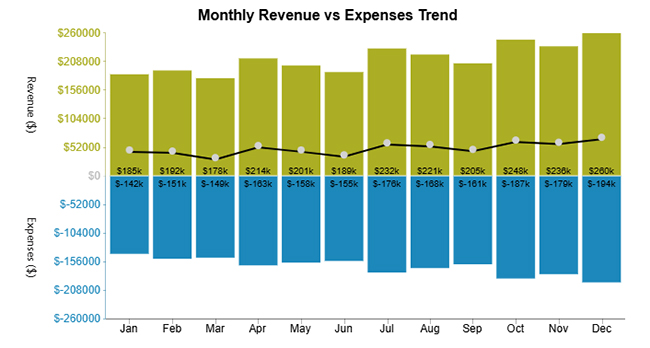
This monthly revenue vs expense trend example reveals expanding top-line performance paired with escalating cost structures, enabling boards to evaluate margin sustainability and expense discipline.
Board Report Template
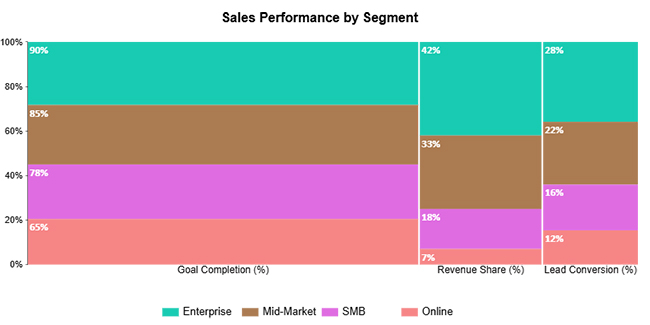
  1. Sales Performance by Segment:

The sales performance example breaks down contribution by customer segment, providing the strategic context boards need to direct resources toward high-value opportunities.
Board Report Template
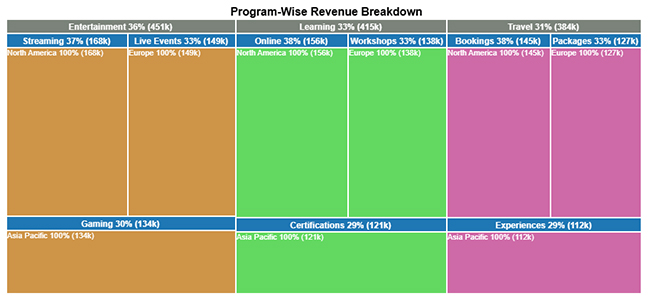
  1. Program-Wise Revenue Breakdown:

This program-wise revenue breakdown example quantifies each program’s revenue share, giving boards the data required to prioritize strategic investments and resource allocation.
Board Report Template
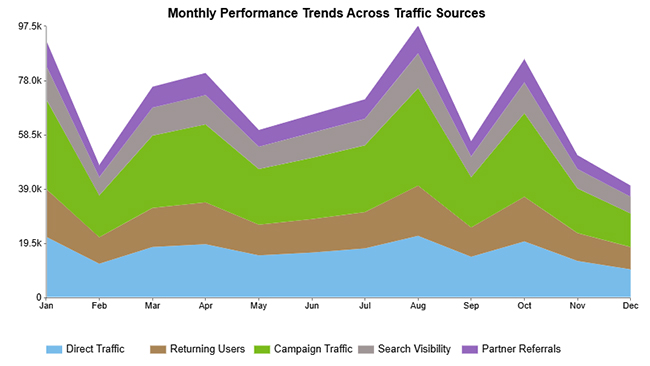
  1. Monthly Performance Trends Across Traffic Sources:

This monthly performance trend across traffic sources example illustrates how individual channels drive overall performance metrics, delivering the channel-specific intelligence boards need for go-to-market decisions.
Board Report Template
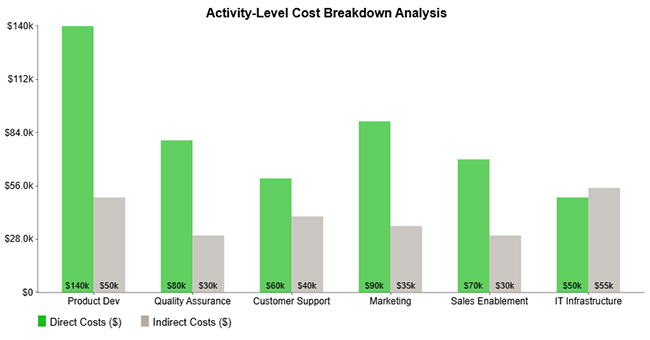
  1. Activity-Level Cost Breakdown Analysis:

The activity-level cost breakdown analysis contrasts direct versus indirect spending across critical activities, exposing the primary cost drivers and efficiency gaps boards can address.
Board Report Template
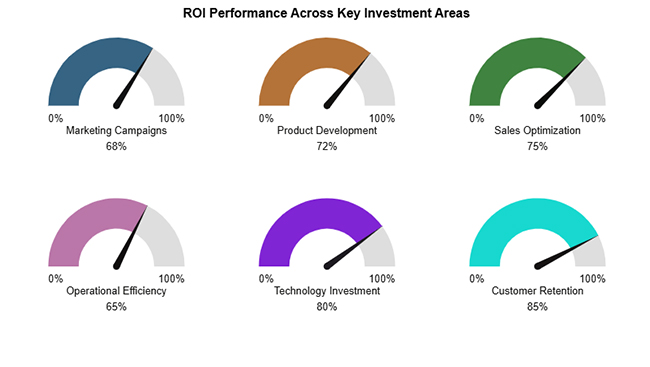
  1. ROI Performance Across Key Investment Areas:

This ROI performance across key investment areas example shows how successfully priority initiatives generate returns relative to capital deployed.
Board Report Template
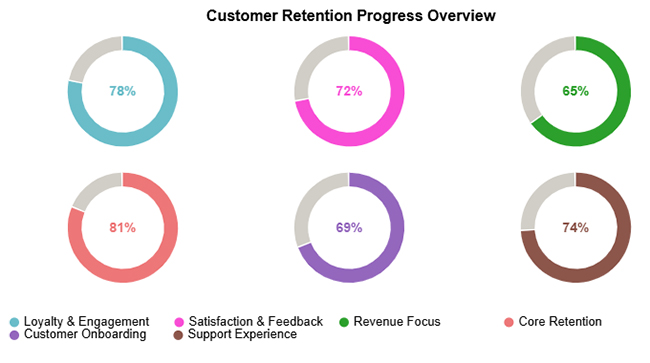
  1. Customer Retention Progress Overview:

The customer retention progress example captures retention metrics across strategic focus areas, enabling rapid board assessment of customer loyalty initiatives.
Board Report Template
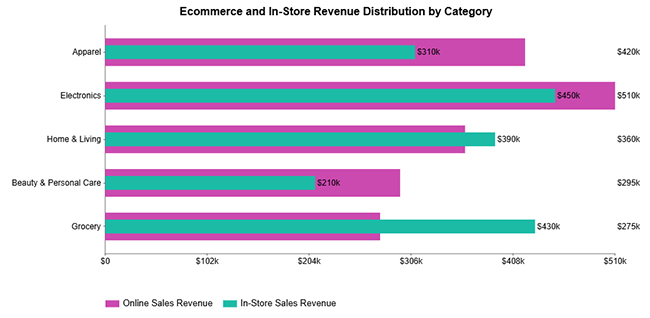
  1. E-commerce and In-Store Revenue Distribution by Category:

This e-commerce and in-store revenue distribution example compares digital versus physical sales performance by product category, informing channel strategy and investment priorities.
Board Report Template

How to Analyze a Board Report Template in Google Sheets?

Analyzing a board report format in Google Sheets lets teams verify trends, benchmark performance across periods, and surface decision-ready insights from raw data.

  1. Organize data into clearly labeled sheets that mirror your board report format structure.
  2. Standardize metrics so comparisons across reporting cycles remain valid.
  3. Use pivot tables to aggregate key indicators.
  4. Apply conditional formatting to flag risks and variance outliers.
  5. Visualize trends using charts for faster pattern recognition.

ChartExpo integrates directly with Google Sheets to transform how board data gets visualized.

Why use ChartExpo?

  • Converts complex board data into executive-ready visual formats.
  • Accelerates trend identification and risk detection with specialized chart types.
  • Strengthens decision-making by making reports more interpretable and engaging.
  • Offers a 7-day free trial and costs just $10/month.

How to install ChartExpo in Google Sheets?

  • Go to Google Sheets and open the file you’re interested in. Then click on the Extensions tab in the upper menu.
  • Click on the Add-ons and enter “Get add-ons.”
  • Go to the Google Workspace Marketplace and search for ChartExpo.
  • Explore “Charts, Graphs & Visualizations by ChartExpo, and click the “Install” button.
  • Allow the necessary access and confirm your Google account when asked.

Example:

Consider we have the following data for the Multi Axis Line Chart.

Month Revenue Growth (%) Operating Expenses ($) Net Profit Margin (%) Customer Retention (%)
Jan 5.1 165000 7.4 81
Feb 5.8 170000 7.1 82
Mar 6.9 178000 6.8 83
Apr 7.6 186000 6.5 85
May 8.4 193000 6.9 86
Jun 9.1 201000 7.2 88
Jul 9.8 208000 7 89
Aug 10.4 214000 7.3 90
Sep 11 220000 7.6 91
Oct 11.6 226000 7.9 92
Nov 12.1 231000 8.2 93
Dec 12.7 237000 8.6 94
  • To get started with ChartExpo, install ChartExpo in Google Sheets.
  • Go to Extensions > Charts, Graphs & Visualizations by ChartExpo > Open.
Board Report Template
  • Once ChartExpo is installed in Google Sheets, click on the “Add new chart” button.
Board Report Template
  • Once ChartExpo is loaded into your sheet, you need to search or select the “Multi Axis Line Chart” in the chart options, and you are off to a good start to render your data.
Board Report Template
  • Then, select your worksheet and confirm the data range; your data is automatically mapped, and with a click on the Create button, your chart is generated in seconds.
Board Report Template
  • If you want to customize your chart, select the ‘Edit Chart’ option and design it to your specifications.
Board Report Template
  • To change the chart’s title, select the pencil icon on the header. Then, enter the text you want and select “Apply”.
Board Report Template
  • You can also change the legend shape type and color.
Board Report Template
  • You can add a prefix sign as well.
Board Report Template
  • You can hide dots from “Line Properties”.
Board Report Template
  • When you are done with all the changes, click the “Save” button to save them.
Board Report Template
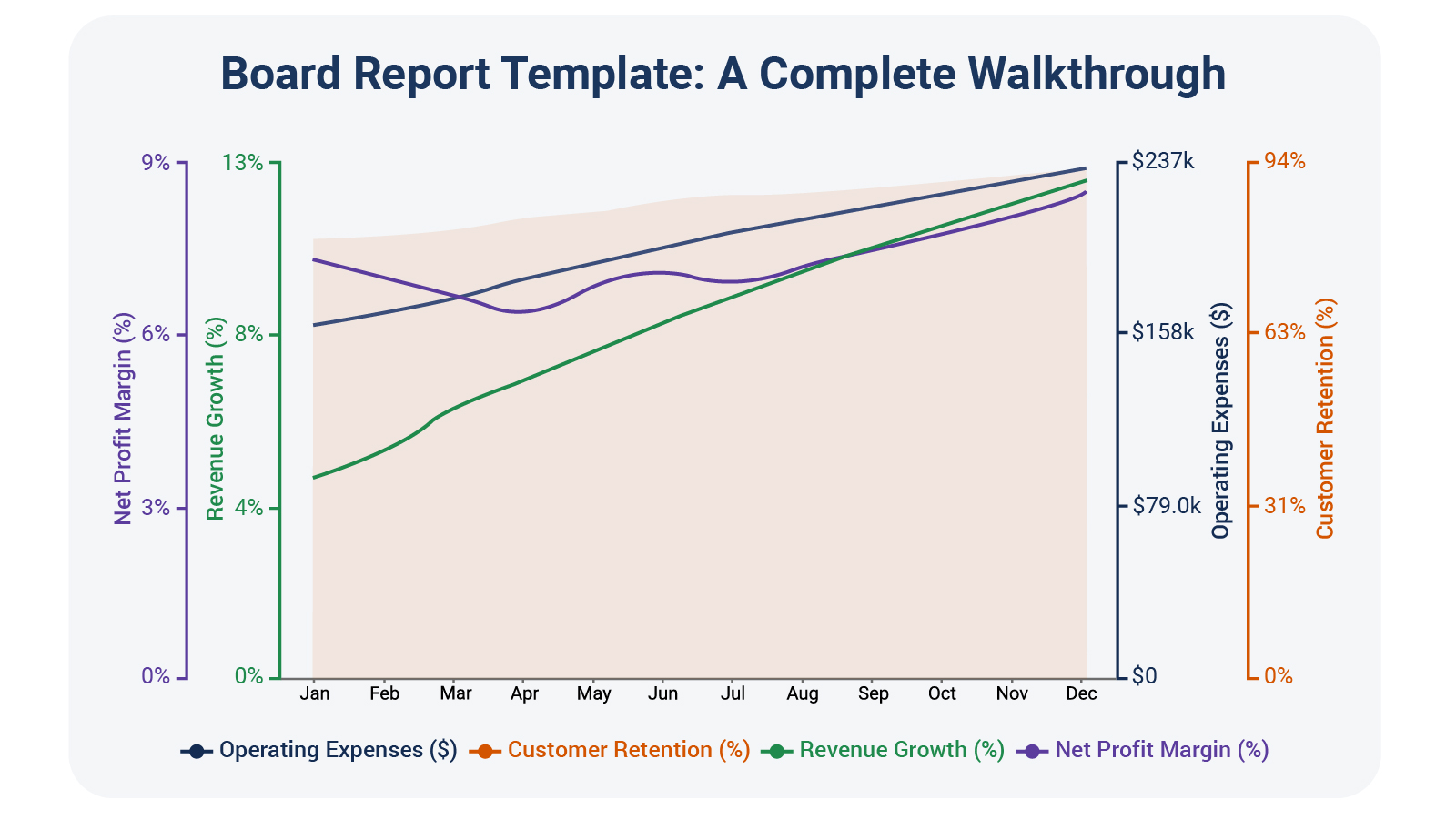
  • The final look of the Multi Axis Line Chart is shown below.
Board Report Template

Key Insights

  • Revenue growth and customer retention both climb steadily throughout the year.
  • Operating expenses increase consistently, signaling higher costs tied to scaling.
  • Net profit margin drops mid-year before recovering as the year closes.

Benefits of a Board Report Template

A Board Report Template gives leadership teams a proven structure for communicating with board members clearly, consistently, and with decision-focused precision. Here’s what this consistency delivers:

  • Enhances board communication by establishing standardized reporting protocols.
  • Sharpens decision accuracy through timely and relevant intelligence delivery.
  • Reduces reporting preparation time by eliminating manual formatting and structural rework.
  • Maintains consistent board reporting quality across all meeting cycles.
  • Aligns strategic priorities between operational leadership and governance oversight.
  • Strengthens board report clarity by reinforcing format discipline and content coherence.

Reliable board reporting complements insights from a progress report, which monitors execution milestones and implementation velocity over time.

Best Practices of a Board Report Format

Implementing best practices keeps your template focused, readable, and valuable for board members who review it under time pressure.

  • Keep information terse to boost readability and prevent cognitive overload.
  • Focus on strategic metrics tied directly to board-level choices.
  • Use consistent formatting so period-over-period comparison becomes effortless.
  • Highlight insights instead of raw data to drive meaningful board discussions.
  • Maintain visual clarity through clean layouts and structured charts.
  • Update template periodically to mirror evolving strategic priorities.

These practices echo the same principles applied in a consulting report template, where executive-focused communication clarity is non-negotiable.

Common Mistakes to Avoid When Designing a Board Report Template

Even well-intentioned templates lose impact when common design pitfalls sneak in. These errors diminish clarity and weaken board engagement. Avoid them:

  • Overloading reports with unnecessary data that obscures key insights.
  • Ignoring board-level priorities by dwelling on operational minutiae.
  • Using inconsistent metrics that prevent meaningful trend analysis and comparison.
  • Poor visual presentation that undermines readability and engagement.
  • Lack of clear insights is forcing board members to interpret data without guidance.
  • Weak board report structure that disrupts logical information flow.

Some teams mistakenly repurpose formats like a construction project daily report template, which introduces operational granularity unsuitable for board review. Similarly, structured updates such as a project status reports template require careful adaptation before being elevated to governance-level reporting.

FAQs

What is the board report also known as?

A board report is often referred to as a board pack, board briefing, or executive board report.

What is a Board Report Template used for?

A Board Report Template standardizes how performance, risks, and strategic updates are communicated to the board.

Who prepares a Board Report Template?

Board reports are typically prepared by senior management and leadership teams responsible for organizational performance.

How often should a Board Report Template be updated?

Most organizations update their template monthly or quarterly, depending on governance requirements.

Wrap Up

A well-constructed Board Report Template strengthens governance by delivering intelligence that’s clear, consistent, and ready for action.

When you pair effective template design with powerful visualization tools like ChartExpo, board reports transform from routine documentation into strategic assets that drive smarter decisions, sharper focus, and better alignment between operational execution and strategic oversight.

The payoff shows up in faster board meetings, clearer accountability trails, and governance discussions centered on what actually moves the business forward instead of rehashing historical data.

Templates don’t guarantee perfect decisions, but they eliminate the friction that prevents decision-makers from seeing what matters most and acting on it with the confidence that comes from having reliable, actionable information.

How much did you enjoy this article?

PBIAd1
Start Free Trial!
159529

Related articles

next previous
Data Analytics10 min read

Online Retailer Demand Forecasting and Price Optimization

Analytics for an Online Retailer Demand Forecasting and Price Optimization: build forecasts, set prices, avoid stockouts, and see trends. Read on!

Data Analytics7 min read

Brand Awareness Metrics for Better Brand Insights

Brand Awareness Metrics show what people notice, remember, and repeat. Track search, reach, share of voice, and surveys. Read on, then act!

Data Analytics10 min read

Charts Templates for PowerPoint for Improved Presentations

Charts Templates for PowerPoint set chart layout, labels, and colors in slides, and reuse charts across decks and reports. Read on!

Data Analytics7 min read

How to Measure Energy Use: Simple Visual Guide

Track energy consumption with precision. Learn practical methods to measure energy use, calculate costs, and optimize efficiency. Read on!

Data Analytics9 min read

Insert Chart in PowerPoint: Easy Steps

Master how to insert a chart in PowerPoint and turn spreadsheet numbers into persuasive slides. From built-in graphs to Excel imports, learn it all. Read on!

ChartExpo logo

Turn Data into Visual
Stories

CHARTEXPO

  • Home
  • Gallery
  • Videos
  • Services
  • Pricing
  • Contact us
  • FAQs
  • Privacy policy
  • Terms of Service
  • Sitemap

TOOLS

  • ChartExpo for Google Sheets
  • ChartExpo for Microsoft Excel
  • Power BI Custom Visuals by ChartExpo
  • Word Cloud

CATEGORIES

  • Bar Charts
  • Circle Graphs
  • Column Charts
  • Combo Charts
  • Comparison Charts
  • Line Graphs
  • PPC Charts
  • Sentiment Analysis Charts
  • Survey Charts

TOP CHARTS

  • Sankey Diagram
  • Likert Scale Chart
  • Comparison Bar Chart
  • Pareto Chart
  • Funnel Chart
  • Gauge Chart
  • Radar Chart
  • Radial Bar Chart
  • Sunburst Chart
  • see more
  • Scatter Plot Chart
  • CSAT Survey Bar Chart
  • CSAT Survey Chart
  • Dot Plot Chart
  • Double Bar Graph
  • Matrix Chart
  • Multi Axis Line Chart
  • Overlapping Bar Chart
  • Control Chart
  • Slope Chart
  • Clustered Bar Chart
  • Clustered Column Chart
  • Box and Whisker Plot
  • Tornado Chart
  • Waterfall Chart
  • Word Cloud
  • see less

RESOURCES

  • Blog
  • Resources
  • YouTube
SIGN UP FOR UPDATES

We wouldn't dream of spamming you or selling your info.

© 2026 ChartExpo, all rights reserved.