• Home
  • Tools dropdown img
    • Spreadsheet Charts

      • ChartExpo for Google Sheets
      • ChartExpo for Microsoft Excel
    • Power BI Charts

      • Power BI Custom Visuals by ChartExpo
    • Word Cloud

  • Charts dropdown img
    • Chart Category

      • Bar Charts
      • Circle Graphs
      • Column Charts
      • Combo Charts
      • Comparison Charts
      • Line Graphs
      • PPC Charts
      • Sentiment Analysis Charts
      • Survey Charts
    • Chart Type

      • Box and Whisker Plot
      • Clustered Bar Chart
      • Clustered Column Chart
      • Comparison Bar Chart
      • Control Chart
      • CSAT Survey Bar Chart
      • CSAT Survey Chart
      • Dot Plot Chart
      • Double Bar Graph
      • Funnel Chart
      • Gauge Chart
      • Likert Scale Chart
      • Matrix Chart
      • Multi Axis Line Chart
      • Overlapping Bar Chart
      • Pareto Chart
      • Radar Chart
      • Radial Bar Chart
      • Sankey Diagram
      • Scatter Plot Chart
      • Slope Chart
      • Sunburst Chart
      • Tornado Chart
      • Waterfall Chart
      • Word Cloud
    • Google Sheets
      Microsoft Excel
  • Services
  • Pricing
  • Contact us
  • Blog
  • Support dropdown img
      • Gallery
      • Videos
      • Contact us
      • FAQs
      • Resources
    • Please feel free to contact us

      atsupport@chartexpo.com

Categories
All Data Visualizations Data Analytics Surveys
Add-ons/
  • Google Sheets
  • Microsoft Excel
  • Power BI
All Data Visualizations Data Analytics Surveys
Add-ons
  • Google Sheets
  • Microsoft Excel
  • Power BI

We use cookies

This website uses cookies to provide better user experience and user's session management.
By continuing visiting this website you consent the use of these cookies.

Ok

ChartExpo Survey


Home > Blog > Data Analytics

KPI Tracking Software: A Visual Approach to KPIs

What’s the best KPI tracking software to stay ahead in 2025? Ask no more. We will help you find and choose the best software. Why? Businesses now rely on real-time data more than ever. Decisions can’t wait, and delays cost money.
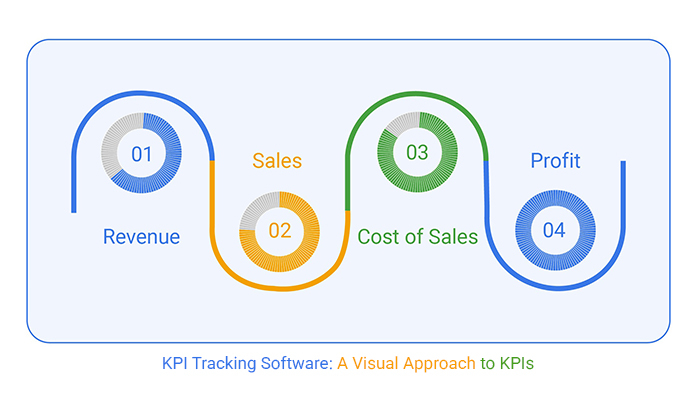
KPI Tracking Software

Good software doesn’t just collect data. It tells a story. Sales dropping? It shows you where and why. Teams overperforming? You’ll see it instantly. With live dashboards and instant updates, leaders move faster, without second-guessing.

Real-time insights aren’t a luxury. They’re expected. The most agile companies don’t guess; they know. They use KPI tracking software that keeps them connected to performance at every level.

Microsoft found that organizations using real-time dashboards make decisions 5x faster. From this, they improved their KPI tracking software to provide top-notch performance. And it’s not just for tech giants. Mid-sized and even small businesses are catching up. The tools are smart.

Do you want to gain a deeper understanding of your team? Track sales trends faster? Or, spot issues before they grow? It all starts with choosing the right software. Because once you can see clearly, you can lead confidently.

Here, we’ll explore the top tools that help leaders monitor progress in real-time. From interactive KPI graphs to live feeds powered by AI, you’ll see what’s working in 2025. Whether you’re improving employee performance KPIs or streamlining your goals, the right solution makes it easier.

Let’s dive in…

Table of Contents:

  1. What is a KPI Tracking Software?
  2. Why is KPI Management Software Important?
  3. Key Features and Functionalities of KPI Reporting Software
  4. Top 10 Popular KPI Tracking Tools
  5. Which One is the Best KPI Tracking Software?
  6. How to Use the KPI Tracking App in Excel?
  7. Benefits of Choosing the Best KPI Tracking Software
  8. FAQs
  9. Wrap Up

What is a KPI Tracking Software?

Definition: KPI tracking software enables you to monitor your business goals in real-time. It shows if you’re on track or falling behind. You can measure results, spot trends, and fix issues fast. Most tools offer charts, dashboards, and alerts, and you don’t need to dig through reports. It’s all in one place.

This type of tool supports better business management KPIs and clearer accounting KPIs. It keeps everyone focused on what matters most.

Why is KPI Management Software Important?

Running a business without tracking KPIs is like driving with your eyes closed. You might be moving, but you have no idea where you’re headed. That’s why KPI management software matters. It keeps everything clear, focused, and moving forward.

How?

  • Accountability: Everyone knows what’s expected and how they’re doing—no hiding behind vague updates or guesswork.
  • Focus: It keeps teams aligned with the goals that matter most. Whether it’s improving employee performance KPIs or boosting revenue, no one gets distracted.
  • Transparency: Data is visible to the right people at the right time. No secrets, no confusion—metrics and KPIs are always in the open.
  • Efficiency: Manual tracking wastes time. The software does the heavy lifting so your team can act without getting involved in calculations.
  • Scalability: As your business grows, your tracking grows with it. Whether you’re adding new departments or expanding KPIs, the system adjusts seamlessly without requiring a restart.

Key Features and Functionalities of KPI Reporting Software

You don’t need to be a data expert to understand performance. Good KPI reporting software makes it easy. It shows what’s working and what’s not, without wasting hours. Think of it as your business scorecard, always up to date. Here’s what to look for:

  • Customizable dashboards: You choose which KPIs appear and how they are displayed. Whether you’re focusing on customer success KPIs or weekly revenue, your dashboard fits your goals, not someone else’s.
  • Real-time data integration: Live updates ensure you always see the latest performance data. This is critical for fast-moving businesses tracking retail industry KPIs or website metrics.
  • Automated reporting: No more chasing numbers or manually building spreadsheets every week. Set it once and let reports arrive automatically.
  • Visualization tools: Data is easier to understand with good visuals. Clear KPI graphs help teams spot issues and wins at a glance.
  • Goal setting alerts: You’ll get notified when your numbers drop or soar past the target. These alerts help you act quickly, before small problems grow.

Top 10 Popular KPI Tracking Tools

Which KPI tracking software helps you see results in real time? There are plenty of tools to choose from. To help you get started, we have compiled 10 popular picks businesses trust in 2025:

  1. Grow: Grow is built to help businesses move fast. Its real-time dashboards make it perfect for tracking business management KPIs across teams with minimal complexity.
  2. Tableau: If your team thrives on in-depth analytics and stunning visuals, Tableau is the go-to choice. It’s powerful, customizable, and ideal for large-scale KPI reporting.
  3. Olation: Olation goes beyond tracking. It helps with performance management and forecasting. This tool is ideal for companies looking to connect KPIs with long-term business goals.
  4. SimpleKPI: True to its name, SimpleKPI offers a streamlined interface. It is perfect for teams managing SMART KPI without the clutter of unnecessary features.
  5. Scoro: Scoro combines project management with KPI tracking, giving you a 360° view of tasks and results in one place.
  6. Asana: While not a traditional KPI tool, Asana integrates goal tracking into your daily workflows. Teams love its visual boards and progress-tracking features.
  7. Google Looker Studio: Formerly Data Studio, this tool is perfect for those already in the Google ecosystem. Flexible, free, and loaded with advanced visualization options.
  8. IDoneThis: This software is a simple solution for teams that prefer lightweight tracking. Daily updates roll into clear, easy-to-read KPI summaries.
  9. Moz Pro: Moz Pro specializes in SEO KPIs, offering keyword tracking and detailed metrics that matter to digital marketers.
  10. HubSpot: HubSpot brings marketing, sales, and customer success metrics together. It is a strong choice for businesses focused on growth and retention.

Which One is the Best KPI Tracking Software?

Tableau stands out for a reason. It makes data easy to see and understand. The best part is that you don’t need to be a data scientist to use it. Just drag, drop, and explore your numbers.

Tableau handles complex metrics and KPIs without slowing you down. The visuals are sharp, and the insights are instant. Whether you’re tracking KPIs for accounting or team goals, this software delivers. It’s trusted by big and small companies alike.

Are you craving depth and clarity? Tableau will help you get there.

How to Use the KPI Tracking App in Excel?

Spreadsheets are great—until they’re not. You open Excel, ready to analyze, and end up buried in rows, formulas, and frustration. Sure, it tracks data. But it doesn’t show you anything.

That’s where the problem lies. Why? In 2025, real-time insights need more than numbers. They need visuals that make sense fast.

That’s where ChartExppo comes into play. ChartExpo picks up the ball where Excel drops it, turning dull data into smart, insightful stories.

How to Install ChartExpo in Excel?

  1. Open your Excel application.
  2. Open the worksheet and click the “Insert” menu.
  3. You’ll see the “My Apps” option.
  4. In the Office Add-ins window, click “Store” and search for ChartExpo on the My Apps Store.
  5. Click the “Add” button to install ChartExpo in your Excel.

ChartExpo charts are available both in Google Sheets and Microsoft Excel. Please use the following CTAs to install the tool of your choice and create beautiful visualizations with a few clicks in your favorite tool.

Example

Let’s analyze KPI tracking software data in Excel using ChartExpo.

KPI Completion (%)
Sales Target 75
Satisfaction 90
Marketing ROI 60
Training 85
Development 50
Ticket SLA 95
  • To get started with ChartExpo, install ChartExpo in Excel.
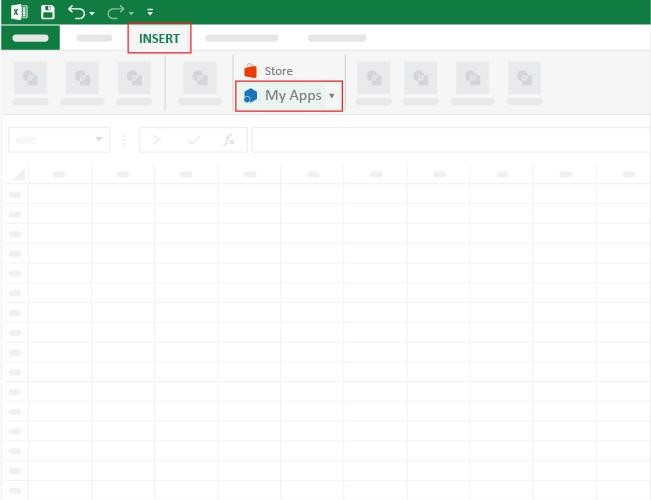
  • Now, click on My Apps from the INSERT menu.
KPI Tracking Software
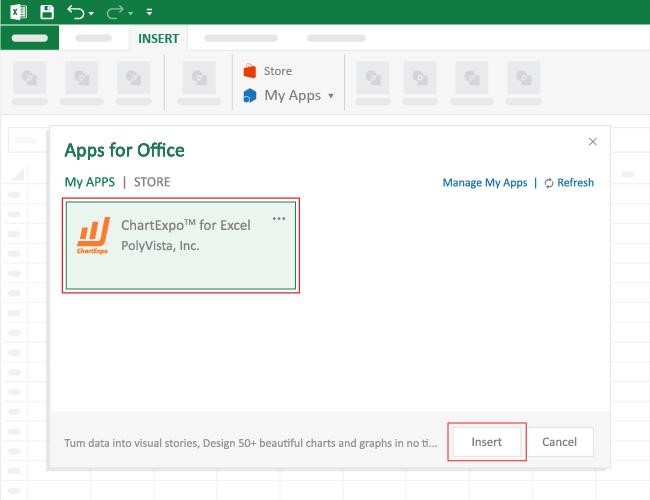
  • Choose ChartExpo from My Apps, then click Insert.
KPI Tracking Software
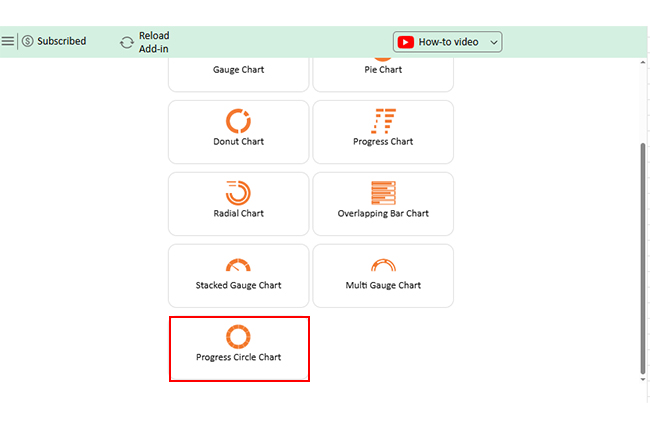
  • Once it loads, scroll through the charts list to locate and choose the “Progress Circle Chart”.
KPI Tracking Software
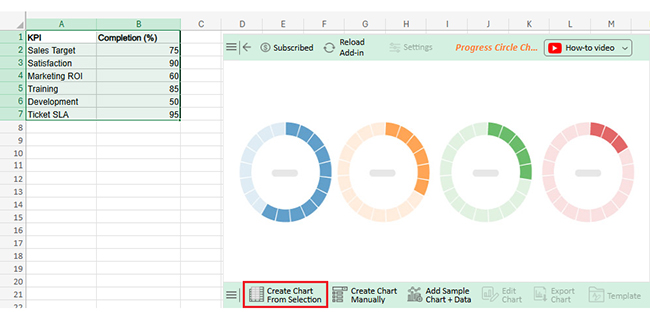
  • Click the “Create Chart From Selection” button after selecting the data from the sheet, as shown.
KPI Tracking Software
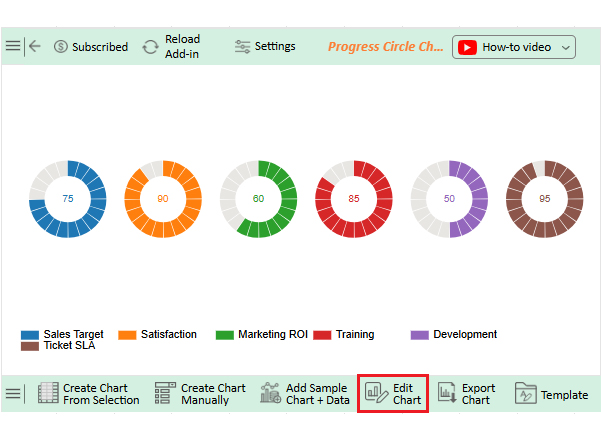
  • ChartExpo will generate the visualization below for you.
KPI Tracking Software
  • If you want to add anything to the chart, click the Edit Chart button:
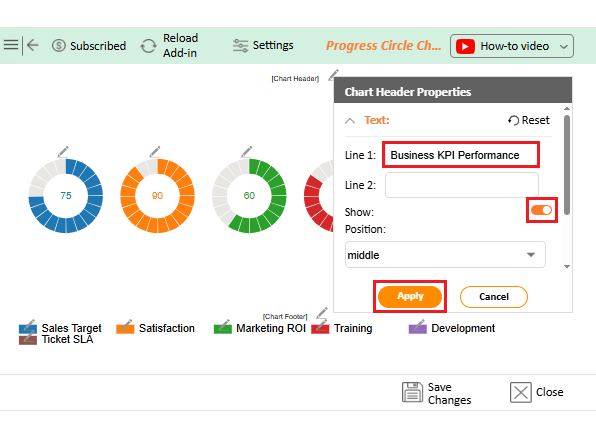
  • Click the pencil icon next to the Chart Header to change the title.
  • It will open the properties dialog. Under the Text section, you can add a heading in Line 1 and enable Show.
  • Give the appropriate title of your chart and click the Apply button.
KPI Tracking Software
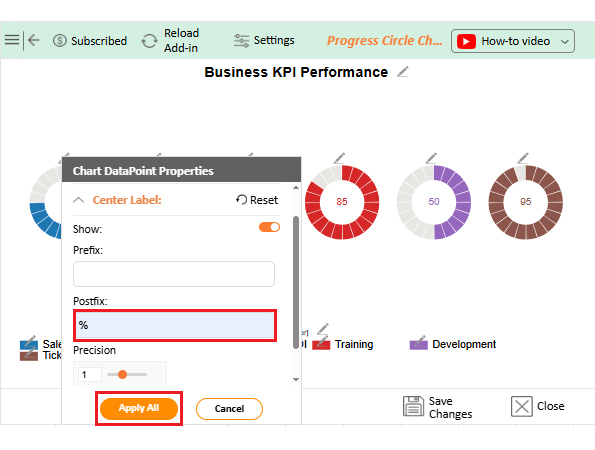
  • You can add the (%) with all values:
KPI Tracking Software
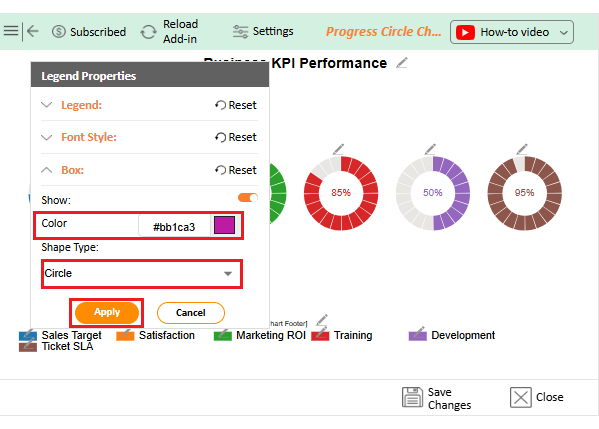
  • Change the color or shape of the legend as follows:
KPI Tracking Software
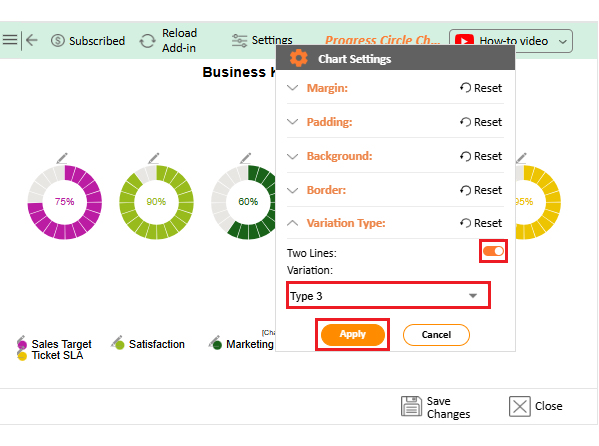
  • You can change the Variation type by clicking on the settings button as follows:
KPI Tracking Software
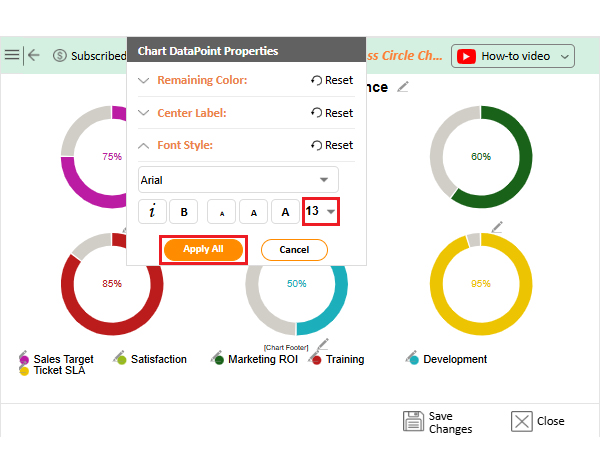
  • You can increase font size for better readability.
KPI Tracking Software
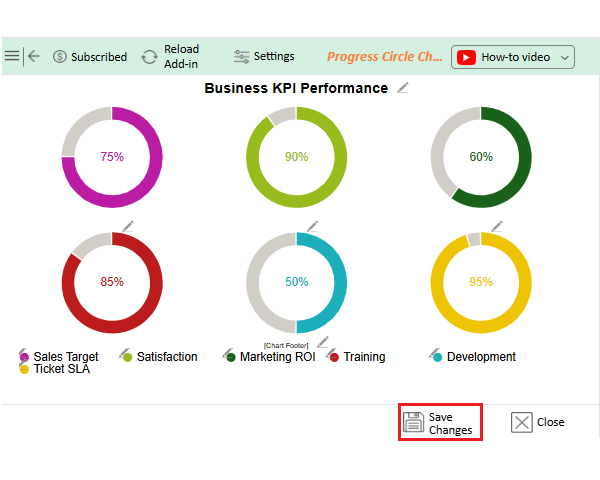
  • Click the “Save Changes” button to persist the changes made to the chart.
KPI Tracking Software
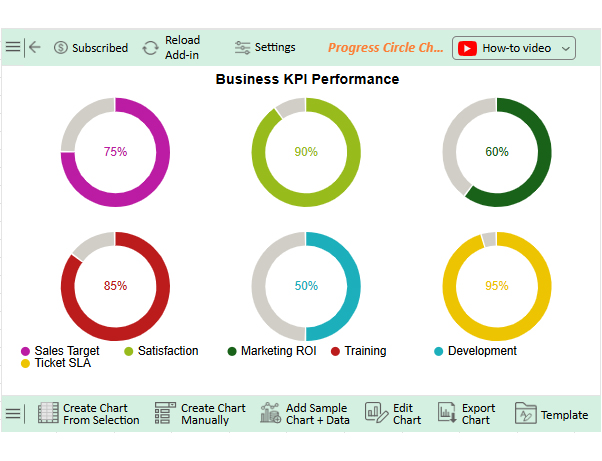
  • Your final Progress Circle Chart will look like the one below.
KPI Tracking Software

Insights

  • Ticket SLA shows 95% completion, meeting service level goals.
  • Satisfaction stands at 90%, reflecting strong customer or employee happiness.
  • Training scores 85%, proving the program is effective.
  • Sales target is at 75%, showing progress but room for improvement.
  • Marketing ROI is 60%, signaling a need to optimize campaigns or adjust resources.
  • Development faces a 50% delay, pointing to possible inefficiencies or bottlenecks.

Benefits of Choosing the Best KPI Tracking Software

Your business runs on data, but tracking it shouldn’t slow you down. That’s where the best KPI tracking software makes a real difference. It doesn’t just report—it helps you lead.

Why?

  • Clear focus: No clutter. No noise. You see only what matters. This helps teams stay aligned and work toward the same goals.
  • Faster decisions: Live data lets you act without waiting for reports. You spot trends and fix issues before they escalate.
  • Better accountability: Everyone is aware of their KPIs and their current standing. It’s easier to track progress and follow through.
  • Smarter planning: Historical trends help guide future strategy. You plan with data, not gut feelings.
  • Improved performance: Track employee performance KPIs and spot gaps early. Adjust training or resources before performance begins to dip.
  • Visual clarity: Clean, simple KPI graphs make data easy to understand. You don’t need to dig through spreadsheets to see what’s happening.

FAQs

How to use Excel to track KPIs?

  • List your KPIs in rows or columns.
  • Add targets and actual values side by side.
  • Use formulas to calculate progress.
  • Apply conditional formatting for alerts.
  • Insert charts to visualize trends.
  • Update data regularly for accuracy.

What is a KPI monitoring tool?

A KPI monitoring tool helps you track key business goals by showing progress in real time. These tools often include dashboards, alerts, and KPI graphs. They simplify performance tracking and decision-making.

Which tool is used for tracking and reporting metrics?

Tools like Tableau, Grow, or a KPI Dashboard in Excel help track metrics. They pull live data into one place, where you can measure progress, build reports, and analyze trends. These tools support smart business moves.

Wrap Up

Modern KPI tracking tools go beyond numbers. They reveal trends, speed up decisions, and keep teams aligned. Whether it’s sales, marketing, or support, the right software helps you act faster and smarter. Real-time tracking changes the game. You can monitor progress, spot performance dips, and correct issues before they escalate. It also makes accountability easier across teams.

KPIs only matter if they’re clear. Use SMART KPIs examples, and the right software to bring your goals to life. Excel KPI dashboards are popular for a reason—they’re flexible and familiar. But they come with limitations. Building them takes time, and the visuals often fall short. If your team needs real-time insights, Excel alone isn’t enough.

Tools like Tableau, Grow, or ChartExpo simplify your data. They give leaders control and teams direction. You see what’s working, and stop wasting time on what’s not.

In conclusion, choosing smart tools isn’t about trends. It’s about better results. And that starts with better tracking.

One simple way to begin is to install ChartExpo. It works with Excel and turns raw data into clear, interactive visuals.

How much did you enjoy this article?

GSAd1
Start Free Trial!
157080

Related articles

next previous
Data Analytics14 min read

Enterprise Reporting: Definition, Benefits, and Examples

Enterprise reporting transforms data into clear insights for smarter decisions. Learn steps, tools, and visuals to use to create reports that drive results.

Data Analytics12 min read

Issue Tracker Template for Smarter Issue Monitoring

Learn what an issue tracker template is and why it’s useful. This blog post shows you how to build and analyze one to track issues and boost team productivity.

Data Analytics9 min read

Lead Generation KPIs: A Guide for Better Results

Lead generation KPIs measure how well you attract and convert leads. Click here to learn how to track, analyze, and improve these KPIs for better results.

Data Analytics9 min read

Sales Pipeline Template: Visualizing Sales Flow

Sales pipeline templates organize your sales process and boost deal tracking. Click here to learn how to build and improve them in Google Sheets.

Data Analytics8 min read

Accounts Dashboard: Insights Made Easy

Discover all there is to know about the account dashboard. This guide also shows you some accounting dashboard examples, and how to create one.

ChartExpo logo

Turn Data into Visual
Stories

CHARTEXPO

  • Home
  • Gallery
  • Videos
  • Services
  • Pricing
  • Contact us
  • FAQs
  • Privacy policy
  • Terms of Service
  • Sitemap

TOOLS

  • ChartExpo for Google Sheets
  • ChartExpo for Microsoft Excel
  • Power BI Custom Visuals by ChartExpo
  • Word Cloud

CATEGORIES

  • Bar Charts
  • Circle Graphs
  • Column Charts
  • Combo Charts
  • Comparison Charts
  • Line Graphs
  • PPC Charts
  • Sentiment Analysis Charts
  • Survey Charts

TOP CHARTS

  • Sankey Diagram
  • Likert Scale Chart
  • Comparison Bar Chart
  • Pareto Chart
  • Funnel Chart
  • Gauge Chart
  • Radar Chart
  • Radial Bar Chart
  • Sunburst Chart
  • see more
  • Scatter Plot Chart
  • CSAT Survey Bar Chart
  • CSAT Survey Chart
  • Dot Plot Chart
  • Double Bar Graph
  • Matrix Chart
  • Multi Axis Line Chart
  • Overlapping Bar Chart
  • Control Chart
  • Slope Chart
  • Clustered Bar Chart
  • Clustered Column Chart
  • Box and Whisker Plot
  • Tornado Chart
  • Waterfall Chart
  • Word Cloud
  • see less

RESOURCES

  • Blog
  • Resources
  • YouTube
SIGN UP FOR UPDATES

We wouldn't dream of spamming you or selling your info.

© 2025 ChartExpo, all rights reserved.