• Home
  • Tools dropdown img
    • Spreadsheet Charts

      • ChartExpo for Google Sheets
      • ChartExpo for Microsoft Excel
    • Power BI Charts

      • Power BI Custom Visuals by ChartExpo
    • Word Cloud

  • Charts dropdown img
    • Chart Category

      • Bar Charts
      • Circle Graphs
      • Column Charts
      • Combo Charts
      • Comparison Charts
      • Line Graphs
      • PPC Charts
      • Sentiment Analysis Charts
      • Survey Charts
    • Chart Type

      • Box and Whisker Plot
      • Clustered Bar Chart
      • Clustered Column Chart
      • Comparison Bar Chart
      • Control Chart
      • CSAT Survey Bar Chart
      • CSAT Survey Chart
      • Dot Plot Chart
      • Double Bar Graph
      • Funnel Chart
      • Gauge Chart
      • Likert Scale Chart
      • Matrix Chart
      • Multi Axis Line Chart
      • Overlapping Bar Chart
      • Pareto Chart
      • Radar Chart
      • Radial Bar Chart
      • Sankey Diagram
      • Scatter Plot Chart
      • Slope Chart
      • Sunburst Chart
      • Tornado Chart
      • Waterfall Chart
      • Word Cloud
    • Google Sheets
      Microsoft Excel
  • Services
  • Pricing
  • Contact us
  • Blog
  • Support dropdown img
      • Gallery
      • Videos
      • Contact us
      • FAQs
      • Resources
    • Please feel free to contact us

      atsupport@chartexpo.com

Categories
All Data Visualizations Data Analytics Surveys
Add-ons/
  • Google Sheets
  • Microsoft Excel
  • Power BI
All Data Visualizations Data Analytics Surveys
Add-ons
  • Google Sheets
  • Microsoft Excel
  • Power BI

We use cookies

This website uses cookies to provide better user experience and user's session management.
By continuing visiting this website you consent the use of these cookies.

Ok

ChartExpo Survey


Home > Blog > Data Analytics

Cost Per Hire: Analyzing Hiring Costs Easily

Every new hire carries a price tag before day one. Cost Per Hire turns that price tag into a number you can track across roles and time. When you measure it, you see which parts of the recruiting drive spend and which parts deliver results.
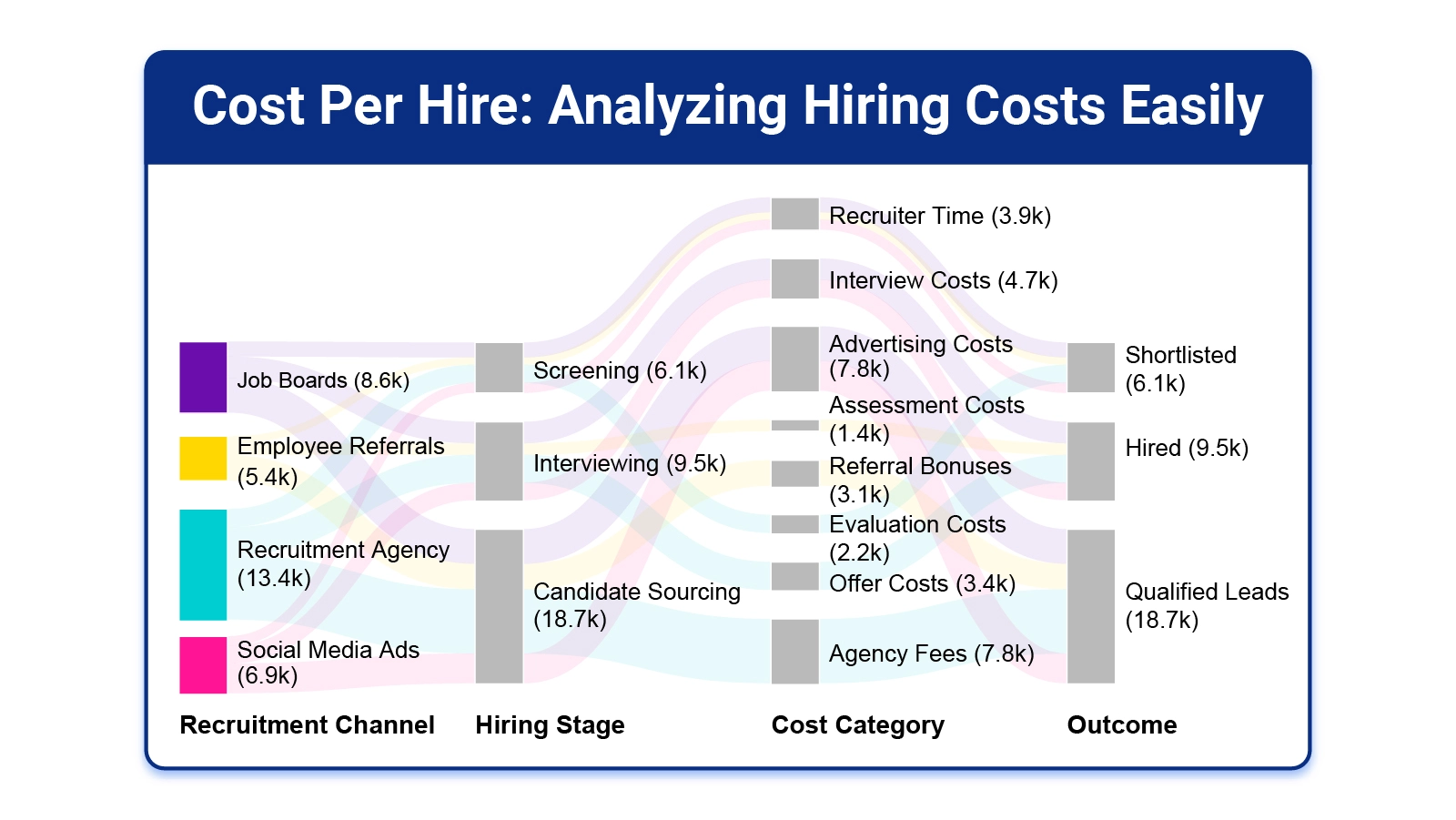
Cost Per Hire

That clarity helps HR and finance speak the same language. It also creates a baseline you can compare month to month and team to team.

In this guide, you will break costs into internal and external buckets, run a simple calculation, and review examples. You will also learn a spreadsheet workflow that highlights cost drivers without losing detail.

Table of Contents:

  1. What is Cost Per Hire?
  2. Why is Cost Per Hire Important?
  3. Key Aspects of Cost Per Hire
  4. Cost Per Hire Formula
  5. How to Calculate Cost Per Hire Step-by-Step?
  6. Cost Per Hire Examples
  7. How to Analyze Cost Per Hire in Excel?
  8. Benefits of Measuring Cost Per Hire
  9. Tips to Optimize and Reduce Cost Per Hire
  10. FAQs
  11. Wrap Up

What is Cost Per Hire?

Definition: Cost Per Hire is the total recruiting spend required to add one employee. It rolls internal labor, recruiting tools, and third-party fees into one figure for a set period. Posting costs, assessment fees, and background checks often belong in the same bucket.

A cost per hire calculation does more than sum invoices. It sets clear rules for which expenses belong to recruiting and which do not, so teams compare results fairly. When you track the metric each period, you can compare roles, channels, and processes, and see whether the unit cost is moving up or down.

Why is Cost Per Hire Important?

Hiring affects budgets and operations, not only headcount. Tracking this metric shows where money goes and where the process most needs change first.

  • Measure hiring efficiency: Shows whether recruiting effort becomes accepted offers each cycle.
  • Control recruiting spend: Limits overruns and keeps business overhead cost tied to hiring visible for finance reviews.
  • Improve budget planning: Use past results to forecast next quarter’s hiring spend.
  • Support data-driven hiring: Turns recruiting choices into numbers leaders can compare.
  • Spot cost leakages: Find steps that add expense without improving candidate outcomes.
  • Align HR and finance goals: Builds one view of hiring cost drivers across teams and budgets.

Key Aspects of Cost Per Hire

Recruiting costs shift with role demands, tools, and market conditions.
Main drivers include these:

  • Internal recruiting costs: Count recruiter pay, training, and systems, and treat them like fixed vs. variable costs for budgeting work.
  • External recruiting costs: Track ads, agencies, and checks, and tag each line as direct cost vs indirect cost for reporting.
  • Time to hire impact: Longer cycles raise costs through more interviews, lost productivity, and extended coordination time overall.
  • Hiring volume effect: Unit cost changes as you add more hires, because fixed costs spread or spike over time.
  • Role complexity influence: Specialized positions often require deeper sourcing, more assessments, and longer interview loops.
  • Source of hire variation: Referrals, boards, and agencies produce different costs and results.
  • Technology and tools cost: Platforms, subscriptions, and automation increase spend but may shorten timelines and errors.

Cost Per Hire Formula

A standard equation keeps hiring cost reporting consistent across teams and time. It connects recruiting expenses to outcomes, so leaders can compare programs without guessing at scale.

Use this equation as your core metric today:

Cost Per Hire = Total Recruitment Costs/hires completed this period

First total internal and external recruiting expense for the period. Then divide that sum by the number of people who accepted offers and started. The result is your per-hire cost for that window.

How to Calculate Cost Per Hire Step-by-Step?

Follow a process so you capture all costs and avoid gaps. Each step narrows the data until you reach one number per hire.

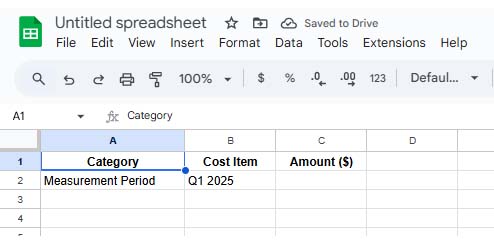
Step 1: Define the Measurement Period

Pick a timeframe, such as a month or quarter, and use the window for costs and hires.
Cost Per Hire

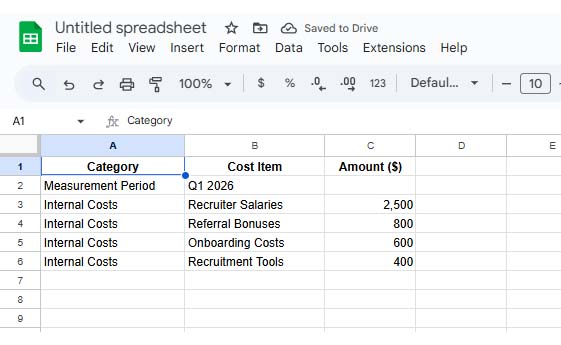
Step 2: Identify Internal Hiring Expenses

List in-house expenses, including recruiter pay, referral payouts, and the tools used to manage applicants.
Cost Per Hire

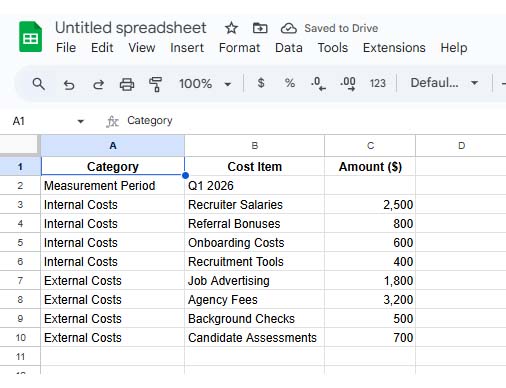
Step 3: Identify External Hiring Expenses

Record outside spending, such as ads, agency fees, assessments, and background checks for candidates.
Cost Per Hire

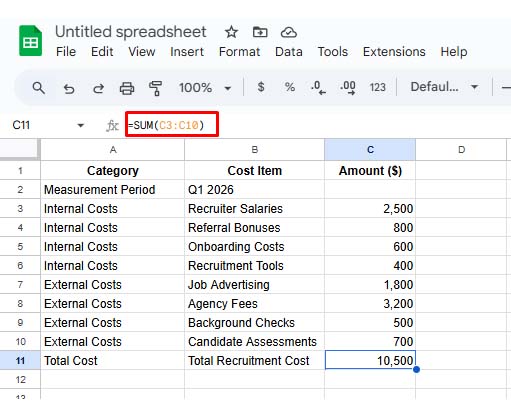
Step 4: Calculate Total Recruitment Costs

Add internal and external totals together to get the full recruiting spend for the measurement period.
Cost Per Hire

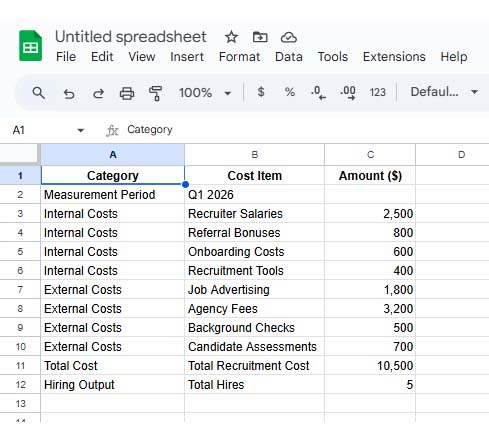
Step 5: Count the Number of Successful Hires

Count how many hires started during that timeframe and confirm dates.
Cost Per Hire

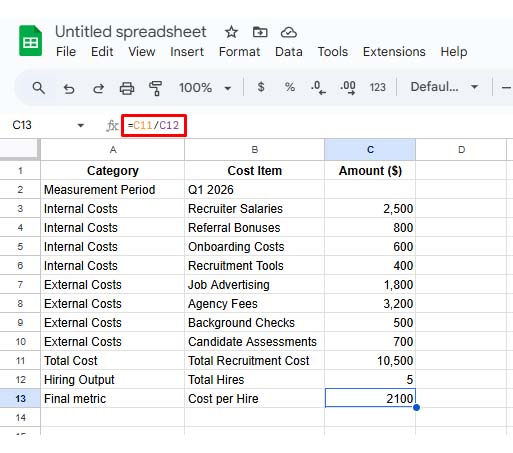
Step 6: Apply the Cost Per Hire Formula

Divide total recruiting costs by hires to compute your final cost per person hired.
Cost Per Hire

Cost Per Hire Examples

Examples make the metric easier to interpret across teams. The patterns usually reflect hiring models, not mistakes in context.

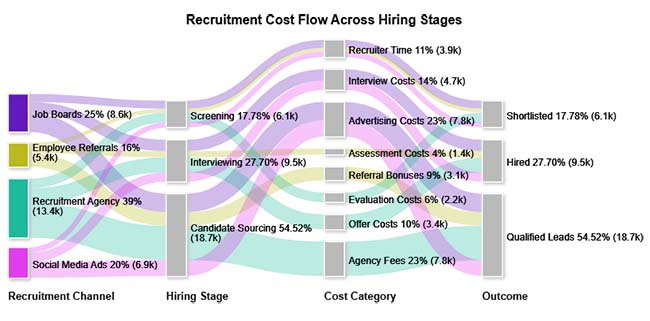
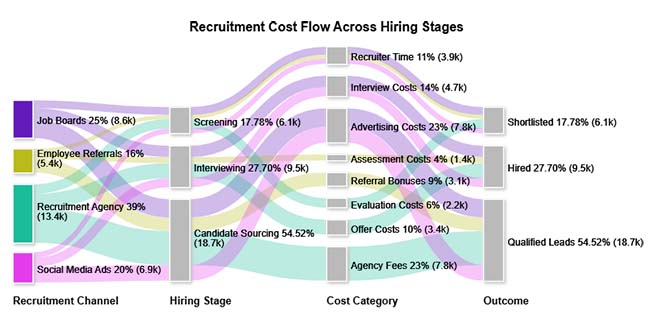
  • Recruitment Cost Flow Across Hiring Stages

This view maps where recruiting dollars move across stages and sources, so you can see which channel dominates total spend.
Cost Per Hire
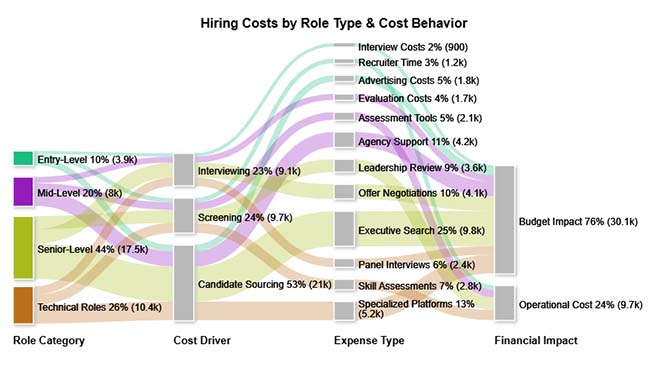
  • Hiring Costs by Role Type & Cost Behavior

This breakdown compares costs for role groups and highlights how senior or specialist searches raise sourcing and interview expenses. It also shows which channels create the largest share of hiring spend.
Cost Per Hire
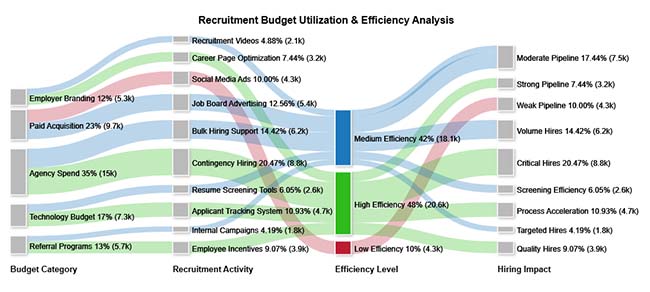
  • Recruitment Budget Utilization & Efficiency Analysis

This analysis links budget allocation to results, showing which spending areas deliver hires and which drain funds without impact in your chosen period.
Cost Per Hire

How to Analyze Cost Per Hire in Excel?

A cost per hire calculation in Excel helps turn raw recruiting expenses into a trackable metric. A layout makes trends easy to review and share.

  1. Collect recruiting expense details
    Enter internal and external costs in labeled columns, and use a cost breakdown template to keep categories consistent everywhere.
  2. Normalize cost categories
    Group costs into sourcing, technology, onboarding, and admin work so comparisons remain clean.
  3. Total recruiting costs
    Use formulas to total each category for the chosen timeframe with accuracy.
  4. Count hiring volume
    Record hires in the period to set the denominator for the metric.
  5. Run the unit cost formula
    Divide total costs by hires to get the unit hiring cost figure.
  6. Chart cost flows for insight
    Tables can hide where money concentrates. If you use ChartExpo to plot the spending flow, the view works like a cost versus value report and shows which sources and stages absorb the budget for fast review.

Why Use ChartExpo?

  • Open Microsoft Excel on the desktop.
  • Create a sheet, then select the Insert tab on the ribbon.
  • From Insert, open Office Add-ins, then choose My Apps to continue.
  • In the Store tab, search for ChartExpo, then review the add-in details there.
  • Select Add, then install ChartExpo and return to your sheet.

How to Install ChartExpo in Excel?

  1. Open your Microsoft Excel.
  2. Start a worksheet and go to the ribbon tab named Insert.
  3. To open the window on Office Add-ins, click on My Apps.
  4. Go to the Add-ins window, and in the “/Store tab,” search ChartExpo.
  5. After finding it, click the Add button to install it.

ChartExpo can be used with both Google Sheets and Microsoft Excel. Follow the CTAs to install your favorite tool and create a beautiful visualization with just a few clicks directly on your favorite platform.

Example:

Consider we have the following data for a Sankey Chart.

Recruitment Channel

Hiring Stage Cost Category Outcome

Hiring Cost ($)

Job Boards Candidate Sourcing Advertising Costs Qualified Leads 4200
Job Boards Screening Recruiter Time Shortlisted 1800
Job Boards Interviewing Interview Costs Hired 2600
Employee Referrals Candidate Sourcing Referral Bonuses Qualified Leads 3100
Employee Referrals Screening Recruiter Time Shortlisted 900
Employee Referrals Interviewing Assessment Costs Hired 1400
Recruitment Agency Candidate Sourcing Agency Fees Qualified Leads 7800
Recruitment Agency Screening Evaluation Costs Shortlisted 2200
Recruitment Agency Interviewing Offer Costs Hired 3400
Social Media Ads Candidate Sourcing Advertising Costs Qualified Leads 3600
Social Media Ads Screening Recruiter Time Shortlisted 1200
Social Media Ads Interviewing Interview Costs Hired 2100
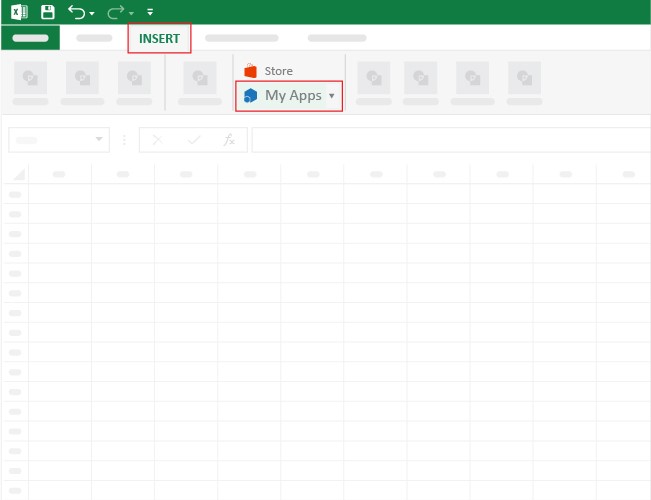
  • Once ChartExpo is installed, please click on the Microsoft Excel “INSERT” menu and then click on the “My Apps” submenu.
Cost Per Hire
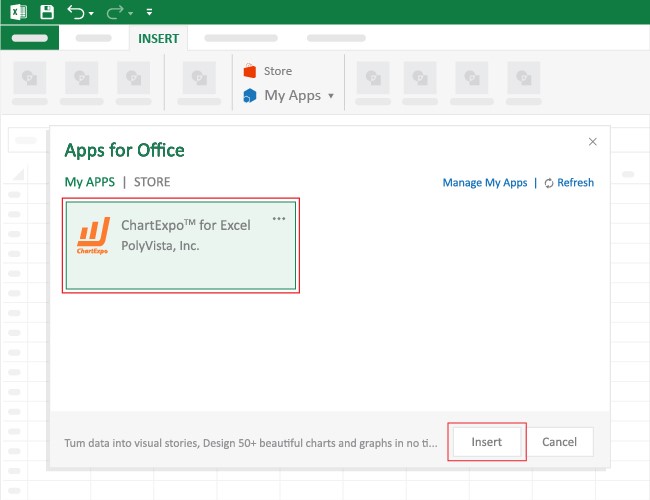
  • This will open the Apps for Office window. Find ChartExpo in the list and press the Insert button to make it appear in your Excel workbook.
Cost Per Hire
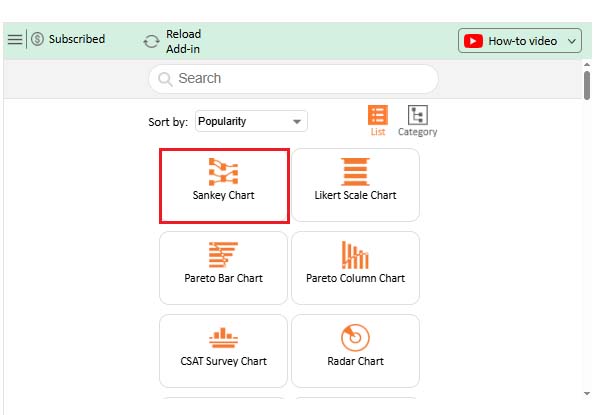
  • Once ChartExpo is loaded into your sheet, you can search or select  “Sankey Chart” from the list.
Cost Per Hire
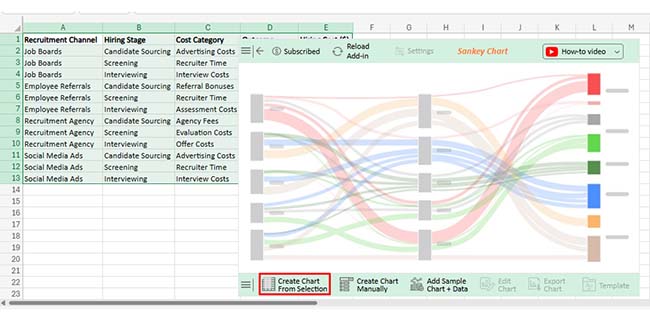
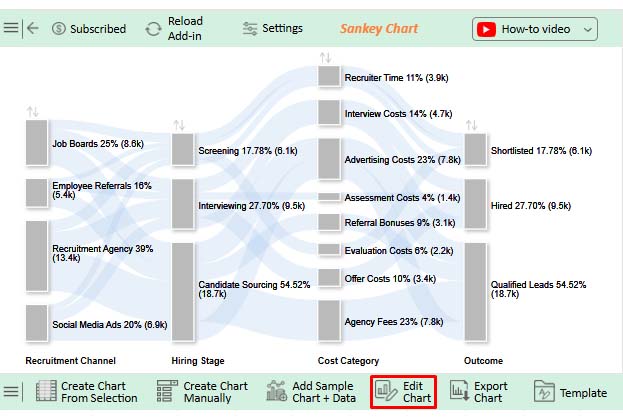
  • Next, select your data and click the ‘Create Chart from Selection’ button.
Cost Per Hire
  • To customize your chart, just click on the “Edit Chart” option to make adjustments effortlessly.
Cost Per Hire
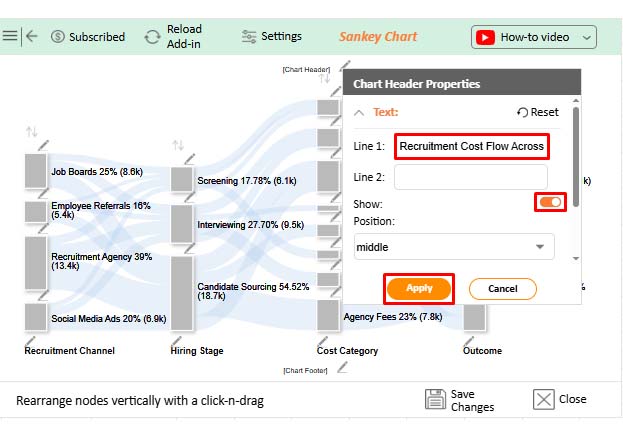
  • To change the chart’s title, select the pencil icon on the header. Then, enter the text you want and press Apply.
Cost Per Hire
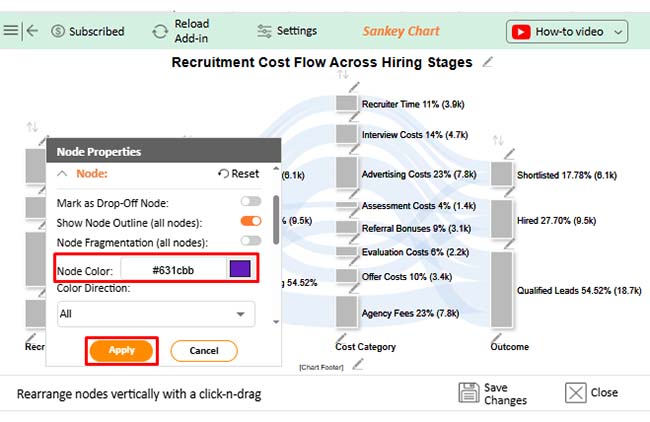
  • Click the pencil icon on the bar, select the node in the Node Properties window, choose a color, and click Apply to save the changes.
Cost Per Hire
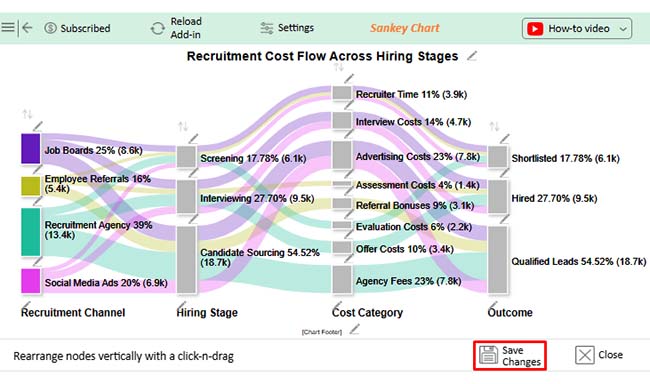
  • When you are done with all the changes, click the “Save” button to save them.
Cost Per Hire
  • The Final look and feel of the Sankey Chart is shown below.
Cost Per Hire

Key Insights

  • Recruitment agencies take the largest cost share, so agency spend is the main driver overall.
  • Across stages, recruiter time and interview sessions form the biggest expense blocks.
  • Referrals cost less per hire than most paid sourcing channels today.

Benefits of Measuring Cost Per Hire

Regular tracking keeps hiring budgets disciplined and ties recruiting choices to measurable cost outcomes for leadership.

Benefits include these:

  • Improve hiring ROI: Compare results to spend, similar to marginal revenue vs marginal cost, to justify channel choices for leaders.
  • Increase cost transparency: Show where recruiting dollars go across tools, channels, and time.
  • Support workforce planning: Use monthly budget examples to set hiring targets that match capacity and cash.
  • Find inefficient channels: Identify sources that burn budget without producing qualified hires.
  • Improve forecasting accuracy: Track trends beside a budget vs. actual Excel template to explain variance in spend.
  • Increase accountability: Give teams shared metrics that support responsible recruiting spend.

Tips to Optimize and Reduce Cost Per Hire

Lowering hiring costs works best when you remove friction, not when you cut needed steps or quality.

Try these moves:

  • Optimize sourcing channels: Put budget into sources that deliver qualified candidates and reduce spend per submission.
  • Use data-driven recruitment: Review funnel metrics and a cost-volume-profit chart to see which steps raise unit cost, then adjust.
  • Improve hiring process efficiency: Remove duplicate steps, shorten handoffs, and keep interview panels focused.
  • Leverage recruitment technology: Automate scheduling and screening so recruiters focus on finalists, not admin tasks.
  • Reduce time to hire: Cut idle days between steps to limit productivity and prevent cost growth.
  • Monitor hiring costs: Review the metric each month and pair it with a business budget template in Excel for tighter spend control.

FAQs

How to check the cost per hire?

Add every recruiting expense for a set period, then divide by hires made in that same period. Keep internal and external costs defined the same way each time consistently.

What is the cost per hire comparable?

Compare it across the same role type, department, or time window. Hold cost rules constant, because hiring volume and seniority can change the reference point materially.

How to reduce cost per hire?

Cut time between steps, boost referrals, and drop weak paid channels. Use templates and automation for scheduling, so recruiter hours fall each month.

Wrap Up

Cost Per Hire becomes useful when everyone counts the same costs and measures the same time window. With clean inputs, you can explain where recruiting dollars go, compare channels, and plan headcount with fewer surprises. Use the formula, track components, and review results after each cycle.

Once you know the drivers, test targeted changes instead of broad cuts. Shift spend toward referrals, tighten screening, and shorten handoffs between reviewers. Automation for scheduling and updates can reduce recruiter hours. Recalculate monthly, share the trend with finance, and document what changed so the metric stays comparable across roles, quarters, and hiring campaigns.

How much did you enjoy this article?

PBIAd1
Start Free Trial!
160053

Related articles

next previous
Data Analytics12 min read

Need Analysis Template: A Complete Guide

A need analysis template transforms scattered observations into structured, evidence-based decisions. Discover how to close performance gaps. Read on!

Data Analytics10 min read

Performance-Based Budgeting: Examples & Analysis

Performance-based budgeting links spending to measurable outcomes. Learn how it works, explore examples, benefits, challenges, and analyze PBB effectively in Excel.

Data Analytics9 min read

Remote Work Statistics: A Complete Visual Guide

Remote work statistics transform workforce activity into measurable insights that guide planning and policy. Discover how to analyze this data. Read on!

Data Analytics13 min read

Total Cost of Ownership Analysis for TCO Insights

Total cost of ownership analysis reveals every lifecycle cost behind any major decision. Stop guessing what investments truly cost. Read on!

Data Analytics10 min read

Value Stream Mapping Template: A Complete Guide

A value stream mapping template helps teams cut waste and improve flow. Learn how to design, analyze, and optimize your processes. Learn more!

ChartExpo logo

Turn Data into Visual
Stories

CHARTEXPO

  • Home
  • Gallery
  • Videos
  • Services
  • Pricing
  • Contact us
  • FAQs
  • Privacy policy
  • Terms of Service
  • Sitemap

TOOLS

  • ChartExpo for Google Sheets
  • ChartExpo for Microsoft Excel
  • Power BI Custom Visuals by ChartExpo
  • Word Cloud

CATEGORIES

  • Bar Charts
  • Circle Graphs
  • Column Charts
  • Combo Charts
  • Comparison Charts
  • Line Graphs
  • PPC Charts
  • Sentiment Analysis Charts
  • Survey Charts

TOP CHARTS

  • Sankey Diagram
  • Likert Scale Chart
  • Comparison Bar Chart
  • Pareto Chart
  • Funnel Chart
  • Gauge Chart
  • Radar Chart
  • Radial Bar Chart
  • Sunburst Chart
  • see more
  • Scatter Plot Chart
  • CSAT Survey Bar Chart
  • CSAT Survey Chart
  • Dot Plot Chart
  • Double Bar Graph
  • Matrix Chart
  • Multi Axis Line Chart
  • Overlapping Bar Chart
  • Control Chart
  • Slope Chart
  • Clustered Bar Chart
  • Clustered Column Chart
  • Box and Whisker Plot
  • Tornado Chart
  • Waterfall Chart
  • Word Cloud
  • see less

RESOURCES

  • Blog
  • Resources
  • YouTube
SIGN UP FOR UPDATES

We wouldn't dream of spamming you or selling your info.

© 2026 ChartExpo, all rights reserved.