Categories

Picking the right data type isn’t optional. It shapes how you collect information, analyze patterns, and tell stories with numbers.
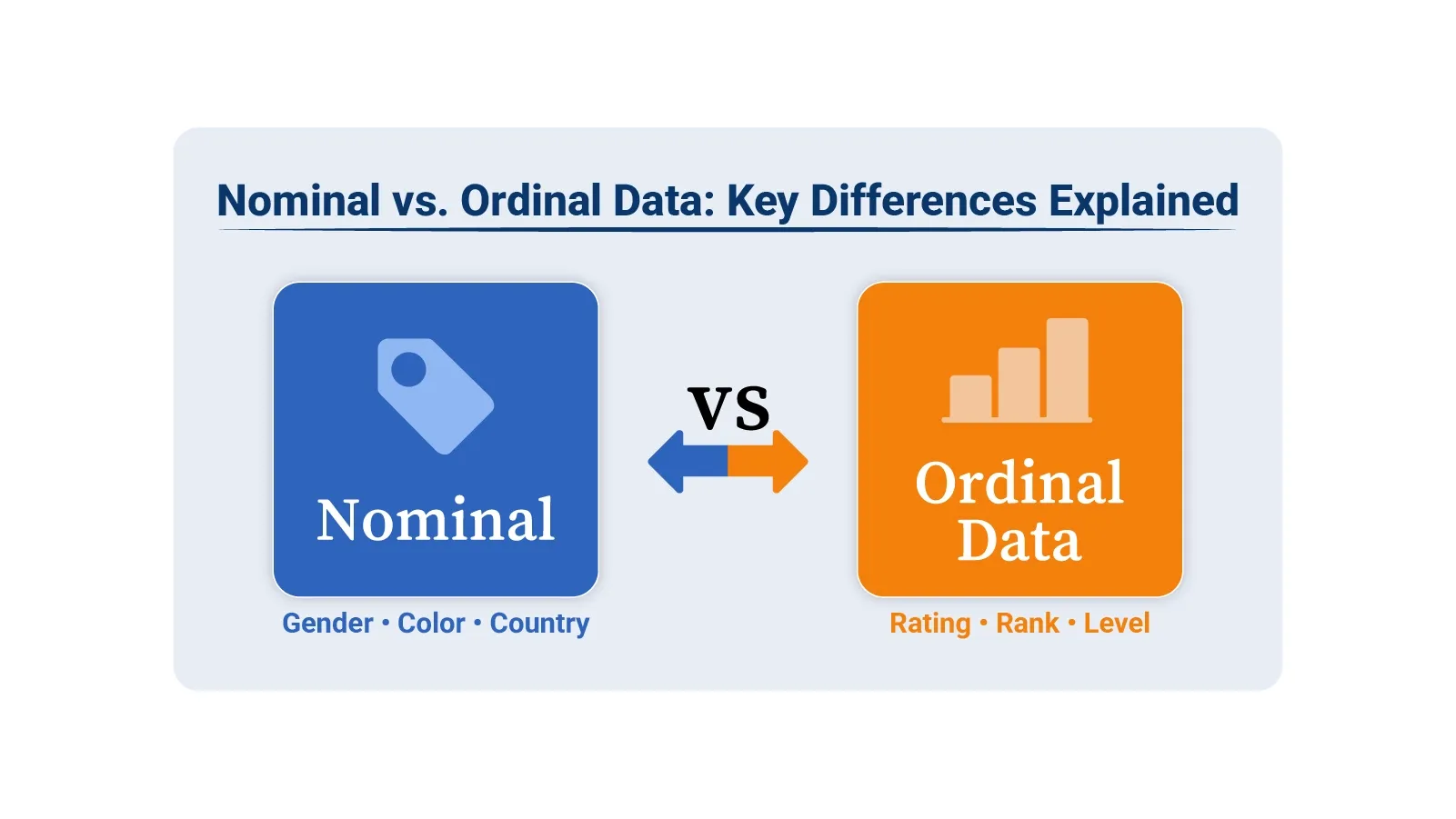
Nominal vs. ordinal data might sound like academic jargon, but get it wrong and your conclusions fall apart. These are both categorical types, yet they function differently and demand distinct approaches.
Nominal data groups things into categories without ranking them. Ordinal data ranks categories in order but can’t measure the gaps between them. That distinction matters when you’re building charts, running analysis, or presenting findings. This guide breaks down definitions, shows real-world scenarios, and walks through visualization methods using Google Sheets tools.
Definition: Nominal data sorts information into distinct groups that have no inherent sequence. Each category stands alone as a label, not a rank. Think of it as putting items into buckets where the buckets don’t line up in any meaningful way.
Gender, product type, region, or customer segment all work as nominal data. You can’t say one is higher or better than another. They’re just different labels for different things.
You typically gather nominal data through structured methods that let people pick from preset categories. Here’s how it works:
Nominal data powers several analysis techniques:
Definition: Ordinal data adds a layer of structure that nominal data lacks. Categories still exist, but now they follow a sequence. One item ranks above or below another in a clear hierarchy.
The catch? You can see the order, but you can’t measure the distance between ranks. Going from poor to fair isn’t the same jump as fair to good, even though both move one step up. That makes ordinal data useful for ranking, but limited for math.
Satisfaction ratings work this way. So do education tiers and priority levels. You know which is higher, just not by how much.
Collection methods capture the ranking structure:
The key element is maintaining logical sequence. Values must follow a path from low to high or worst to best.
Ordinal data supports analysis where position matters:
Ranking lets you compare relative standing. Exact calculations like standard deviation don’t apply because the intervals aren’t uniform.
The split between these types comes down to structure and what you can do with them. Here’s the breakdown:
|
Nominal Data |
Ordinal Data |
| There is no natural order among categories. | Categories follow a meaningful order. |
| Categories cannot be ranked or compared. | Categories can be ranked based on their position. |
| Mathematical operations cannot be performed. | Mathematical operations are limited and do not include fixed intervals. |
| Examples include color, gender, and region. | Examples include ratings, grades, and levels. |
Even with their differences, ordinal data vs. nominal data share common ground:
This overlap confuses. Knowing which type you’re working with prevents analytical mistakes.
Real scenarios make the distinction clearer.
These ordinal data vs. nominal data examples show whether your categories form a hierarchy or simply label different groups. Tools like Excel and Google Sheets handle both types.
ChartExpo turns categorical information into clear charts that support better data interpretation and reporting. The next section highlights ten powerful ChartExpo visuals for analyzing nominal vs. ordinal data in Excel and Google Sheets.
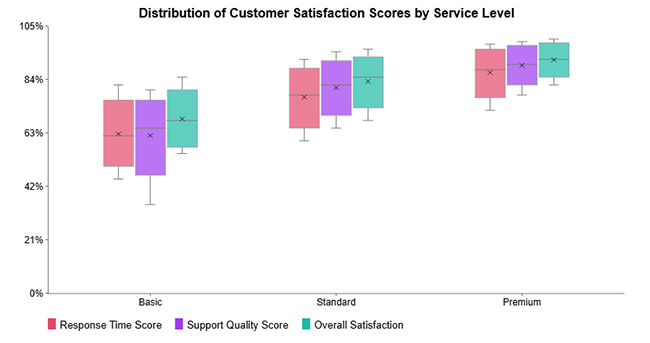
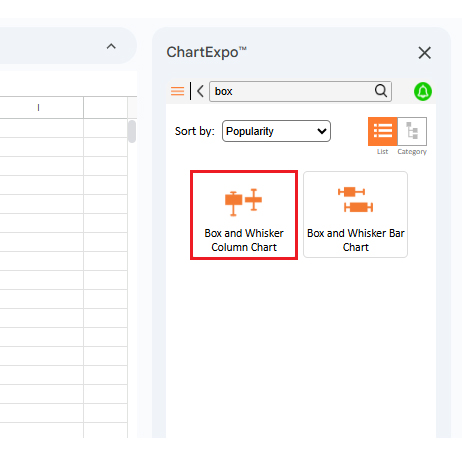
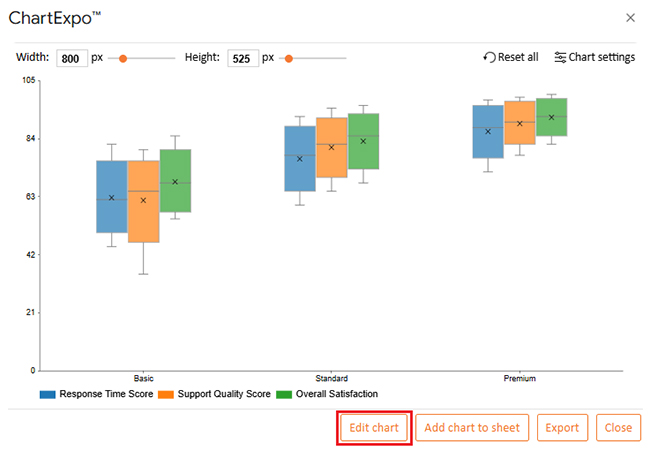
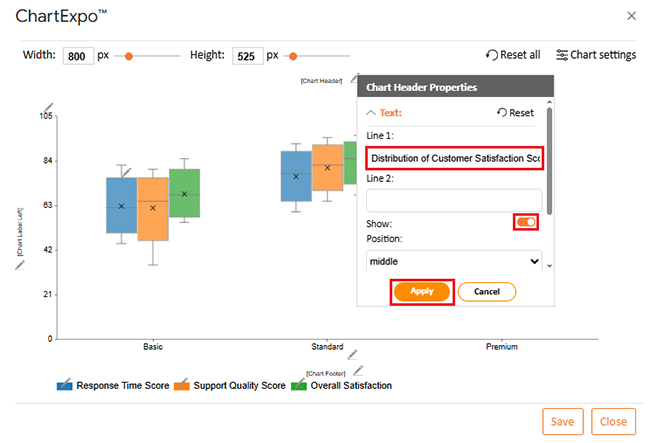
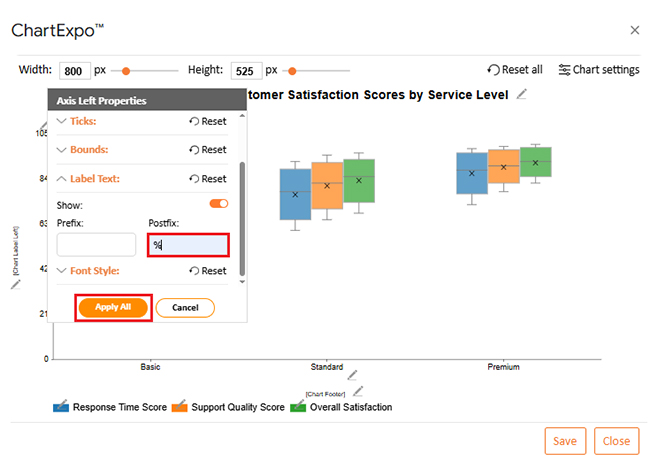
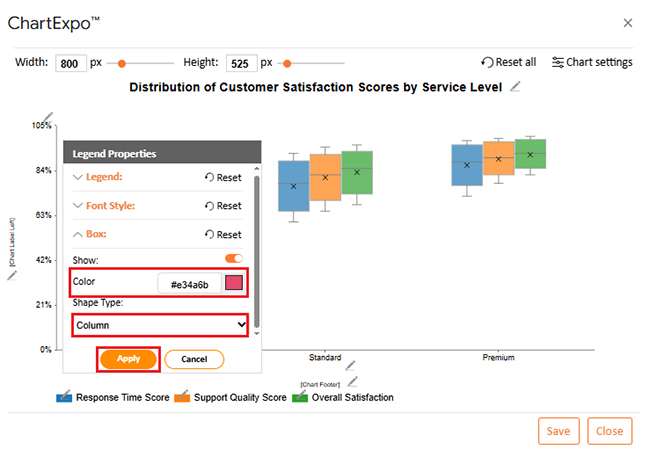
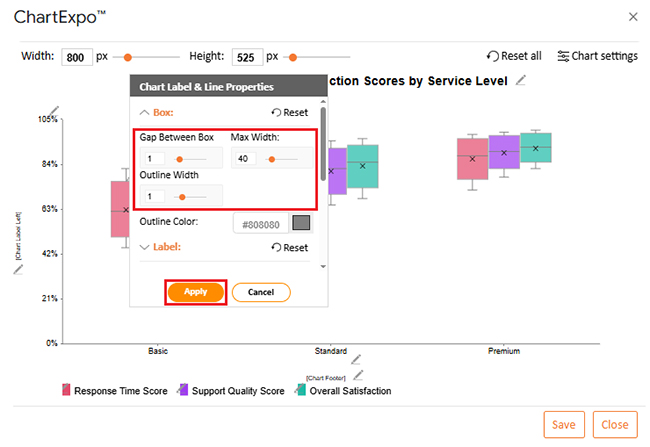
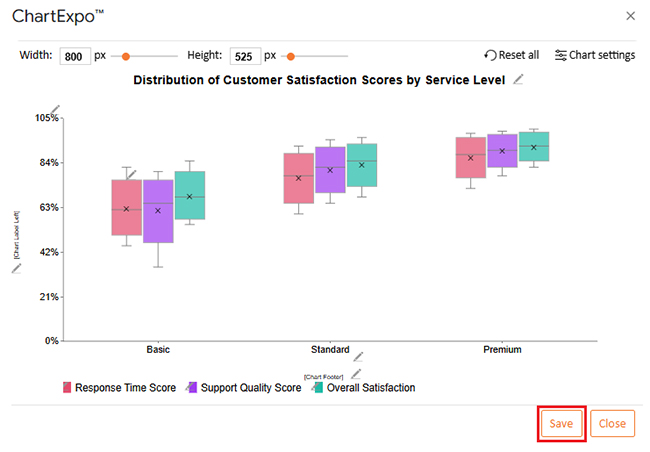
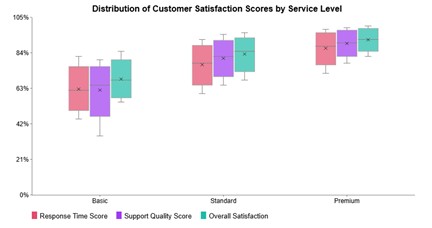
Box and Whisker Column Charts show how data spreads across categories by displaying median values, quartiles, range, and outliers. They’re particularly effective for comparing ordinal or grouped information, revealing consistency and spotting unusual values.
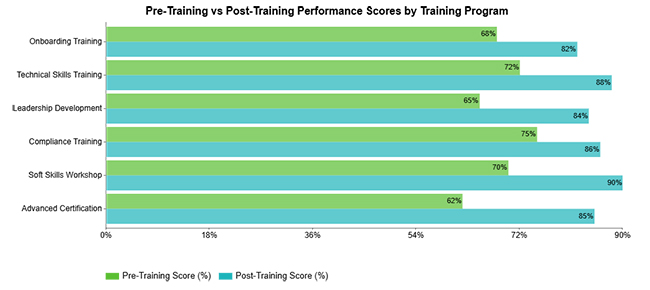
Clustered Bar Charts let you compare several metrics at once within the same categories. They make differences obvious at a glance, which helps when analyzing patterns across categorical data groupings.
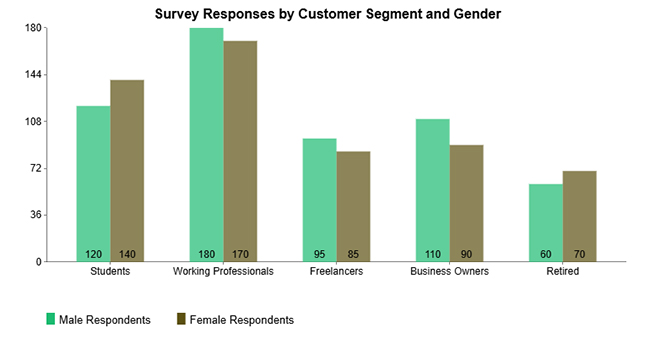
Clustered Column Charts display multiple measures side by side for easy evaluation. They work well with nominal data when you want to compare respondent groups across different customer segments.
Double Bar Graphs show two related metrics across identical categories, making contrasts easy to spot. They’re especially useful with ordinal data where values get compared across naturally ordered groups.
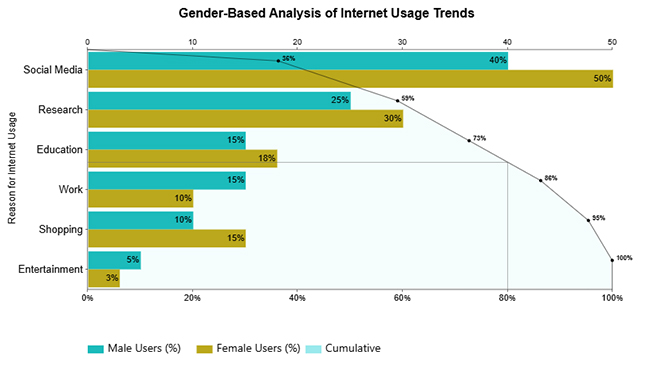
Pareto Bar Charts rank categories from highest to lowest impact while adding a cumulative trend line. They shine when analyzing nominal data, showing which few categories drive most of the results.
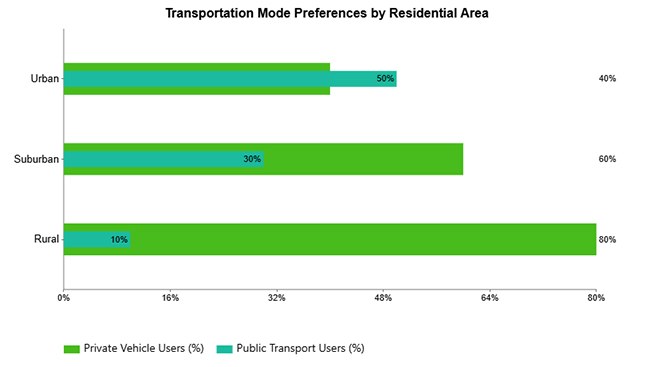
Overlapping Bar Charts layer multiple values within categories so you can see differences quickly. They’re effective for visualizing nominal data when comparing different groups across shared categories.
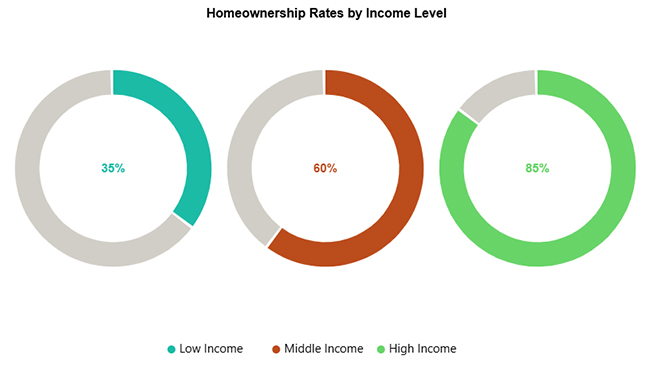
Progress Circle Charts use circular indicators to show completion or proportion, giving you instant visual feedback on performance. They work perfectly for comparing progress across ordered categories like income brackets, satisfaction tiers, or achievement levels.
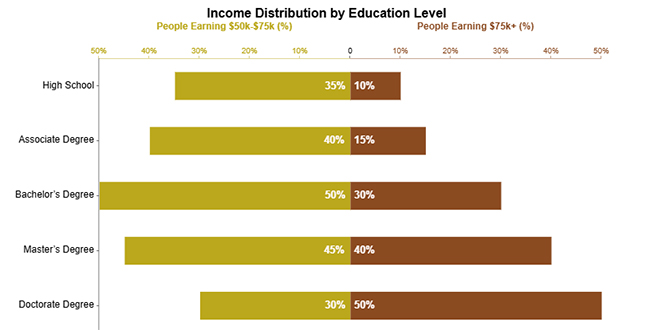
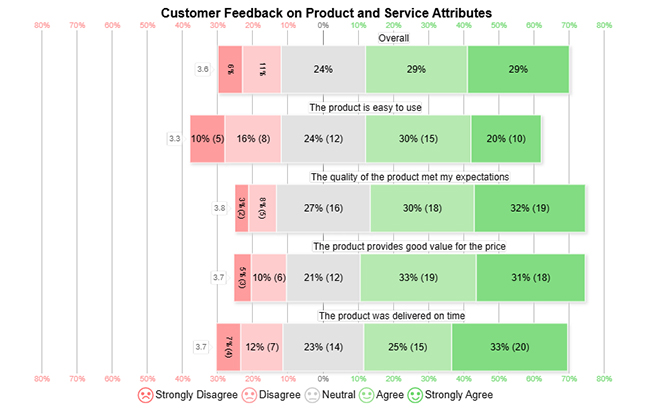
Likert Charts visualize ordinal survey responses by showing ordered agreement or satisfaction levels for each question. They make comparing sentiment distribution simple and highlight overall response trends immediately.
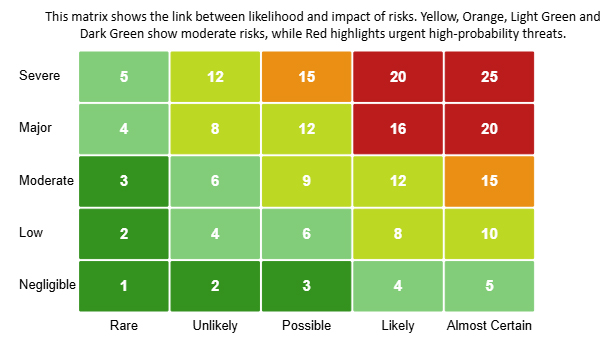
Heatmaps use color gradients to show data intensity, letting you spot patterns, trends, and outliers fast. They’re particularly powerful for analyzing ordinal data where ordered categories help you compare levels of impact, frequency, or risk.
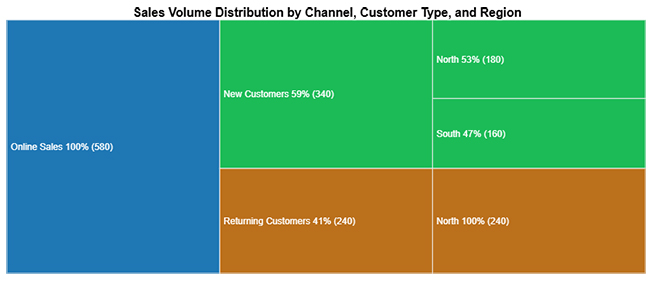
Tree Diagrams show hierarchical relationships by breaking data into categories and subcategories with a structured layout. They’re ideal for visualizing nominal data, revealing how different categories contribute to an overall outcome.
Google Sheets gives you built-in chart options that handle both data types. Bar charts, column charts, and pie charts suit nominal data. Ordered bar charts and line charts work better for ordinal data. The trick is keeping category grouping intact for nominal data and preserving natural order for ordinal data.
Adding tools like ChartExpo to Google Sheets unlocks advanced options. You get Likert Charts, Pareto Charts, Heatmaps, and Tree Diagrams without writing complex formulas.
Why use ChartExpo?
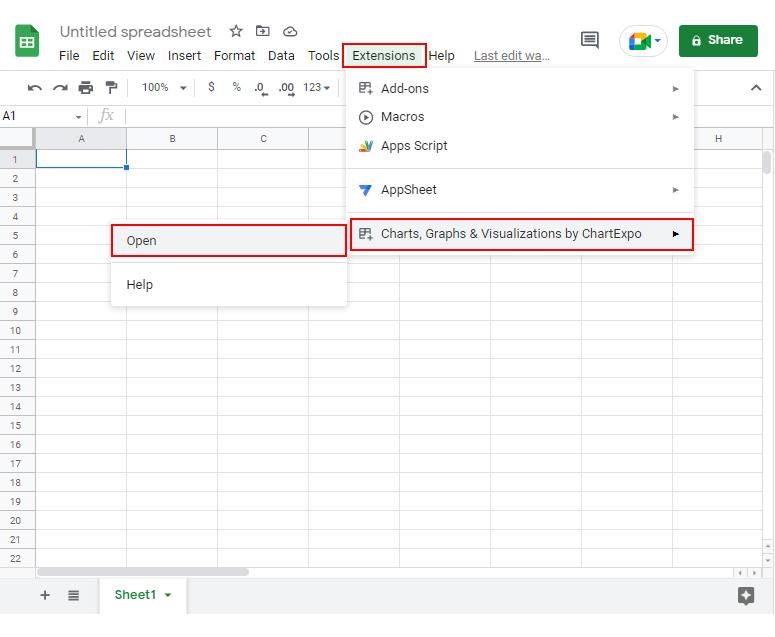
How to install ChartExpo in Google Sheets?
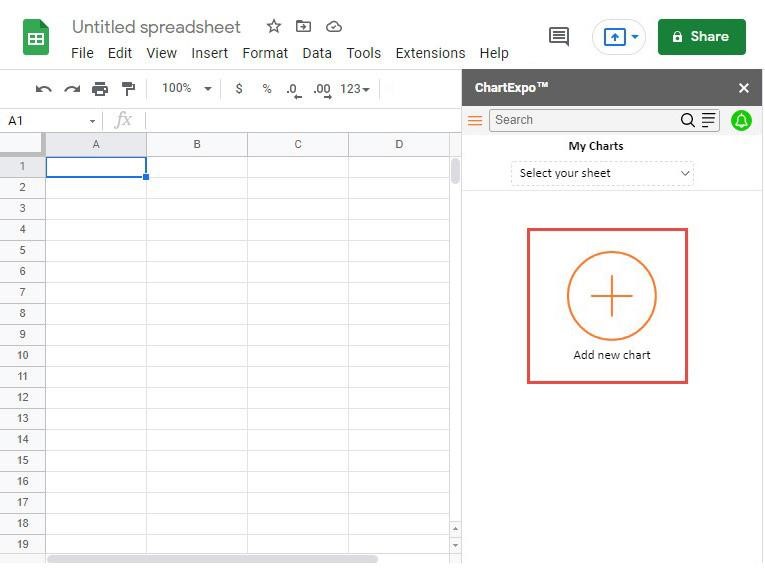
ChartExpo works with Google Sheets and Microsoft Excel. Select a platform you like, install the add-on, and start creating powerful visualizations with a few clicks.
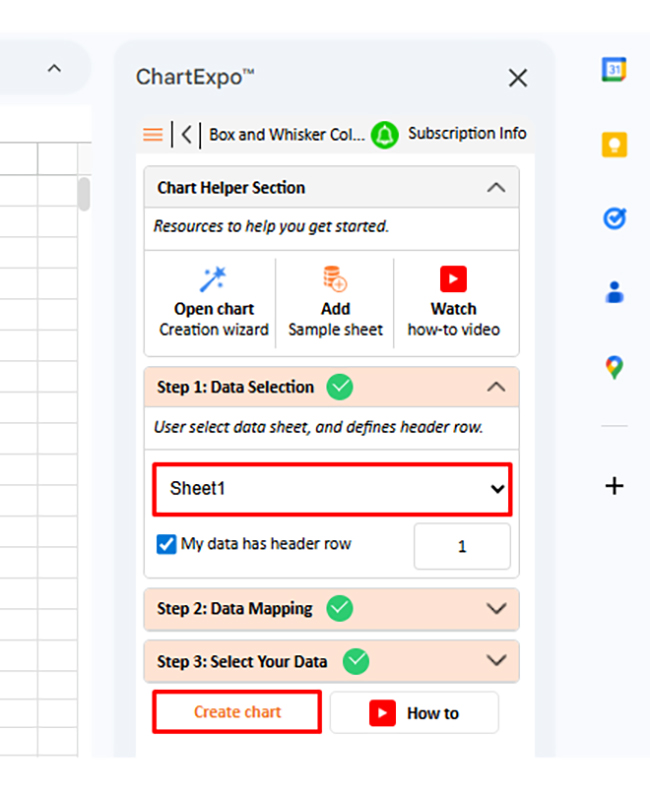
Consider we have the following data for the Box and Whisker Column Chart.
|
Service Level |
Response Time Score | Support Quality Score |
Overall Satisfaction |
| Basic | 45 | 35 | 55 |
| Basic | 55 | 58 | 60 |
| Basic | 62 | 65 | 68 |
| Basic | 70 | 72 | 75 |
| Basic | 82 | 80 | 85 |
| Standard | 60 | 65 | 68 |
| Standard | 70 | 75 | 78 |
| Standard | 78 | 82 | 85 |
| Standard | 85 | 88 | 90 |
| Standard | 92 | 95 | 96 |
| Premium | 72 | 78 | 82 |
| Premium | 82 | 86 | 88 |
| Premium | 88 | 90 | 92 |
| Premium | 94 | 96 | 97 |
| Premium | 98 | 99 | 100 |
If your data consists of categories without order, it is nominal. If the categories follow a clear ranking, it is ordinal.
An example of nominal data is customer region, while an example of ordinal data is customer satisfaction level.
Understanding nominal vs. ordinal data determines which analysis methods work and which charts make sense. When you categorize data correctly, you improve precision in data analysis, strengthen data interpretation, and make your data storytelling clearer. Using proper charts in Google Sheets alongside tools like ChartExpo transforms categorical information into actionable insights.
Whether your labels lack order or follow a rank, the right visualization approach improves data quality, presents findings more effectively, and supports confident decisions. Don’t skip the step of identifying your data type – it’s the foundation everything else builds on.
How much did you enjoy this article?



Calculate accounts receivable turnover ratio to measure credit collection speed, improve cash flow, and strengthen your financial strategy. Read on!

Change Management KPIs are the key to tracking adoption, performance, and ROI during transitions. Find out which metrics matter. Read on!

Data collection methods and techniques determine the quality of every insight you act on. Explore key approaches for gathering reliable data. Read on!




