• Home
  • Tools dropdown img
    • Spreadsheet Charts

      • ChartExpo for Google Sheets
      • ChartExpo for Microsoft Excel
    • Power BI Charts

      • Power BI Custom Visuals by ChartExpo
    • Word Cloud

  • Charts dropdown img
    • Chart Category

      • Bar Charts
      • Circle Graphs
      • Column Charts
      • Combo Charts
      • Comparison Charts
      • Line Graphs
      • PPC Charts
      • Sentiment Analysis Charts
      • Survey Charts
    • Chart Type

      • Box and Whisker Plot
      • Clustered Bar Chart
      • Clustered Column Chart
      • Comparison Bar Chart
      • Control Chart
      • CSAT Survey Bar Chart
      • CSAT Survey Chart
      • Dot Plot Chart
      • Double Bar Graph
      • Funnel Chart
      • Gauge Chart
      • Likert Scale Chart
      • Matrix Chart
      • Multi Axis Line Chart
      • Overlapping Bar Chart
      • Pareto Chart
      • Radar Chart
      • Radial Bar Chart
      • Sankey Diagram
      • Scatter Plot Chart
      • Slope Chart
      • Sunburst Chart
      • Tornado Chart
      • Waterfall Chart
      • Word Cloud
    • Google Sheets
      Microsoft Excel
  • Services
  • Pricing
  • Contact us
  • Blog
  • Support dropdown img
      • Gallery
      • Videos
      • Contact us
      • FAQs
      • Resources
    • Please feel free to contact us

      atsupport@chartexpo.com

Categories
All Data Visualizations Data Analytics Surveys
Add-ons/
  • Google Sheets
  • Microsoft Excel
  • Power BI
All Data Visualizations Data Analytics Surveys
Add-ons
  • Google Sheets
  • Microsoft Excel
  • Power BI

We use cookies

This website uses cookies to provide better user experience and user's session management.
By continuing visiting this website you consent the use of these cookies.

Ok

ChartExpo Survey


Home > Blog > Data Analytics

Customer Retention Metrics: Key KPIs Explained Visually

Retention numbers look calm right up until renewals sag and support queues explode. Customer Retention Metrics are the early warning system that shows whether existing customers are staying engaged or quietly drifting away.
Customer Retention Metrics

These signals cover repeat buying, feature use, satisfaction feedback, and the revenue that depends on all of it. The point isn’t a fancy report.

It’s fast, practical clarity that helps teams spot churn risk, tighten onboarding, and keep the product delivering value month after month.

Table of Contents:

  1. What are Customer Retention Metrics?
  2. Why Customer Retention Metrics Matter?
  3. Top 10 Customer Retention KPIs to Track
  4. Customer Retention Metrics Examples
  5. How to Measure Customer Retention Metrics?
  6. How to Analyze Customer Retention Metrics & KPIs in Excel?
  7. Benefits of Customer Retention Metrics
  8. Best Practices for Creating Customer Retention Metrics
  9. FAQs
  10. Wrap-up

What are Customer Retention Metrics?

Definition: Customer Retention Metrics are measurements that show how well a company keeps current customers over a set time.

They track who stays, who leaves, and what changes before churn. When they’re tracked consistently, teams can catch risk early and protect long-term value.

They’re used to test whether retention work is paying off and where the experience is cracking. Alongside user retention metrics, they spotlight drop-offs after onboarding, feature fatigue, and dissatisfaction.

Customer Retention Metrics belong next to revenue reporting because they explain the trend, not just the total.

Why Customer Retention Metrics Matter?

Customer Retention Metrics matter because they show stability that acquisition can’t fake. Keeping existing accounts costs less than replacing them, and customer retention isn’t optional when recurring revenue pays the bills.

Key reasons these numbers earn a permanent spot on the dashboard include:

  • Better retention steadies recurring revenue and keeps long-term financial metrics from whipping around.
  • Loyal customers spend more over time and talk up the brand on their own.
  • Lower churn cuts replacement marketing and acquisition costs.
  • Retention data keeps sales, marketing, and product aligned on what to fix next.
  • Data-led retention work sharpens overall business metrics and planning.

Top 10 Customer Retention KPIs to Track

A sensible KPI set mixes behavior and sentiment. Done right, the KPI mix flags churn risk before the revenue hit shows up.

Key Quantitative Metrics

  • Retention rate: The percentage of customers still active at period end compared with the starting group for that window.
  • Churn rate: The share of customers who cancel or stop buying during the period, showing how fast accounts leak out.
  • Repeat purchase rate: How often existing customers buy again after the first purchase, a quick read on habit.
  • Customer lifetime value: An estimate of total revenue expected from a customer across the relationship, not one order.

Key Qualitative Metrics

  • Net promoter score: Rates loyalty by asking how likely customers are to recommend the brand to others, then scoring the responses.
  • Loyalty index: A combined view of repeat behavior, engagement, and advocacy that signals commitment strength.
  • Product engagement frequency: How often customers use key features over time, which often explains retention shifts.

Satisfaction Metrics

  • Customer satisfaction KPI: Direct feedback that shows how satisfied customers are with the experience, usually from surveys, reviews, or ratings.
  • Customer effort score: How hard it is for customers to complete a task or solve an issue, where friction drives churn.
  • Support resolution feedback: A read on satisfaction after support interactions or issue resolution to spot weak handoffs.

Customer Retention Metrics Examples

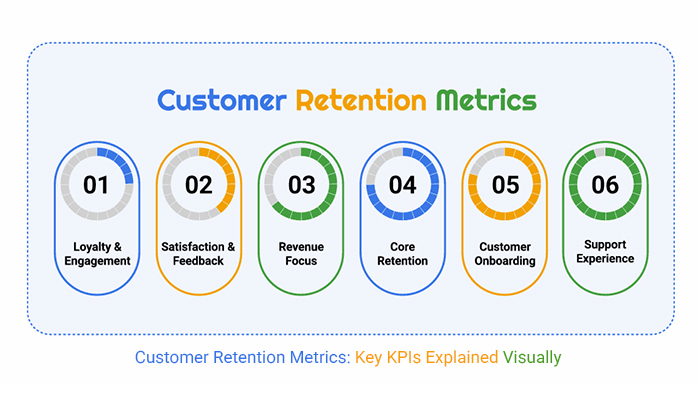
Examples are where Customer Retention Metrics stop being theory and start being useful. Most teams group retention signals by what they’re trying to protect, such as engagement, satisfaction, revenue lift, or plain churn control.
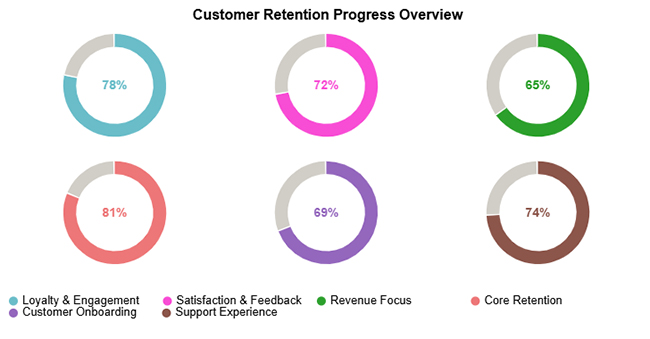
  • Loyalty & engagement metrics track repeat usage, logins, and purchase frequency to show whether customers keep coming back.
  • Satisfaction & feedback metrics pull from surveys, reviews, and sentiment signals to capture what customers think and feel over time.
  • Revenue-focused metrics follow renewals, upsells, and expansion revenue to show the financial impact of customers who stay.
  • Core retention metrics highlight retention rate and churn trends across periods to assess whether stability is improving or slipping.
Customer Retention Metrics

How to Measure Customer Retention Metrics?

Measuring Customer Retention Metrics works best as a routine, not a one-time exercise. Start with clear definitions and consistent data sources so the results stay comparable from period to period.

  • Choose a measurement window and keep it consistent for comparisons.
  • Track activity, purchases, and product engagement in a single dataset.
  • Calculate retention and churn indicators for that same window.
  • Review trends by customer segments or cohorts to find patterns.
  • Use the insights to remove friction, improve experience, and curb churn.

Following the same steps each cycle keeps measurement tied to action. It turns retention tracking into a working feedback loop, not isolated reporting.

How to Analyze Customer Retention Metrics & KPIs in Excel?

Analyzing Customer Retention Metrics turns raw logs and transactions into decisions.

  1. Import customer activity and lifecycle data.
  2. Group customers into time-based cohorts.
  3. Calculate retention, churn, and user retention metrics.
  4. Segment data using pivot tables.
  5. Visualize trends clearly.

ChartExpo supports that workflow by turning Customer Retention KPIs into visuals that are easier to scan and explain.

Why Use ChartExpo?

  • Shows performance gaps fast with visuals that make customer success KPIs easier to read at a glance.
  • Makes it easier to share the story behind metrics and KPIs so teams don’t argue about the same chart.
  • Cuts manual chart work by automating advanced visuals, so time goes into analysis instead of tedious formatting.
  • Includes a 7-day free trial and costs $10/month for stronger visualization options.

How to Install ChartExpo in Excel?

  1. Open your Microsoft Excel.
  2. Start a worksheet and go to the ribbon tab named Insert.
  3. To open the window on Office Add-ins, click on My Apps.
  4. Go to the Add-ins window, and in the “/Store tab,” search ChartExpo.
  5. After finding it, click the Add button to install it.

ChartExpo works in both Google Sheets and Microsoft Excel. Use the CTAs to install the tool you prefer, then build a clean visualization in just a few clicks right inside the spreadsheet.

Example:

Assume the following dataset will be used for the Progress Circle Chart.

Category

Score (%)

Loyalty & Engagement 78
Satisfaction & Feedback 72
Revenue Focus 65
Core Retention 81
Customer Onboarding 69
Support Experience 74
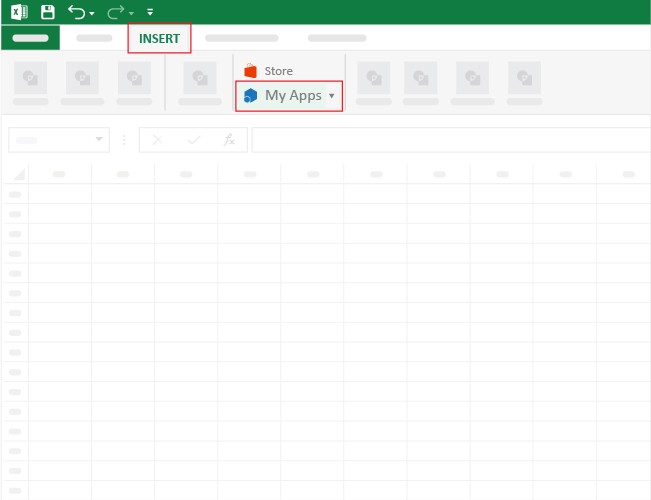
  • Once ChartExpo is installed, please click on the Microsoft Excel “INSERT” menu and then click on the “My Apps” submenu.
Customer Retention Metrics
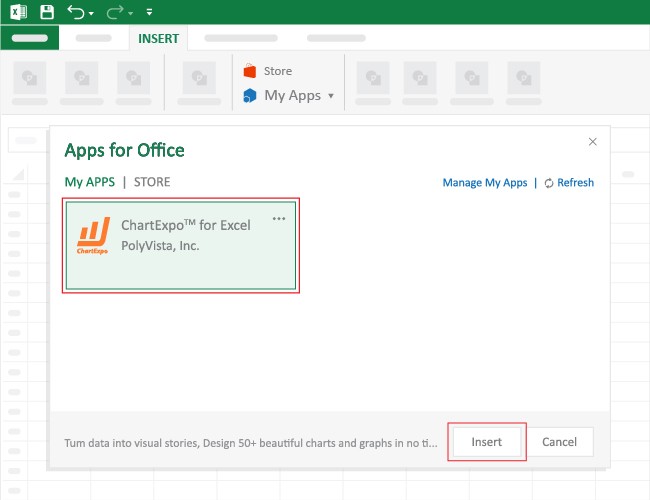
  • This will open the Apps for Office window. Find ChartExpo in the list and press the Insert button to make it appear in your Excel workbook.
Customer Retention Metrics
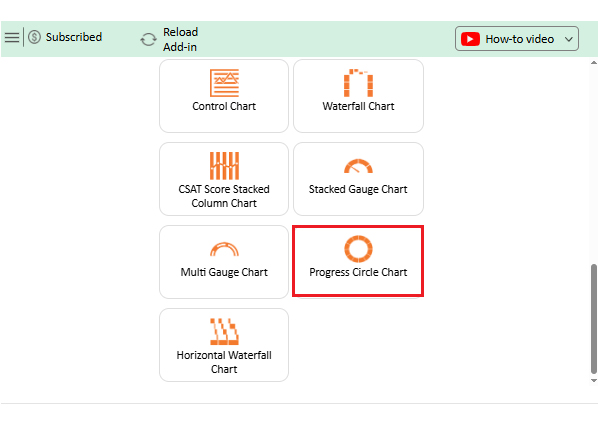
  • Once ChartExpo is loaded into your sheet, you can search or select  “Progress Circle Chart” from the list.
Customer Retention Metrics
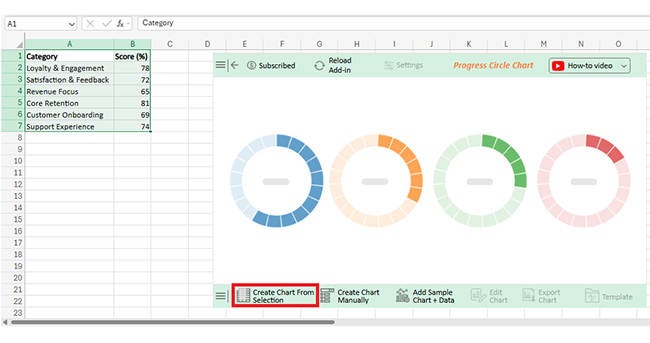
  • Next, select your data and click the ‘Create Chart from Selection’ button.
Customer Retention Metrics
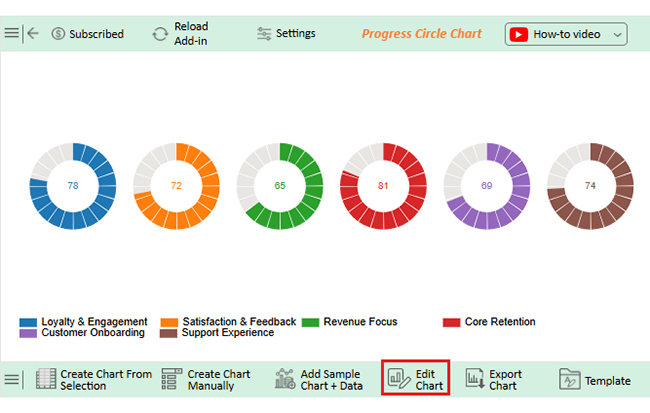
  • To customize your chart, just click on the “Edit Chart” option to make adjustments effortlessly.
Customer Retention Metrics
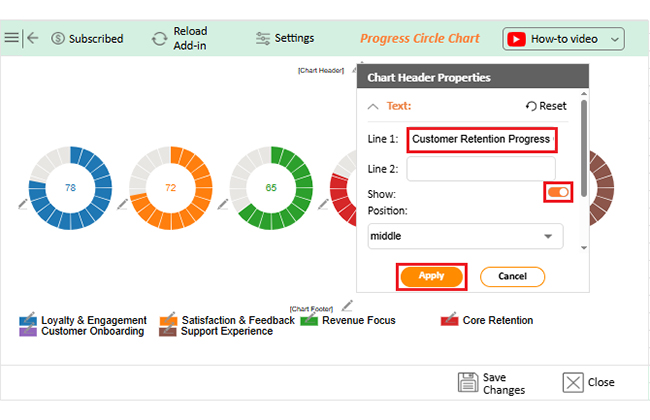
  • To change the chart’s title, select the pencil icon on the header. Then, enter the text you want and press apply.
Customer Retention Metrics
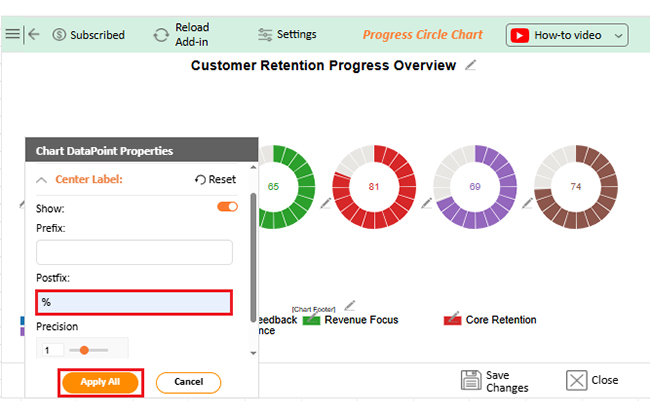
  • You can add a percentage sign on the center label from “Chart DataPoint Properties”.
Customer Retention Metrics
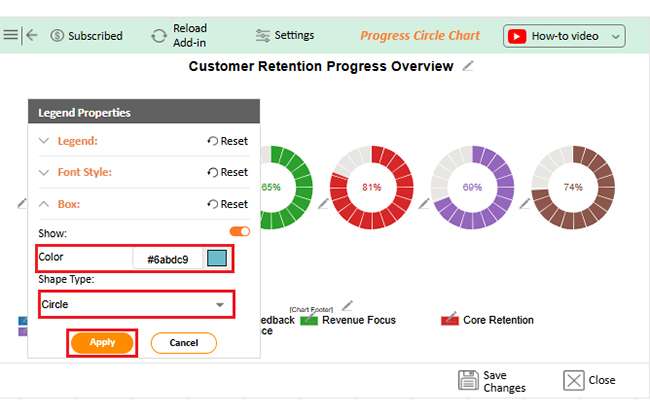
  • You can change the color or shape of the legend from the “Legend Properties”.
Customer Retention Metrics
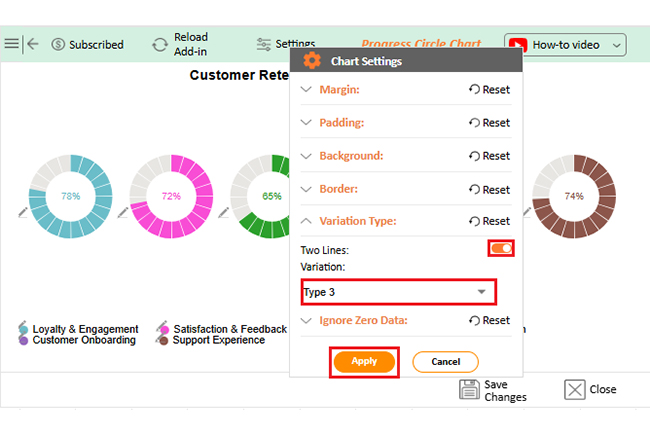
  • Next, change the Variation type from “Chart Settings” to make the chart look even more presentable overall.
Customer Retention Metrics
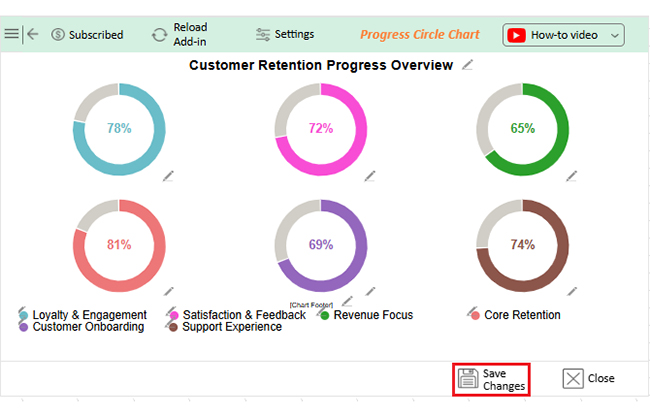
  • When you are done with all the changes, click the “Save” button to save the changes.
Customer Retention Metrics
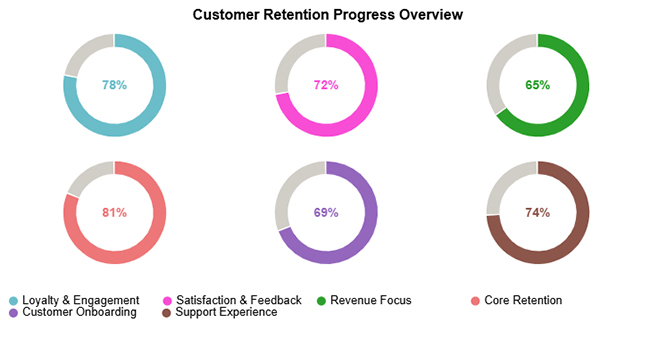
  • The final look of Progress Circle Chart is shown below.
Customer Retention Metrics

Key Insights

  • Core Retention (81%) leads the pack, suggesting most customers keep the relationship going over time.
  • Revenue Focus (65%) and Customer Onboarding (69%) lag, which points to gaps in early value delivery and monetization.
  • Loyalty & Engagement (78%), Support Experience (74%), and Satisfaction & Feedback (72%) are solid, yet there’s still room to tighten the experience.

Benefits of Customer Retention Metrics

Customer Retention Metrics do more than fill a slide deck. When they’re reviewed the right way, they point teams toward the fixes that actually move retention outcomes.

Common benefits include:

  • More stable revenue and stronger performance metrics overall.
  • Greater loyalty that supports organic growth over time.
  • Better planning backed by consistent customer service metrics.

Best Practices for Creating Customer Retention Metrics

Useful Customer Retention Metrics come from disciplined tracking, not random reporting. Good practices keep the numbers consistent, readable, and tied to decisions that teams can execute.

  • Study behavior and feedback, then tie them to churn patterns.
  • Personalize outreach by usage patterns and lifecycle stage.
  • Refine onboarding so customers hit value fast and early churn drops.
  • Provide proactive support that resolves issues fast and keeps friction low.
  • Build loyalty programs that reward long-term engagement.

Those habits also clear up metrics vs. measures, so activity counts don’t get confused with outcomes that matter.

FAQs

What’s the most important retention metric?

Retention rate is the anchor because it shows who keeps coming back. Pair it with churn so it doesn’t get rosy.

Which metrics should SaaS companies track?

SaaS teams watch retention rate, churn rate, customer lifetime value, and product engagement frequency. Together, they flag renewal risk.

How often should retention metrics be reviewed?

Most teams review monthly or quarterly, but high-volume products need a weekly check. Regular review keeps small dips from turning into big losses.

Wrap-up

Customer Retention Metrics become actionable when measurement, analysis, and visuals work together. Tracking the right indicators and presenting them well helps teams find gaps faster and agree on what to fix next.

Tools such as ChartExpo can speed up that last mile by making the story obvious without manual work, supporting stronger long-term customer relationships.

How much did you enjoy this article?

PBIAd1
Start Free Trial!
158437

Related articles

next previous
Data Analytics8 min read

Cost Breakdown Template for Better Budget Visibility

Understand how a cost breakdown template improves budget clarity, controls spending, and supports smarter planning with Excel examples and visuals.

Data Analytics12 min read

Agile Performance Metrics: From Activity to Real Outcomes

Agile performance metrics track team progress, quality, and delivery. Discover the key KPIs, examples, and best practices to boost results.

Data Analytics13 min read

Cash Flow Forecasting Template: A Complete Guide

Cash flow forecasting template designed to help businesses monitor liquidity, plan expenses, and prepare for financial changes.

Data Analytics13 min read

Social Media Marketing Plan Template for SMM Success

A template for a social media marketing plan organizes goals and tracking. This blog shows you how to plan, analyze, and report smarter for better results.

Data Analytics12 min read

Cash Flow Analysis Template: A Complete Guide

A cash flow analysis template helps track inflows and outflows with clarity. Discover how Google Sheets and smart tools improve analysis and decision-making.

ChartExpo logo

Turn Data into Visual
Stories

CHARTEXPO

  • Home
  • Gallery
  • Videos
  • Services
  • Pricing
  • Contact us
  • FAQs
  • Privacy policy
  • Terms of Service
  • Sitemap

TOOLS

  • ChartExpo for Google Sheets
  • ChartExpo for Microsoft Excel
  • Power BI Custom Visuals by ChartExpo
  • Word Cloud

CATEGORIES

  • Bar Charts
  • Circle Graphs
  • Column Charts
  • Combo Charts
  • Comparison Charts
  • Line Graphs
  • PPC Charts
  • Sentiment Analysis Charts
  • Survey Charts

TOP CHARTS

  • Sankey Diagram
  • Likert Scale Chart
  • Comparison Bar Chart
  • Pareto Chart
  • Funnel Chart
  • Gauge Chart
  • Radar Chart
  • Radial Bar Chart
  • Sunburst Chart
  • see more
  • Scatter Plot Chart
  • CSAT Survey Bar Chart
  • CSAT Survey Chart
  • Dot Plot Chart
  • Double Bar Graph
  • Matrix Chart
  • Multi Axis Line Chart
  • Overlapping Bar Chart
  • Control Chart
  • Slope Chart
  • Clustered Bar Chart
  • Clustered Column Chart
  • Box and Whisker Plot
  • Tornado Chart
  • Waterfall Chart
  • Word Cloud
  • see less

RESOURCES

  • Blog
  • Resources
  • YouTube
SIGN UP FOR UPDATES

We wouldn't dream of spamming you or selling your info.

© 2026 ChartExpo, all rights reserved.