• Home
  • Tools dropdown img
    • Spreadsheet Charts

      • ChartExpo for Google Sheets
      • ChartExpo for Microsoft Excel
    • Power BI Charts

      • Power BI Custom Visuals by ChartExpo
    • Word Cloud

  • Charts dropdown img
    • Chart Category

      • Bar Charts
      • Circle Graphs
      • Column Charts
      • Combo Charts
      • Comparison Charts
      • Line Graphs
      • PPC Charts
      • Sentiment Analysis Charts
      • Survey Charts
    • Chart Type

      • Box and Whisker Plot
      • Clustered Bar Chart
      • Clustered Column Chart
      • Comparison Bar Chart
      • Control Chart
      • CSAT Survey Bar Chart
      • CSAT Survey Chart
      • Dot Plot Chart
      • Double Bar Graph
      • Funnel Chart
      • Gauge Chart
      • Likert Scale Chart
      • Matrix Chart
      • Multi Axis Line Chart
      • Overlapping Bar Chart
      • Pareto Chart
      • Radar Chart
      • Radial Bar Chart
      • Sankey Diagram
      • Scatter Plot Chart
      • Slope Chart
      • Sunburst Chart
      • Tornado Chart
      • Waterfall Chart
      • Word Cloud
    • Google Sheets
      Microsoft Excel
  • Services
  • Pricing
  • Contact us
  • Blog
  • Support dropdown img
      • Gallery
      • Videos
      • Contact us
      • FAQs
      • Resources
    • Please feel free to contact us

      atsupport@chartexpo.com

Categories
All Data Visualizations Data Analytics Surveys
Add-ons/
  • Google Sheets
  • Microsoft Excel
  • Power BI
All Data Visualizations Data Analytics Surveys
Add-ons
  • Google Sheets
  • Microsoft Excel
  • Power BI

We use cookies

This website uses cookies to provide better user experience and user's session management.
By continuing visiting this website you consent the use of these cookies.

Ok

ChartExpo Survey


Home > Blog > Google Sheets

Real Estate Investment Spreadsheet for Property Insights

Is a real estate investment spreadsheet the tool you’ve been missing? We’ll find out.

Numbers drive decisions, and in real estate, a single percentage point can mean thousands gained or lost. Think about it. Without an investment tracking spreadsheet, you’re operating in the dark.
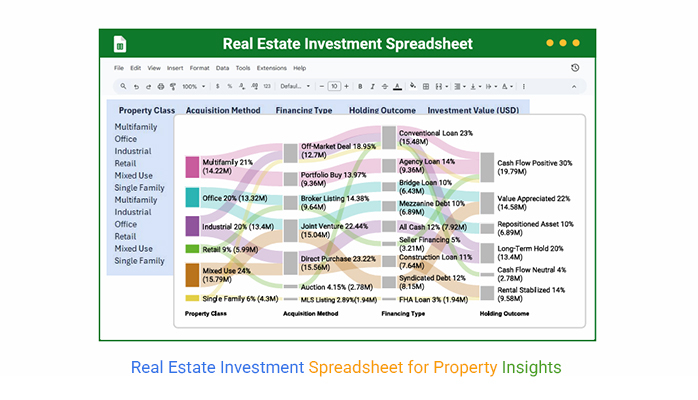
Real Estate Investment Spreadsheet

Spreadsheets transform raw figures into meaningful insights. They help you see patterns that are invisible in bank statements or property management reports.

With them, you can compare returns across multiple properties, project rental growth, and measure operating costs with accuracy. Investors who track carefully are the ones who scale.

Technology has shifted expectations. Tools like Google Finance in Google Sheets allow real-time market updates without endless data entry. Instead of waiting for monthly reports, you can see live price changes, stock movements, and indexes directly linked to your property portfolio. That means decisions can happen faster, with confidence grounded in data.

So why put your focus on the real estate investment spreadsheet? Because it is no longer a sidekick—it is the main driver. It shows you where you are overspending, which property delivers the highest yield, and where to direct your dollar. This spreadsheet is no longer a record-keeper. It’s the difference between surviving and outperforming in today’s investment landscape.

Let’s dive deeper.

Table of Contents:

  1. What is a Real Estate Investment Spreadsheet?
  2. Why Use an Investment Property Spreadsheet?
  3. When to Use a Spreadsheet for Property Investment?
  4. Examples of Real Estate Investment Analysis Spreadsheet
  5. How to Create an Investment Property Analysis Spreadsheet?
  6. How to Analyze a Real Estate Investment Spreadsheet in Google Sheets?
  7. How to Use the Real Estate Investment Template in Google Sheets?
  8. Pros and Cons of Google Spreadsheets for Property Investment
  9. Tips for Using a Real Estate Investment Analysis Spreadsheet
  10. FAQs
  11. Wrap Up

What is a Real Estate Investment Spreadsheet?

Definition: A real estate investment spreadsheet is a digital tool for tracking numbers that matter. It records income, expenses, and property values. Investors use it to measure growth and spot weak areas. It helps with comparisons across multiple assets.

A rental property expenses spreadsheet can show hidden costs that cut into profits. The data is clear and organized. This enables faster and more confident decision-making. You can see patterns that guide long-term planning.

This is an analysis in motion. For investors, it means control. For portfolios, it means clarity.

Why Use an Investment Property Spreadsheet?

Many investors jump into property with excitement, but without structure, profits slip away quietly. An investment property spreadsheet changes that. It gives you a clear path instead of scattered notes or random calculations. With it, every number tells a story.

So, why should you use it?

  • ROI analysis: This shows the real return from your property after accounting for costs. It helps you decide whether to hold, sell, or expand with confidence.
  • Commercial real estate reporting: This gathers detailed financial and operational data about properties. It makes comparisons easier and highlights trends that might stay hidden in raw numbers.
  • Investment property spreadsheet: This keeps track of income, expenses, and net profit in one place. It simplifies decision-making and saves time by putting everything in clear view.

When to Use a Spreadsheet for Property Investment?

Property investing looks exciting on paper, but the real challenge is in the numbers. A spreadsheet makes those numbers simple, straightforward, and valuable. Knowing when to use one can be the difference between steady growth and hidden losses.

Use a spreadsheet when;

  • Preparing to purchase: An ROI analysis in your spreadsheet shows the expected return after expenses. This helps you avoid risky deals and focus on profitable opportunities.
  • During ownership: A Google Sheets profit and loss template keeps track of income and expenses. It provides a clear view of cash flow, ensuring that nothing slips through the cracks.
  • Preparing for the future: The forecasting in Google Sheets lets you test different scenarios for growth. It provides data-driven insights that guide smarter investment decisions.

Examples of Real Estate Investment Analysis Spreadsheet

Numbers tell the truth about property investments, but only if you record them the right way. A simple spreadsheet can turn scattered figures into a complete picture of performance. And the best part is that tools in Google Sheets make this process fast, flexible, and easy to scale. See the examples below;

  • Rental Income Tracker: This sheet captures rent payments month by month. It shows consistency in cash flow and highlights late or missed payments.
  • ROI Analysis Sheet: This one measures the actual return on a property. It compares income with expenses, so you see if profits meet your expectations.
  • Expense Tracker: Every repair, tax, or maintenance cost goes here. It keeps spending visible and connects directly to your bottom line.
  • Forecasting in Google Sheets: This allows you to test future scenarios. It combines real data with projections, allowing you to plan growth with confidence.

How to Create an Investment Property Analysis Spreadsheet?

Most investors dream about growth, but few take the time to track the numbers that drive it. An investment property analysis spreadsheet makes the difference. It turns raw figures into insights you can act on. The process is simple, and once it is set up, it becomes the backbone of every decision:

  1. Start with income: Record all rental payments and any extra charges such as parking or storage fees. This provides a clear picture of total earnings and shows whether your property is performing as expected.
  2. Add expenses: Track every cost, including taxes, insurance, maintenance, and repairs. By keeping these visible, you avoid hidden drains on profit and maintain control of your budget.
  3. Calculate returns: Use formulas to measure net profit compared to the total investment. This acts as your built-in ROI analysis and shows if your property is worth keeping or selling.
  4. Project growth: With Google Sheets, you can model different scenarios for rent increases, vacancy rates, and costs. These projections help you plan confidently for future purchases or portfolio expansion.
  5. Review regularly: Numbers change as markets shift, so update your sheet often. Regular reviews ensure your investment remains aligned with your financial goals.

Top 10 ChartExpo Visuals in Google Sheets to Show Real Estate Investment Analysis

Data makes more sense when you can see it, not just read it. With ChartExpo in Google Sheets, you can turn raw data into insights in seconds. Here are ten powerful visuals that transform real estate analysis:
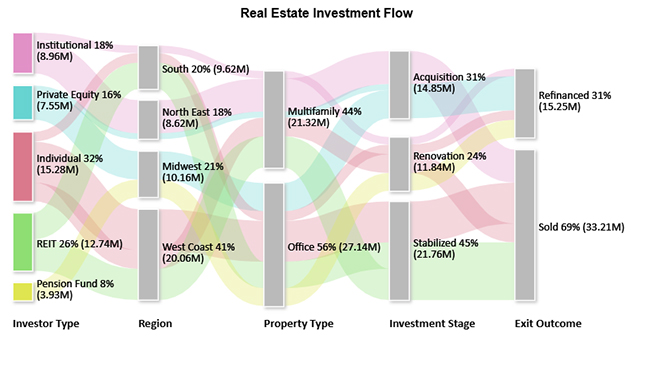
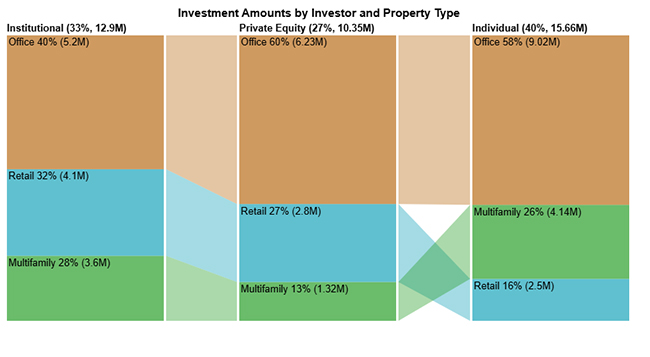
  • Sankey Chart: A Sankey Chart shows the flow of investments between categories, such as investor type, property type, and exit outcome. It highlights connections and the size of flows across stages.
Real Estate Investment Spreadsheet
  • Comparison Bar Chart: This chart compares investment amounts across categories. It makes differences and trends easy to see at a glance.
Real Estate Investment Spreadsheet
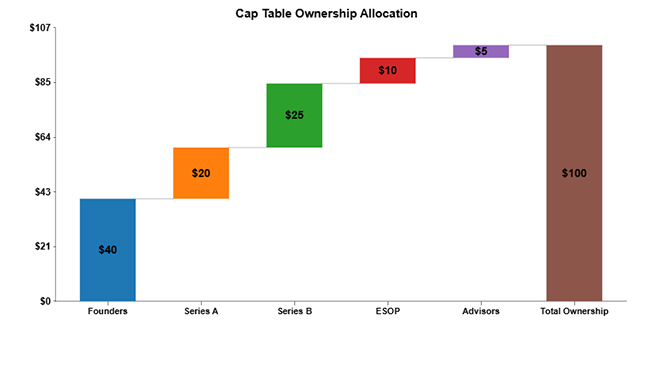
  • Waterfall Chart: A Waterfall Chart shows step-by-step changes in value leading to a final total. It is perfect for visualizing income, expenses, and the financing impact on ROI.
Real Estate Investment Spreadsheet
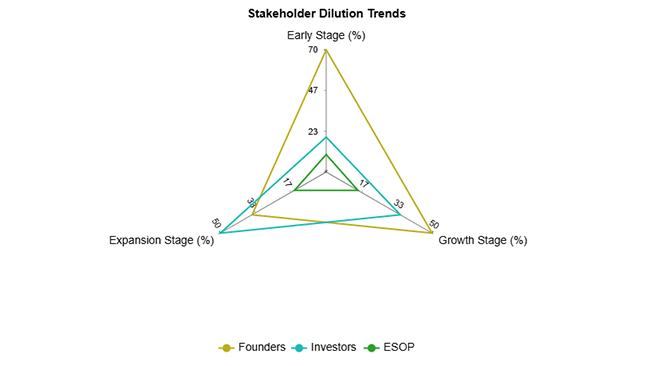
  • Multi-Axis Spider Chart: This chart displays multiple variables on the same web-shaped graph. It helps compare rental income, expenses, and ROI growth together.
Real Estate Investment Spreadsheet
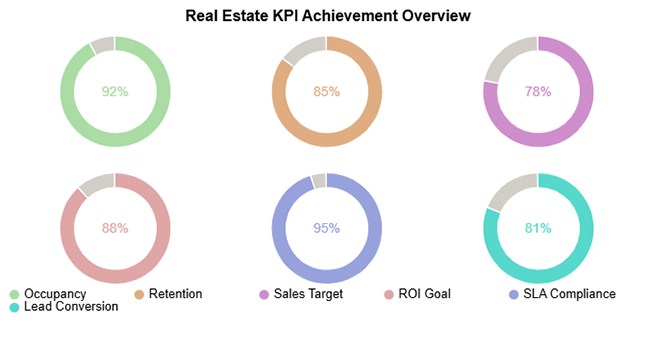
  • Progress Circle Chart: A Progress Circle Chart tracks performance toward a goal as a percentage. It works well for occupancy rates, ROI achievement, or sales targets.
Real Estate Investment Spreadsheet
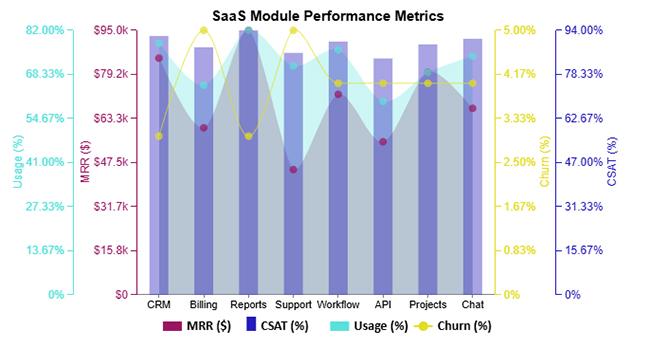
  • Multi-Axis Line Chart: This chart plots different metrics with separate scales on one graph. It allows you to see trends for income, expenses, and ROI in one view.
Real Estate Investment Spreadsheet
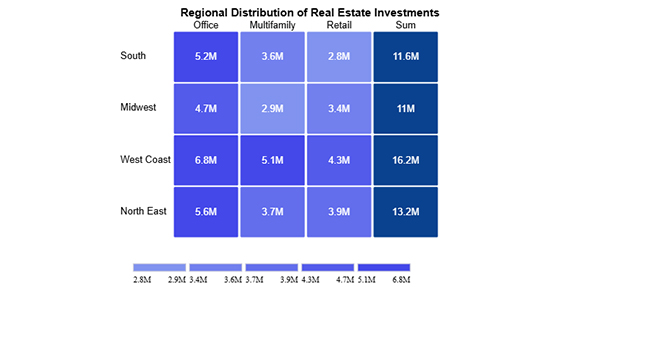
  • Heatmap: A Heatmap uses color to show the intensity of values across categories. It quickly reveals patterns, such as investment amounts by region and property type.
Real Estate Investment Spreadsheet
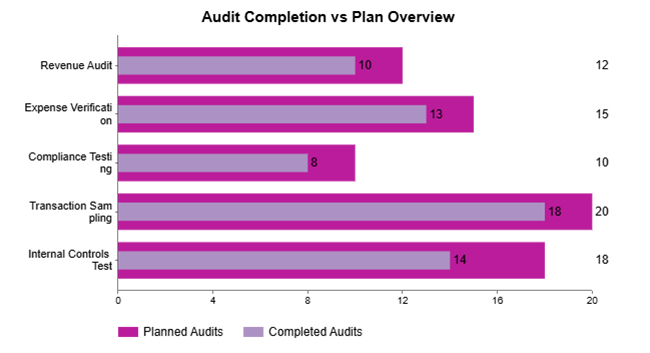
  • Overlapping Bar Chart: This chart compares two metrics side by side in the same category. It’s useful for projected vs. actual returns or budgeted vs. actual expenses.
Real Estate Investment Spreadsheet
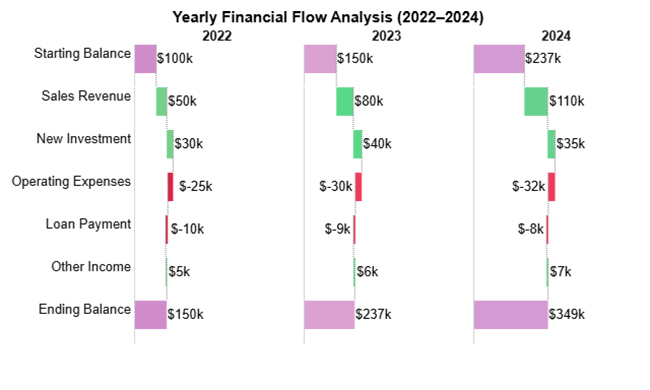
  • Horizontal Waterfall Chart: This chart tracks how income, expenses, and ROI shift year by year. It helps investors measure changes in the overall performance of their portfolio.
Real Estate Investment Spreadsheet
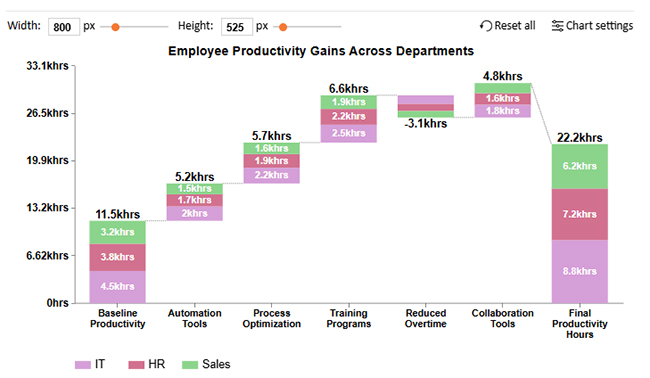
  • Stacked Waterfall Chart: A Stacked Waterfall Chart breaks down income and expenses by subcategory. It provides deeper insights into how different groups or property types impact ROI.
Real Estate Investment Spreadsheet

How to Analyze a Real Estate Investment Spreadsheet in Google Sheets?

Spreadsheets never lie, but they rarely tell the whole story at first glance. A real estate investment spreadsheet is excellent for storing numbers, yet raw rows and columns can leave insights hidden. Data visualization is what transforms those numbers into decisions.

And that’s where Google Sheets shows its limits.

Why?

Basic charts work, but they lack depth for serious investment analysis. ChartExpo steps in as the game changer. It turns static data into visuals that speak. With it, patterns are clearer, ROI is sharper, and your spreadsheet finally works as hard as your investments.

How to Install ChartExpo in Google Sheets?

  1. To start using ChartExpo, download it directly from the Google Sheets program. To do this, select Extensions from the top toolbar.
  2. A menu will appear. Click the Get add-ons option.
  3. Search for ChartExpo, and click on Charts, Graphs & Visualizations by ChartExpo when it appears in the results.
  4. Click the Install button. You will have to confirm your Google account and accept some permissions.

ChartExpo charts are available both in Google Sheets and Microsoft Excel. Please use the following CTAs to install the tool of your choice and create beautiful visualizations in a few clicks in your favorite tool.

Example

Let’s visualize a real estate investment spreadsheet in Google Sheets using ChartExpo.

Investor Type

Region Property Type Investment Stage Exit Outcome

Investment Amount (USD)

Institutional South Multifamily Renovation Refinanced 1,657,139
Private Equity Midwest Office Acquisition Refinanced 6,231,546
Individual West Coast Office Stabilized Sold 9,020,491
Individual West Coast Multifamily Renovation Sold 4,143,481
Private Equity North East Multifamily Acquisition Refinanced 1,320,886
REIT South Office Stabilized Sold 5,847,322
Pension Fund Midwest Office Renovation Refinanced 3,928,145
Institutional North East Multifamily Acquisition Sold 7,301,219
Individual South Office Renovation Refinanced 2,114,378
REIT West Coast Multifamily Stabilized Sold 6,893,200
  • To get started with ChartExpo, install ChartExpo in Google Sheets.
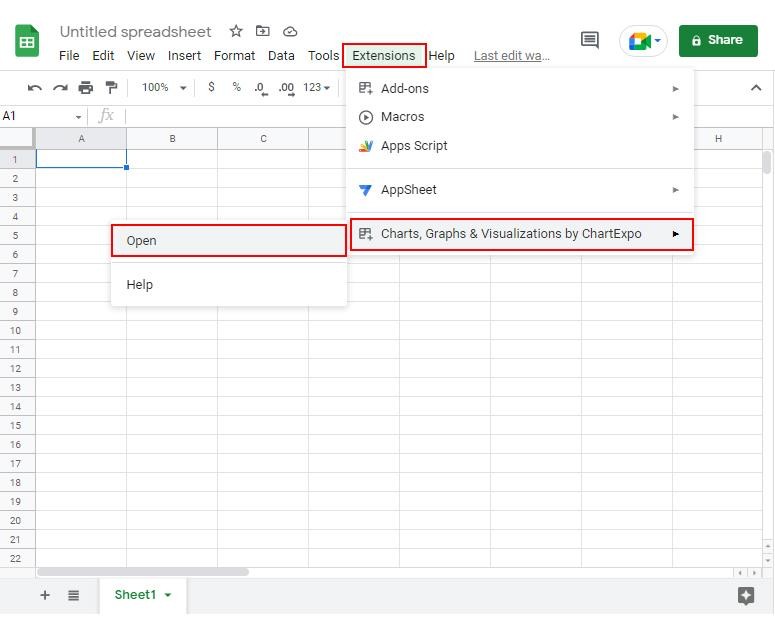
  • Go to Extensions > Charts, Graphs & Visualizations by ChartExpo > Open.
Real Estate Investment Spreadsheet
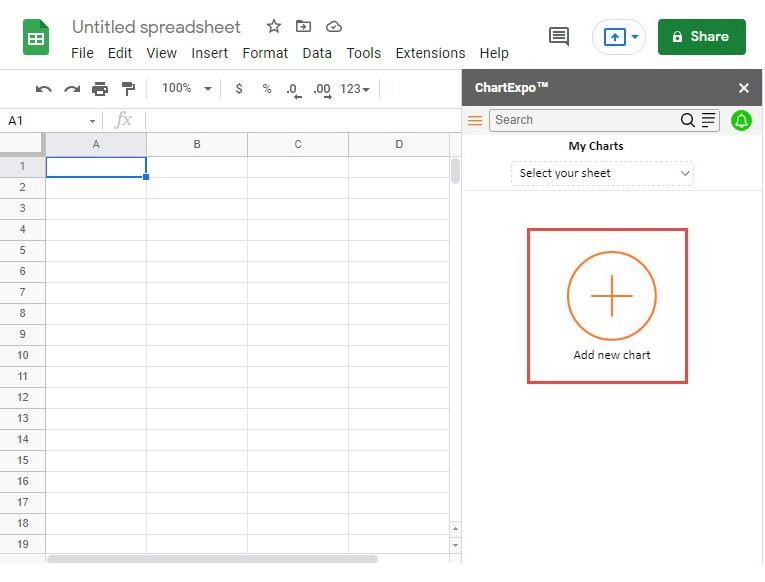
  • To access the charts library, click the Add new chart button.
Real Estate Investment Spreadsheet
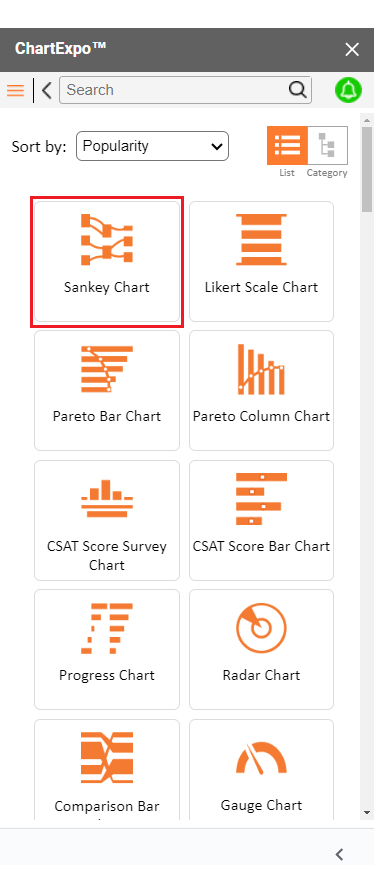
  • Once ChartExpo is loaded. Click on “Sankey Chart”.
Real Estate Investment Spreadsheet
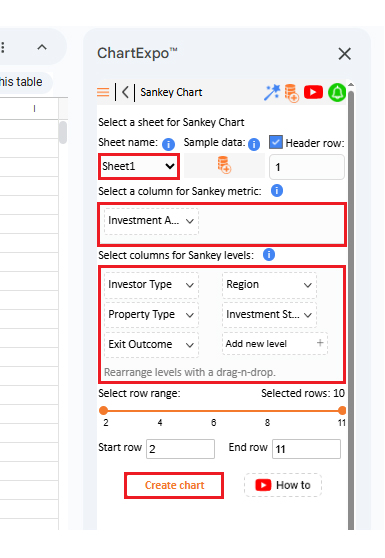
  • Put the data table in the sheet first. Then, choose the Sheet name from the drop-down in the ChartExpo section.
  • Select the metric column; metric is the numeric column in your data sheet.
  • Select the dimensions column; the dimension is the categorical column in your datasheet that contains text information.
  • Click the Create chart button to complete the process.
Real Estate Investment Spreadsheet
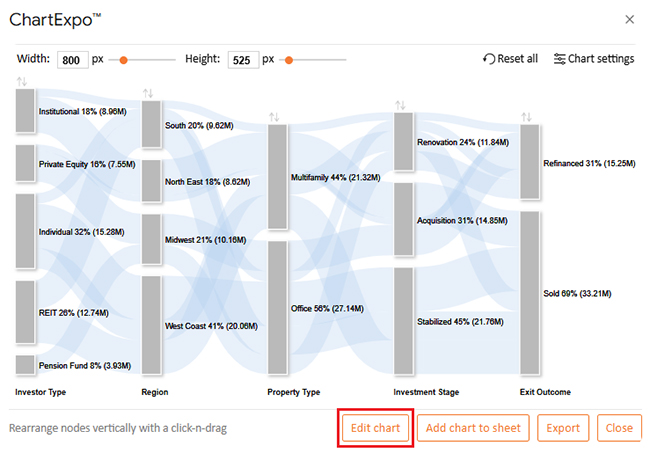
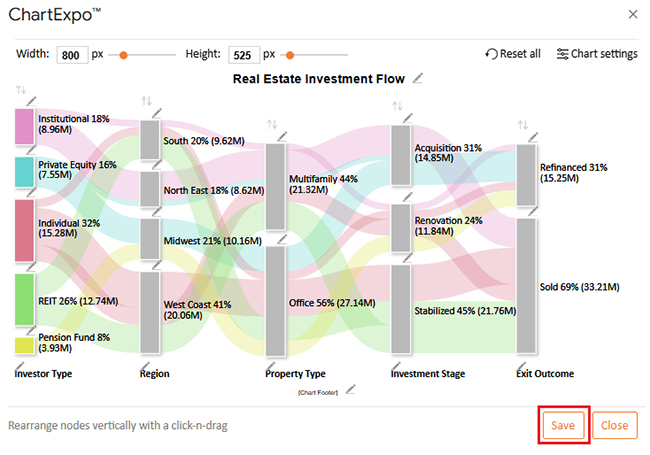
  • ChartExpo will generate the visualization below for you.
Real Estate Investment Spreadsheet
  • If you want to have the chart’s title, click Edit Chart, as shown in the above image.
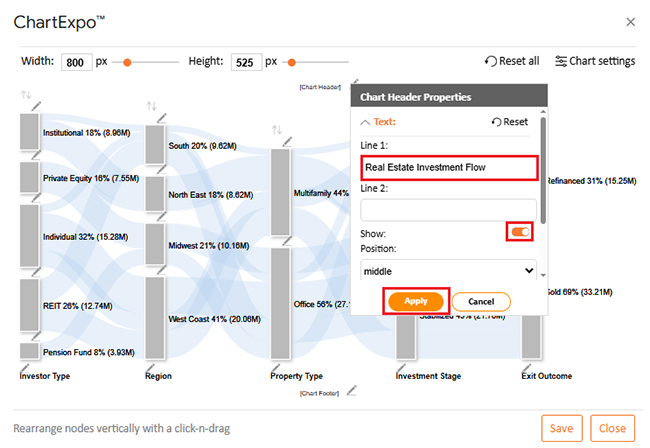
  • Click the pencil icon next to the Chart Header to change the title.
  • It will open the properties dialog. Under the Text section, you can add a heading in Line 1 and enable Show.
  • Give the appropriate title of your chart and click the Apply button.
Real Estate Investment Spreadsheet
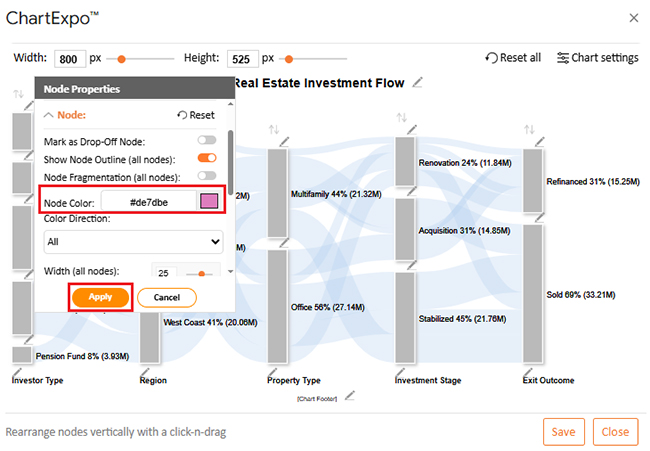
  • You can add color in Nodes and set the direction as follows:
Real Estate Investment Spreadsheet
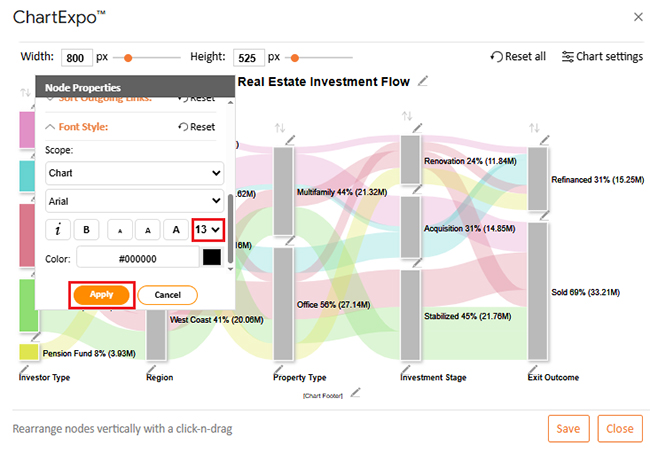
  • You can increase font size for better readability as follows.
Real Estate Investment Spreadsheet
  • Click the “Save Changes” button to persist the changes.
Real Estate Investment Spreadsheet
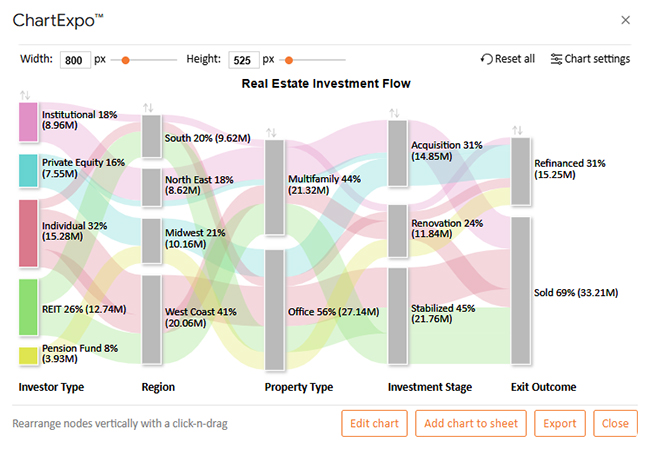
  • Your final chart will appear as follows.
Real Estate Investment Spreadsheet

Insights

  • Office assets led with 56% of investments, totaling $27.14M, outperforming multifamily properties.
  • The West Coast attracted the most capital, with 41% or $20.06M of the allocation.
  • Individual investors contributed the largest share at 32% ($15.28M), followed by REITs at 26% ($12.74M).
  • Sales dominated as the preferred project outcome at 69% ($33.21M), far ahead of refinancing.

How to Use the Real Estate Investment Template in Google Sheets?

You can dream about returns, but without data tracking, those dreams stay on paper. A real estate investment template in Google Sheets makes the process simple. It organizes income, expenses, and returns so you see the big picture at a glance. The best part is that anyone can use it; no advanced skills required.

Here is how to get started:

  1. Set up property details: Add addresses, purchase prices, and mortgage information. This creates a foundation for all calculations.
  2. Input income: Record rental payments and any extra charges. This shows your total cash inflow clearly.
  3. List expenses: Use the template to track taxes, maintenance, and repairs. It ensures you never miss hidden costs.
  4. Measure performance: Built-in formulas calculate profits and run an ROI analysis automatically. This reveals whether your investment is moving in the right direction.
  5. Update regularly: Refresh the numbers each month. Consistency keeps your spreadsheet accurate and ready for more intelligent decisions.

Pros and Cons of Google Spreadsheets for Property Investment

Spreadsheets are every investor’s silent partner. They sit quietly, but when used right, they reveal everything about your portfolio. Google Sheets is a popular choice because it’s free, flexible, and easy to share. But is it perfect? Not quite. Here are the pros and cons:

Pros:

  • Accessible anywhere: You can check numbers on any device. This keeps your portfolio within reach at all times.
  • Easy collaboration: Multiple people can edit in real time. It’s perfect for sharing with partners or accountants.
  • Built-in tools: Features like Google Finance in Google Sheets pull in live data. This saves time and adds context instantly.

Cons:

  • Basic visuals: The chart options are limited and often fail to show deeper insights. For advanced visualization, additional tools are usually required.
  • Formula complexity: More advanced functions can be hard to master. A single error in a formula can affect the accuracy of your entire spreadsheet.
  • Update errors: Outdated inputs distort results. Therefore, consistent updates are essential.

Tips for Using a Real Estate Investment Analysis Spreadsheet

When used strategically, a spreadsheet becomes a decision-making engine. The goal is not just tracking but maximizing insight. Here are practical tips to help you:

  • Stay consistent: Enter property details in a clear, uniform way every time. This makes commercial real estate reporting much smoother and easier to interpret.
  • Track equity: A balance sheet template in Google Sheets helps you list assets against liabilities. This shows your overall net worth and the equity tied up in each property.
  • Update often: Regularly add the latest income and expenses. Keeping the data current ensures your decisions are based on reality, not outdated numbers.
  • Add context: Use notes or comments to explain unusual expenses or changes. These details make your reports more meaningful when you review them later.
  • Use formulas: Take advantage of built-in functions to handle ROI, profits, and loan balances. This reduces manual work and helps eliminate calculation errors.

FAQs

What is the 70% rule in real estate investing?

The 70% rule helps investors avoid overpaying. It says you should spend no more than 70% of a property’s after-repair value. Subtract repair costs first. The rest sets your maximum purchase price.

Are there free real estate investment spreadsheet templates?

Yes, free templates exist online. Many are available in Google Sheets. They track income, expenses, and returns. Some even include a rental property expenses spreadsheet or ROI analysis tools to simplify calculations for investors.

Wrap Up

Real estate rewards those who plan and track with care. With a real estate investment spreadsheet, you get to see the proper health of your portfolio. It shows you where money comes in and where it leaves.

Good investing needs more than guesswork. With an ROI analysis, you can see if a property is worth holding or selling. Moreover, trends appear faster when numbers are updated on time. This is how savvy investors stay ahead.

Detailed records matter in property deals. Commercial real estate reporting depends on accurate numbers. A spreadsheet makes this process easier by organizing details clearly. You save time while reducing mistakes.

Growth also needs planning. With forecasting in Google Sheets, you can model future rent, costs, and profits. It prepares you for expansion without surprises. It gives confidence to move forward with data-backed choices.

Finally, tools should make work simple. Google Sheets CRM templates can track contacts and deals, but visuals are where the real power begins. ChartExpo fills the gap by turning data into clear charts.

So, do not hesitate. Install ChartExpo and bring your spreadsheets to life. Numbers become stories, and these stories turn into smarter investments.

How much did you enjoy this article?

GSAd1
Start Free Trial!
158247

Related articles

next previous
Google Sheets24 min read

Google Sheets Charts: Types, Examples, and Best Practices

Discover how Google Sheets charts can simplify data visualization and help you make data-driven decisions quickly.

Google Sheets13 min read

Sales Projection Template in Google Sheets for Clear Insights

A sales projection template helps predict revenue with clarity. Learn best practices, examples, and tips in Google Sheets to improve planning and growth.

Google Sheets11 min read

Google Sheets Apps for Presentable Insights

Google Sheets apps boost productivity with smarter data handling. Click here to learn how to use them for better charts, faster analysis, and smarter decisions.

Google Sheets14 min read

Google Sheets Query Function: A Visual Approach

The Google Sheets query function filters and analyzes data fast. Click here to learn the syntax with examples and best practices to boost your data analysis.

Google Sheets14 min read

Google Sheets Automation: Practical Use Cases

Google Sheets automation helps you save time and reduce errors with smart tools. Learn how to automate, analyze, and visualize your data with ease.

ChartExpo logo

Turn Data into Visual
Stories

CHARTEXPO

  • Home
  • Gallery
  • Videos
  • Services
  • Pricing
  • Contact us
  • FAQs
  • Privacy policy
  • Terms of Service
  • Sitemap

TOOLS

  • ChartExpo for Google Sheets
  • ChartExpo for Microsoft Excel
  • Power BI Custom Visuals by ChartExpo
  • Word Cloud

CATEGORIES

  • Bar Charts
  • Circle Graphs
  • Column Charts
  • Combo Charts
  • Comparison Charts
  • Line Graphs
  • PPC Charts
  • Sentiment Analysis Charts
  • Survey Charts

TOP CHARTS

  • Sankey Diagram
  • Likert Scale Chart
  • Comparison Bar Chart
  • Pareto Chart
  • Funnel Chart
  • Gauge Chart
  • Radar Chart
  • Radial Bar Chart
  • Sunburst Chart
  • see more
  • Scatter Plot Chart
  • CSAT Survey Bar Chart
  • CSAT Survey Chart
  • Dot Plot Chart
  • Double Bar Graph
  • Matrix Chart
  • Multi Axis Line Chart
  • Overlapping Bar Chart
  • Control Chart
  • Slope Chart
  • Clustered Bar Chart
  • Clustered Column Chart
  • Box and Whisker Plot
  • Tornado Chart
  • Waterfall Chart
  • Word Cloud
  • see less

RESOURCES

  • Blog
  • Resources
  • YouTube
SIGN UP FOR UPDATES

We wouldn't dream of spamming you or selling your info.

© 2026 ChartExpo, all rights reserved.