• Home
  • Tools dropdown img
    • Spreadsheet Charts

      • ChartExpo for Google Sheets
      • ChartExpo for Microsoft Excel
    • Power BI Charts

      • Power BI Custom Visuals by ChartExpo
    • Word Cloud

  • Charts dropdown img
    • Chart Category

      • Bar Charts
      • Circle Graphs
      • Column Charts
      • Combo Charts
      • Comparison Charts
      • Line Graphs
      • PPC Charts
      • Sentiment Analysis Charts
      • Survey Charts
    • Chart Type

      • Box and Whisker Plot
      • Clustered Bar Chart
      • Clustered Column Chart
      • Comparison Bar Chart
      • Control Chart
      • CSAT Survey Bar Chart
      • CSAT Survey Chart
      • Dot Plot Chart
      • Double Bar Graph
      • Funnel Chart
      • Gauge Chart
      • Likert Scale Chart
      • Matrix Chart
      • Multi Axis Line Chart
      • Overlapping Bar Chart
      • Pareto Chart
      • Radar Chart
      • Radial Bar Chart
      • Sankey Diagram
      • Scatter Plot Chart
      • Slope Chart
      • Sunburst Chart
      • Tornado Chart
      • Waterfall Chart
      • Word Cloud
    • Google Sheets
      Microsoft Excel
  • Services
  • Pricing
  • Contact us
  • Blog
  • Support dropdown img
      • Gallery
      • Videos
      • Contact us
      • FAQs
      • Resources
    • Please feel free to contact us

      atsupport@chartexpo.com

Categories
All Data Visualizations Data Analytics Surveys
Add-ons/
  • Google Sheets
  • Microsoft Excel
  • Power BI
All Data Visualizations Data Analytics Surveys
Add-ons
  • Google Sheets
  • Microsoft Excel
  • Power BI

We use cookies

This website uses cookies to provide better user experience and user's session management.
By continuing visiting this website you consent the use of these cookies.

Ok

ChartExpo Survey


Home > Blog > Data Analytics

Measuring Workforce Productivity for Insightful Analysis

Every organization runs on the output of its people, yet few leaders have a reliable method to gauge that output with confidence.
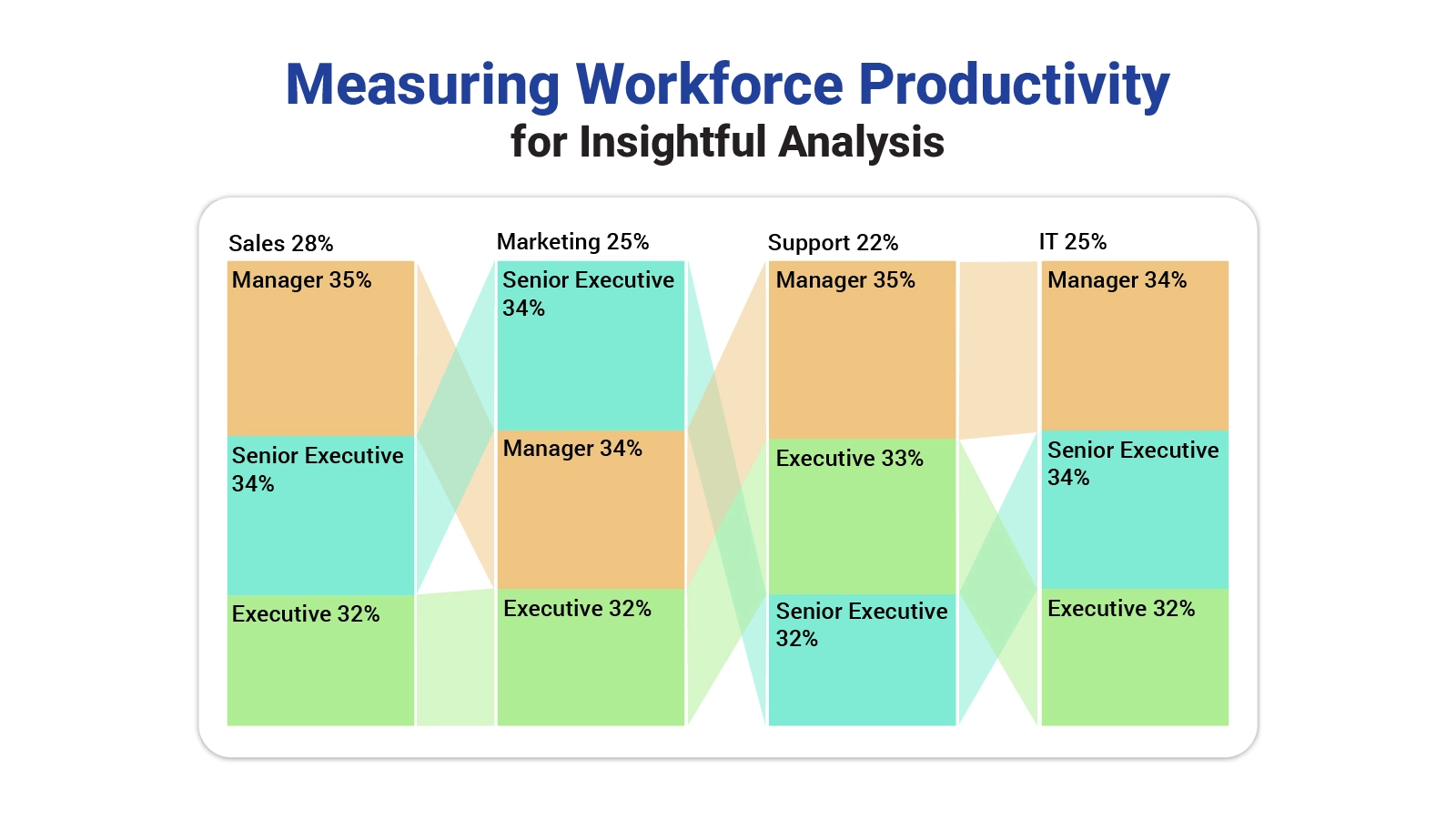
Measuring Workforce Productivity

Measuring Workforce Productivity gives businesses a structured way to connect employee effort with real results, revealing how well time, skills, and resources translate into value.

Beyond raw output numbers, productivity spans work quality, operational efficiency, and employee engagement.

Organizations that track these dimensions consistently can spot bottlenecks before they escalate, build more informed strategies, and foster a culture where performance improvement is continuous rather than reactive.

This guide covers the core methods, formulas, and metrics your organization needs.

What is Measuring Workforce Productivity?

Definition: Measuring Workforce Productivity is the practice of quantifying how effectively a workforce converts its combined time, capabilities, and available resources into tangible business output.

Organizations rely on this practice to establish clear performance baselines, expose inefficiencies, and align individual contributions with broader strategic objectives.

Beyond simple output counts, the practice connects workforce productivity metrics to engagement levels, training investments, and operational workflows.

When leaders understand what drives or limits employee output, they can allocate resources with greater precision, develop targeted development plans, and sustain momentum toward long-term goals across every department.

Why Measuring Workforce Productivity is Important?

Consistent visibility into workforce output is one of the core benefits of measuring workforce productivity: it gives leadership a factual foundation for operational decisions rather than relying on assumptions. The data shows, in concrete terms, how effectively each employee drives value for the organization.

Core reasons it matters:

  • Improve efficiency: Performance data surfaces bottlenecks in workflows, enabling teams to eliminate delays and keep work moving at the right pace.
  • Identify training needs: When output data reveals where employees fall short, managers can direct targeted skill-building programs to close those specific gaps.
  • Optimize resource allocation: Tracking workforce productivity KPIs alongside growth metrics allows leaders to distribute personnel and budgets where they generate the greatest return.
  • Increase profitability: Greater output without proportional cost increases means each productivity gain contributes directly to the bottom line.
  • Track employee performance: Objective employee performance KPIs replace subjective impressions, giving managers a consistent, fair basis for evaluating results.
  • Support decision-making: Structured productivity data transforms complex workforce questions into clear, evidence-based answers that guide strategic choices.
  • Boost overall productivity: Regular measurement sustains a performance-aware culture, keeping output levels consistent across teams and time periods.

Methods for Measuring Workforce Productivity

Selecting the right approach matters because measuring workforce productivity accurately requires matching the method to the nature of the work and the organization’s goals. The right method paired with the right context produces the most actionable workforce productivity metrics.

Widely used measurement methods include:

  • Output per employee: Divides total work produced by headcount to establish a clear per-person productivity benchmark across the organization.
  • Revenue per employee: Translates each employee’s contribution into a financial figure, making the monetary impact of workforce output straightforward to assess.
  • Task completion rate: Tracks the proportion of assigned tasks finished within a defined period, highlighting execution speed and workload management.
  • Quality of work metrics: Assesses output accuracy and consistency using key performance indicators for operations, ensuring that volume gains do not come at the expense of standards.
  • Time tracking: Logs working hours at a granular level to detect where time is lost, misallocated, or underutilized across teams.
  • Balanced scorecards: Integrates HR analytics with financial, operational, and employee-facing data to build a multi-dimensional picture of workforce performance.
  • Benchmarking against standards: Positions current output levels against historical baselines or sector norms, making relative performance immediately visible.

Measuring Workforce Productivity Formulas

Standard formulas are central to measuring workforce productivity because they convert raw performance data into numeric values that support direct comparison across teams, time periods, and business units. Each formula produces a clear indicator that feeds into data-driven decision-making across the organization.

Key formulas used in practice:

  • Output divided by number of employees: Determines the average work volume each employee produces, serving as a baseline efficiency indicator for the entire team.
  • Revenue divided by workforce cost: Compares total revenue generated against total employment expenditure to measure the financial return on workforce investment.
  • Tasks completed divided by time: Calculates output velocity by measuring how many work items a team or individual finishes within a set period.
  • Sales per employee: Divides total sales by headcount to isolate each person’s contribution to the organization’s top-line growth.
  • Project efficiency ratio: Weighs actual project outcomes against planned targets, revealing how closely execution matched the original scope and timeline.
  • Performance index calculation: Aggregates multiple workforce productivity metrics into a single composite score for organization-wide performance comparison.

How to Measure Workforce Productivity?

A structured sequence is the most reliable approach when measuring workforce productivity. Each step builds on the previous one to generate results that actually inform decisions.

  • Define goals and KPIs

Clearly define business objectives and select team productivity metrics that match organizational goals.

  • Collect performance data

Gather accurate data from reports, time tracking systems, and workplace culture surveys to support proper productivity measurement.

  • Apply the appropriate formula

Use the correct productivity formula, such as output per employee or revenue per workforce, to calculate results.

  • Compare against benchmarks

Compare current productivity results with past performance, targets, or industry standards to evaluate efficiency.

  • Analyze results for insights

Review the results along with employee engagement survey data to identify performance gaps and improvement opportunities.

Workforce Productivity Metrics and Examples

Concrete examples make measuring workforce productivity concepts easier to apply. Each scenario below illustrates a distinct way performance data can be visualized and interpreted to support better decisions.

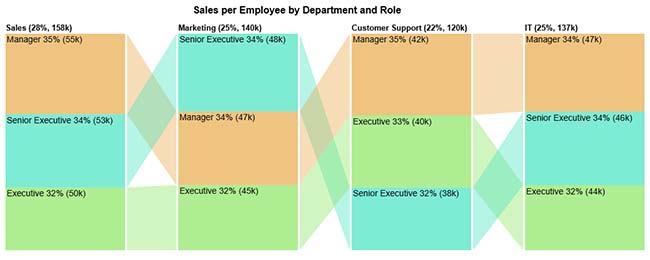
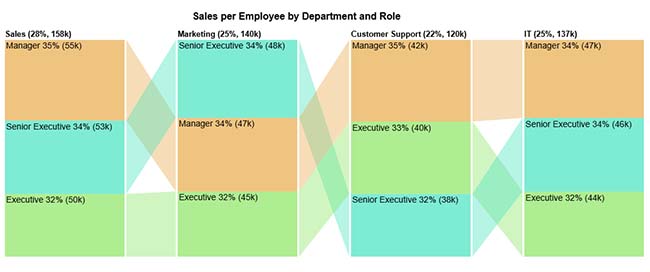
  • Sales Per Employee

The sales per employee breakdown by department and role reveals how revenue output varies across executive, senior executive, and manager levels, making performance differences between groups directly comparable.

Example Insight: Pinpoints the roles and departments that drive the strongest sales output per person.
Measuring Workforce Productivity
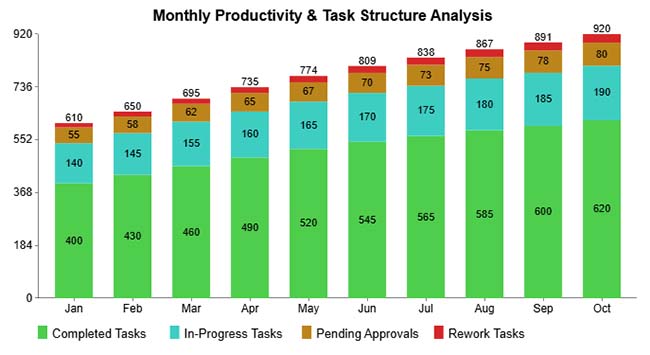
  • Monthly Productivity Analysis

The monthly productivity and task structure breakdown tracks task status across completed, in-progress, pending, and rework categories month by month, surfacing shifts in team throughput over time.

Example Insight: Reveals workflow bottlenecks and highlights months where productivity improved or declined.
Measuring Workforce Productivity
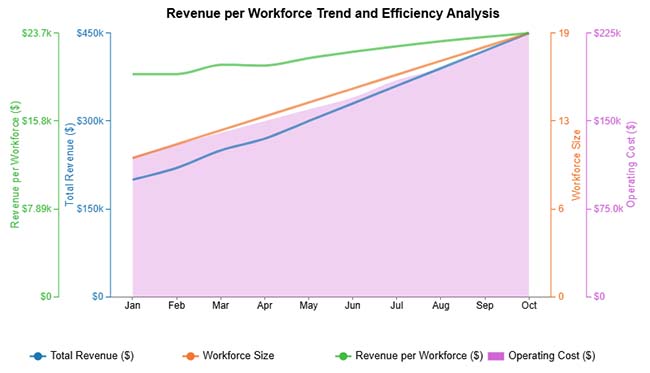
  • Revenue Per Workforce

The revenue per workforce trend analysis tracks how revenue, headcount, and total costs move together over time, allowing leaders to monitor whether workforce expansion is generating proportional revenue gains.

Example Insight: Confirms whether workforce growth is translating into higher revenue efficiency per employee.
Measuring Workforce Productivity
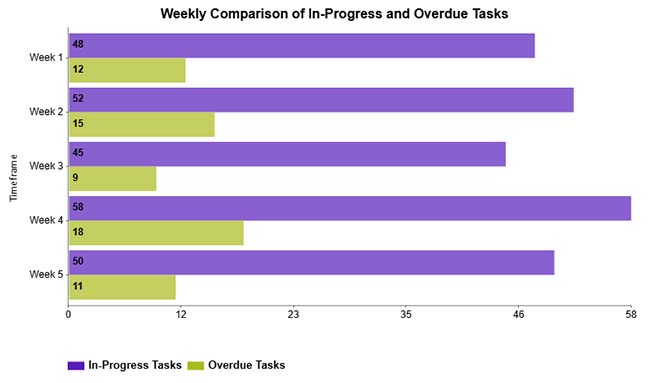
  • In-Progress and Overdue Tasks Comparison

The weekly in-progress and overdue task comparison places active work volume alongside delayed items to expose which weeks experienced the most significant execution shortfalls.

Example Insight: Identifies high-delay periods and supports targeted action to reduce overdue task accumulation.
Measuring Workforce Productivity
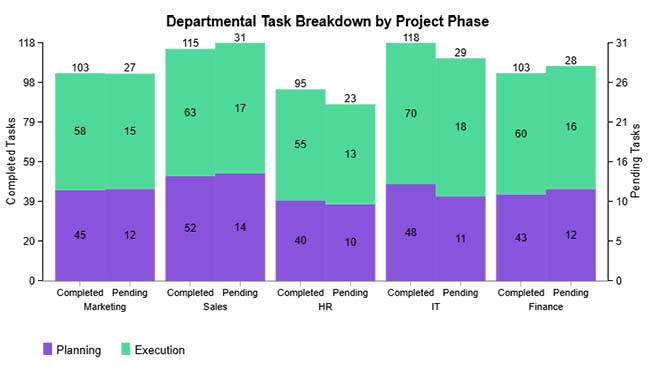
  • Task Planning and Execution Analysis

The task planning and execution breakdown compares completed tasks against pending ones across multiple periods, illustrating the gap between what teams planned to do and what they actually delivered.

Example Insight: Highlights execution gaps, supports better scheduling, and guides adjustments to task management practices.
Measuring Workforce Productivity

How to Analyze Workforce Productivity in Excel?

Excel provides a versatile platform for measuring workforce productivity metrics and turning raw performance numbers into clear visual insights. Follow these steps to perform an accurate workforce productivity analysis.

  • Step 1: Organize Employee Productivity Data

Start by arranging your dataset with clear column headers such as employee name, hours worked, sales, and total output.

Keep the format consistent so calculations work correctly, just like when preparing structured reports.

Tip: Use separate columns for employees, time, and output to make analysis easier.

  • Step 2: Define Workforce Productivity Metrics

Select the right productivity metrics based on your goal, such as sales per employee, output per hour, or revenue per workforce.

These metrics help measure efficiency and compare performance across teams.

Tip: Choose KPIs that directly show how employee effort affects business results.

  • Step 3: Calculate Sales per Employee (Example)

Use formulas to calculate productivity values for each employee or team.

Example:

Sales per employee = Total sales ÷ Number of employees

If a company generates $500,000 in sales with 10 employees, productivity = $50,000 per employee.

(Image: Sales per employee chart)

Tip: Apply formulas to the whole column to calculate productivity automatically.

  • Step 4: Compare Results with Benchmarks

Compare current productivity values with past performance, targets, or industry standards.

This helps identify high-performing employees and areas where productivity needs improvement.

Tip: Use sorting, filters, or Pivot Tables to compare departments quickly.

  • Step 5: Visualize with Charts

Create charts to understand trends and performance differences more clearly.

You can use bar charts, line charts, pie charts, or dashboards to present team productivity metrics.

Tools like ChartExpo can help create advanced charts when default Excel visuals are not enough.

Tip: Visual charts make it easier for managers to understand productivity insights and make better decisions.
Measuring Workforce Productivity

Key Insights

  • The Sales department leads all groups with approximately 158K in revenue per employee, placing it ahead of Marketing, IT, and Customer Support in output per person.
  • Across every department, managers account for roughly 34 to 35 percent of total sales per employee, a consistent pattern that points to elevated output at senior levels.
  • Executives hold the smallest share at around 32 to 33 percent in all departments, suggesting their per-person output trails both managers and senior executives.

Benefits of Measuring Workforce Productivity

The business case for measuring workforce productivity becomes clear when organizations see the strategic advantages it delivers. Regular output monitoring reveals what is working, where inefficiencies hide, and how to allocate effort for maximum return.

Key benefits include:

  • Identify top performers: Systematic output tracking gives managers clear, objective evidence of which employees deliver consistently strong results.
  • Improve efficiency: Productivity monitoring pinpoints exactly where time and resources are spent without proportional return, enabling targeted process improvements.
  • Reduce operational costs: Higher output from the same workforce level means each unit of work costs less, reducing overall operational expenditure.
  • Enhance decision-making: Reliable workforce productivity metrics replace guesswork with evidence, giving leadership a concrete basis for resource and strategic decisions.
  • Boost employee engagement: Transparent, fair performance measurement signals to employees that their contributions are recognized, which sustains motivation and involvement.
  • Support strategic planning: Detailed productivity data informs workforce planning, budget allocation, and goal-setting with the precision that long-term strategy demands.

Factors Affecting Workforce Productivity

Understanding what shapes results is essential when measuring workforce productivity because output levels are affected by a wide range of variables, both within and outside management control. Recognizing these factors is the first step toward building conditions where sustained high performance is achievable.

Key factors include:

  • Employee motivation: Workers who feel a clear connection between their effort and meaningful outcomes typically deliver faster, higher-quality output with less supervision.
  • Work environment: Physical comfort, psychological safety, and the availability of necessary resources all influence how effectively employees can focus and produce.
  • Training and skills: Employees equipped with current knowledge and practical skills complete tasks more accurately and with fewer rework cycles than those lacking development support.
  • Technology and tools: Purpose-fit software and modern equipment reduce manual effort, minimize error rates, and accelerate the completion of complex tasks.
  • Management practices: Consistent leadership, open communication, and clearly defined expectations reduce confusion and keep teams focused on the right priorities.
  • Organizational culture: A workplace culture built on accountability, collaboration, and growth encourages every employee to contribute at a higher level.

Best Practices for Measuring and Improving Workforce Productivity

Sustainable gains from measuring workforce productivity require more than gathering data; they depend on embedding the right habits and systems into how the organization operates every day. The practices below create the conditions for consistent, long-term improvement.

Recommended practices include:

  • Set clear KPIs: Define specific, measurable performance targets so that every employee understands the standards their work is expected to meet.
  • Monitor regularly: Frequent reviews catch performance shifts early, giving managers time to intervene before small declines become systemic problems.
  • Provide training and support: Structured development programs give employees the tools to address skill gaps and raise the baseline quality of their output.
  • Use productivity tools: Dedicated reporting software captures workforce performance data more accurately than manual methods and makes analysis far faster.
  • Encourage feedback: Gathering perspectives from employees surfaces practical workflow obstacles that data alone may not capture, enabling smarter process changes.
  • Recognize achievements: Acknowledging strong performance reinforces the behaviors that produce it, encouraging others to pursue similar results.

FAQs

How to increase workforce productivity?

Building productivity starts with setting precise targets, pairing them with targeted training, and backing both with consistent performance tracking. Organizations that use structured workforce productivity metrics to pinpoint specific problem areas can drive measurable gains far more efficiently than those relying on broad initiatives.

What are the 4 types of workforce productivity measures?

The four primary measures are output per employee, revenue per employee, task completion rate, and quality of work. Together, these methods give a well-rounded view of how effectively a workforce is operating.

How often should you measure workforce productivity?

Monthly or quarterly reviews strike the right balance between frequency and practicality. For organizations committed to measuring workforce productivity, regular intervals allow them to catch performance trends early, adjust plans accordingly, and make scheduling or staffing changes before productivity losses become entrenched.

Wrap Up

Tracking employee output is not a one-time exercise but an ongoing discipline that separates organizations with real operational clarity from those guessing at performance. Measuring Workforce Productivity with the right formulas, tools, and metrics gives businesses the visibility they need to act with confidence at every level of the organization.

When productivity data informs planning, budgeting, and team development, organizations build a reinforcing cycle: better insight produces better decisions, and better decisions produce stronger results over time. Start with a clear measurement method, apply it consistently across all teams, act on what the data reveals, and the cumulative performance gains will follow across the entire workforce.

How much did you enjoy this article?

ExcelAd1
Start Free Trial!
161281

Related articles

next previous
Data Analytics10 min read

Software Testing Metrics: A Modern Approach

Software testing metrics measure quality, track defects, and guide release decisions. Explore formulas, KPIs, and examples. Read on!

Data Analytics8 min read

Economic Indicators Examples: A Complete Guide

Economic indicators examples reveal how economies grow, contract, and shift. Learn types, top indicators, and how to visualize data. Read on!

Data Analytics10 min read

How to Calculate Closing Costs: Easy Formula and Visuals

How to calculate closing costs correctly before any deal closes. Compare fees, plan your budget, and stay in control. Read on now!

Data Analytics10 min read

How to Normalize Data: Step-by-Step Guide

How to normalize data transforms raw datasets into reliable insights. Explore methods, best practices, and step-by-step techniques. Read on!

Data Analytics9 min read

Investment Performance Reporting: Insights for Better ROI

Investment performance reporting turns raw data into portfolio insights. Learn key metrics, report types, and analysis methods. Read on!

ChartExpo logo

Turn Data into Visual
Stories

CHARTEXPO

  • Home
  • Gallery
  • Videos
  • Services
  • Pricing
  • Contact us
  • FAQs
  • Privacy policy
  • Terms of Service
  • Sitemap

TOOLS

  • ChartExpo for Google Sheets
  • ChartExpo for Microsoft Excel
  • Power BI Custom Visuals by ChartExpo
  • Word Cloud

CATEGORIES

  • Bar Charts
  • Circle Graphs
  • Column Charts
  • Combo Charts
  • Comparison Charts
  • Line Graphs
  • PPC Charts
  • Sentiment Analysis Charts
  • Survey Charts

TOP CHARTS

  • Sankey Diagram
  • Likert Scale Chart
  • Comparison Bar Chart
  • Pareto Chart
  • Funnel Chart
  • Gauge Chart
  • Radar Chart
  • Radial Bar Chart
  • Sunburst Chart
  • see more
  • Scatter Plot Chart
  • CSAT Survey Bar Chart
  • CSAT Survey Chart
  • Dot Plot Chart
  • Double Bar Graph
  • Matrix Chart
  • Multi Axis Line Chart
  • Overlapping Bar Chart
  • Control Chart
  • Slope Chart
  • Clustered Bar Chart
  • Clustered Column Chart
  • Box and Whisker Plot
  • Tornado Chart
  • Waterfall Chart
  • Word Cloud
  • see less

RESOURCES

  • Blog
  • Resources
  • YouTube
SIGN UP FOR UPDATES

We wouldn't dream of spamming you or selling your info.

© 2026 ChartExpo, all rights reserved.