• Home
  • Tools dropdown img
    • Spreadsheet Charts

      • ChartExpo for Google Sheets
      • ChartExpo for Microsoft Excel
    • Power BI Charts

      • Power BI Custom Visuals by ChartExpo
    • Word Cloud

  • Charts dropdown img
    • Chart Category

      • Bar Charts
      • Circle Graphs
      • Column Charts
      • Combo Charts
      • Comparison Charts
      • Line Graphs
      • PPC Charts
      • Sentiment Analysis Charts
      • Survey Charts
    • Chart Type

      • Box and Whisker Plot
      • Clustered Bar Chart
      • Clustered Column Chart
      • Comparison Bar Chart
      • Control Chart
      • CSAT Survey Bar Chart
      • CSAT Survey Chart
      • Dot Plot Chart
      • Double Bar Graph
      • Funnel Chart
      • Gauge Chart
      • Likert Scale Chart
      • Matrix Chart
      • Multi Axis Line Chart
      • Overlapping Bar Chart
      • Pareto Chart
      • Radar Chart
      • Radial Bar Chart
      • Sankey Diagram
      • Scatter Plot Chart
      • Slope Chart
      • Sunburst Chart
      • Tornado Chart
      • Waterfall Chart
      • Word Cloud
    • Google Sheets
      Microsoft Excel
  • Services
  • Pricing
  • Contact us
  • Blog
  • Support dropdown img
      • Gallery
      • Videos
      • Contact us
      • FAQs
      • Resources
    • Please feel free to contact us

      atsupport@chartexpo.com

Categories
All Data Visualizations Data Analytics Surveys
Add-ons/
  • Google Sheets
  • Microsoft Excel
  • Power BI
All Data Visualizations Data Analytics Surveys
Add-ons
  • Google Sheets
  • Microsoft Excel
  • Power BI

We use cookies

This website uses cookies to provide better user experience and user's session management.
By continuing visiting this website you consent the use of these cookies.

Ok

ChartExpo Survey


Home > Blog > Data Analytics

Cash Flow Forecasting Template: A Complete Guide

What if the answer to keeping your business alive was hidden in a cash flow forecasting template? This blog post will help you find out.

Many companies fail, not because they lack customers, but because they run out of cash. Money moves faster than most expect. Sales come in, bills go out, and without a clear plan, chaos follows.
Cash Flow Forecasting Template

A simple cash flow forecasting template can transform numbers on a screen into a living map of survival. It shows whether you can cover payroll next month or expand operations with confidence. This is where smart planning outshines unquestioning optimism.

Consider this: a small company using forecasting in Google Sheets can identify cash gaps weeks in advance. Then negotiate with suppliers before the crunch hits. This turns uncertainty into foresight. Pair that with cash flow forecasting, and you can easily model different scenarios. What happens if sales dip? What if expenses spike? You see the answer instantly.

Cash flow is not abstract. It is the daily pulse of your company. A growing startup may chase big funding, but without visibility into cash flow, ambition turns risky.

The right tools keep the dream alive. Therefore, a cash flow forecasting template is not a luxury. It is the difference between growth and struggle. And the good news? Anyone can master it with clear examples, smart visuals, and simple tools inside Google Sheets.

Table of Content:

  1. What is a Cash Flow Forecasting Template in Google Sheets?
  2. Why is the Cash Flow Projection Template Important in Google Sheets?
  3. What Does a Cash Flow Projection Format Show in Google Sheets?
  4. How to Create a Cash Flow Forecasting Template in Google Sheets?
  5. Top 5 Cash Flow Forecasting Template Examples in Google Sheets
  6. How to Analyze Cash Flow Forecasting Template in Google Sheets?
  7. How to Download and Use the Cash Flow Forecast Template in Google Sheets?
  8. Benefits and Limitations of Cash Flow Forecasting Template in Google Sheets
  9. Tips for Using the Cash Flow Forecasting Template in Google Sheets
  10. FAQs
  11. Wrap Up

What is a Cash Flow Forecasting Template in Google Sheets?

Definition: A cash flow forecasting template in Google Sheets helps track money coming in and out. It organizes income, expenses, and savings in one convenient location. Businesses use it to predict future cash positions. This supports better planning and decision-making. It is helpful for financial forecasting for startups as it shows whether funds will cover costs.

The template is flexible and easy to update. You can compare projections with actual results for clarity and accuracy. It works well with a balance sheet template in Google Sheets to give a full financial view. This tool guides stability and growth.

Why is the Cash Flow Projection Template Important in Google Sheets?

A cash flow projection template in Google Sheets illuminates the financial landscape, making the road ahead clearer. It gives you confidence to plan, grow, and avoid surprises.

Why?

  • It is simple to use: You don’t need advanced skills. The template organizes data so anyone can understand future inflows and outflows.
  • Supports cash flow analysis: It helps you track trends and spot risks early. Clear numbers reduce financial surprises.
  • It is practical for business forecasting: This template allows you to test scenarios and prepare for different outcomes. Planning is easier when you can compare possible futures.
  • Essential for decision making: The template guides spending and investment choices. It keeps your business prepared for growth or tough times.

What Does a Cash Flow Projection Format Show in Google Sheets?

A cash flow projection format in Google Sheets is not just numbers on a page. It tells you where money comes from, where it goes, and what remains. This clarity is the foundation of strong planning and smarter business forecasting.

  • Cash inflows: These represent all the money entering your business. It could be revenue from sales, fresh capital from investors, or loans captured during financial forecasting for startups.
  • Cash outflows: These are the payments leaving your business. They include operating costs, supplier bills, payroll, and other expenses that can be easily tracked through a cash flow analysis.
  • Net cash flow: This represents the final balance after accounting for all cash inflows and outflows. It quickly reveals whether your business is generating growth or slipping into a deficit that requires attention.

How to Create a Cash Flow Forecasting Template in Google Sheets?

Creating a cash flow forecast doesn’t have to feel overwhelming. With Google Sheets, the process becomes simple, visual, and adaptable. By combining it with tools such as a balance sheet template in Google Sheets, you gain a comprehensive view of your financial health. The steps below make the process clear and actionable.

  1. List all inflows: Start by writing down every source of income. This may include sales revenue, loan proceeds, or investment funds.
  2. Add all outflows: Record all expected expenses in detail. This covers rent, utilities, payroll, and other operational costs.
  3. Organize by month: Arrange inflows and outflows on a monthly timeline. This structure helps track patterns and supports better time series forecasting.
  4. Calculate net cash flow: Subtract total outflows from total inflows. The result shows whether your business is in surplus or deficit for that month.
  5. Add cumulative balance: Keep a running total across months. This highlights long-term cash trends and helps prevent unexpected shortfalls.

Top 5 Cash Flow Forecasting Template Examples in Google Sheets

Every business has moments of doubt about money. Will there be enough to pay salaries next month? Can new equipment be purchased without risk? This is where a cash flow forecast example in Google Sheets comes alive. It shows the story of money in motion with clarity and simplicity.

Here are the examples:

  • Short-term example: A forecast covering the next 30 days highlights immediate needs. Pairing it with a Google Sheet profit and loss template shows how daily operations impact liquidity.
  • Medium-term example: A three- to six-month projection uncovers seasonal patterns. This approach works well with time series forecasting to spot cycles in sales and expenses.
  • Long-term example: A one-year projection helps owners plan investments and growth. Startups benefit by combining this with financial forecasting to secure funding and demonstrate stability.

Here are templates with examples:

Numbers alone rarely tell the full story. With the right visuals, cash flow forecasts in Google Sheets become clear and actionable. ChartExpo makes this easy by turning raw data into powerful insights. Whether you are working on a sales forecast example or applying time series forecasting, visuals reveal patterns that tables cannot.

Here are the top charts to use:
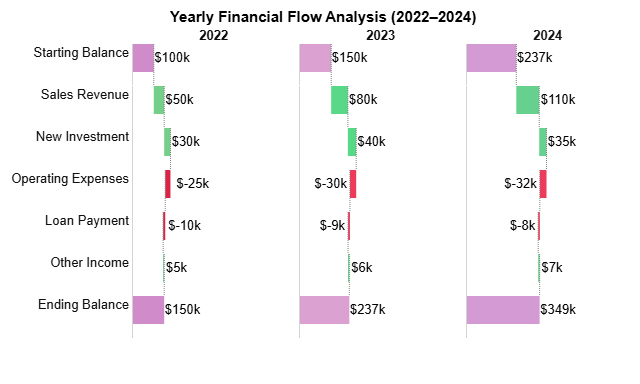
  • Horizontal Waterfall Chart: This chart illustrates how inflows and outflows converge toward the final balance. With ChartExpo in Google Sheets, you can create it easily to make forecasts clear and actionable.
Cash Flow Forecasting Template 1
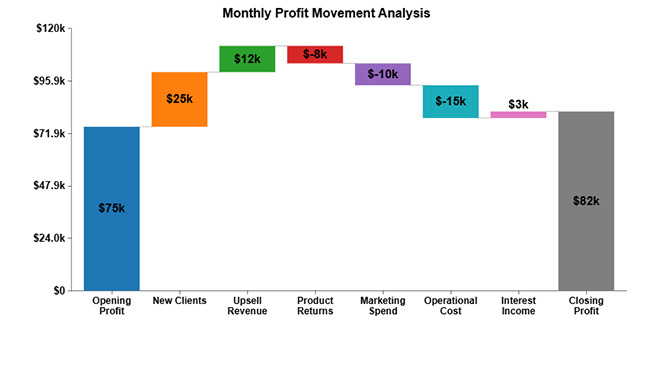
  • Waterfall Chart: A Waterfall Chart shows how inflows and outflows move from opening to closing balance. It is ideal for cash flow forecasting, as it clearly highlights the impact of each income and expense.
Cash Flow Forecasting Template 2
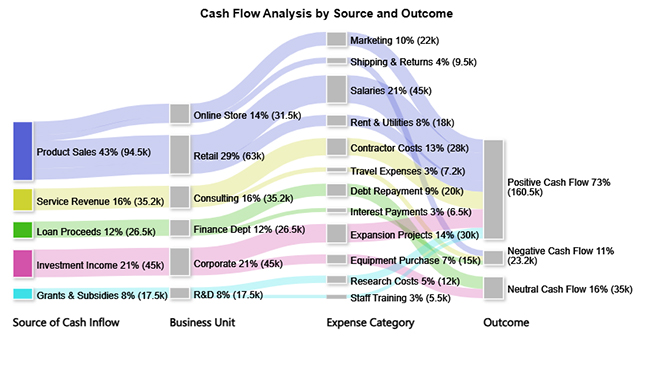
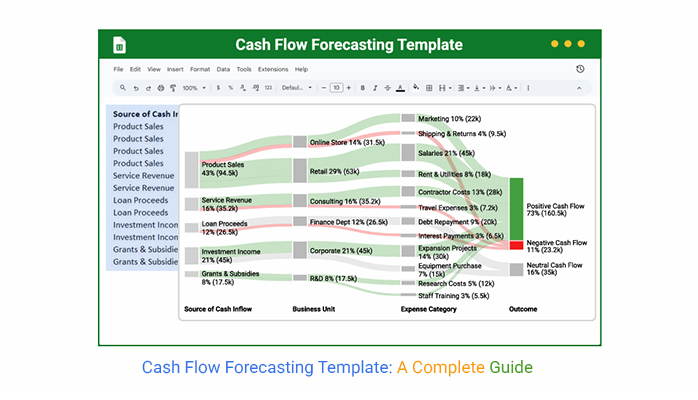
  • Sankey Chart: It maps the flow of cash from sources to expenses and outcomes. Cash flow forecasting highlights where the majority of money comes from and where it goes. This enables businesses to identify key drivers of their financial performance quickly using a Sankey Diagram.
Cash Flow Forecasting Template 3
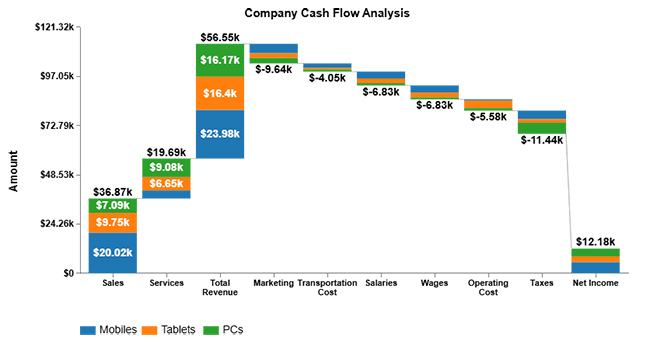
  • Multi-Series Stacked Waterfall Chart: This chart compares different cash flow scenarios side by side, allowing for easy comparison. It adds depth to forecasting by breaking down revenue and expense categories for a clear comparison.
Cash Flow Forecasting Template 4
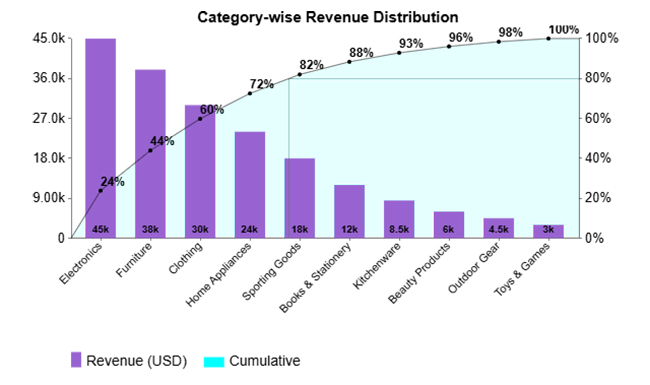
  • Pareto Column Chart: The Pareto Column Chart applies the 80/20 principle to cash flow. It shows which few categories drive most financial outcomes, so you can focus on what matters most with a Pareto chart.
Cash Flow Forecasting Template 5

How to Analyze Cash Flow Forecasting Template in Google Sheets?

Money talks, but spreadsheets often mumble. Excel can crunch numbers, but when it comes to visuals, it leaves you squinting at clunky charts. Data deserves better storytelling, and that is where Google Sheets and smart tools step in.

Data visualization is the secret ingredient that makes cash flow forecasting clear and convincing. Instead of staring at endless rows, you can see patterns at a glance. ChartExpo takes this further by turning flat data into visuals that actually speak. It bridges the gap that Excel leaves open, making forecasting accurate and engaging.

How to Install ChartExpo in Google Sheets?

  1. To start using ChartExpo, download it directly from the Google Sheets program. To do this, select Extensions from the top toolbar.
  2. A menu will appear. Click the Get add-ons option.
  3. Search for ChartExpo, and click on Charts, Graphs & Visualizations by ChartExpo when it appears in the results.
  4. Click the Install button. You will have to confirm your Google account and accept some permissions.

ChartExpo charts are available both in Google Sheets and Microsoft Excel. Please use the following CTAs to install the tool of your choice and create beautiful visualizations in a few clicks in your favorite tool.

Example

Let’s analyze the cash flow sample data below in Google Sheets using ChartExpo.

Source of Cash Inflow Business Unit Expense Category Outcome Amount (USD)
Product Sales Retail Salaries Positive Cash Flow 45,000
Product Sales Retail Rent & Utilities Positive Cash Flow 18,000
Product Sales Online Store Marketing Positive Cash Flow 22,000
Product Sales Online Store Shipping & Returns Negative Cash Flow 9,500
Service Revenue Consulting Contractor Costs Positive Cash Flow 28,000
Service Revenue Consulting Travel Expenses Negative Cash Flow 7,200
Loan Proceeds Finance Dept Debt Repayment Neutral Cash Flow 20,000
Loan Proceeds Finance Dept Interest Payments Negative Cash Flow 6,500
Investment Income Corporate Expansion Projects Positive Cash Flow 30,000
Investment Income Corporate Equipment Purchase Neutral Cash Flow 15,000
Grants & Subsidies R&D Research Costs Positive Cash Flow 12,000
Grants & Subsidies R&D Staff Training Positive Cash Flow 5,500
  • To get started with ChartExpo, install ChartExpo in Google Sheets.
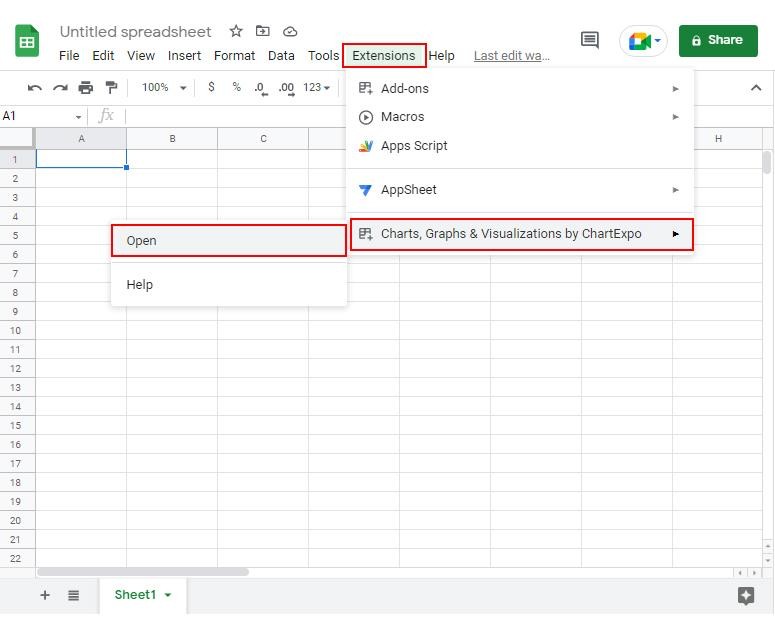
  • Go to Extensions > Charts, Graphs & Visualizations by ChartExpo > Open.
Cash Flow Forecasting Template 6
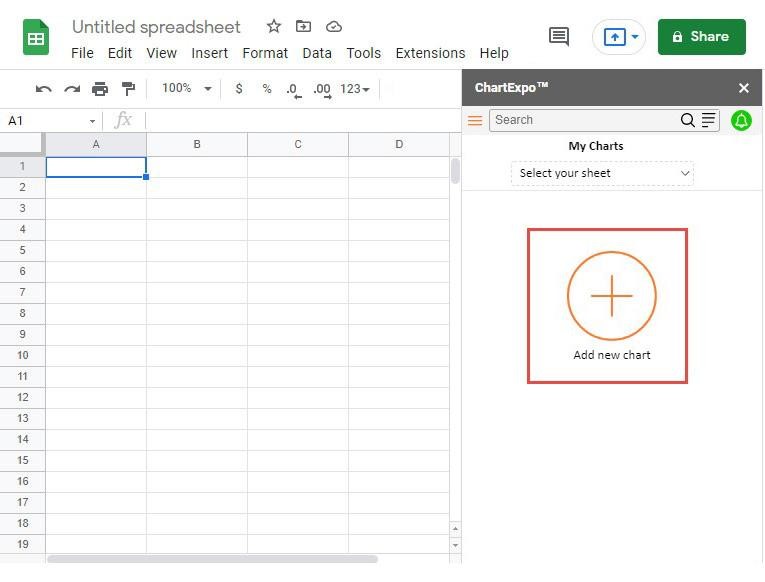
  • To access the charts library, click the Add new chart button.
Cash Flow Forecasting Template 7
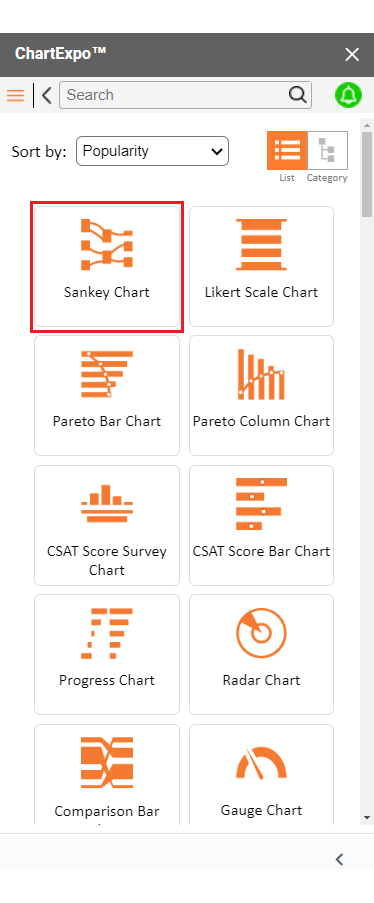
  • Once ChartExpo is loaded. Click on “Sankey Chart”.
Cash Flow Forecasting Template 8
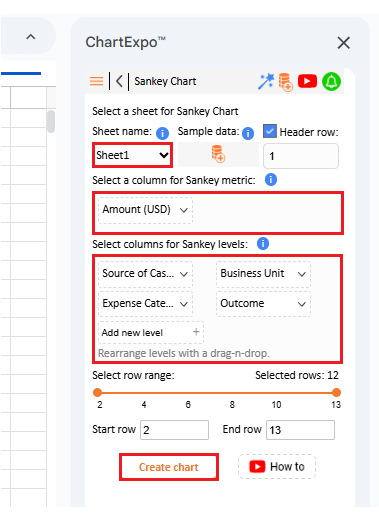
  • Put the data table in the sheet first. Then, choose the Sheet name from the drop-down in the ChartExpo section.
  • Select the metric column; metric is the numeric column in your data sheet.
  • Select the dimensions column; the dimension is the categorical column in your datasheet that contains text information.
  • Click the Create chart button to complete the process.
Cash Flow Forecasting Template 9
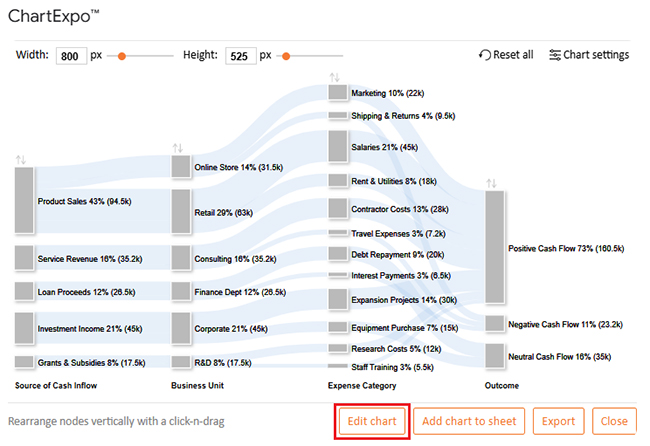
  • ChartExpo will generate the visualization below for you.
Cash Flow Forecasting Template 10
  • If you want to have the chart’s title, click Edit Chart, as shown in the above image.
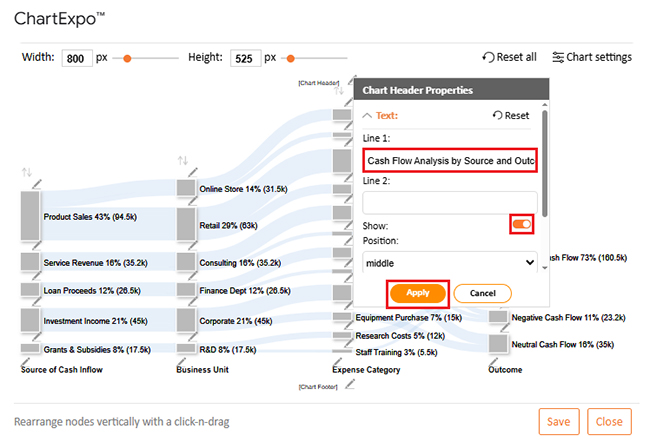
  • Click the pencil icon next to the Chart Header to change the title.
  • It will open the properties dialog. Under the Text section, you can add a heading in Line 1 and enable Show.
  • Give the appropriate title of your chart and click the Apply button.
Cash Flow Forecasting Template 11
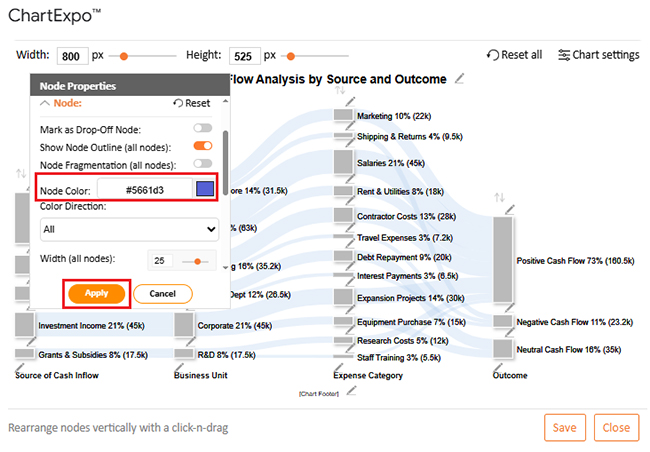
  • You can add color in Nodes and set the direction as follows:
Cash Flow Forecasting Template 12
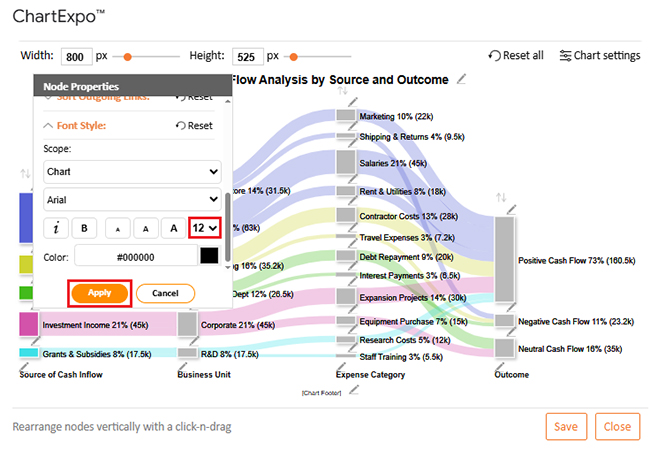
  • You can increase font size for better readability as follows:
Cash Flow Forecasting Template 13
  • Click the “Save Changes” button to persist the changes.
Cash Flow Forecasting Template 14
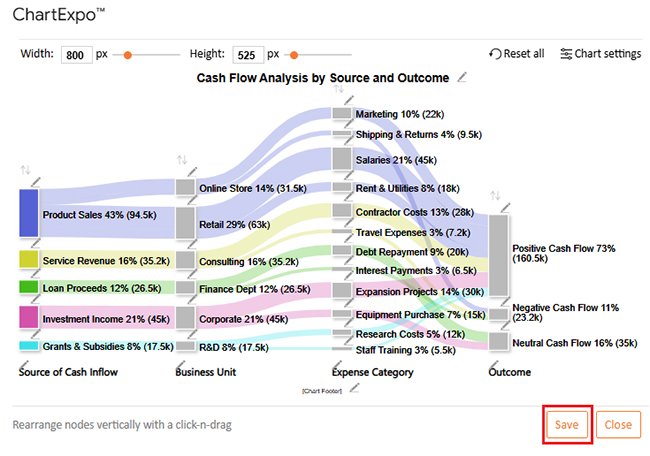
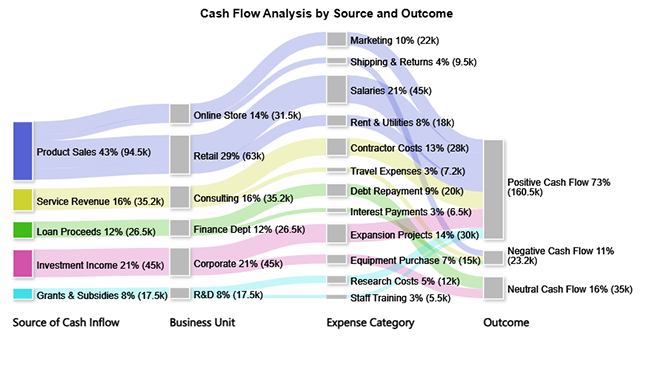
  • Your final chart will appear as follows.
Cash Flow Forecasting Template 15

Insights

  • Product sales contribute the most to inflows at 43%.
  • Positive cash flow leads at 73%, showing strong financial health.
  • The negative cash flow is 11%, primarily due to returns, travel, and interest expenses.
  • Neutral cash flow is 16%, driven by loan repayments and equipment purchases.

How to Download and Use the Cash Flow Forecast Template in Google Sheets?

Managing money feels overwhelming until you see it laid out clearly. A cash flow forecasting template in Google Sheets turns scattered numbers into a plan you can trust. Follow these steps to get started with this template:

  1. Download the template: Find a free or prebuilt template online. Open it in Google Sheets and save your own copy to start editing.
  2. Enter inflows: Add every source of income, such as product sales or new investments. This ensures your forecast reflects all possible revenue.
  3. Add outflows: Record recurring and one-time expenses. Include rent, payroll, and utilities for a complete view.
  4. Organize by month: Structure the template so numbers are grouped by month. This makes it easier to spot patterns in your business forecasting.
  5. Pair with other templates: Combine it with a Google Sheet profit and loss template for broader financial insights. This gives you both performance and cash position in one place.

Benefits and Limitations of Cash Flow Forecasting Template in Google Sheets

Benefits:

  • Free and flexible: Google Sheets costs nothing and works anywhere. You can adapt the template to fit your unique business setup.
  • Easy to track: It displays inflows and outflows in real-time. When paired with a balance sheet template in Google Sheets, it becomes a more complete financial guide.
  • Supports planning: Templates simplify testing scenarios. They support smarter cash flow analysis by showing how choices affect outcomes.

Limitations:

No tool is perfect. A cash flow forecasting template in Google Sheets has limitations that you should be aware of. Understanding these will help you use it wisely and avoid any surprises.

  • Limited automation: Unlike accounting software, templates require manual updates. This can take extra time for larger businesses.
  • It may be too simple: Growing companies with complex finances might outgrow Google Sheets. At that stage, more advanced systems may be needed.

Tips for Using the Cash Flow Forecasting Template in Google Sheets

A template on its own does not guarantee better results. The value comes from how you use it, how often you update it, and how carefully you read the numbers. A cash flow forecasting template in Google Sheets can guide your decisions, but only if you work with it consistently.

Here are some simple tips to follow:

  • Record accurately: Enter all inflows and outflows with the details. Reliable numbers make your cash flow analysis meaningful.
  • Review often: Check your forecast monthly. This keeps you alert to risks and opportunities.
  • Compare scenarios: Use extra sheets to test best-case and worst-case outcomes. Linking with an operating budget spreadsheet makes scenario planning even stronger.
  • Support funding needs: If you are raising capital, combine your forecast with financial forecasting for startups. Clear numbers build trust with investors.

FAQs

What is a 3-way cash flow forecast?

A 3-way cash flow forecast connects profit and loss, balance sheet, and cash flow. It shows how income, expenses, and assets interact. This forecast offers a comprehensive financial overview, enabling businesses to plan with confidence.

How do you create a cash flow forecast?

  1. List all cash inflows.
  2. Record all outflows.
  3. Organize by month.
  4. Subtract outflows from inflows.
  5. Track cumulative balance.
  6. Review regularly.

Wrap Up

Cash flow forecasting is not complicated when you have the right tools. With Google Sheets, you can turn raw numbers into clarity. Templates make the process structured, while examples and visuals bring the data to life.

A sales forecast example illustrates how revenue is generated. Pairing it with expense tracking reveals where money goes. Together, they form a story that helps you act wisely. Numbers stop being random and start guiding decisions.

A balance sheet template in Google Sheets adds another layer of insight. It connects assets and liabilities to your cash flow. You see the full picture, not just part of it. This keeps planning grounded in reality.

An operating budget spreadsheet works well in conjunction with cash flow forecasts. It allows you to compare planned expenses with actual outcomes. This makes managing finances proactive rather than reactive. Surprises become less frequent as confidence grows.

For smaller companies, bookkeeping spreadsheets are a practical solution for managing finances. They track daily activity and feed accurate data into your forecast. Clean records mean better insights, and better insights mean better decisions.

Conclusively, ChartExpo in Google Sheets transforms flat tables into clear, interactive charts. It helps you spot trends instantly and share results with ease.

So, do not hesitate. Install ChartExpo today and start using it right away. Your forecasts will be sharper, your planning will be more effective, and your business will be better prepared for growth.

How much did you enjoy this article?

PBIAd1
Start Free Trial!
158135

Related articles

next previous
Data Analytics13 min read

Social Media Marketing Plan Template for SMM Success

A template for a social media marketing plan organizes goals and tracking. This blog shows you how to plan, analyze, and report smarter for better results.

Data Analytics12 min read

Cash Flow Analysis Template: A Complete Guide

A cash flow analysis template helps track inflows and outflows with clarity. Discover how Google Sheets and smart tools improve analysis and decision-making.

Data Analytics12 min read

Cap Table Template: Simplifying Equity Analysis

A cap table template tracks ownership and dilution. This blog shows how to create, analyze, and visualize cap tables in Google Sheets for better decisions.

Data Analytics14 min read

Visual Encoding: The Rules That Improve Insights

Visual encoding converts complex data into visuals that are simple to read. It uses color, size, shape, and position to reveal trends, comparisons, and insights.

Data Analytics15 min read

Operational Reporting for Data-Driven Operations

Operational Reporting tracks daily performance with real-time data. Discover its benefits, examples, and Power BI tips to make smarter business decisions.

ChartExpo logo

Turn Data into Visual
Stories

CHARTEXPO

  • Home
  • Gallery
  • Videos
  • Services
  • Pricing
  • Contact us
  • FAQs
  • Privacy policy
  • Terms of Service
  • Sitemap

TOOLS

  • ChartExpo for Google Sheets
  • ChartExpo for Microsoft Excel
  • Power BI Custom Visuals by ChartExpo
  • Word Cloud

CATEGORIES

  • Bar Charts
  • Circle Graphs
  • Column Charts
  • Combo Charts
  • Comparison Charts
  • Line Graphs
  • PPC Charts
  • Sentiment Analysis Charts
  • Survey Charts

TOP CHARTS

  • Sankey Diagram
  • Likert Scale Chart
  • Comparison Bar Chart
  • Pareto Chart
  • Funnel Chart
  • Gauge Chart
  • Radar Chart
  • Radial Bar Chart
  • Sunburst Chart
  • see more
  • Scatter Plot Chart
  • CSAT Survey Bar Chart
  • CSAT Survey Chart
  • Dot Plot Chart
  • Double Bar Graph
  • Matrix Chart
  • Multi Axis Line Chart
  • Overlapping Bar Chart
  • Control Chart
  • Slope Chart
  • Clustered Bar Chart
  • Clustered Column Chart
  • Box and Whisker Plot
  • Tornado Chart
  • Waterfall Chart
  • Word Cloud
  • see less

RESOURCES

  • Blog
  • Resources
  • YouTube
SIGN UP FOR UPDATES

We wouldn't dream of spamming you or selling your info.

© 2026 ChartExpo, all rights reserved.