• Home
  • Tools dropdown img
    • Spreadsheet Charts

      • ChartExpo for Google Sheets
      • ChartExpo for Microsoft Excel
    • Power BI Charts

      • Power BI Custom Visuals by ChartExpo
    • Word Cloud

  • Charts dropdown img
    • Chart Category

      • Bar Charts
      • Circle Graphs
      • Column Charts
      • Combo Charts
      • Comparison Charts
      • Line Graphs
      • PPC Charts
      • Sentiment Analysis Charts
      • Survey Charts
    • Chart Type

      • Box and Whisker Plot
      • Clustered Bar Chart
      • Clustered Column Chart
      • Comparison Bar Chart
      • Control Chart
      • CSAT Survey Bar Chart
      • CSAT Survey Chart
      • Dot Plot Chart
      • Double Bar Graph
      • Funnel Chart
      • Gauge Chart
      • Likert Scale Chart
      • Matrix Chart
      • Multi Axis Line Chart
      • Overlapping Bar Chart
      • Pareto Chart
      • Radar Chart
      • Radial Bar Chart
      • Sankey Diagram
      • Scatter Plot Chart
      • Slope Chart
      • Sunburst Chart
      • Tornado Chart
      • Waterfall Chart
      • Word Cloud
    • Google Sheets
      Microsoft Excel
  • Services
  • Pricing
  • Contact us
  • Blog
  • Support dropdown img
      • Gallery
      • Videos
      • Contact us
      • FAQs
      • Resources
    • Please feel free to contact us

      atsupport@chartexpo.com

Categories
All Data Visualizations Data Analytics Surveys
Add-ons/
  • Google Sheets
  • Microsoft Excel
  • Power BI
All Data Visualizations Data Analytics Surveys
Add-ons
  • Google Sheets
  • Microsoft Excel
  • Power BI

We use cookies

This website uses cookies to provide better user experience and user's session management.
By continuing visiting this website you consent the use of these cookies.

Ok

ChartExpo Survey


Home > Blog > Data Analytics

Total Cost of Ownership Analysis for TCO Insights

Spending more than planned is rarely caused by bad products or poor ideas. It happens when organizations commit to assets without knowing what those assets will truly cost across their full lifespan.
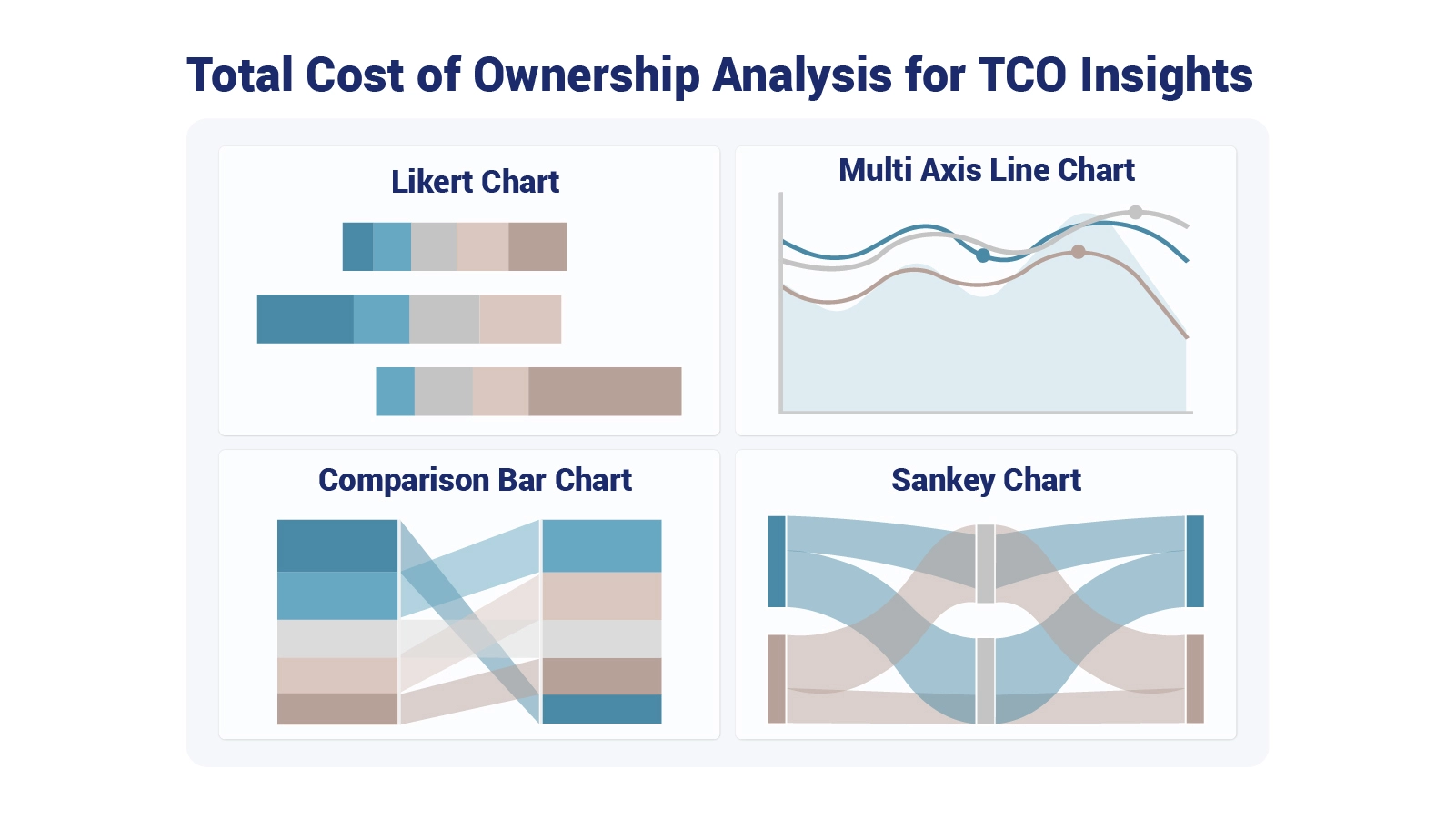
Total Cost of Ownership Analysis

Total cost of ownership analysis was developed to close that gap, bringing every expense into view from the moment of acquisition through final decommissioning. Without this framework, financial blind spots turn routinely into budget shortfalls that could have been avoided.

This guide walks through the concepts, calculation methods, and practical steps behind this discipline, including how modern analytics platforms simplify the process and make the insights easier to act on.

Table of Contents:

  1. What is Total Cost of Ownership (TCO) Analysis?
  2. Why Conduct a Total Cost of Ownership Analysis?
  3. Key Components of a TCO Analysis
  4. How TCO Analysis Works?
  5. How to Calculate Total Cost of Ownership?
  6. Examples of Total Cost of Ownership Analysis
  7. Steps to Perform Total Cost of Ownership Analysis
  8. How to do Total Cost of Ownership Analysis in Power BI?
  9. Benefits of Conducting Total Cost of Ownership Analysis
  10. Tips for Total Cost of Ownership Analysis
  11. FAQs
  12. Wrap Up

What is Total Cost of Ownership (TCO) Analysis?

Definition: Total cost of ownership analysis is a financial evaluation framework built to account for every expense involved in acquiring, operating, maintaining, and retiring an asset or solution. This approach goes well beyond sticker price, capturing the full economic weight of a decision across its entire lifecycle.

The methodology is applied broadly in IT procurement, manufacturing investment planning, logistics, and vendor evaluation. By accounting for long-term financial impact, organizations gain a grounded view of what any commitment will actually demand. TCO analysis answers the question every major purchasing decision deserves: what will this truly cost from beginning to end?

Why Conduct a Total Cost of Ownership Analysis?

Total cost of ownership analysis delivers financial clarity beyond standard budgeting, sharpening investment decisions, vendor negotiations, and long-term planning.

  • Compare long-term vs upfront costs: Determines whether a higher initial investment generates lower cumulative spending across the full asset lifecycle.
  • Identify hidden operational expenses: Surface indirect costs, including maintenance, technical support, energy use, and downtime, expenses that are regularly missed when analyzing company financials in isolation.
  • Support data-driven purchasing decisions: Strengthens procurement evaluations by pairing ownership costs with structured frameworks like cost-benefit analysis.
  • Improve budgeting accuracy: Produces more reliable financial plans by incorporating recurring and variable costs into projections from the outset.
  • Reduce lifecycle cost risks: Limits exposure to unforeseen obligations by surfacing long-term financial commitments early in the decision process.
  • Align costs with business goals: Confirms that investment decisions support strategic priorities such as operational efficiency, scalability, and sustainability.
  • Improve vendor comparisons: Establishes a consistent basis for evaluating suppliers on total lifetime value rather than purchase price alone.

Key Components of a TCO Analysis

Effective analysis draws a clear line between visible expenditures and the indirect or long-term costs that are so often overlooked, a discipline central to both sound business analytics and strategic cost evaluation.

  • Acquisition costs: The purchase price, licensing fees, and any foundational baseline expenses incurred at the point of acquisition.
  • Installation and implementation costs: Labor and resources required for setup, configuration, and deployment.
  • Operating expenses: Recurring charges tied to active use, including subscriptions, cloud hosting, and utility costs.
  • Maintenance and support costs: Ongoing expenditures for repairs, software updates, and technical assistance throughout the active lifecycle.
  • Training costs: Investment in employee onboarding, skill development, and sustained proficiency with the solution.
  • Downtime and productivity loss: The quantified financial impact of disruptions, outages, or operational inefficiencies.
  • End-of-life or disposal costs: Expenses tied to decommissioning, replacing, or responsibly retiring the asset.

How TCO Analysis Works?

While the concept is accessible, running a cost of ownership analysis that produces reliable results requires a disciplined, step-by-step approach. The process typically unfolds across these stages:

  • Define the asset or solution scope: Set precise boundaries for what is being evaluated so no costs fall through the cracks.
  • Identify direct and indirect cost categories: Separate the obvious upfront charges from the hidden, long-term financial impacts that tend to go unnoticed.
  • Estimate costs across the lifecycle: Project spending for each phase: acquisition, active operation, maintenance, and end-of-life retirement.
  • Aggregate total costs over time: Combine every cost element into a single unified view that supports side-by-side comparison.
  • Compare alternatives consistently: Evaluate each option under the same assumptions, metrics, and time horizons for a fair assessment.
  • Use results to guide decisions: Transform completed cost evaluations into actionable business insights that strengthen strategic planning.

How to Calculate Total Cost of Ownership?

Translating a total cost of ownership analysis into actionable numbers requires a structured, repeatable sequence of steps.

  • List all cost components: Build a complete inventory of every direct, indirect, recurring, and one-time expense connected to the asset.
  • Assign cost values to each component: Attach verified figures to each cost element, drawing on financial data, reasonable estimates, or documented historical records.
  • Define the analysis time horizon: Establish the evaluation period clearly, a step that is equally critical in financial forecasting for startups and in long-range capital investment planning.
  • Sum costs across lifecycle phases: Add acquisition, operational, maintenance, and end-of-life costs together into one comprehensive total.
  • Compare total ownership costs: Evaluate alternatives based on the complete ownership figure, not any single isolated metric.

Examples of Total Cost of Ownership Analysis

Practical examples illustrate why total cost of ownership analysis delivers insights that standard price comparisons simply cannot. Solutions that look budget-friendly at purchase frequently carry substantial costs once recurring and hidden charges are included.

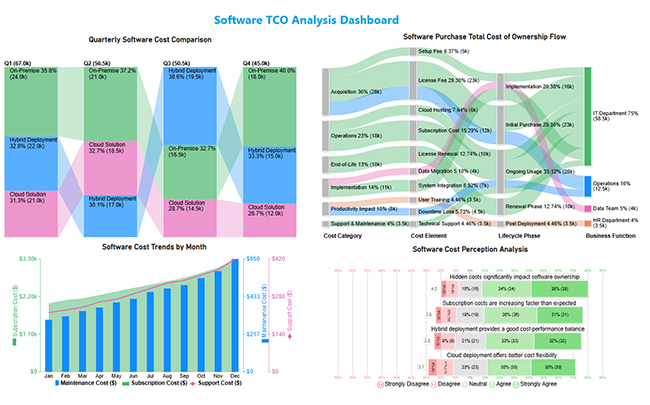
  • Software TCO Analysis Dashboard

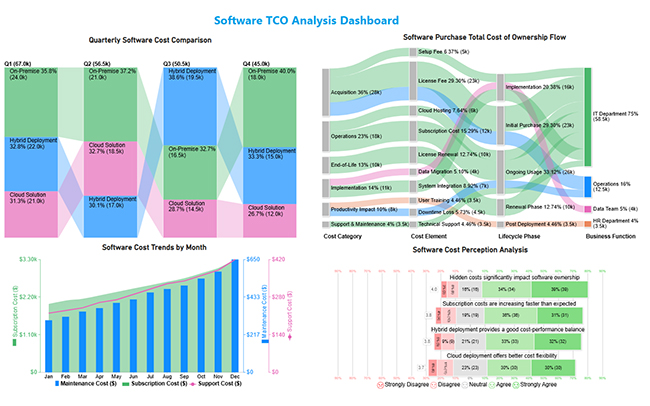
The Software TCO Dashboard maps cost distribution, spending trends, deployment model comparisons, and stakeholder feedback to support well-informed software investment decisions, to help organizations make well-informed software investment choices.
Total Cost of Ownership Analysis
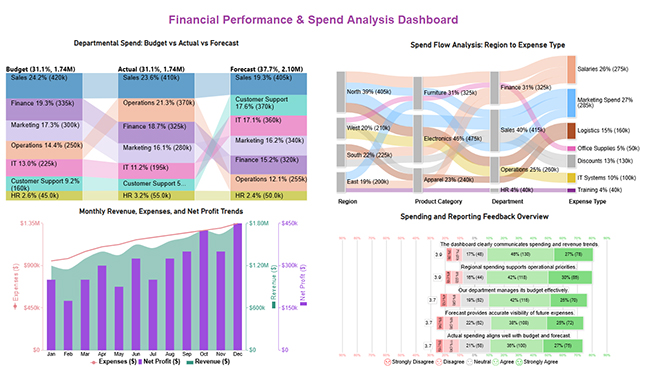
  • Financial Performance & Spend Analysis Dashboard

The financial performance and spend analysis dashboard tracks expenditure patterns, budget alignment, and cost control opportunities, giving decision-makers the context needed to manage spending relative to plan.
Total Cost of Ownership Analysis
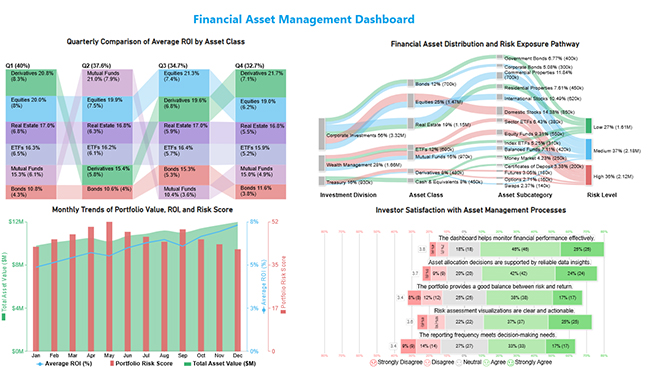
  • Financial Asset Management Dashboard

The financial asset management dashboard brings together ROI figures, portfolio allocation data, and risk exposure levels so organizations can evaluate performance and guide strategic capital allocation decisions.
Total Cost of Ownership Analysis

Steps to Perform Total Cost of Ownership Analysis

Reliable total cost of ownership analysis depends on careful, disciplined preparation. Inaccurate assumptions or incomplete inputs will undermine any conclusions the analysis is meant to produce.

A structured approach follows these steps:

  • Define objectives and assumptions: Establish the purpose, scope, and constraints of the analysis so every input shares a consistent foundation.
  • Identify all cost drivers: Pinpoint every factor with potential cost implications, covering operational, technical, and financial variables.
  • Collect historical and estimated data: Gather the reliable inputs required to build lifecycle cost projections that can withstand review.
  • Calculate total ownership costs: Aggregate all cost components across every lifecycle phase to arrive at a complete financial picture.
  • Review and validate results: Verify assumptions and interpret findings using a structured business dashboard for clearer decision-making support.

How to do Total Cost of Ownership Analysis in Power BI?

Total cost of ownership analysis becomes significantly more manageable when organizations work with analytical platforms built to consolidate and model complex, multi-source cost data.

  1. Consolidate cost data from multiple sources.
  2. Structure cost categories into logical tables and relationships.
  3. Build calculated measures representing lifecycle cost components.
  4. Design a finance dashboard in Power BI to track ownership variables.
  5. Compare alternatives through dynamic filters and time horizons.
  6. Apply BI reporting techniques to highlight decision-critical trends.

Power BI’s native visuals handle many use cases well, but advanced ownership cost models often call for more expressive charting. ChartExpo addresses this by transforming dense, multi-variable data into intuitive visual narratives that make cost structures easier to analyze.

Why Use ChartExpo?
  • Converts intricate datasets into visuals that are immediately clear and easy to understand.
  • Presents insights in a format that both technical teams and executive stakeholders can follow without effort.
  • Shortens the distance between raw data and confident, evidence-backed decisions.
  • Comes with a 7-day free trial; ongoing access is priced at $10 per month.

Example:

  • Log in to Power BI.
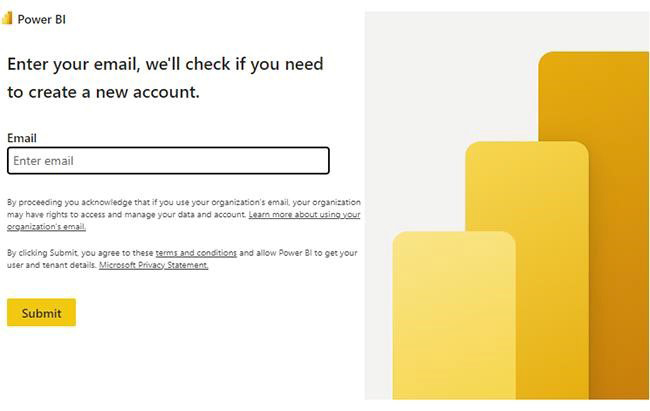
  • Enter your email. Click the “Submit” button.
Total Cost of Ownership Analysis
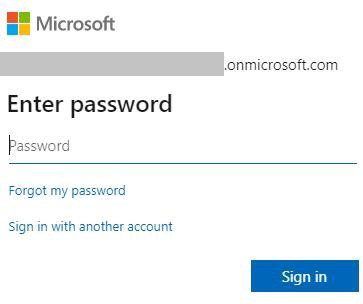
  • You are redirected to your Microsoft account.
  • Enter your password and click “Sign in”.
Total Cost of Ownership Analysis
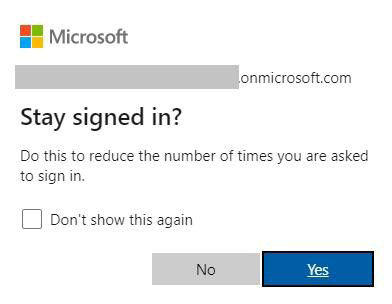
  • Choose whether to stay signed in.
Total Cost of Ownership Analysis
  • Once done, the home screen will open.

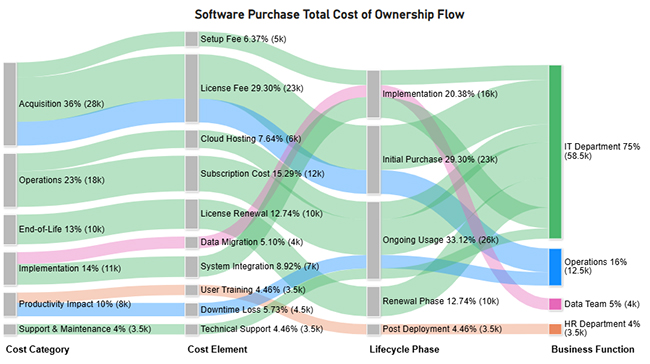
Now, consider we have the following data for a Sankey Chart.

Cost Category Cost Element Lifecycle Phase Business Function Cost Amount
Acquisition License Fee Initial Purchase IT Department 15000
Acquisition License Fee Initial Purchase Operations 8000
Acquisition Setup Fee Implementation IT Department 5000
Implementation System Integration Implementation IT Department 7000
Implementation Data Migration Implementation Data Team 4000
Operations Subscription Cost Ongoing Usage IT Department 12000
Operations Cloud Hosting Ongoing Usage IT Department 6000
Support & Maintenance Technical Support Ongoing Usage IT Department 3500
Productivity Impact User Training Post Deployment HR Department 2000
Productivity Impact Downtime Loss Ongoing Usage Operations 4500
End-of-Life License Renewal Renewal Phase IT Department 10000
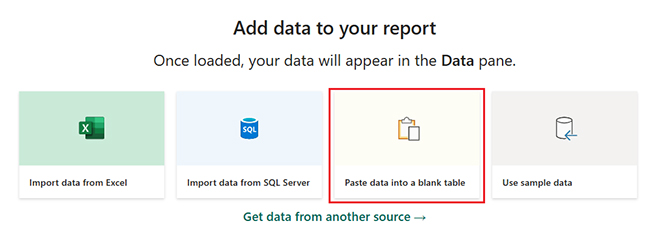
  • First, you need to add data to your report, and click on the “Paste data into a blank report”.
Total Cost of Ownership Analysis
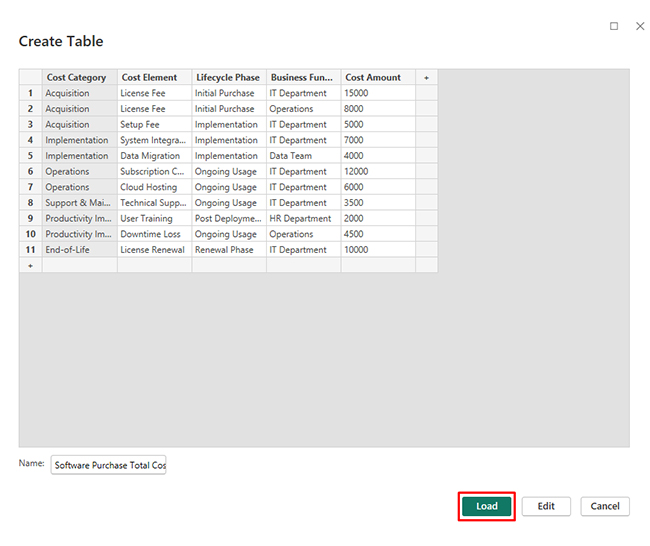
  • Paste the data table above into a blank table, name it, and click on the “Load” button.
Total Cost of Ownership Analysis
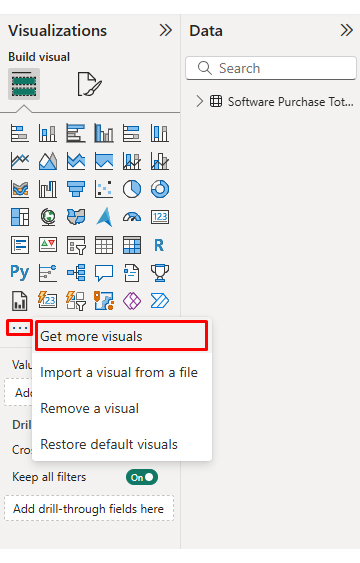
  • To build a Sankey Chart, import the visual from App Source by opening the Visualizations panel.
  • Select “Get more Visuals”.
Total Cost of Ownership Analysis
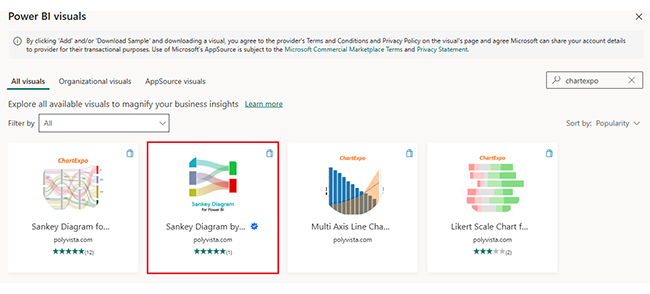
  • Search ChartExpo and select the Sankey Diagram. It’s also recommended to add the Multi Axis Line Chart, Comparison Bar Chart, and Likert Chart to support different insights.
Total Cost of Ownership Analysis
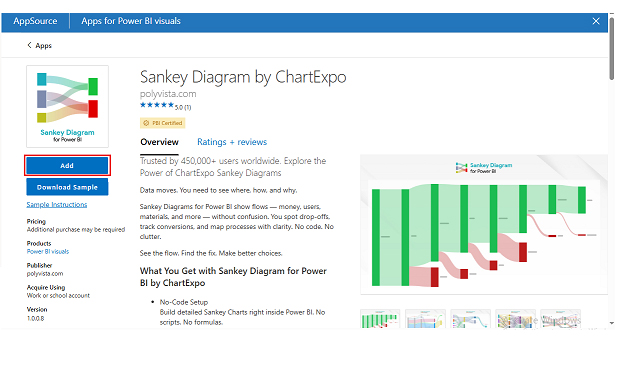
  • Click on the “ADD” button.
Total Cost of Ownership Analysis
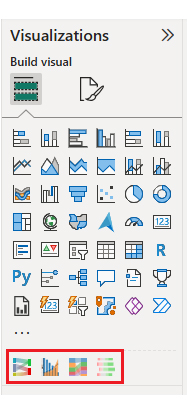
  • Once you have added all four charts to your visuals, you’ll see the chart icons in your visuals list.
Total Cost of Ownership Analysis
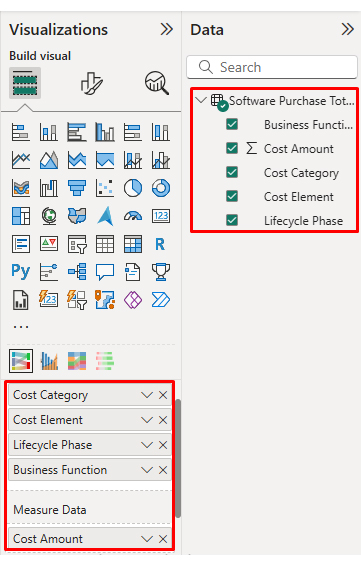
  • To add a Sankey Chart visual, click on the chart icon and choose the dimension and measures.
Total Cost of Ownership Analysis
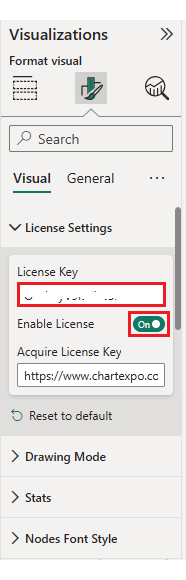
  • In Visualization’s properties, click on License Settings and add the key. So that you’ll see the Sankey Chart without a watermark.
Total Cost of Ownership Analysis
  • Now, after applying the key, the watermark is removed from the chart.
Total Cost of Ownership Analysis
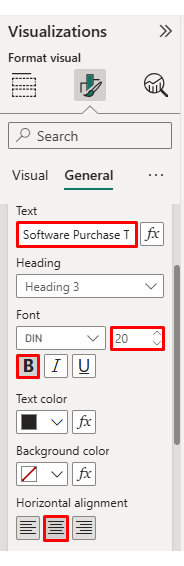
  • Now, we will enhance the chart’s appearance and modify the title to better align with the visualized data.
Total Cost of Ownership Analysis
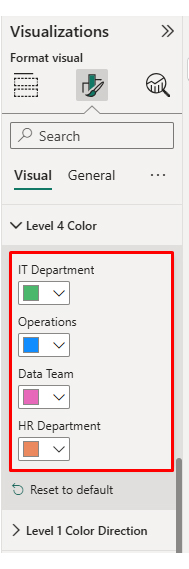
  • You can set bar colors from “Visual”.
Total Cost of Ownership Analysis
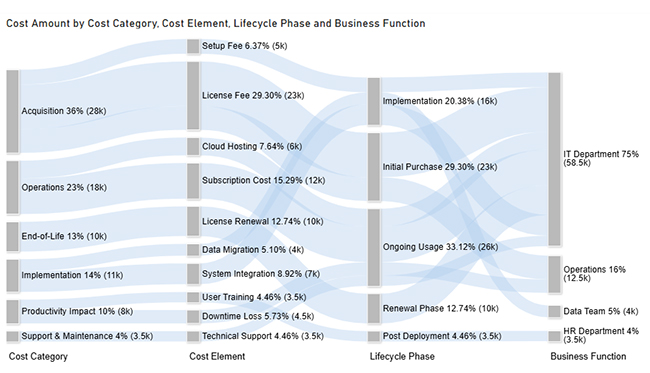
  • The final look of the Sankey Chart is given below.
Total Cost of Ownership Analysis

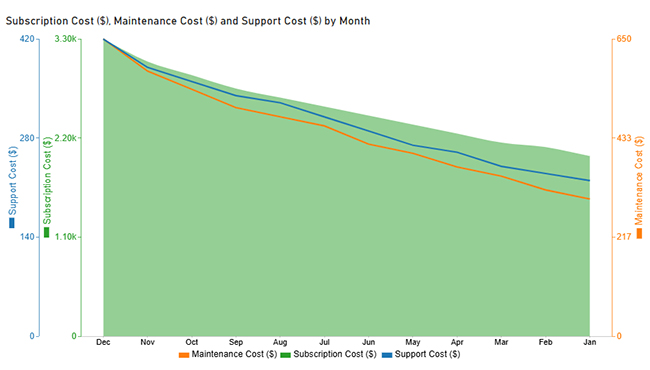
Now discuss the second chart. Consider we have the following data for the Multi Axis Line Chart.

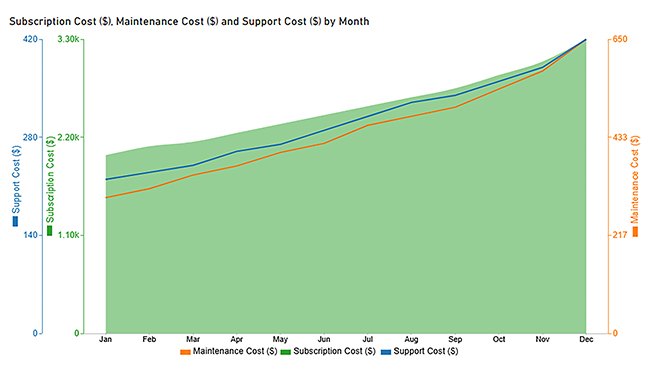
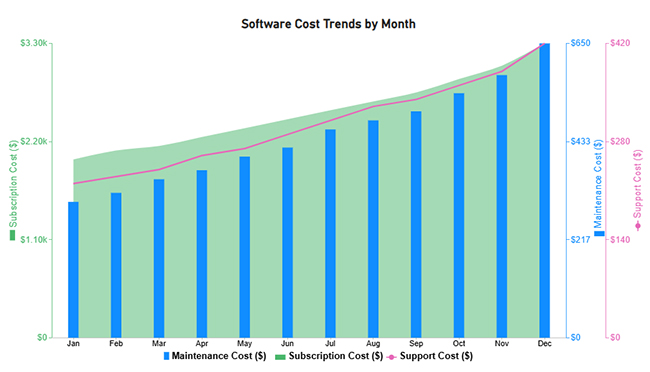
Month Subscription Cost ($) Maintenance Cost ($) Support Cost ($)
Jan 2000 300 220
Feb 2100 320 230
Mar 2150 350 240
Apr 2250 370 260
May 2350 400 270
Jun 2450 420 290
Jul 2550 460 310
Aug 2650 480 330
Sep 2750 500 340
Oct 2900 540 360
Nov 3050 580 380
Dec 3300 650 420
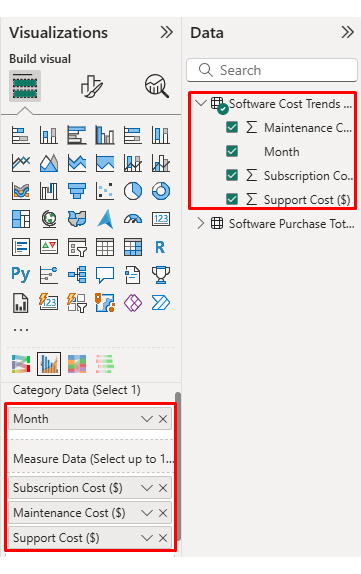
  • Once data is manually pasted or exported from Excel, choose the dimension and measures.
Total Cost of Ownership Analysis
  • Before creating the chart, enter the key to remove the watermark. Once applied, the chart will appear without the watermark.
Total Cost of Ownership Analysis
  • If you notice in the chart, the months on the x-axis are not ordered correctly. Create a new table to sort the data from Jan to Dec.
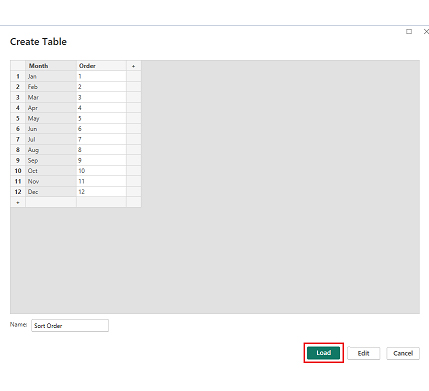
  • Enter data manually, name it, and click on the “Load” button.
Total Cost of Ownership Analysis
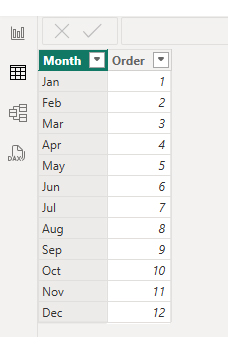
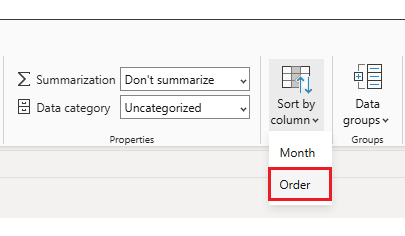
  • Open “Table View”, select the “Sort Order” table, select the “Month Column”, and set the sorting order column.
Total Cost of Ownership Analysis
  • Choose sort by order.
Total Cost of Ownership Analysis
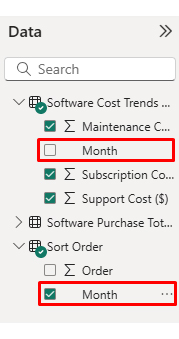
  • With the custom sorting set, use the Month column from the Sort Order table instead of the original table’s Month column.
Total Cost of Ownership Analysis
  • The chart should now display with the custom sorting order applied on the X-axis.
Total Cost of Ownership Analysis
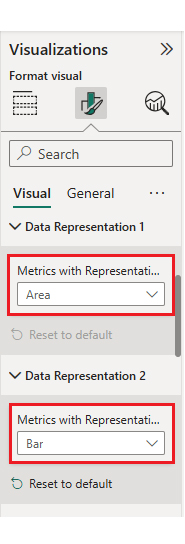
  • First, we will change the title of the chart, then we will change the data representation.
Total Cost of Ownership Analysis
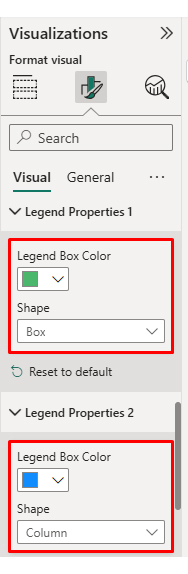
  • Next, we will change legend properties to set the shape type.
Total Cost of Ownership Analysis
  • The final look of the Multi Axis Line Chart is given below.
Total Cost of Ownership Analysis

Now discuss the third chart. Consider we have the following data for a Comparison Bar Chart.

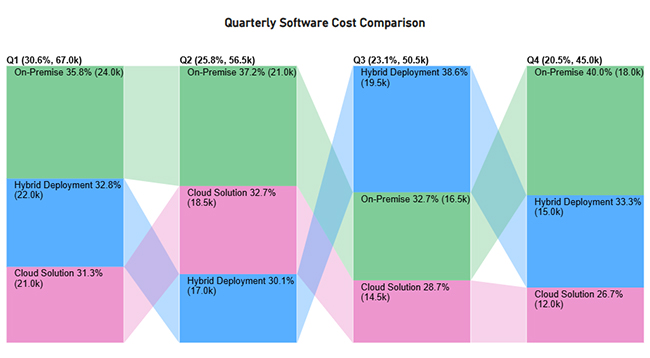
Quarter Deployment Model Cost Amount ($)
Q1 Cloud Solution 21000
Q1 On-Premise 24000
Q1 Hybrid Deployment 22000
Q2 Cloud Solution 18500
Q2 On-Premise 21000
Q2 Hybrid Deployment 17000
Q3 Cloud Solution 14500
Q3 On-Premise 16500
Q3 Hybrid Deployment 19500
Q4 Cloud Solution 12000
Q4 On-Premise 18000
Q4 Hybrid Deployment 15000


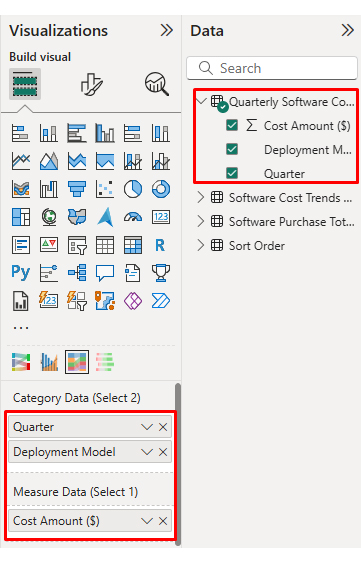
  • Once the data is manually pasted or exported from Excel, choose the dimension and measures.
Total Cost of Ownership Analysis
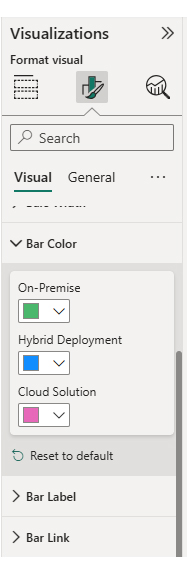
  • Enter the key to remove the watermark, then update the chart title and change the bar color.
Total Cost of Ownership Analysis
  • The final look of the Comparison Bar Chart is given below.
Total Cost of Ownership Analysis

Now discuss the fourth chart. Consider we have the following data for the Likert Chart.

Question

Scale

Responses

Subscription costs are increasing faster than expected 1 4
Subscription costs are increasing faster than expected 2 10
Subscription costs are increasing faster than expected 3 19
Subscription costs are increasing faster than expected 4 36
Subscription costs are increasing faster than expected 5 31
Hidden costs significantly impact software ownership 1 3
Hidden costs significantly impact software ownership 2 8
Hidden costs significantly impact software ownership 3 16
Hidden costs significantly impact software ownership 4 34
Hidden costs significantly impact software ownership 5 39
Cloud deployment offers better cost flexibility 1 6
Cloud deployment offers better cost flexibility 2 11
Cloud deployment offers better cost flexibility 3 23
Cloud deployment offers better cost flexibility 4 30
Cloud deployment offers better cost flexibility 5 30
Hybrid deployment provides a good cost-performance balance 1 5
Hybrid deployment provides a good cost-performance balance 2 9
Hybrid deployment provides a good cost-performance balance 3 21
Hybrid deployment provides a good cost-performance balance 4 33
Hybrid deployment provides a good cost-performance balance 5 32
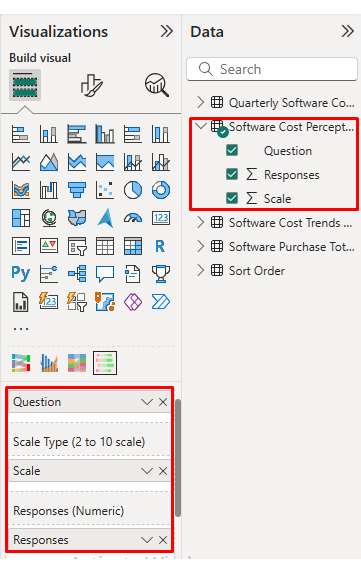
  • Once the data is manually pasted or exported from Excel, choose the dimension and measures.
Total Cost of Ownership Analysis
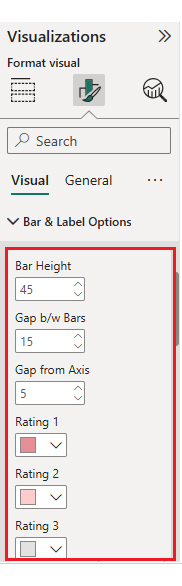
  • Enter the key to remove the watermark, update the title, and adjust rating colors and labels.
Total Cost of Ownership Analysis
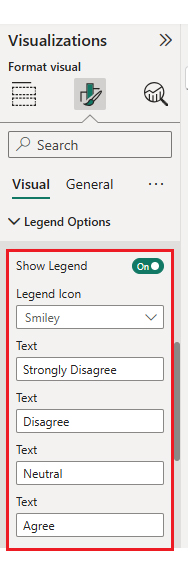
  • You can legend text as well.
Total Cost of Ownership Analysis
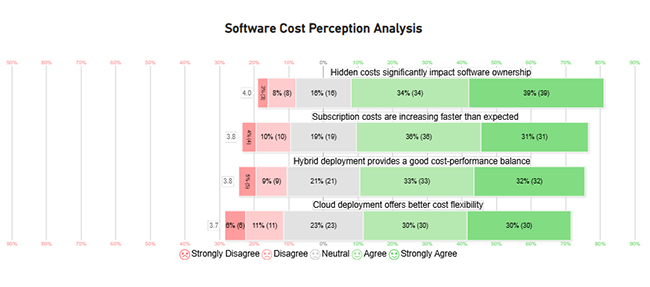
  • The final look of the Likert Chart is shown below.
Total Cost of Ownership Analysis

Arrange the charts efficiently and add interactivity to create a clear, engaging dashboard. After placement, the dashboard should appear as shown below.
Total Cost of Ownership Analysis

Key Insights

  • Software ownership is dominated by subscription and licensing fees, with recurring charges far outweighing any one-time acquisition costs.
  • Monthly expenses climb steadily throughout the year, with the sharpest acceleration occurring in Q4.
  • Cloud deployment carries the lowest initial cost, on-premise solutions front-load spending heavily, and hybrid models maintain a cost-balanced profile.
  • Stakeholder feedback highlights rising subscription fees and underestimated hidden charges as the two most pressing ownership concerns.

Benefits of Conducting Total Cost of Ownership Analysis

Organizations that apply total cost of ownership analysis regularly gain measurable advantages in financial planning and day-to-day cost management.

  • Better long-term cost visibility: Reveals lifecycle expenses that never appear in initial pricing discussions.
  • More accurate investment decisions: Supports full financial impact evaluation using capabilities such as Power BI embedded analytics.
  • Reduced unexpected expenses: Anticipates hidden and indirect costs before they escalate into budget overruns.
  • Improved cost control: Identifies optimization opportunities across operations, including those highlighted by a manufacturing dashboard.
  • Stronger vendor evaluations: Enables supplier comparisons grounded in total value delivered over the full ownership period.
  • Enhanced strategic planning: Anchors investment decisions in long-term objectives rather than short-term pricing alone.

Tips for Total Cost of Ownership Analysis

The principles behind total cost of ownership analysis are straightforward, but disciplined execution across complex, real-world scenarios is where many organizations struggle.

  • Consider full asset lifecycle: Evaluate every cost stage from initial acquisition through final disposal so no lifecycle phase goes unaccounted for.
  • Include indirect and hidden costs: Capture expenses that never show up on invoices, including training time, downtime impact, and ongoing support.
  • Use realistic assumptions: Ground projections in verified historical data and, where applicable, leverage Power BI artificial intelligence to sharpen estimates.
  • Update analysis regularly: Revisit and revise models as actual cost data becomes available and operating conditions change.
  • Validate data sources: Build reliability into every cost of ownership analysis by drawing on structured, governed inputs like Power BI data flows.
  • Align analysis with business goals: Keep evaluations tied to strategic priorities, balancing efficiency targets, growth objectives, and acceptable risk thresholds.

FAQs

What is the formula for TCO analysis?

No single formula covers every situation because the cost variables differ significantly across assets and industries. In most cases, the analysis aggregates acquisition, implementation, operational, maintenance, and end-of-life costs over a clearly defined evaluation window.

What are some common total cost of ownership analysis mistakes?

The most frequent errors include neglecting indirect costs, underestimating ongoing maintenance spending, building projections on overly optimistic assumptions, and applying different timeframes when comparing competing options.

What does a lower TCO mean?

A lower result indicates that one option is more cost-efficient over the evaluated period. That figure should be weighed alongside performance benchmarks, risk tolerance, and strategic alignment before any final decision is reached.

Wrap Up

Every major business commitment carries a price that extends well beyond the first invoice. Total cost of ownership analysis provides the framework that brings the full scope of lifecycle costs into view, covering acquisition, deployment, ongoing operations, and eventual retirement, so that financial decisions rest on complete information rather than incomplete estimates.

When this evaluation approach is paired with visualization platforms that can render complex cost models as accessible, story-driven charts, decision-makers gain a tool that is as useful in a boardroom presentation as it is in a procurement analysis. Organizations that adopt this discipline invest with greater precision, manage costs with greater control, and plan with greater confidence.

How much did you enjoy this article?

PBIAd1
Start Free Trial!
159852

Related articles

next previous
Data Analytics10 min read

Value Stream Mapping Template: A Complete Guide

A value stream mapping template helps teams cut waste and improve flow. Learn how to design, analyze, and optimize your processes. Learn more!

Data Analytics9 min read

Sales Follow-Up Statistics: Insights That Improve Follow-Ups

Track and analyze sales follow-up statistics, response speed, outreach frequency, and conversions to improve your sales outcomes.

Data Analytics9 min read

Nominal vs. Ordinal Data: Key Differences Explained

Explore the differences between nominal vs. ordinal data types and learn when to use each for accurate analysis. Discover now!

Data Analytics10 min read

Fleet Management Dashboard: Features, Metrics, and Tips

Fleet Management Dashboard tracks vehicles, drivers, and fuel usage in real time. Build actionable insights using Power BI visuals. Learn more now!

Data Analytics9 min read

Board Report Template: A Complete Walkthrough

Board Report Templates streamline governance with decision-ready insights. Build effective formats that strengthen oversight. Discover how!

ChartExpo logo

Turn Data into Visual
Stories

CHARTEXPO

  • Home
  • Gallery
  • Videos
  • Services
  • Pricing
  • Contact us
  • FAQs
  • Privacy policy
  • Terms of Service
  • Sitemap

TOOLS

  • ChartExpo for Google Sheets
  • ChartExpo for Microsoft Excel
  • Power BI Custom Visuals by ChartExpo
  • Word Cloud

CATEGORIES

  • Bar Charts
  • Circle Graphs
  • Column Charts
  • Combo Charts
  • Comparison Charts
  • Line Graphs
  • PPC Charts
  • Sentiment Analysis Charts
  • Survey Charts

TOP CHARTS

  • Sankey Diagram
  • Likert Scale Chart
  • Comparison Bar Chart
  • Pareto Chart
  • Funnel Chart
  • Gauge Chart
  • Radar Chart
  • Radial Bar Chart
  • Sunburst Chart
  • see more
  • Scatter Plot Chart
  • CSAT Survey Bar Chart
  • CSAT Survey Chart
  • Dot Plot Chart
  • Double Bar Graph
  • Matrix Chart
  • Multi Axis Line Chart
  • Overlapping Bar Chart
  • Control Chart
  • Slope Chart
  • Clustered Bar Chart
  • Clustered Column Chart
  • Box and Whisker Plot
  • Tornado Chart
  • Waterfall Chart
  • Word Cloud
  • see less

RESOURCES

  • Blog
  • Resources
  • YouTube
SIGN UP FOR UPDATES

We wouldn't dream of spamming you or selling your info.

© 2026 ChartExpo, all rights reserved.