• Home
  • Tools dropdown img
    • Spreadsheet Charts

      • ChartExpo for Google Sheets
      • ChartExpo for Microsoft Excel
    • Power BI Charts

      • Power BI Custom Visuals by ChartExpo
    • Word Cloud

  • Charts dropdown img
    • Chart Category

      • Bar Charts
      • Circle Graphs
      • Column Charts
      • Combo Charts
      • Comparison Charts
      • Line Graphs
      • PPC Charts
      • Sentiment Analysis Charts
      • Survey Charts
    • Chart Type

      • Box and Whisker Plot
      • Clustered Bar Chart
      • Clustered Column Chart
      • Comparison Bar Chart
      • Control Chart
      • CSAT Survey Bar Chart
      • CSAT Survey Chart
      • Dot Plot Chart
      • Double Bar Graph
      • Funnel Chart
      • Gauge Chart
      • Likert Scale Chart
      • Matrix Chart
      • Multi Axis Line Chart
      • Overlapping Bar Chart
      • Pareto Chart
      • Radar Chart
      • Radial Bar Chart
      • Sankey Diagram
      • Scatter Plot Chart
      • Slope Chart
      • Sunburst Chart
      • Tornado Chart
      • Waterfall Chart
      • Word Cloud
    • Google Sheets
      Microsoft Excel
  • Services
  • Pricing
  • Contact us
  • Blog
  • Support dropdown img
      • Gallery
      • Videos
      • Contact us
      • FAQs
      • Resources
    • Please feel free to contact us

      atsupport@chartexpo.com

Categories
All Data Visualizations Data Analytics Surveys
Add-ons/
  • Google Sheets
  • Microsoft Excel
  • Power BI
All Data Visualizations Data Analytics Surveys
Add-ons
  • Google Sheets
  • Microsoft Excel
  • Power BI

We use cookies

This website uses cookies to provide better user experience and user's session management.
By continuing visiting this website you consent the use of these cookies.

Ok

ChartExpo Survey


Home > Blog > Data Visualization

Stakeholder Analysis Matrix: A Chart-Based Approach

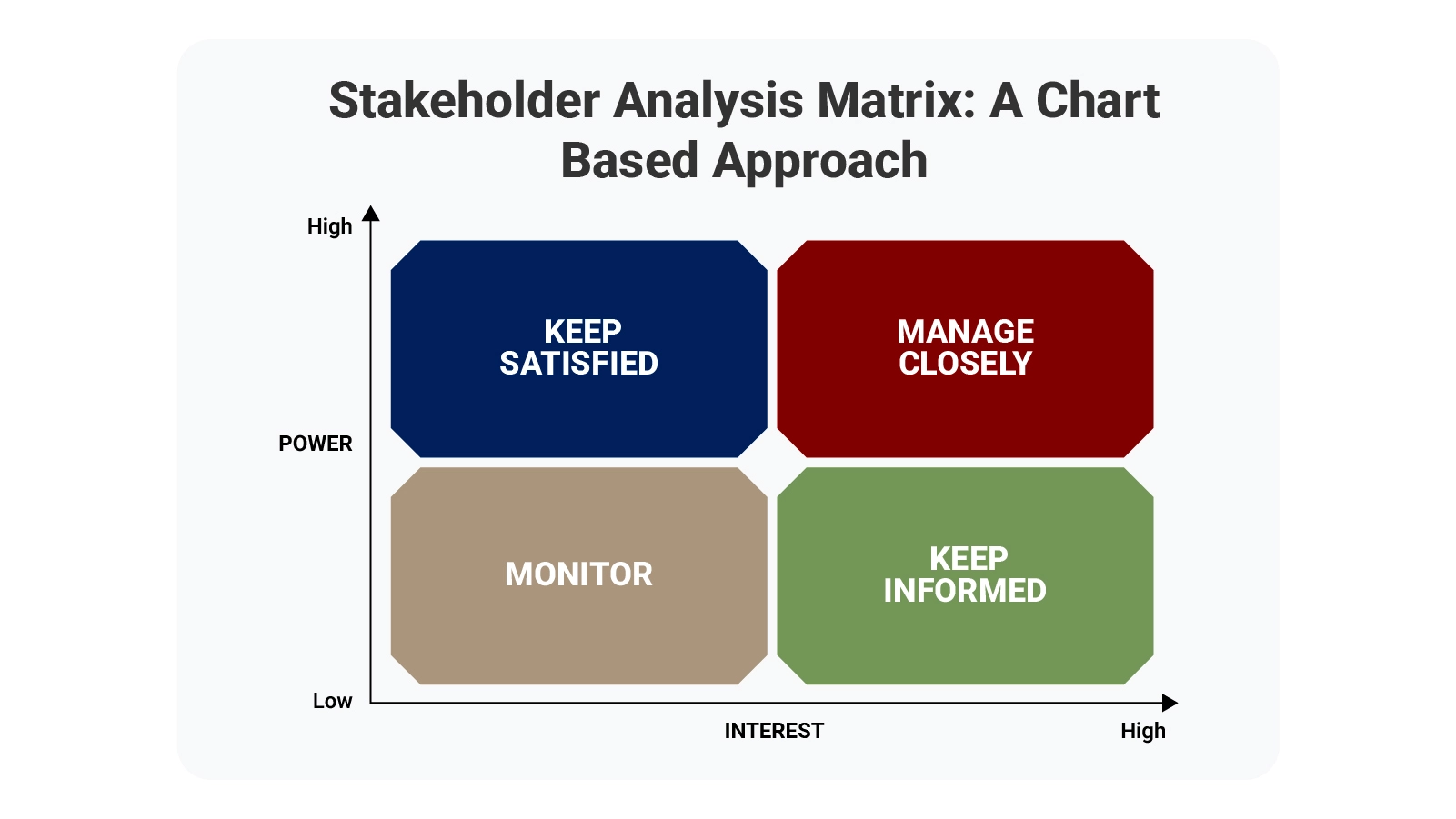
Project managers who ignore stakeholder dynamics usually regret it. A stakeholder analysis matrix maps every person or group with a stake in your work, then ranks them by two metrics: power and interest level.
Stakeholder Analysis Matrix

This visual system lets you spot exactly where to invest energy. Some people need constant updates and careful handling. Others just want occasional check-ins. The matrix shows you the difference, preventing wasted effort and missed opportunities.

When you know who matters most, you can build smarter communication plans and make decisions that stick. Risk assessment matrix principles apply here, too—anticipate problems before they land on you.

Table of Contents:

  1. What is a Stakeholder Analysis Matrix?
  2. Why is the Stakeholder Analysis Matrix Essential?
  3. Key Components to Build a Stakeholder Analysis Matrix
  4. How to Choose a Perfect Stakeholder Analysis Matrix?
  5. Stakeholder Analysis Matrix Examples
  6. How to Create a Stakeholder Analysis Matrix in Google Sheets?
  7. How to Analyze Stakeholder Matrix in Google Sheets Using ChartExpo?
  8. Benefits of a Stakeholder Matrix
  9. Tips for Creating a Stakeholder Analysis Matrix
  10. Stakeholder Analysis Matrix in Google Sheets vs ChartExpo
  11. Why ChartExpo Is Better for Stakeholder Analysis Matrix in Google Sheets
  12. FAQs
  13. Wrap Up

What is a Stakeholder Analysis Matrix?

Definition: A stakeholder analysis matrix serves as a visual mapping tool that sorts people by two factors: their capacity to affect project outcomes and their level of concern about those outcomes. Think of it as a targeting system for engagement.

Project managers lean on this framework to structure conversations and resource allocation. When stakeholders appear on clearly marked axes, patterns emerge fast. High-power, high-interest individuals demand attention.

The matrix prevents guessing about who needs what level of involvement. Teams using this framework see clearer priorities and waste less time on ineffective outreach. Everyone gets the right amount of engagement—no more, no less.

Why is the Stakeholder Analysis Matrix Essential?

Organizations using a stakeholder analysis matrix spend less time reacting to surprises. The tool forces early mapping of relationships and power structures.

Projects gain multiple advantages from systematic stakeholder tracking:

  • Ranks participants by actual impact potential.
  • Defines who owns which aspects of delivery.
  • Keeps information flowing to appropriate parties.
  • Prevents tension from unclear or competing demands.
  • Ground engagement choices in facts rather than assumptions.
  • Builds credibility through consistent follow-through.
  • Simplifies updates using spreadsheet tools.

Like any prioritization matrix, this approach channels effort toward activities that deliver measurable value. Stop distributing energy evenly when influence is distributed unevenly.

Key Components to Build a Stakeholder Analysis Matrix

Building a functional stakeholder matrix template demands precision. Structured inputs create actionable outputs.

Core elements that belong in every matrix:

  • Individual identities and their organizational positions.
  • Degree of concern about project direction.
  • Capacity to sway outcomes or block progress.
  • Specific tactics for maintaining their support.
  • Best channels for reaching them.
  • Tier assignment based on combined metrics.
  • Charts displaying relationships graphically.

Scoring influence and interest with consistency turns your matrix into something resembling a decision matrix—evidence-based rather than guesswork-driven.

How to Choose a Perfect Stakeholder Analysis Matrix?

Different projects demand different matrix configurations. Complexity, team size, and reporting requirements all shape which format works best.

Selection criteria worth considering:

  • Define what success looks like upfront.
  • Catalog everyone with any connection to the work.
  • Rate power and concern without personal bias.
  • Establish how often different groups need information.
  • Pick visualization methods that match your data.
  • Select between basic spreadsheets and specialized platforms.

Complex initiatives benefit from analyzing how stakeholder interest and influence correlate, much like examining patterns in a covariance matrix. Hidden dynamics surface early when you look for them.

Stakeholder Analysis Matrix Examples

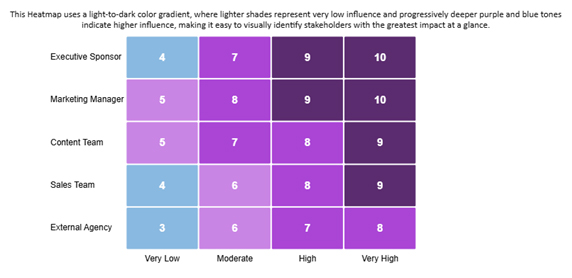
  • Marketing Project Stakeholders Influence:

Marketing initiatives demonstrate how influence grows across organizational tiers. The Marketing Manager and Executive Sponsor carry the most weight.
Stakeholder Analysis Matrix
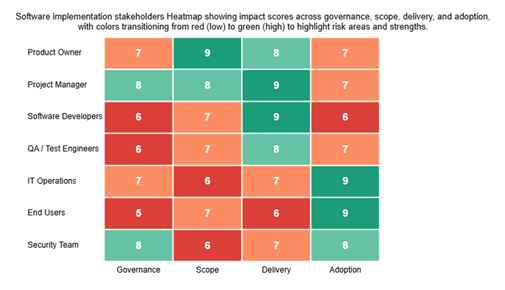
  • Software Implementation Stakeholders Impact:

Software rollouts reveal stakeholder impact through multidimensional analysis. Red-to-green coloring highlights risk zones and strength areas instantly.
Stakeholder Analysis Matrix
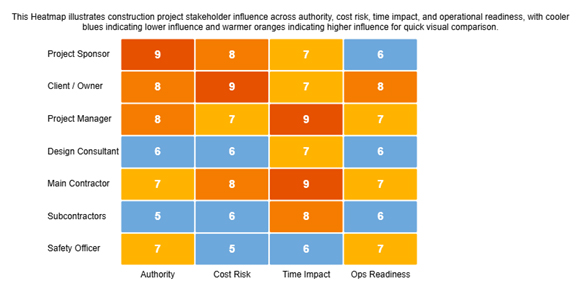
  • Construction Project Stakeholders’ Influence:

Construction scenarios map influence using blue-to-orange gradients. Authority levels become visually distinct, streamlining contractor management.
Stakeholder Analysis Matrix

These visualizations also expose co-occurrence patterns between decision-making power and engagement requirements. Spotting such relationships early prevents collaboration breakdowns.

How to Create a Stakeholder Analysis Matrix in Google Sheets?

Building your matrix in Google Sheets offers flexibility without specialized software.

Follow this process to set up your matrix:

  • Launch a blank spreadsheet file.
  • Structure rows to hold all participant names.
  • Create separate columns tracking power and engagement levels.
  • Score each person using consistent numerical scales.
  • Format cells with color gradients for instant visual scanning.
  • Grant access to team members who need visibility.

First-time visualizers should explore resources explaining how to create a chart in Google Sheets. Proper chart construction ensures influence and interest data displays without confusion.

How to Analyze Stakeholder Matrix in Google Sheets Using ChartExpo?

Turning stakeholder matrix template data into strategic insights requires more than static tables. ChartExpo converts raw information into dynamic visual intelligence.

The platform streamlines complex analysis through these steps:

  1. Add ChartExpo through the Google Sheets add-ons marketplace.
  2. Import participant data straight from your existing matrix.
  3. Select heatmap charts to cross-reference power against engagement.
  4. Watch the tool auto-segment people into priority quadrants.
  5. Surface high-risk and high-impact individuals through visual cues.
  6. Extract planning recommendations that inform communication tactics.

ChartExpo shifts stakeholder analysis from passive spreadsheets toward active decision support.

Why use ChartExpo?

  • Walks through the heatmap setup without requiring coding knowledge.
  • Provides richer formatting options than native spreadsheet features.
  • Processes thousands of stakeholder records without performance lag.
  • Costs only $10 monthly after a week-long trial period.

How to install ChartExpo in Excel?

  1. Open your Microsoft Excel.
  2. Start a worksheet and go to the ribbon tab named Insert.
  3. To open the window on Office Add-ins, click on My Apps.
  4. Go to the Add-ins window, and in the “/Store tab,” search ChartExpo.
  5. After finding it, click the Add button to install it.

Example:

Consider we have the following data for a heatmap.

Stakeholder Group Influence Category Influence Score
Executive Sponsor Very Low 4
Executive Sponsor Moderate 7
Executive Sponsor High 9
Executive Sponsor Very High 10
Marketing Manager Very Low 5
Marketing Manager Moderate 8
Marketing Manager High 9
Marketing Manager Very High 10
Content Team Very Low 5
Content Team Moderate 7
Content Team High 8
Content Team Very High 9
Sales Team Very Low 3.8
Sales Team Moderate 6
Sales Team High 7.6
Sales Team Very High 8.5
External Agency Very Low 3.4
External Agency Moderate 5.7
External Agency High 7.1
External Agency Very High 8
  • To get started with ChartExpo, install ChartExpo.
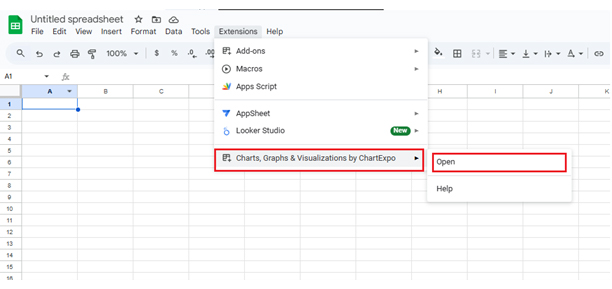
  • Go to Extensions > Charts, Graphs & Visualizations by ChartExpo > Open.
Stakeholder Analysis Matrix
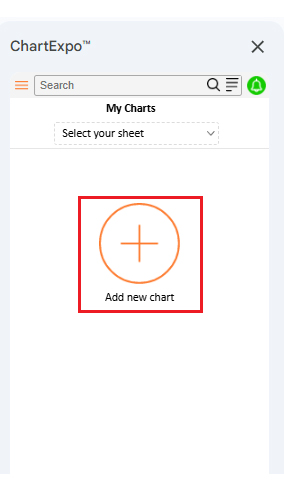
  • Once ChartExpo is installed, click on the “Add new chart” button.
Stakeholder Analysis Matrix
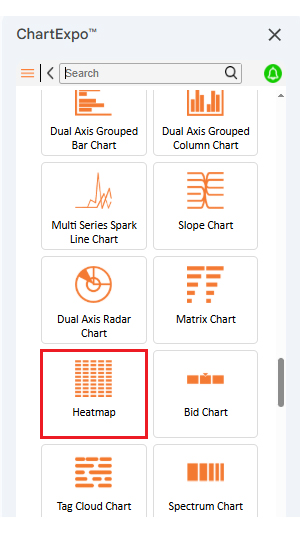
  • Once ChartExpo is loaded into your sheet, you need to search for or select the “Heatmap” in the chart options, and you are off to a good start to render your data.
Stakeholder Analysis Matrix
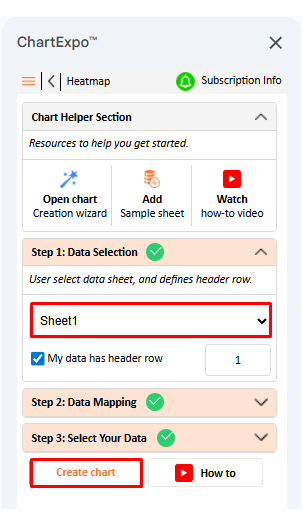
  • Then, select your worksheet and confirm the data range; your data is automatically mapped, and with a click on the Create button, your chart is generated in seconds.
Stakeholder Analysis Matrix
  • If you want to customize your chart, select the ‘Edit Chart’ option and design it to your specifications.
Stakeholder Analysis Matrix
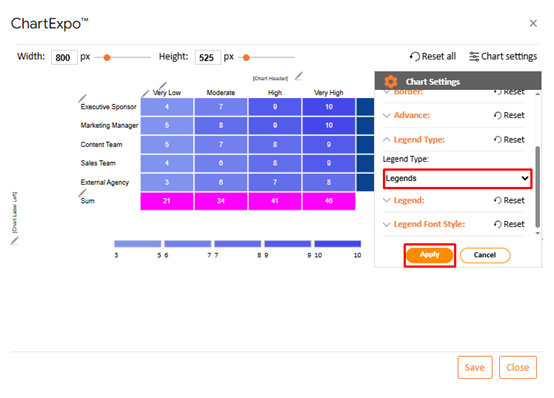
  • You can change the legend type from “Settings”.
Stakeholder Analysis Matrix
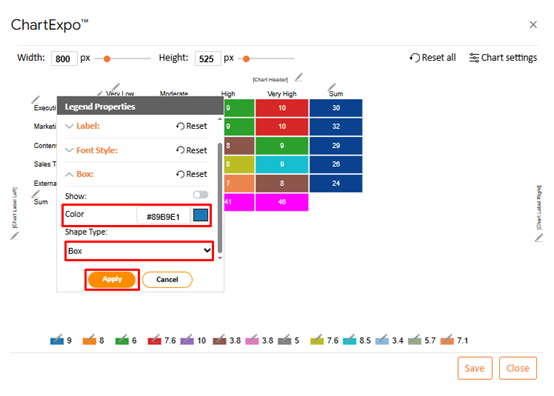
  • You can change legend colors from “Legend Properties”.
Stakeholder Analysis Matrix
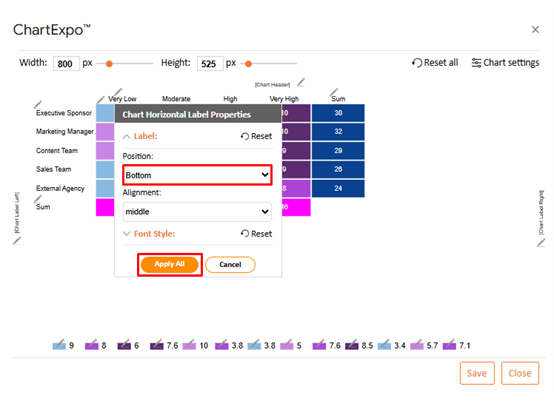
  • You can change the label position from “Chart Horizontal Label Properties”.
Stakeholder Analysis Matrix
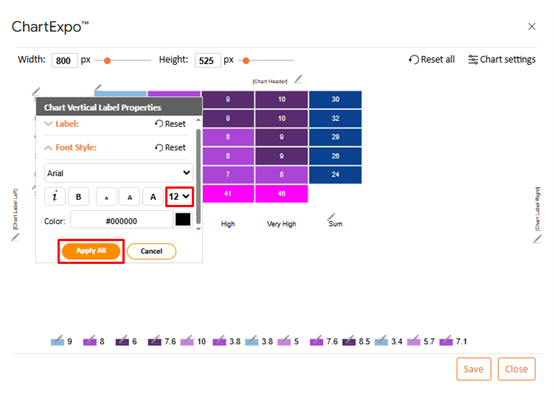
  • Next, you can increase the font size for better readability.
Stakeholder Analysis Matrix
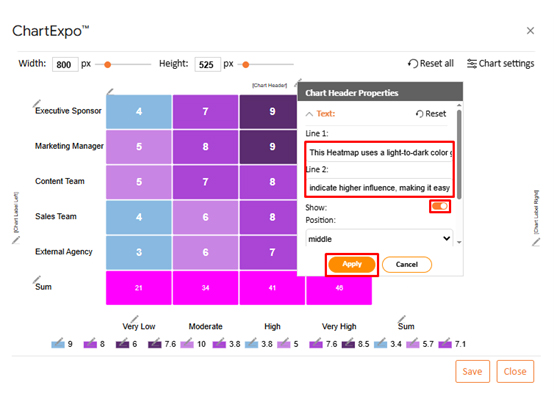
  • To add the chart’s description, select the pencil icon on the header. Then, enter the text you want and press Apply.
Stakeholder Analysis Matrix
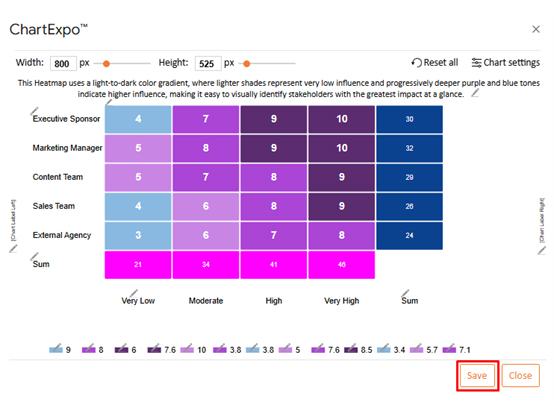
  • When you are done with all the changes, click the “Save” button to save them.
Stakeholder Analysis Matrix
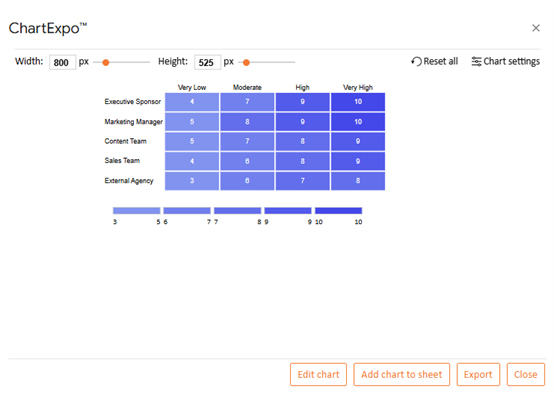
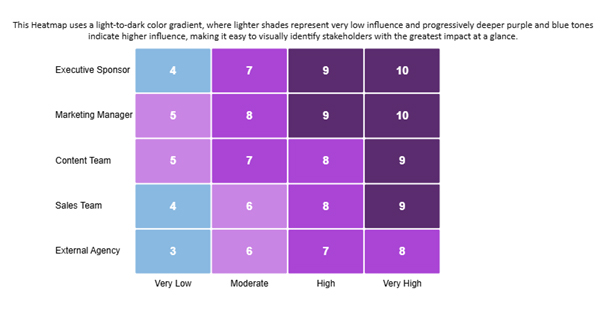
  • The final look of the Heatmap is shown below.
Stakeholder Analysis Matrix

Key Insights

  • Executive-level sponsors and marketing directors dominate the Very High influence band.
  • Power levels climb steadily from minimal to maximum across all participant types.
  • Outside vendors and sales contributors show notably reduced overall sway.

Benefits of a Stakeholder Matrix

The stakeholder analysis matrix delivers consistent value across every project phase. Structure and foresight replace reactive scrambling.

Specific advantages teams gain:

  • Objective ranking eliminates favoritism or guesswork.
  • Communication blueprints get built on solid foundations.
  • Misalignment risks drop when expectations are mapped early.
  • Leadership makes informed choices backed by stakeholder data.
  • Participation levels rise when people feel properly engaged.
  • Progress tracking stays simple through spreadsheet updates.

For finance-oriented stakeholders, pulling insights from Google Finance in Google Sheets helps synchronize engagement tactics with budget constraints and cash flow realities.

Tips for Creating a Stakeholder Analysis Matrix

Strong matrices rest on accuracy, flexibility, and relentless refinement. Shortcuts produce unreliable outputs.

Best practices that strengthen your work:

  • Cast a wide net when listing every possible stakeholder.
  • Evaluate concern levels and authority without letting bias creep in.
  • Assign people to distinct quadrants that reflect their actual position.
  • Build engagement plans tailored to each segment’s needs.
  • Stay adaptable as project circumstances shift.
  • Monitor changes and push updates to affected parties promptly.

Combining stakeholder records with trend analysis from forecasting in Google Sheets lets you anticipate shifts in power or interest before issues erupt.

Stakeholder Analysis Matrix in Google Sheets vs ChartExpo

Comparing baseline tools against advanced visualization platforms reveals where efficiency and insight quality diverge.

While native implementations depend mostly on basic Google Sheets apps, specialized solutions simplify both analysis and reporting workflows.

Feature Google Sheets ChartExpo
Ease of use Moderate High
Visual customization Limited Advanced
Data import/export Manual Automated
Time to create Longer Faster
Collaboration features Basic Enhanced
Reporting and dashboards Static Interactive

Why ChartExpo Is Better for Stakeholder Analysis Matrix in Google Sheets

ChartExpo upgrades stakeholder analysis by fusing automation, visualization clarity, and speed. Spreadsheets handle data entry just fine, but ChartExpo transforms that information into understanding.

Manual effort drops, visual precision climbs, and decision velocity accelerates. For teams managing intricate stakeholder ecosystems, ChartExpo provides a more efficient and scalable path forward.

FAQs

When should I update my Stakeholder Analysis Matrix?

You should update it whenever stakeholder roles, influence levels, or project scope change to keep insights accurate.

What are common mistakes when making a Stakeholder Analysis Matrix?

Common issues include missing key stakeholders, relying on assumptions, and failing to revisit the matrix as projects evolve.

How to make a stakeholder engagement matrix?

Identify stakeholders, assess influence and interest, define engagement strategies, and visualize them using a structured matrix.

Wrap Up

Stakeholder matrices help project teams direct their relationship-building efforts where those efforts actually matter most and deliver value.

Risks shrink, and decision quality improves when you know exactly who holds power and cares about outcomes. Every project faces limited time and resources, making strategic engagement essential rather than optional.

Pairing Google Sheets with ChartExpo makes stakeholder data easier to visualize, interpret, and act on purposefully and effectively.

This combination ensures clarity, alignment, and smarter engagement choices throughout the entire project lifecycle.

Teams that map influence patterns consistently outperform those operating on assumptions alone. The investment delivers measurable returns through stronger relationships.

How much did you enjoy this article?

PBIAd1
Start Free Trial!
159751

Related articles

next previous
Data Analytics7 min read

Sales Follow-Up Statistics: Insights That Improve Follow-Ups

Track response speed, outreach frequency, and conversions with sales follow up statistics. Learn what these metrics reveal. Read on!

Data Analytics9 min read

Nominal vs. Ordinal Data: Key Differences Explained

Explore the differences between nominal vs. ordinal data types and learn when to use each for accurate analysis. Discover now!

Data Analytics10 min read

Fleet Management Dashboard: Features, Metrics, and Tips

Fleet Management Dashboard tracks vehicles, drivers, and fuel usage in real time. Build actionable insights using Power BI visuals. Learn more now!

Data Analytics9 min read

Board Report Template: A Complete Walkthrough

Board Report Templates streamline governance with decision-ready insights. Build effective formats that strengthen oversight. Discover how!

Data Analytics10 min read

Online Retailer Demand Forecasting and Price Optimization

Analytics for an Online Retailer Demand Forecasting and Price Optimization: build forecasts, set prices, avoid stockouts, and see trends. Read on!

ChartExpo logo

Turn Data into Visual
Stories

CHARTEXPO

  • Home
  • Gallery
  • Videos
  • Services
  • Pricing
  • Contact us
  • FAQs
  • Privacy policy
  • Terms of Service
  • Sitemap

TOOLS

  • ChartExpo for Google Sheets
  • ChartExpo for Microsoft Excel
  • Power BI Custom Visuals by ChartExpo
  • Word Cloud

CATEGORIES

  • Bar Charts
  • Circle Graphs
  • Column Charts
  • Combo Charts
  • Comparison Charts
  • Line Graphs
  • PPC Charts
  • Sentiment Analysis Charts
  • Survey Charts

TOP CHARTS

  • Sankey Diagram
  • Likert Scale Chart
  • Comparison Bar Chart
  • Pareto Chart
  • Funnel Chart
  • Gauge Chart
  • Radar Chart
  • Radial Bar Chart
  • Sunburst Chart
  • see more
  • Scatter Plot Chart
  • CSAT Survey Bar Chart
  • CSAT Survey Chart
  • Dot Plot Chart
  • Double Bar Graph
  • Matrix Chart
  • Multi Axis Line Chart
  • Overlapping Bar Chart
  • Control Chart
  • Slope Chart
  • Clustered Bar Chart
  • Clustered Column Chart
  • Box and Whisker Plot
  • Tornado Chart
  • Waterfall Chart
  • Word Cloud
  • see less

RESOURCES

  • Blog
  • Resources
  • YouTube
SIGN UP FOR UPDATES

We wouldn't dream of spamming you or selling your info.

© 2026 ChartExpo, all rights reserved.