• Home
  • Tools dropdown img
    • Spreadsheet Charts

      • ChartExpo for Google Sheets
      • ChartExpo for Microsoft Excel
    • Power BI Charts

      • Power BI Custom Visuals by ChartExpo
    • Word Cloud

  • Charts dropdown img
    • Chart Category

      • Bar Charts
      • Circle Graphs
      • Column Charts
      • Combo Charts
      • Comparison Charts
      • Line Graphs
      • PPC Charts
      • Sentiment Analysis Charts
      • Survey Charts
    • Chart Type

      • Box and Whisker Plot
      • Clustered Bar Chart
      • Clustered Column Chart
      • Comparison Bar Chart
      • Control Chart
      • CSAT Survey Bar Chart
      • CSAT Survey Chart
      • Dot Plot Chart
      • Double Bar Graph
      • Funnel Chart
      • Gauge Chart
      • Likert Scale Chart
      • Matrix Chart
      • Multi Axis Line Chart
      • Overlapping Bar Chart
      • Pareto Chart
      • Radar Chart
      • Radial Bar Chart
      • Sankey Diagram
      • Scatter Plot Chart
      • Slope Chart
      • Sunburst Chart
      • Tornado Chart
      • Waterfall Chart
      • Word Cloud
    • Google Sheets
      Microsoft Excel
  • Services
  • Pricing
  • Contact us
  • Blog
  • Support dropdown img
      • Gallery
      • Videos
      • Contact us
      • FAQs
      • Resources
    • Please feel free to contact us

      atsupport@chartexpo.com

Categories
All Data Visualizations Data Analytics Surveys
Add-ons/
  • Google Sheets
  • Microsoft Excel
  • Power BI
All Data Visualizations Data Analytics Surveys
Add-ons
  • Google Sheets
  • Microsoft Excel
  • Power BI

We use cookies

This website uses cookies to provide better user experience and user's session management.
By continuing visiting this website you consent the use of these cookies.

Ok

ChartExpo Survey


Home > Blog > Data Analytics

Consulting Report Template: A Complete Guide

Presenting complex findings to clients demands more than solid research. Without a clear structure, even well-supported insights can fail to land before the conversation ends.
Consulting Report Template

Professionals who communicate value consistently know that a well-organized report is what separates credible advisors from those who struggle to be heard.

This guide breaks down the Consulting Report Template: what it includes, why structure matters, which types exist for different engagements, and how to analyze data within one effectively. Whether you are new to client reporting or refining a long-running process, each section here offers practical detail you can put to use right away.

What is a Consulting Report Template?

Definition: A consulting report template is a structured document that organizes a consultant’s findings, analysis, and recommendations into a format clients can follow from the problem definition through to the final action plan.

Rather than rebuilding a report layout for each engagement, consultants rely on templates to keep deliverables organized, professional, and complete. A reliable template covers executive summaries, research methodology, data analysis, and strategic recommendations.

This approach lets consultants communicate complex ideas without sacrificing clarity. Many teams also use a consultant report template in Excel to process raw datasets, then translate results into polished reports that follow a consistent consultation report format.

Why is a Consulting Report Template Important?

A consulting report template in Excel ensures that client deliverables follow a clear, predictable structure from one project to the next. Key reasons include:

  • Ensures consistent structure: Follows a standardized format aligned with a management report, so all reporting teams organize content the same way.
  • Improves clarity of insights: Translates complex analysis into a format that stakeholders can evaluate without needing specialized expertise.
  • Enhances professionalism: Produces reports that reflect a high standard of organization and reinforces client confidence in the consultant.
  • Saves preparation time: Removes the need to build a reporting structure from the ground up for every new client engagement.
  • Aligns stakeholders: Gives all decision-makers access to the same structured information so reviews stay focused and productive.
  • Supports data-driven decisions: Arranges metrics and insights in a way that makes data reporting straightforward for every stakeholder.
  • Prevents missing sections: Keeps required components such as findings and recommendations present in every deliverable without exception.

Key Components of a Consulting Report Template

Every consulting report template organizes content so readers move logically from the problem definition through to concrete next steps. Key components include:

  • Executive summary: Captures the report’s purpose, primary findings, and recommendations in a brief opening section, similar to the overview in an analytical report template.
  • Problem statement: Specifies the business challenge or project objective the consulting engagement was designed to address.
  • Methodology: Describes the research tools, analytical methods, and data collection approach applied throughout the project.
  • Key findings: Summarizes the most significant patterns and insights uncovered during the analysis phase.
  • Data visuals: Incorporates charts and dashboards to make complex information accessible, similar to the visuals found in a marketing report.
  • Recommendations: Presents strategic actions the client should take based on the insights produced during the project.
  • Next steps: Details the implementation actions stakeholders need to take after reviewing the report’s conclusions.

Types of Consulting Report Templates

Each consulting engagement calls for a reporting format that fits its scope and objectives. The structure of a consulting report template shifts depending on the industry, project type, and the nature of the analysis involved.

Below are common types consultants use in practice.

  • Strategy Report Template

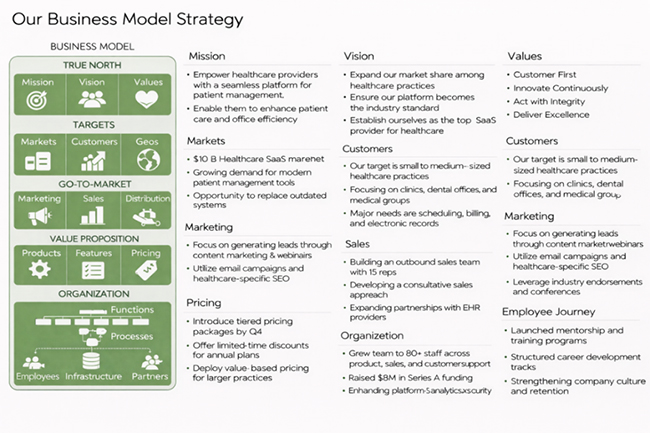
The strategy report template supports long-term business planning by mapping out market opportunities, competitive positioning, and growth priorities for executive decision-making.
Consulting Report Template
  • Financial Report Template

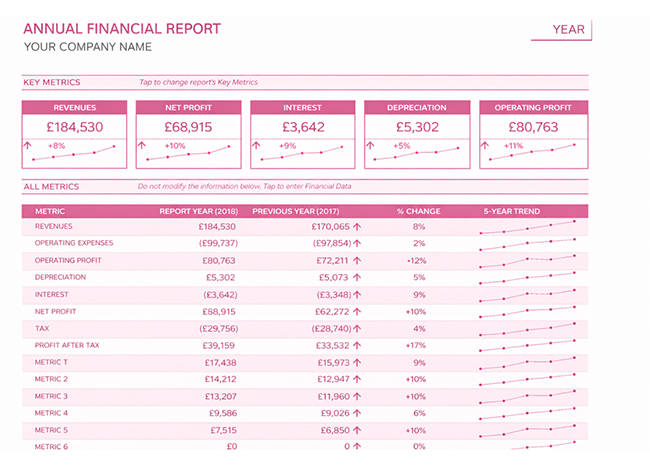
A financial report template presents a company’s revenues, costs, profitability, and key financial indicators in a structured layout covering a defined reporting period.
Consulting Report Template
  • Market Research Template

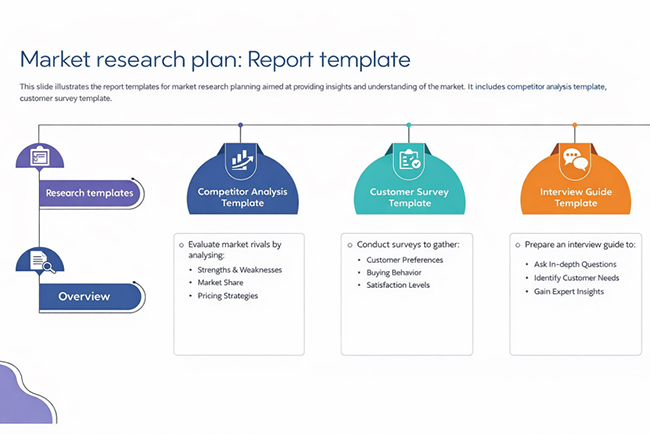
A market research template provides a structured format for gathering, organizing, and interpreting data about target markets, customer segments, and competitive dynamics.
Consulting Report Template
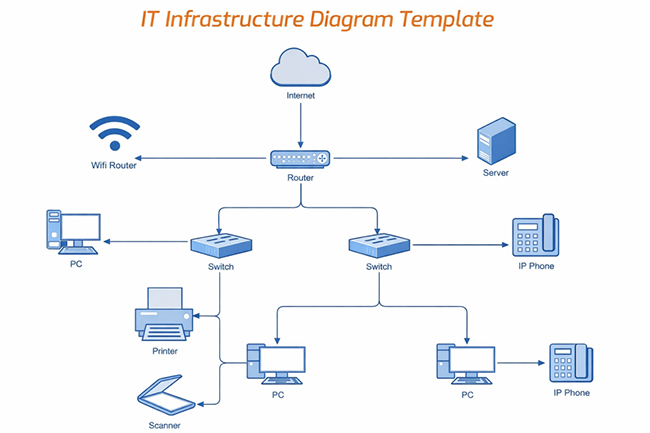
  • IT Consulting Template

An IT consulting template offers a structured approach for assessing technology systems, identifying gaps, and documenting recommended solutions.
Consulting Report Template
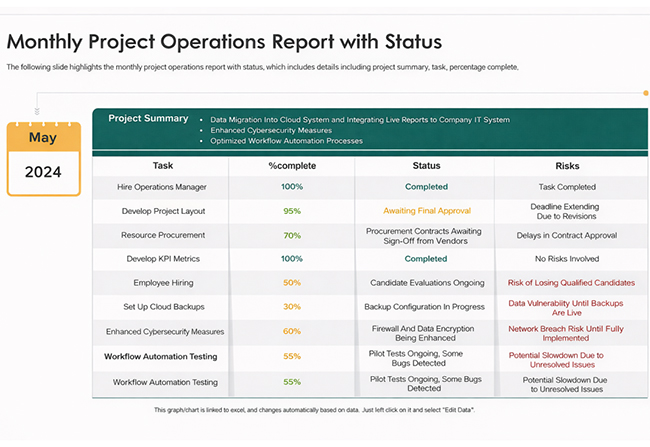
  • Operations Report Template

An operations report template tracks and summarizes operational activities, resource utilization, and performance against targets across defined time periods.
Consulting Report Template
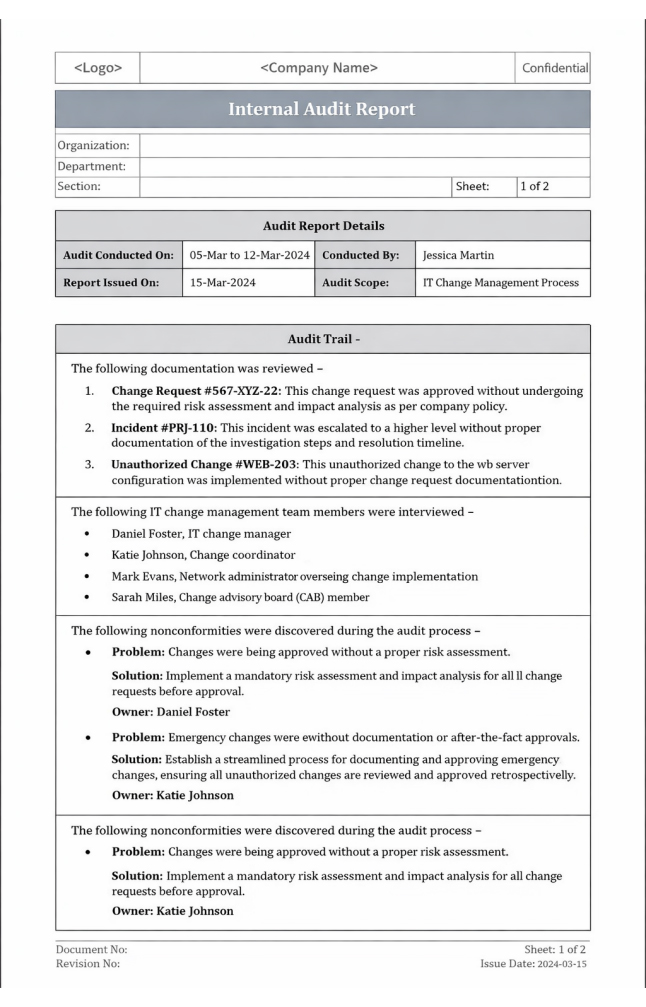
  • Audit Report Template

An audit report template documents findings from a formal audit, recording observations, compliance gaps, and the corrective actions recommended.
Consulting Report Template

Consulting Report Template Examples

Seeing a consulting report template in context clarifies its value. These examples show how data insights become structured recommendations that businesses can act on.

Below are three common examples used by consulting firms.

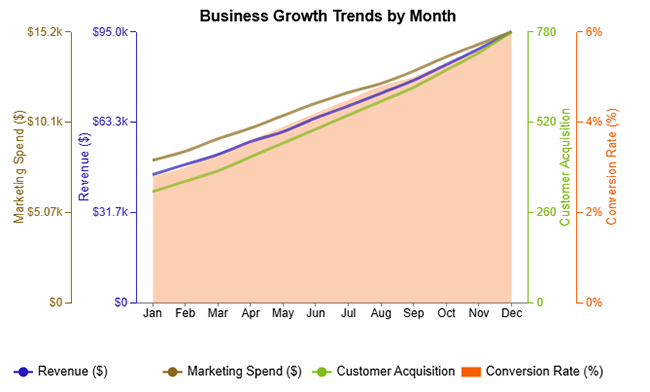
  • Monthly Business Growth Trends

The Monthly Business Growth Trends example tracks consistent gains across revenue, marketing spend, customer acquisition, and conversion rate throughout the year.
Consulting Report Template
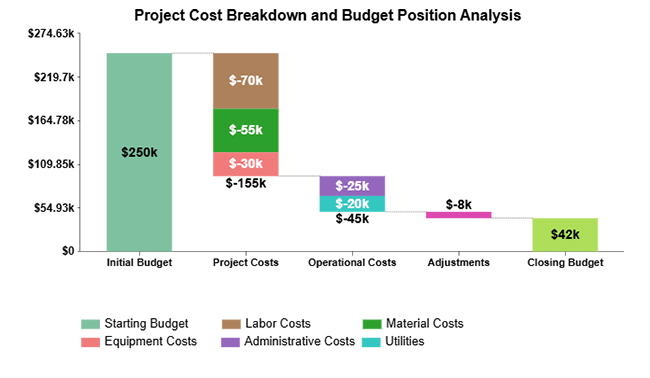
  • Project Cost Breakdown

The Project Cost Breakdown example illustrates how individual expense reductions across categories combine to lower total operational costs.
Consulting Report Template
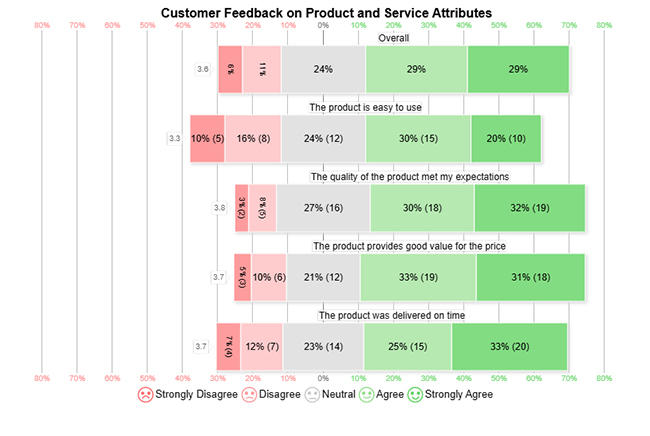
  • Customer Feedback on Product and Service Attributes

The Customer Feedback on Product and Service Attributes example measures client satisfaction levels across key product and service dimensions.
Consulting Report Template

How to Write a Consulting Report Step by Step

Building a professional report demands both logical structure and deliberate content choices. A consulting report template guides consultants through each stage so nothing critical gets overlooked.

Follow these steps to create an effective report:

1. Define objectives

Establish the project’s purpose and specify the questions the analysis must answer before any content is drafted.

2. Outline sections

Create a logical content framework that covers summaries, supporting findings, and recommendation sections.

3. Standardize formatting

Apply consistent heading styles, typography choices, and layout rules across every section of the document.

4. Add data placeholders

Reserve space for charts, tables, and insights pulled from an expense report template in Excel or similar data sources.

5. Insert branding elements

Incorporate company logos, color schemes, and visual design elements that reflect organizational identity.

6. Review and refine

Verify that the finished report delivers its insights clearly and conforms to the intended consultation report format before submission.

How to Analyze a Consulting Report Template in Excel?

A consultant report template in Excel turns raw datasets into an organized analysis that supports strategic decisions.

Follow these steps to analyze consulting data effectively:

  • Import and organize data:

Pull datasets from relevant sources and arrange them in a clean table structure, which is the foundation of how to create a report in Excel.

  • Clean and validate the data:

Eliminate duplicate entries, resolve inconsistencies, and verify that all values meet accuracy requirements before proceeding.

  • Create summary tables:

Apply formulas or pivot tables to aggregate key metrics and surface trends across the dataset.

  • Visualize insights with charts:

Transform aggregated data into visual formats that make comparisons and patterns immediately apparent.

  • Enhance visualization with an add-in:

While standard charts provide an overview, add-in tools let consultants produce advanced visuals such as Multi Axis Line Charts and comparative dashboards.

  • Translate insights into recommendations:

Use the visual output to surface patterns, flag risks, and build conclusions comparable to those derived from a cost versus value report.

  • Final Visuals:

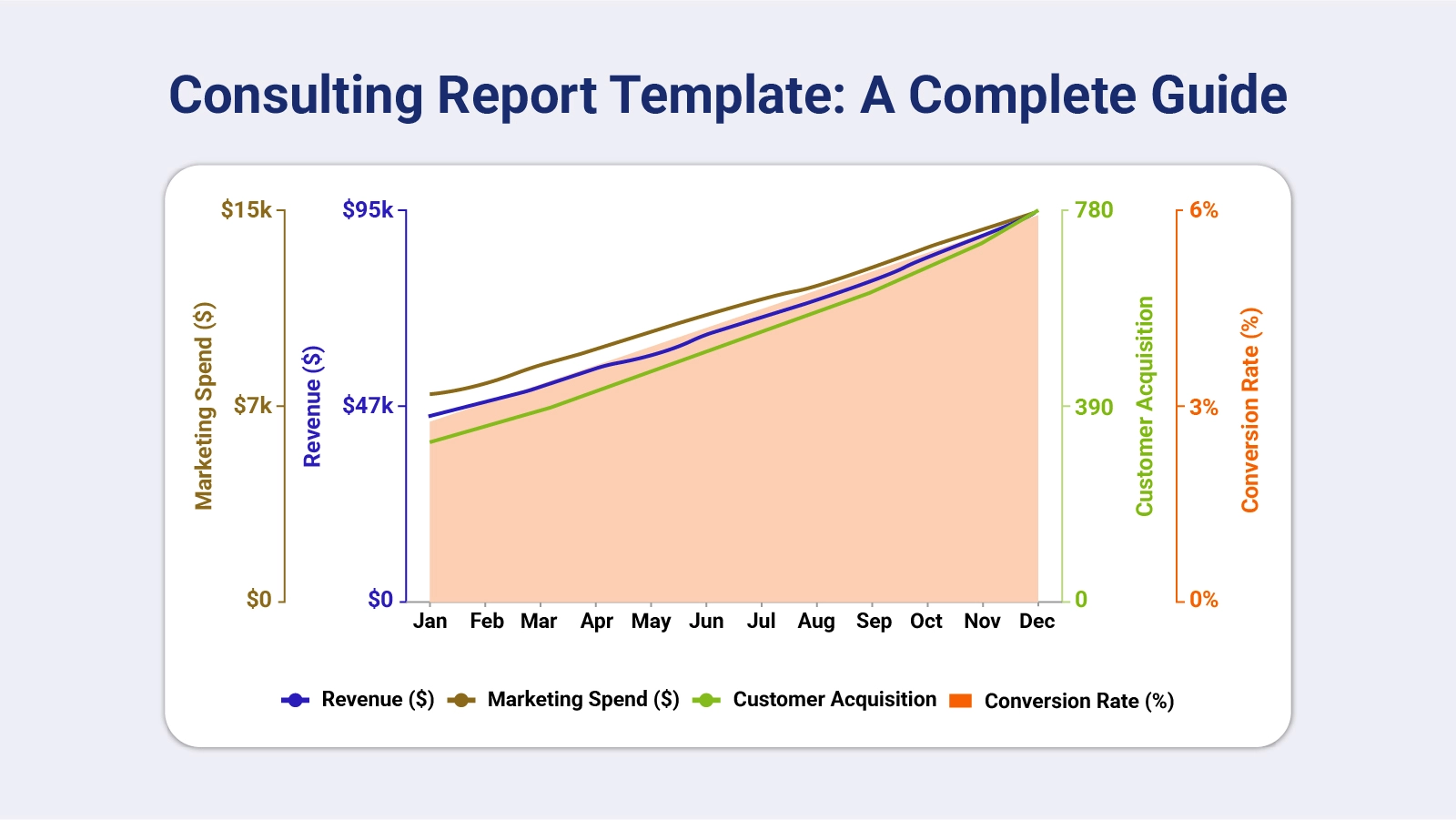
The chart shows steady monthly growth across key metrics—revenue, marketing spend, customer acquisition, and conversion rate—all increasing consistently from January to December.
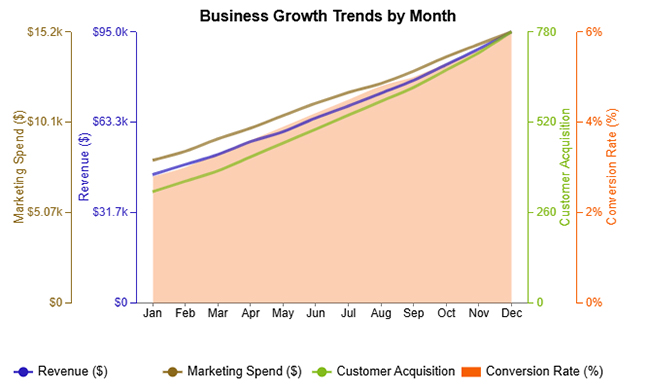
This indicates strong business scaling, where higher marketing investment correlates with more customers, improved conversions, and rising revenue over time.

Consulting Report Template

Key Insights

  • Year-long revenue shows a consistent upward pattern, reaching its peak in December.
  • Spending on marketing climbs incrementally across the period to sustain business expansion.
  • Both the number of customers acquired and the conversion rate record gains over time.

Benefits of Using a Structured Consulting Report Template

A structured consulting report template raises both the quality and the speed of every consulting deliverable. Benefits include:

  • Maintains consistency: Keeps every report following the same structured format so nothing important varies from one engagement to the next.
  • Improves transparency: Lays out insights in a clear sequence, comparable to the organization found in a monthly financial report template.
  • Speeds delivery: Cuts preparation time by giving consultants a ready-made reporting framework they can populate immediately.
  • Strengthens branding: Keeps logos, typography, and color choices uniform so every report reinforces the firm’s visual identity.
  • Simplifies communication: Presents dense information in a structured sequence that stakeholders can follow without needing prior technical knowledge.
  • Scales processes: Let teams reuse proven frameworks and track expenditure in the same way a small business expense report keeps costs visible.

Common Mistakes to Avoid in Consulting Reports

Strong analytical skills alone do not guarantee a useful consulting report. Certain reporting habits reduce the value of even solid research. Common mistakes include:

  • Too much raw data: Filling the report with unprocessed data buries the most important findings under unnecessary detail.
  • Weak executive summary: An unfocused opening section fails to communicate key findings and leaves decision-makers without clear direction.
  • Unclear recommendations: Vague action items without specific steps create confusion and slow down stakeholder response.
  • Poor visuals: Charts or graphs that are difficult to read force the audience to interpret raw information rather than act on clear insights.
  • Ignoring objectives: A report that drifts from the original project goals produces findings that are technically sound but practically irrelevant.
  • Inconsistent formatting: Varying layouts, fonts, and visual styles throughout the report signal a lack of attention to detail and weaken its authority.

Best Practices for Consulting Report Template

An effective consulting report template requires deliberate planning at the design stage. When the structure is sound, even complex insights come through clearly.

Follow these best practices when designing consulting reports:

  • Keep reports concise: Concentrate on the findings that matter most and cut any content that does not advance the client’s understanding.
  • Use clear headings: Organize the document with descriptive section titles that let readers locate specific information quickly.
  • Support insights with visuals: Back analysis with credible data and charts, comparable to the visualizations used in a market intelligence report.
  • Maintain consistent formatting: Apply uniform layout rules, typefaces, and branding across all sections to reinforce a professional appearance.
  • Provide actionable recommendations: Ground every suggestion in a specific, practical step the client can realistically implement.

FAQs

How do you structure a consulting report?

A consulting report typically opens with an executive summary, followed by a problem statement, methodology, key findings, data visuals, and recommendations that move stakeholders from analysis to a clear course of action.

How long should a consulting report be?

Length depends on project scope. Focused engagements may require only a concise summary, while complex strategic projects can justify a more detailed document.

What should a consulting report include?

A complete report covers project objectives, research methodology, key insights, supporting visuals, and specific recommendations that give stakeholders a foundation for decision-making.

How is a consulting report different from a business report?

A consulting report centers on analysis and strategic recommendations, whereas a business report primarily documents operational activity or tracks performance against set targets.

Wrap Up

A Consulting Report Template gives every client engagement a solid foundation for clear, credible communication. From identifying the core problem through to laying out specific implementation steps, a well-structured format ensures clients receive findings they can act on directly rather than raw data they must interpret without guidance.

Apply the types, components, and best practices covered in this guide to build deliverables that reflect real analytical rigor and professional discipline. When you pair the right template structure with reliable visualization tools, each finished report becomes a stronger and more convincing basis for the strategic decisions your clients need to make.

How much did you enjoy this article?

ExcelAd1
Start Free Trial!
154699

Related articles

next previous
Data Analytics10 min read

How to Calculate Closing Costs: Easy Formula and Visuals

How to calculate closing costs correctly before any deal closes. Compare fees, plan your budget, and stay in control. Read on now!

Data Analytics10 min read

How to Normalize Data: Step-by-Step Guide

How to normalize data transforms raw datasets into reliable insights. Explore methods, best practices, and step-by-step techniques. Read on!

Data Analytics9 min read

Investment Performance Reporting: Insights for Better ROI

Investment performance reporting turns raw data into portfolio insights. Learn key metrics, report types, and analysis methods. Read on!

Data Analytics10 min read

Pay Equity Analysis: Smart Ways to Analyze Pay Gaps

Pay equity analysis uncovers hidden salary gaps. Learn how to measure compensation fairness, close pay disparities, and build trust. Read on!

Data Analytics10 min read

What Are Sales KPIs: Sales Metrics Made Easy

What are sales KPIs, and why should every business track them? Learn the top indicators, how to measure them, and improve results. Read on!

ChartExpo logo

Turn Data into Visual
Stories

CHARTEXPO

  • Home
  • Gallery
  • Videos
  • Services
  • Pricing
  • Contact us
  • FAQs
  • Privacy policy
  • Terms of Service
  • Sitemap

TOOLS

  • ChartExpo for Google Sheets
  • ChartExpo for Microsoft Excel
  • Power BI Custom Visuals by ChartExpo
  • Word Cloud

CATEGORIES

  • Bar Charts
  • Circle Graphs
  • Column Charts
  • Combo Charts
  • Comparison Charts
  • Line Graphs
  • PPC Charts
  • Sentiment Analysis Charts
  • Survey Charts

TOP CHARTS

  • Sankey Diagram
  • Likert Scale Chart
  • Comparison Bar Chart
  • Pareto Chart
  • Funnel Chart
  • Gauge Chart
  • Radar Chart
  • Radial Bar Chart
  • Sunburst Chart
  • see more
  • Scatter Plot Chart
  • CSAT Survey Bar Chart
  • CSAT Survey Chart
  • Dot Plot Chart
  • Double Bar Graph
  • Matrix Chart
  • Multi Axis Line Chart
  • Overlapping Bar Chart
  • Control Chart
  • Slope Chart
  • Clustered Bar Chart
  • Clustered Column Chart
  • Box and Whisker Plot
  • Tornado Chart
  • Waterfall Chart
  • Word Cloud
  • see less

RESOURCES

  • Blog
  • Resources
  • YouTube
SIGN UP FOR UPDATES

We wouldn't dream of spamming you or selling your info.

© 2026 ChartExpo, all rights reserved.






