• Home
  • Tools dropdown img
    • Spreadsheet Charts

      • ChartExpo for Google Sheets
      • ChartExpo for Microsoft Excel
    • Power BI Charts

      • Power BI Custom Visuals by ChartExpo
    • Word Cloud

  • Charts dropdown img
    • Chart Category

      • Bar Charts
      • Circle Graphs
      • Column Charts
      • Combo Charts
      • Comparison Charts
      • Line Graphs
      • PPC Charts
      • Sentiment Analysis Charts
      • Survey Charts
    • Chart Type

      • Box and Whisker Plot
      • Clustered Bar Chart
      • Clustered Column Chart
      • Comparison Bar Chart
      • Control Chart
      • CSAT Survey Bar Chart
      • CSAT Survey Chart
      • Dot Plot Chart
      • Double Bar Graph
      • Funnel Chart
      • Gauge Chart
      • Likert Scale Chart
      • Matrix Chart
      • Multi Axis Line Chart
      • Overlapping Bar Chart
      • Pareto Chart
      • Radar Chart
      • Radial Bar Chart
      • Sankey Diagram
      • Scatter Plot Chart
      • Slope Chart
      • Sunburst Chart
      • Tornado Chart
      • Waterfall Chart
      • Word Cloud
    • Google Sheets
      Microsoft Excel
  • Services
  • Pricing
  • Contact us
  • Blog
  • Support dropdown img
      • Gallery
      • Videos
      • Contact us
      • FAQs
      • Resources
    • Please feel free to contact us

      atsupport@chartexpo.com

Categories
All Data Visualizations Data Analytics Surveys
Add-ons/
  • Google Sheets
  • Microsoft Excel
  • Power BI
All Data Visualizations Data Analytics Surveys
Add-ons
  • Google Sheets
  • Microsoft Excel
  • Power BI

We use cookies

This website uses cookies to provide better user experience and user's session management.
By continuing visiting this website you consent the use of these cookies.

Ok

ChartExpo Survey


Home > Blog > Surveys

How to Interpret 4-Point Likert Scale Results?

Tracking opinions, feedback, and customer sentiment is essential for making better decisions. But when surveys include a neutral option, responses often become unclear and harder to interpret.

That’s where a 4-point Likert scale becomes useful.

A 4-point Likert scale removes the neutral choice and encourages respondents to take a clear position. This makes the data more decisive, easier to analyze, and more valuable for identifying real trends.
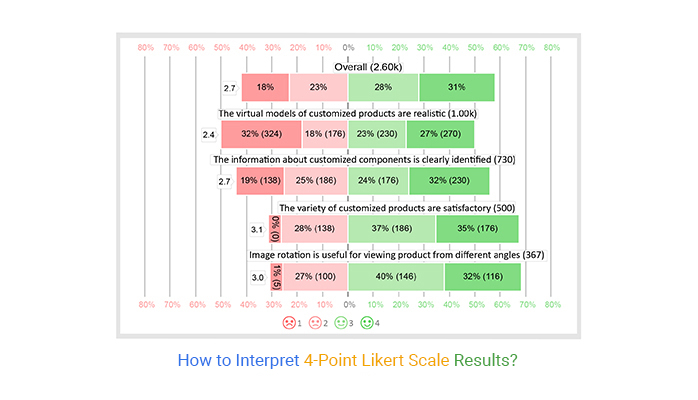
4 point likert scale

However, while collecting responses is straightforward, presenting this data clearly and meaningfully can be challenging, especially in Excel.

In this guide, you’ll learn how it works and how to create and visualize it effectively.

What is the 4-Point Likert Scale?

Definition: A 4-point Likert Scale is a survey tool used to measure attitudes, opinions, or perceptions. It provides respondents with four response options, forcing them to indicate a preference without a neutral choice.

likert scale chart

This scale helps gauge the intensity of opinions while simplifying analysis. Unlike longer Likert scales, it lacks a neutral midpoint, making it a forced-choice scale that encourages respondents to take a clear stance.

The 4-level opinion scale is widely used in psychology, market research, and social studies for its brevity, ease of interpretation, and ability to collect actionable data. Removing a neutral option helps researchers obtain more decisive responses.

Why use the 4-Point Likert Scale?

  • Eliminate neutral responses: Forces respondents to take a clear stance between agreement and disagreement.
  • Improve data reliability: Capture more decisive opinions to make survey results actionable.
  • Simplify analysis: Easily identify trends and patterns in the collected data.
  • Apply in practice: Perfect for employee surveys, product feedback, and course evaluations where clear insights are needed.
  • Gain brevity over longer scales: Remove ambiguity and speed up responses without losing meaningful information.

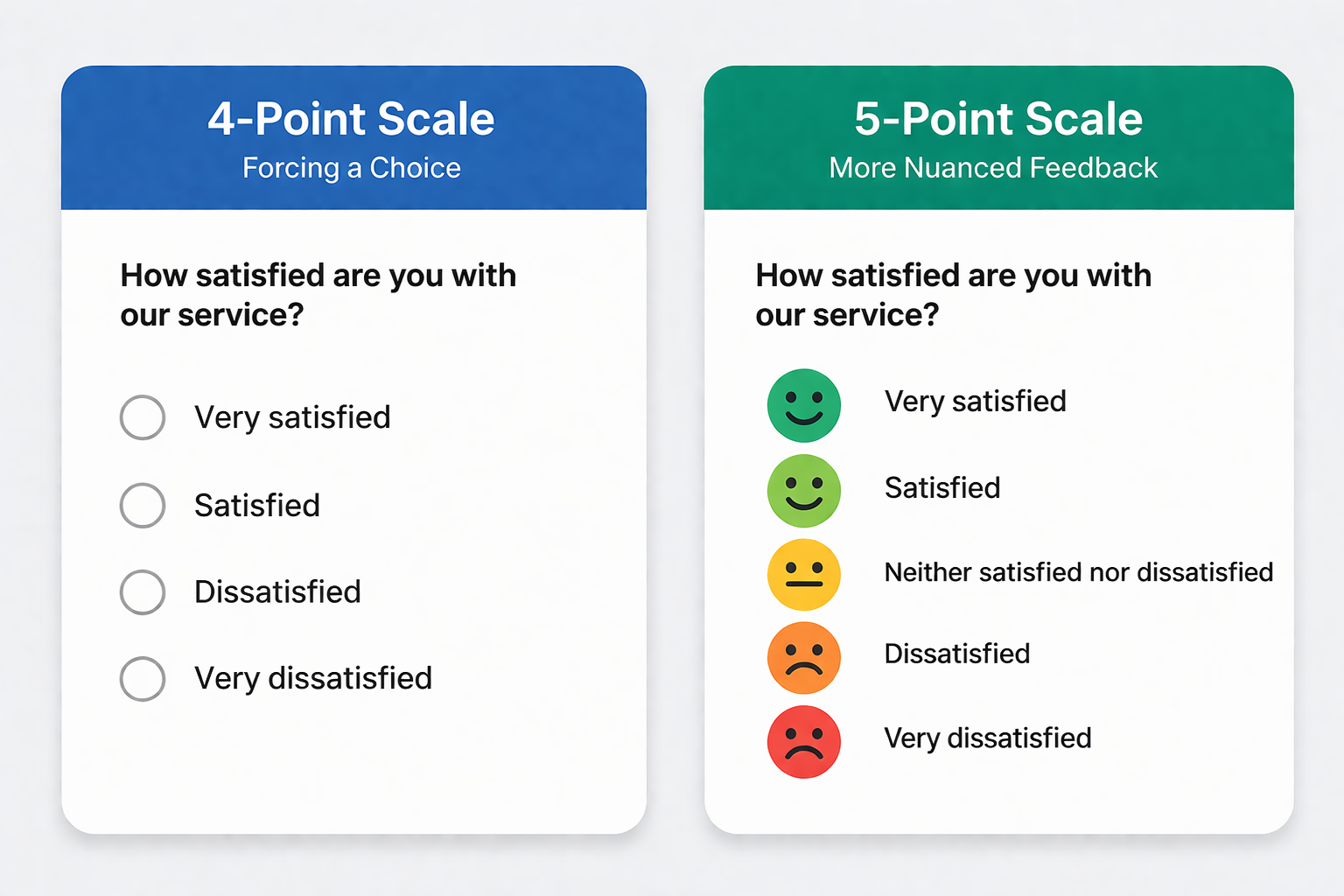
  5-Point vs. 4 Point Likert Scale

Both 5-point and 4-point Likert scales are widely used in surveys to measure opinions, but they differ in how they handle neutrality and response flexibility.

5-Point vs. 4 Point Likert Scale

4-Point Likert Scale Examples

Below are practical examples used in different survey scenarios. Each example removes the neutral option to encourage clear and actionable responses.

Customer Satisfaction

How satisfied are you with our customer service?

  • Very Dissatisfied
  • Dissatisfied
  • Satisfied
  • Very Satisfied

Product Quality

How would you rate the quality of our product?

  • Very Poor
  • Poor
  • Good
  • Excellent

Service Efficiency

How would you rate the speed of service you received?

  • Very Slow
  • Slow
  • Fast
  • Very Fast

Work Environment

How comfortable is your current work environment?

  • Very Uncomfortable
  • Uncomfortable
  • Comfortable
  • Very Comfortable

Training Effectiveness

How effective was the training session?

  • Not Effective
  • Slightly Effective
  • Effective
  • Very Effective

Website Experience

How easy is it to navigate our website?

  • Very Difficult
  • Difficult
  • Easy
  • Very Easy

How to Create a 4-Point Likert Scale: Step-by-Step

Step 1: Define Your Objective

  • Identify what you want to measure, such as customer satisfaction, employee feedback, or product experience. A clear goal ensures relevant questions.

Step 2: Write Clear Survey Questions

  • Create simple, specific questions that focus on one idea at a time. Avoid vague or double-barreled questions.

Step 3: Choose a Consistent Scale

  • Select four response options that reflect intensity, such as:
    • Strongly Disagree
    • Disagree
    • Agree
    • Strongly Agree

Step 4: Remove the Neutral Option

  • Ensure there is no middle choice so respondents are encouraged to take a clear position.

Step 5: Keep Wording Balanced

  • Use symmetrical and consistent language across all options to avoid bias in responses.

Step 6: Test Your Scale

  • Run a quick test with a small group to check clarity, consistency, and understanding.

Step 7: Analyze and Use the Data

  • Collect responses and analyze patterns to gain insights and support decision-making.

How to Calculate a 4-Point Likert Scale?

To calculate a four-point Likert Scale, assign numerical values to each response option:

  • Strongly Disagree = 1
  • Disagree = 2
  • Agree = 3
  • Strongly Agree = 4

Next, calculate the mean score using the formula:

Mean = (Sum of all responses) ÷ (Total number of responses)

This average helps determine the overall sentiment of respondents.

You can also analyze the distribution of responses by calculating:

  • Frequency: Number of times each option is selected
  • Percentage: (Frequency ÷ Total responses) × 100

Finally, identify the mode, which is the most frequently selected response, to understand the dominant opinion.

Scores closer to 4 indicate positive sentiment, while scores closer to 1 reflect negative sentiment.

Interpretation of a 4-Point Likert Scale

Interpreting a 4-option scale involves analyzing the mean score and response distribution to understand overall sentiment.

Mean Score

  • Scores closer to 4 indicate positive sentiment, while scores closer to 1 indicate negative sentiment.
  • For example, values above 3.0 suggest overall satisfaction, while values below 2.5 indicate concern.

Response Distribution

  • Analyze the percentage split between negative (red) and positive (green) responses.
  • A higher proportion of green indicates agreement, while more red highlights dissatisfaction.

Balance of Responses

  • Even if the mean is moderate (e.g., 2.7), a mixed distribution suggests divided opinions rather than a clear trend.

Overall Insight

  • Since there is no neutral option, the results clearly show whether responses lean toward agreement or disagreement, making it easier to identify strengths and areas for improvement.

How to Visualize a 4 Point Feedback Scale Data in Excel?

Visualizing survey results with a Likert scale is easy using a survey chart. Tools like ChartExpo can help make this process faster and produce cleaner, more readable charts.

Step 1: Prepare Your Data

  • Organize your Excel data with each question as a row.
  • Add columns for responses: Strongly Disagree, Disagree, Agree, Strongly Agree.
  • Use counts or percentages for each response.

Step 2: Open Microsoft Excel

  • Open Excel and go to Insert → My Apps → ChartExpo.
  • Launch the Add-in to start creating your chart.

Step 3: Choose Chart Type

  • Select the Likert Chart.
  • This chart type balances positive and negative responses on a centered axis.

Step 4: Map Your Data

  • Assign response categories to chart segments:
    • Negative responses (Strongly Disagree, Disagree) → left side
    • Positive responses (Agree, Strongly Agree) → right side
  • Label each question clearly.

Step 5: Customize the Chart

  • Adjust colors: red for negative, green for positive.
  • Reverse category order if needed.
  • Reduce gap width for thicker bars.

Step 6: Add Labels and Titles

  • Display percentages or counts with data labels.
  • Include a descriptive chart title.
  • Highlight key insights if necessary.

Step 7: Finalize and Export

  • Review the chart for readability.
  • Export as an image or embed in reports and presentations like below.

likert scale graph in excel

When to Use This Scale

  • Forced-Choice Situations: Use when you want respondents to take a stand, preventing neutral answers and pushing them toward a positive or negative perspective.
  • Feedback on Specific Experiences: Ideal for collecting opinions on products, services, or events that respondents have already interacted with.
  • Quick and Efficient Surveys: Perfect for short surveys with simple response options like “Strongly Disagree, Disagree, Agree, Strongly Agree,” allowing faster analysis.
  • Clear Decision-Making Metrics: Useful when leadership or researchers need an actionable summary, such as the overall percentage of agreement versus disagreement.

When NOT to Use This Scale

  • When Neutral Matters: If a neutral or middle-ground response is valid, forcing a choice can distort the data.
  • Protecting Participant Comfort: Avoid if you risk frustrating genuinely neutral respondents, which may reduce data quality and reliability.

Advantages of a 4 Point Likert Scale

Encourages Definitive Responses

  • Without a neutral option, respondents are pushed to express a clear positive or negative opinion, capturing genuine sentiment.

Provides Actionable Insights

  • By forcing a choice, it reveals stronger trends in agreement or disagreement, helping decision-makers understand preferences more accurately.

Simplifies Data Interpretation

  • Results are easier to analyze and visualize, enabling quick summaries like favorable vs. unfavorable responses.

Reduces Survey Fatigue

  • Fewer response options make surveys faster to complete, reducing cognitive load and improving response rates.

Minimizes Non-Engaged Responses

  • It limits “fence-sitting” or default neutral answers, ensuring the data reflects deliberate opinions rather than indecision.

Key Limitations of a 4-Point Likert Scale

Risk of Forced Responses

  • Without a neutral choice, some respondents may pick an option that doesn’t reflect their true, moderate opinion, potentially skewing results.

Oversimplifies Opinions

  • With only four options, subtle differences in attitude or sentiment can be lost, reducing the depth of insights.

Potential Frustration for Participants

  • Genuinely undecided respondents may feel pressured to choose an answer, which can lower engagement and data quality.

Lower Precision

  • Compared to 5- or 7-point scales, a 4-point scale may not capture the intensity of agreement or disagreement as accurately.

Risk of Disengagement

  • If participants cannot find a suitable option, they may provide less thoughtful responses or drop out, affecting reliability.

FAQ

Is 4 point Likert scale reliable?

Yes, a 4-point Likert scale can be reliable for capturing clear opinions and trends, especially when you want definitive responses. However, it may be less precise than 5- or 7-point scales when measuring the strength of attitudes, and it can frustrate genuinely neutral respondents.

Is a 4-Point Likert Scale ordinal?

A 4-Point Likert Scale is a one-dimensional scale you can use to collect the attitudes and opinions of your target market.

It uses an ordinal scale to help you understand the views and perspectives of the market towards your brand. Besides, it has different variants to help your business personalize its communication.

What is the Difference Between 5- and 4-Point Likert Scales?

The difference between 5- and 4-point Likert scales lies in the neutral option. A 5-point scale includes a middle “neutral” choice, allowing respondents to stay undecided, while a 4-point scale removes the neutral option, forcing respondents to take a clear positive or negative stance. This makes 4-point scales better for capturing decisive opinions.

Wrap Up

Visualizing survey data is one of the most effective ways to make your insights persuasive and easy to understand.

Our brains are naturally wired to recognize patterns and ranks in visual content. Using ranking-based data visualization charts, such as survey charts, helps create compelling narratives for your audience.

Why does this work?

Ranking charts display insights in a clear order—either bottom-up or top-down—making it easier to identify trends, strengths, and areas that need attention.

One of the most effective designs for survey data is the four-point survey scale.

A four-point survey scale is a “forced” scale, meaning respondents must form an opinion since there is no neutral option. This helps capture decisive responses and avoids indecision that can dilute insights.

While Excel does not natively provide a 4-point Likert scale, third-party charting tools and add-ins can simplify the process, offering ready-to-use Likert scale charts that are easy to create, interpret, and visually appealing.

Using visualizations like these ensures your survey data tells a clear, actionable story for better decision-making and reporting.

Related Article: 
7 Point Likert Scale

How much did you enjoy this article?

PBIAd1
Start Free Trial!
120552

Related articles

next previous
Surveys9 min read

Fun Survey Questions: Turn Responses into Insights

Fun Survey Questions can raise response rates, reveal patterns, and guide survey planning across teams, classrooms, and customer research. Read on!

Surveys11 min read

5 Point Likert Scale: Analysis, Interpretation and Examples

Learn how to analyze and interpret a 5-point Likert scale with examples, charts, and step-by-step methods to turn survey responses into actionable insights.

Surveys8 min read

Income Survey Questions: A Detailed Guide

Income survey questions capture financial data while protecting privacy. Master bracket design, response analysis, and visualization tactics. Learn more!

Surveys5 min read

7-Point Likert Scale: Step by Step Guide

Discover how a 7-point Likert scale works in surveys and learn step-by-step methods to capture detailed opinions and analyze responses effectively.

Surveys11 min read

Google Forms Free Online Surveys for Personal Use

Learn how to create and analyze Google Forms free online surveys for personal use. This guide also has valuable tips for creating effective surveys.

ChartExpo logo

Turn Data into Visual
Stories

CHARTEXPO

  • Home
  • Gallery
  • Videos
  • Services
  • Pricing
  • Contact us
  • FAQs
  • Privacy policy
  • Terms of Service
  • Sitemap

TOOLS

  • ChartExpo for Google Sheets
  • ChartExpo for Microsoft Excel
  • Power BI Custom Visuals by ChartExpo
  • Word Cloud

CATEGORIES

  • Bar Charts
  • Circle Graphs
  • Column Charts
  • Combo Charts
  • Comparison Charts
  • Line Graphs
  • PPC Charts
  • Sentiment Analysis Charts
  • Survey Charts

TOP CHARTS

  • Sankey Diagram
  • Likert Scale Chart
  • Comparison Bar Chart
  • Pareto Chart
  • Funnel Chart
  • Gauge Chart
  • Radar Chart
  • Radial Bar Chart
  • Sunburst Chart
  • see more
  • Scatter Plot Chart
  • CSAT Survey Bar Chart
  • CSAT Survey Chart
  • Dot Plot Chart
  • Double Bar Graph
  • Matrix Chart
  • Multi Axis Line Chart
  • Overlapping Bar Chart
  • Control Chart
  • Slope Chart
  • Clustered Bar Chart
  • Clustered Column Chart
  • Box and Whisker Plot
  • Tornado Chart
  • Waterfall Chart
  • Word Cloud
  • see less

RESOURCES

  • Blog
  • Resources
  • YouTube
SIGN UP FOR UPDATES

We wouldn't dream of spamming you or selling your info.

© 2026 ChartExpo, all rights reserved.