Categories

Raw data holds little value until it is structured, governed, and purposefully delivered to the people who need it most. Organizations that build reliable, reusable data solutions gain a measurable advantage in speed, quality, and strategic decision-making.
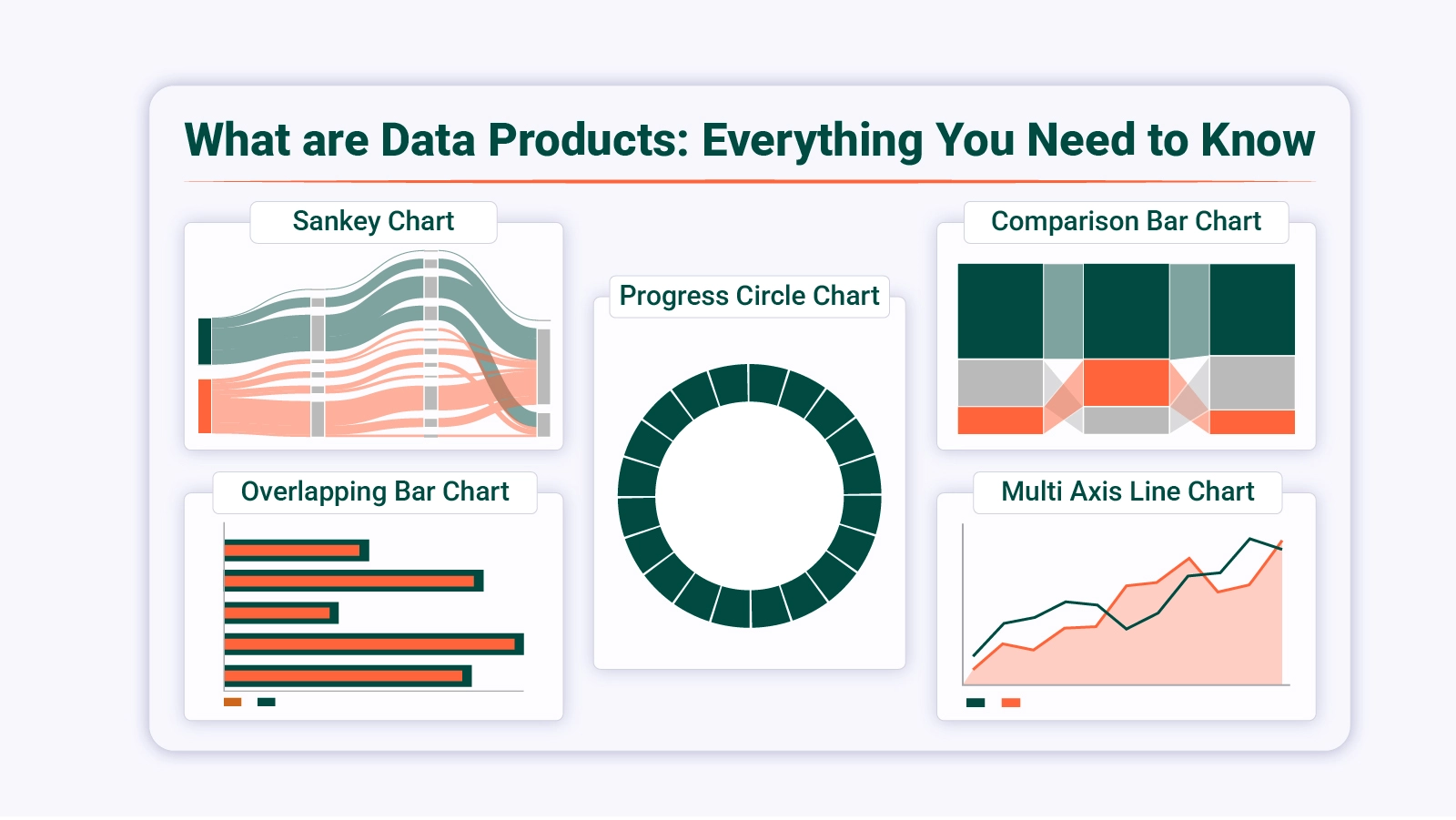
Understanding what data products are is the essential starting point for any business ready to treat information as a competitive asset rather than an operational afterthought.
This blog covers the definition, key components, types, real-world examples, and a step-by-step design process for building effective data products. You will also learn how to analyze them in Excel and explore practical applications across diverse industries and business functions.
Definition: Data products are packaged, reusable solutions built from data to deliver value to analysts, executives, customers, or automated systems. Unlike raw datasets, they arrive structured, governed, and designed with a specific purpose built in from the start.
Their function is to convert fragmented or complex information into something immediately actionable, such as a dashboard, a predictive model, or a data API. They connect technical infrastructure to business decisions.
Familiar forms of data products include customer performance dashboards, fraud detection engines, and recommendation systems. In mature analytics environments, they serve as the conduit through which insights move from storage to the people who act on them.
Building what data products into core operations turns data assets into accessible, business-ready tools. Here is why this approach has become a priority for modern enterprises:
Every reliable implementation of data products rests on interconnected components that ensure usability and stability. Key components include:
|
Aspect |
Data Products |
Data as a Product |
| Definition | End-to-end solution built to deliver insights | Treating datasets themselves as sellable assets |
| Focus | Usability and business outcomes | Data ownership and monetization |
| Users | Internal teams, customers, systems | External buyers or partners |
| Structure | Includes pipelines, analytics, and interfaces | Primarily structured datasets |
| Goal | Drive decisions and automation | Commercialize data assets |
Recognizing what data products are also means understanding the traits that make them effective and trustworthy.
Key characteristics include:
Understanding what data products are starts with recognizing the different architectures businesses deploy based on need and maturity. Among the most common examples of data products are the following types:
Seeing what data products are in practice, through real-world examples of data products, clarifies the tangible impact they create across business functions.
Below are three widely used implementations:
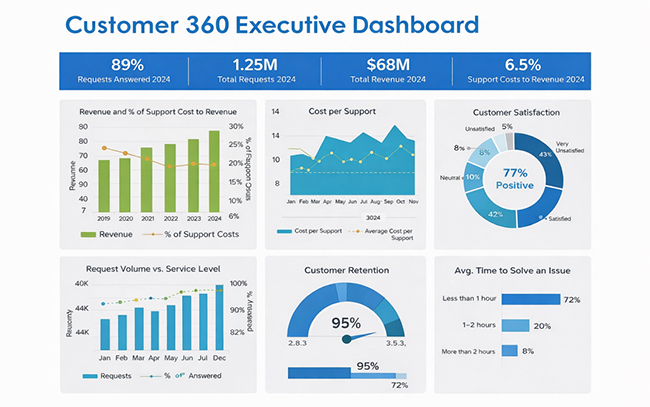
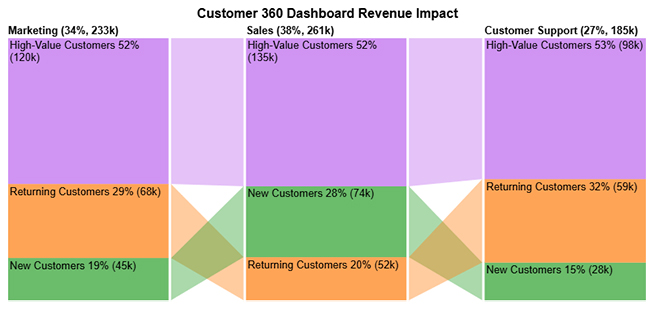
The Customer 360 executive dashboard is one of the most practical data visualization examples in Excel, bringing together revenue, retention, satisfaction, and service performance into a single executive-facing view.
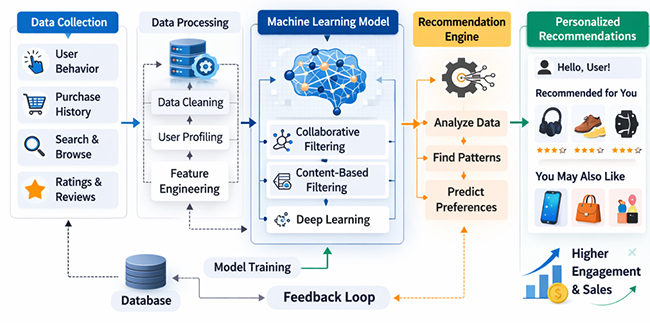
Platforms like Amazon rely on machine learning-driven recommendation engines to surface personalized product suggestions. These systems lift both user experience and revenue by applying predictive analysis to behavioral patterns.
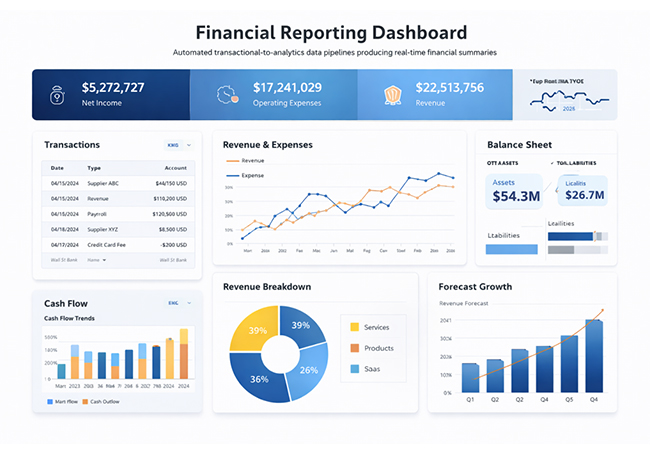
Automated financial reporting pipelines connect transactional systems with analytics platforms to generate real-time summaries that support both compliance requirements and forward-looking financial forecasts.
Knowing data products is one thing; building them effectively requires a structured process that keeps technical execution aligned with clear business goals and measurable outcomes.
Clearly define the business problem, stakeholders, expected outcomes, and measurable success criteria before development begins.
Collect information from across systems and consolidate it using structured processes such as data merging in Excel to ensure completeness and alignment with business requirements.
Standardize and prepare datasets through techniques like data transformation in Excel to improve data consistency, reliability, and readiness for analysis.
Establish clear performance indicators that tie analytics outputs directly to strategic business goals and provide a measurable basis for evaluating success.
Develop dashboards, reporting frameworks, or predictive models based on validated and structured datasets.
Continuously track system performance, refine logic, and update workflows to ensure sustainable impact.
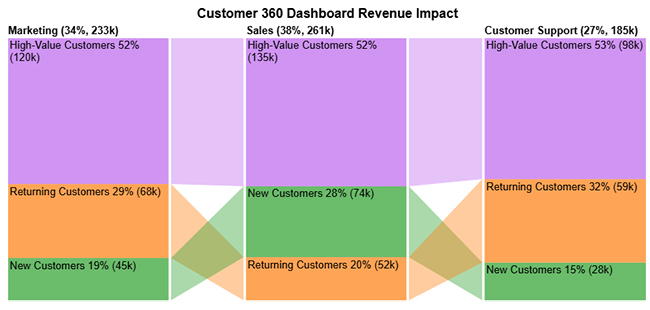
This Customer 360 example illustrates what are data products in a revenue context: High-Value Customers dominate revenue across Marketing, Sales, and Customer Support, with Sales contributing the highest overall total.
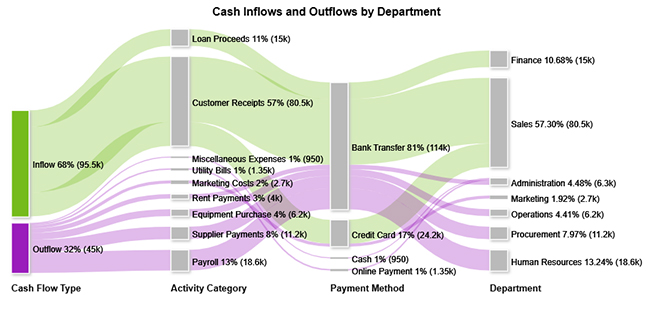
The Cash Inflows and Outflows by Department visual maps how funds move from inflow and outflow sources through payment methods to final departmental allocation.
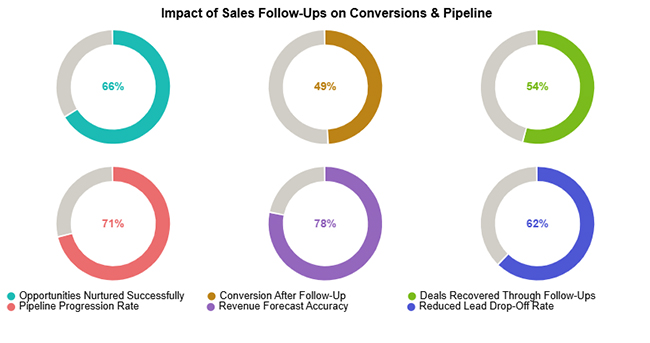
The Impact of Sales Follow-Ups on Conversions & Pipeline example shows what are data products can reveal about sales performance: follow-up activity strengthens conversions, pipeline progression, revenue accuracy, and lead retention.
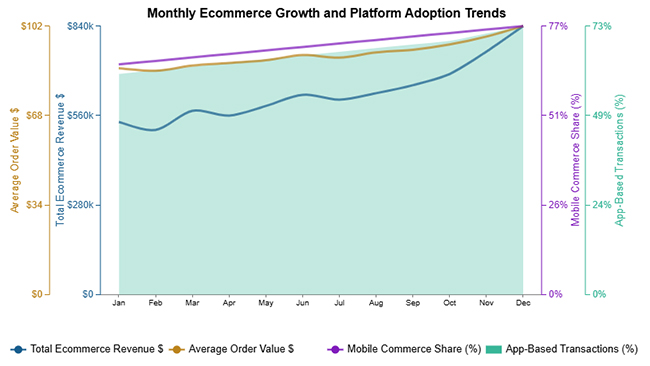
The Monthly Ecommerce Growth and Platform Adoption Trends visual tracks revenue growth, average order value, and digital adoption metrics to measure overall ecommerce performance over time.
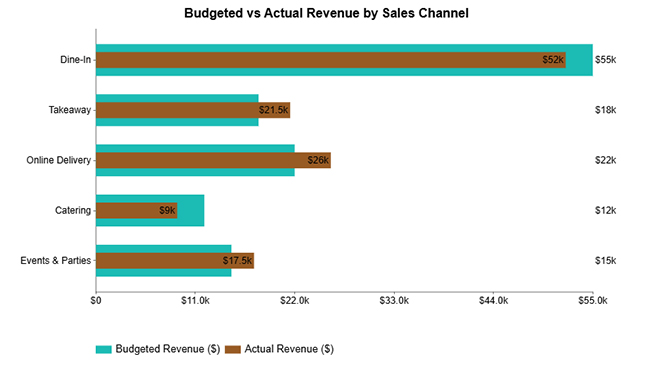
The Budgeted vs Actual Revenue by Sales Channel comparison evaluates planned and realized performance across channels to identify revenue gaps and optimization opportunities.
Analyzing a data product in Excel helps you uncover patterns, measure performance, and make data-driven decisions. Follow these steps to get meaningful insights:
Start by importing your data into Excel. Ensure it is clean and well-structured, with clear column headers and no duplicate or missing values. Proper organization makes analysis easier and more accurate.
Identify the key metrics relevant to your data product, such as user engagement, conversion rates, or usage trends. Focusing on the right metrics ensures your analysis aligns with your goals.
Use built-in Excel functions like SUM, AVERAGE, COUNT, and IF to summarize your data. These functions help you quickly calculate totals, averages, and conditions for better insights.
Convert your data into charts such as bar charts, line graphs, or pie charts. For more advanced and interactive visuals, you can use ChartExpo to create insightful dashboards without complex steps.
Analyze your charts to spot patterns, trends, and anomalies. Look for changes over time or differences between categories to understand your data product’s performance.
Include a final visualization using a comparison bar chart to clearly present how your data product segments differ across categories or time periods. For example, the chart can compare segments such as High-Value Customers, New Customers, and Returning Customers, showing their proportions side by side.
Key Insights
Organizations that fully understand what data products are and adopt them gain measurable advantages across every team and function. Key benefits include:
Once teams grasp data products, they can deploy them across industries and operational contexts to drive real impact. Use cases include:
An API enables systems to exchange data, while data products are complete, outcome-focused solutions that may incorporate APIs alongside analytics, governance, and reporting layers.
A data asset is a raw or processed dataset owned by an organization, while data products are structured solutions built on top of those assets to deliver insights or automation.
SAP provides enterprise resource planning and analytics tools that support the creation of data products, but the platform itself is not a standalone data product.
Understanding what are data products changes how organizations approach information: not as a byproduct, but as a deliberate asset. Well-structured and governed solutions make data accessible, reliable, and decision-ready across every business function. The value lies not only in what they reveal but in how consistently they deliver it.
The real question is no longer whether to adopt them, but how quickly to act. What are data products if not the practical bridge between raw data and measurable outcomes? By combining well-designed pipelines, analytics frameworks, and powerful visualization tools, organizations can convert complexity into clarity and translate insight into sustained competitive advantage.
How much did you enjoy this article?



Calculate accounts receivable turnover ratio to measure credit collection speed, improve cash flow, and strengthen your financial strategy. Read on!

Change Management KPIs are the key to tracking adoption, performance, and ROI during transitions. Find out which metrics matter. Read on!

Data collection methods and techniques determine the quality of every insight you act on. Explore key approaches for gathering reliable data. Read on!




