• Home
  • Tools dropdown img
    • Spreadsheet Charts

      • ChartExpo for Google Sheets
      • ChartExpo for Microsoft Excel
    • Power BI Charts

      • Power BI Custom Visuals by ChartExpo
    • Word Cloud

  • Charts dropdown img
    • Chart Category

      • Bar Charts
      • Circle Graphs
      • Column Charts
      • Combo Charts
      • Comparison Charts
      • Line Graphs
      • PPC Charts
      • Sentiment Analysis Charts
      • Survey Charts
    • Chart Type

      • Box and Whisker Plot
      • Clustered Bar Chart
      • Clustered Column Chart
      • Comparison Bar Chart
      • Control Chart
      • CSAT Survey Bar Chart
      • CSAT Survey Chart
      • Dot Plot Chart
      • Double Bar Graph
      • Funnel Chart
      • Gauge Chart
      • Likert Scale Chart
      • Matrix Chart
      • Multi Axis Line Chart
      • Overlapping Bar Chart
      • Pareto Chart
      • Radar Chart
      • Radial Bar Chart
      • Sankey Diagram
      • Scatter Plot Chart
      • Slope Chart
      • Sunburst Chart
      • Tornado Chart
      • Waterfall Chart
      • Word Cloud
    • Google Sheets
      Microsoft Excel
  • Services
  • Pricing
  • Contact us
  • Blog
  • Support dropdown img
      • Gallery
      • Videos
      • Contact us
      • FAQs
      • Resources
    • Please feel free to contact us

      atsupport@chartexpo.com

Categories
All Data Visualizations Data Analytics Surveys
Add-ons/
  • Google Sheets
  • Microsoft Excel
  • Power BI
All Data Visualizations Data Analytics Surveys
Add-ons
  • Google Sheets
  • Microsoft Excel
  • Power BI

We use cookies

This website uses cookies to provide better user experience and user's session management.
By continuing visiting this website you consent the use of these cookies.

Ok

ChartExpo Survey


Home > Blog > Data Analytics

What are DORA Metrics: A Complete Guide

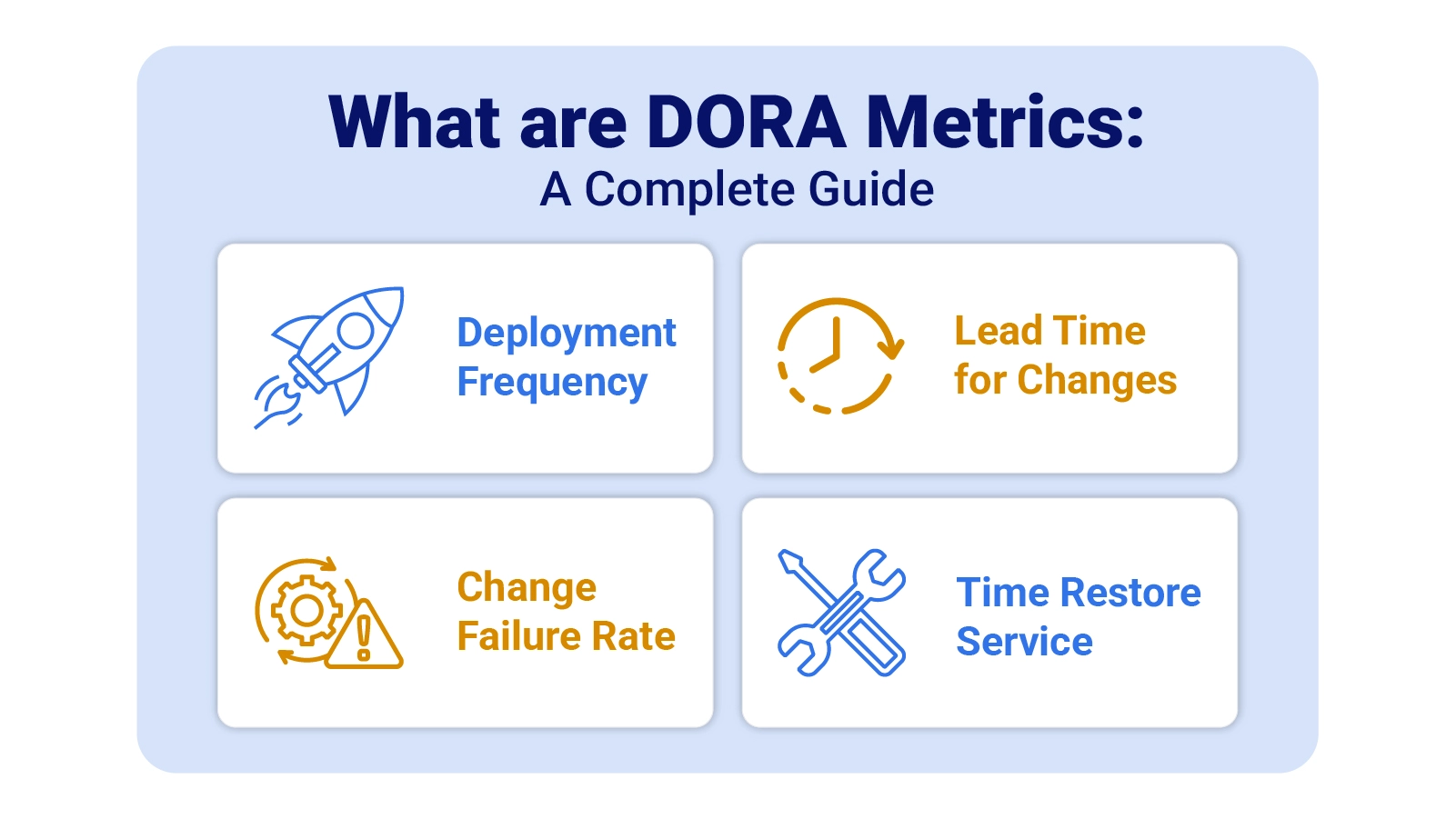
Software teams that ship faster do not do it by accident. They measure what matters. What are DORA Metrics? They are the four performance indicators that translate engineering activity into business outcomes, giving leaders a data-backed view of delivery speed and system reliability.
What are DORA Metrics

Developed by the DevOps Research and Assessment program, this framework is now the gold standard for evaluating engineering delivery.

By tracking two velocity signals and two stability signals, teams stop guessing and start improving. This guide covers each metric, the formulas, and how to apply the framework.

Table of Contents:

  1. What are DORA Metrics?
  2. Why are DORA Metrics Important?
  3. The Four Key DORA KPIs Explained
  4. DORA Metrics Formula and Calculation Methods
  5. DORA Metrics Examples
  6. How to Implement DORA Metrics?
  7. How to Analyze DORA Metrics in Excel?
  8. Benefits of Implementing DORA Metrics
  9. Best Practices for Improving DORA Metrics Performance
  10. FAQs
  11. Wrap Up

What are DORA Metrics?

Definition: DORA Metrics are a set of four quantitative indicators created by the DevOps Research and Assessment team to measure how effectively software organizations deliver value.

Each indicator captures a distinct dimension of engineering performance, helping teams understand not just how much they ship, but how safely and sustainably they do it.

Rather than rewarding raw activity, this framework connects process decisions to real outcomes. Teams learn whether pipelines are fast, releases are stable, and systems can recover quickly.

Why are DORA Metrics Important?

Guesswork is expensive. This framework gives engineering organizations a structured, reproducible way to assess delivery health without relying on subjective judgment or vanity counters.

Key advantages include:

  • Improved software delivery performance: Bottlenecks that slow releases become visible, giving teams a clear starting point for improvement.
  • Faster deployment cycles: Consistent measurement drives automation and learner workflows that shorten the time between commits and production.
  • Reduced change failure rate: Monitoring failures reveals quality gaps in testing before they compound into costly production incidents.
  • Better operational stability: Stability-focused resilience signals highlight system health patterns and flag recurring incident sources.
  • Data-driven decision making: Shared metrics and KPIs ground leadership priorities in evidence rather than assumptions.
  • Alignment between Dev and Ops teams: A common measurement framework creates a shared delivery language across both disciplines.
  • Continuous improvement culture: Regular evaluation builds a feedback loop that sustains learning and incremental process refinement.

The Four Key DORA KPIs Explained

Each of the four core indicators targets a different pressure point in the software delivery lifecycle. Together, they cover the full arc from code commit to production stability.

  • Deployment Frequency

Counts how often a team pushes code successfully to production. High frequency signals mature automation, disciplined CI/CD pipelines, and a culture of small, incremental releases. Within the context of agile performance metrics, this indicator reflects delivery adaptability and release confidence. Sustained frequency growth shows that deployment workflows are becoming less friction-prone over time.

  • Lead Time for Changes

Measures the elapsed time between a code commit and its arrival in production. Short lead times point to efficient review gates, minimal handoff delays, and fast validation cycles. This reading tells teams how quickly they can respond to user needs or market changes. Persistent lead time growth often signals review backlogs, flaky test suites, or manual approval bottlenecks.

  • Change Failure Rate

Captures the share of deployments that trigger incidents, require rollbacks, or degrade service. A low rate reflects disciplined testing, hardened release practices, and stable system architecture. Among reliability-focused performance metrics, this is the clearest signal of release safety. Watching it over time helps teams balance shipping speed with production confidence.

  • Time to Restore Service (MTTR)

Tracks how long it takes a team to return a degraded system to full operation after a failure. Rapid restoration reflects strong monitoring coverage, practiced incident response playbooks, and resilient service design. Unlike the other three indicators, this metric focuses on recovery capability rather than prevention. Steady improvement signals growing operational readiness.

DORA Metrics Formula and Calculation Methods

Each calculation maps to a straightforward arithmetic expression. The inputs come from pipeline telemetry and incident logs that most CI/CD platforms already capture automatically, making baseline measurement achievable without custom tooling.

  • Deployment Frequency

Reflects release cadence by dividing the total number of successful production deployments by a defined time period.

Formula: Total Deployments ÷ Time Period

  • Lead Time for Changes

Quantifies delivery speed by calculating the elapsed time between a commit event and its corresponding production release.

Formula: Production Release Time – Commit Time

  • Change Failure Rate

Expresses release reliability as the share of deployments that trigger incidents, service degradation, or rollbacks.

Formula: Failed Deployments ÷ Total Deployments × 100

  • MTTR (Mean Time to Restore)

Calculates recovery efficiency by averaging total incident resolution time across all production disruptions in a period.

Formula: Total Incident Resolution Time ÷ Number of Incidents

DORA Metrics Examples

Putting the four indicators into a real-world context makes their practical value far easier to grasp and act on.

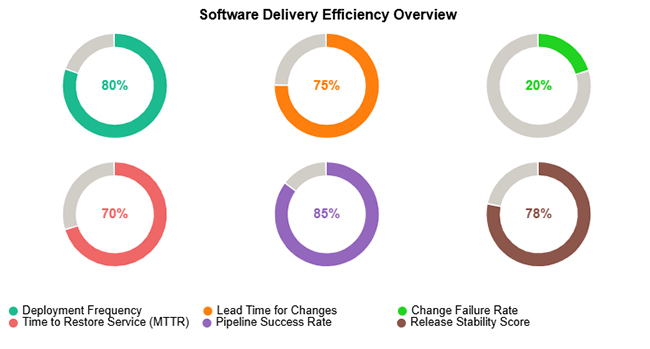
  • Software Delivery Efficiency Overview

This example depicts a team with a highly reliable deployment pipeline, consistent release velocity, low failure rates, and strong recovery performance across the measured window.
What are DORA Metrics
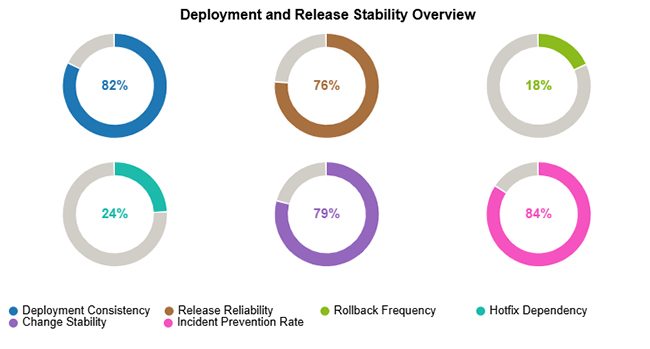
  • Deployment and Release Stability Overview

This scenario highlights a pattern of steady deployment volume, high release reliability, minimal rollback risk, and proactive practices that prevent incidents from reaching end users.
What are DORA Metrics
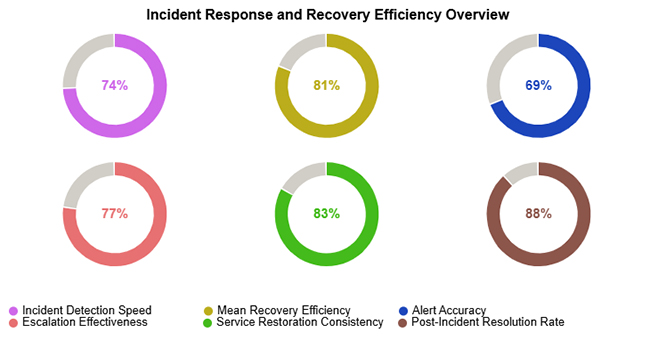
  • Incident Response and Recovery Efficiency Overview

This view captures efficient early detection of service degradation, strong throughput in incident resolution, and consistent restoration of normal operations across measured events.
What are DORA Metrics

How to Implement DORA Metrics?

Embedding DORA KPIs into an existing operation requires deliberate planning rather than bolt-on measurement. A phased rollout produces more reliable signals and lasting adoption.

  • Define deployment pipeline stages: Map each step code travels through from commit to production, so measurement boundaries are precise and consistent.
  • Integrate CI/CD tools for tracking: Connect delivery infrastructure to capture deployment events and timestamps automatically without manual intervention.
  • Establish baseline performance: Record initial metric values to build reference points that tie engineering outcomes to broader business metrics.
  • Automate data collection: Use continuous instrumentation to capture delivery signals reliably without depending on manual logging practices.
  • Set measurable improvement goals: Align targets with long-term growth metrics and delivery objectives so progress remains concrete and trackable.
  • Review metrics regularly: Schedule recurring reviews to catch regressions early and sustain momentum on ongoing improvement initiatives.

How to Analyze DORA Metrics in Excel?

Spreadsheets offer a practical starting point for delivery measurement, especially for teams still building their data infrastructure.

  • Structure your dataset

Arrange columns for deployments, commits, incidents, and resolution times in a clear, query-friendly layout.

  • Compute metric values

Use spreadsheet formulas to calculate frequency, lead times, failure percentages, and average restoration durations.

  • Sort chronologically

Ordering rows by date reveals performance trends, one-off anomalies, and meaningful shifts over time.

  • Visualize operational signals

Raw figures rarely communicate trends on their own. Tools like ChartExpo convert spreadsheet calculations into visual dashboards, much like website performance metrics translate traffic data into actionable insight for stakeholders.

Why use ChartExpo?

  • Converts complex delivery data into clear, presentation-ready charts without requiring a dedicated analytics platform.
  • Accelerates performance reviews by surfacing trends, coverage gaps, and progress indicators at a single glance.
  • Produces polished KPI dashboards that give stakeholders a professional view of engineering delivery health.
  • Available with a 7-day free trial; ongoing access is priced at $10 per month.

How to install ChartExpo in Excel?

  1. Open your Microsoft Excel.
  2. Start a worksheet and go to the ribbon tab named Insert.
  3. To open the window on Office Add-ins, click on My Apps.
  4. Go to the Add-ins window, and in the “/Store tab,” search ChartExpo.
  5. After finding it, click the Add button to install it.

ChartExpo integrates with both Microsoft Excel and Google Sheets. Follow the install prompts for your preferred platform and start building charts with just a few clicks directly inside the tool you already use.

Example:

Consider we have the following data for the Progress Circle Chart.

Performance Indicator

Efficiency (%)

Deployment Frequency 80
Lead Time for Changes 75
Change Failure Rate 20
Time to Restore Service (MTTR) 70
Pipeline Success Rate 85
Release Stability Score 78
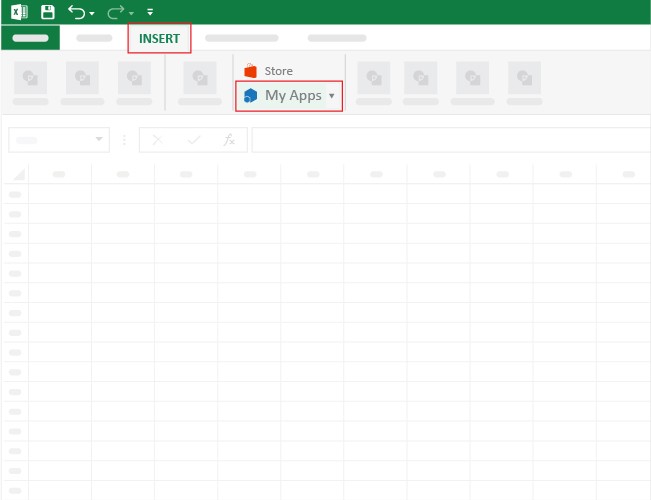
  • Once ChartExpo is installed, please click on the “INSERT” menu and then click on the “My Apps” submenu.
What are DORA Metrics
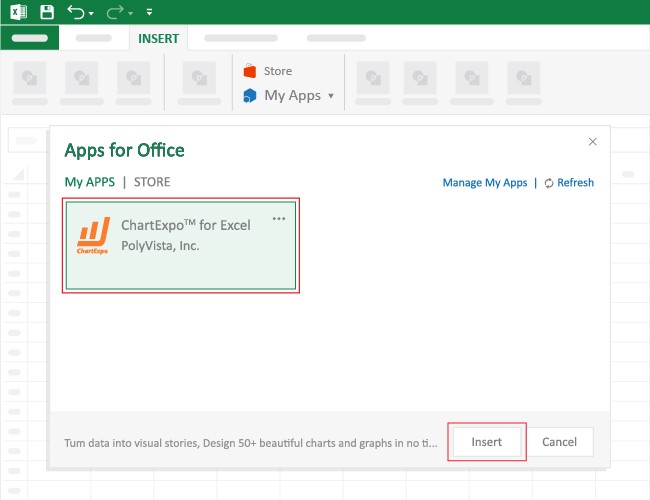
  • This will open the Apps for Office window. Find ChartExpo in the list and press the Insert button to make it appear in your Excel workbook.
What are DORA Metrics
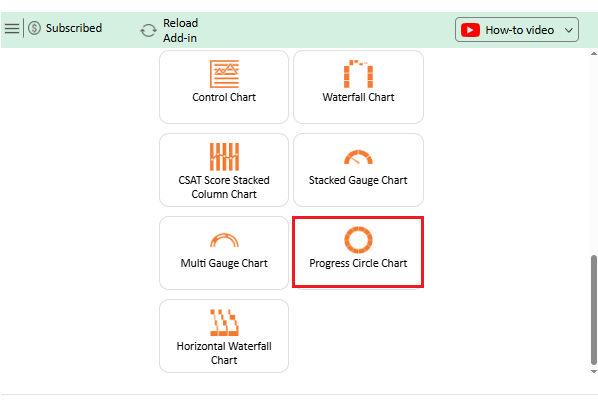
  • Once ChartExpo is loaded into your sheet, you can search or select “Progress Circle Chart” from the list.
What are DORA Metrics
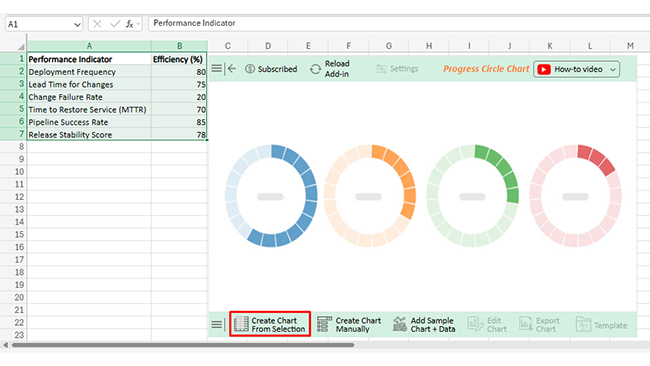
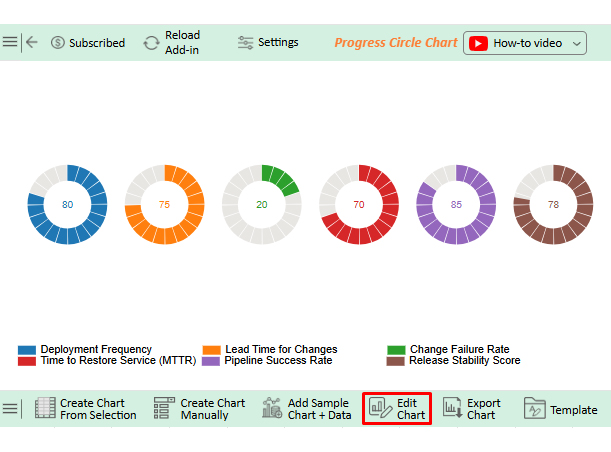
  • Next, select your data and click the ‘Create Chart from Selection’ button.
What are DORA Metrics
  • To customize your chart, just click on the “Edit Chart” option to make adjustments effortlessly.
What are DORA Metrics
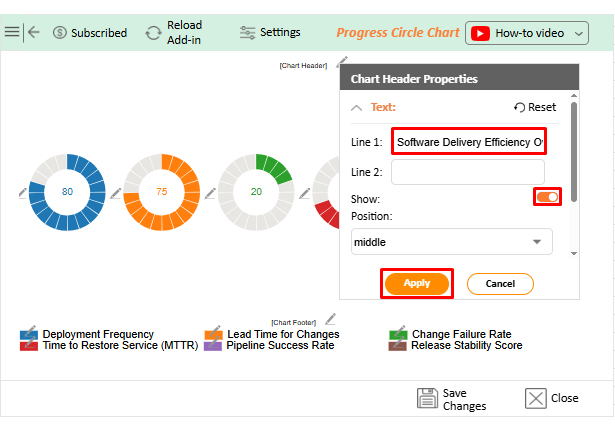
  • To change the chart’s title, select the pencil icon on the header. Then, enter the text you want and press Apply.
What are DORA Metrics
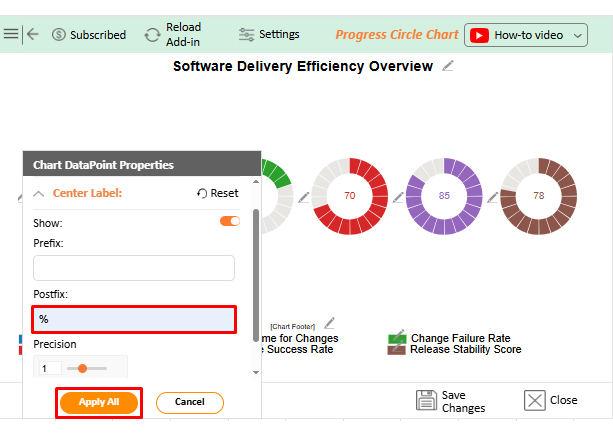
  • You can add a percentage sign on the center label from “Chart DataPoint Properties”.
What are DORA Metrics
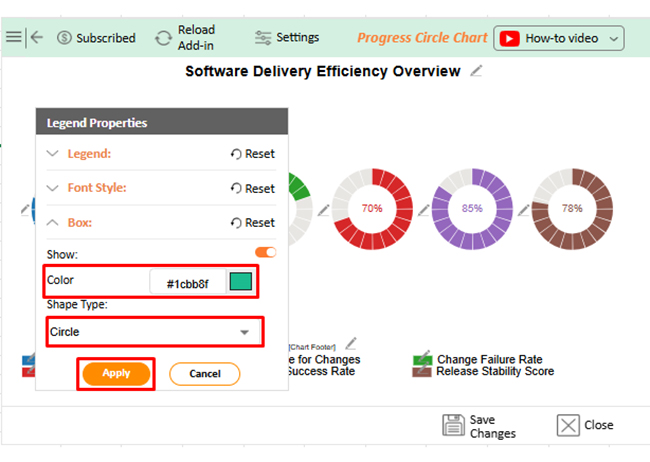
  • You can change the color or shape of the legend from the “Legend Properties”.
What are DORA Metrics
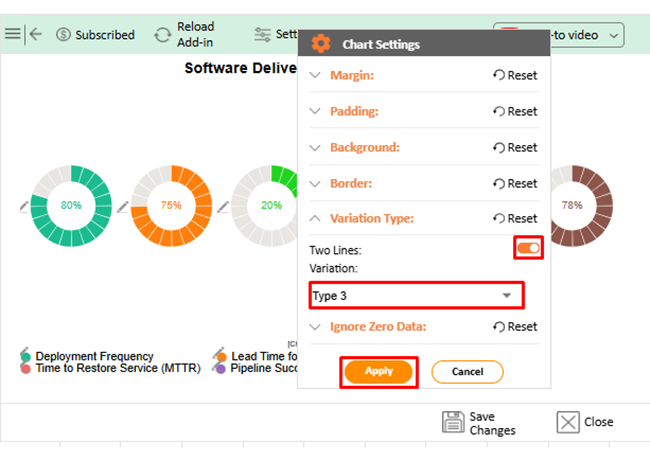
  • Next, we can change the Variation type from “Chart Settings” to make the chart look more presentable.
What are DORA Metrics
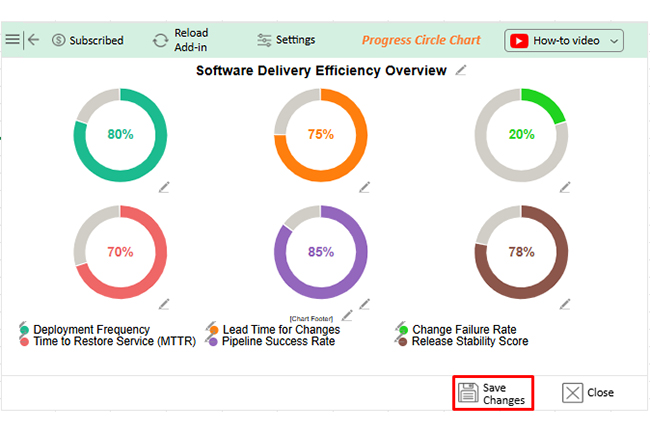
  • When you are done with all the changes, click the “Save” button to save them.
What are DORA Metrics
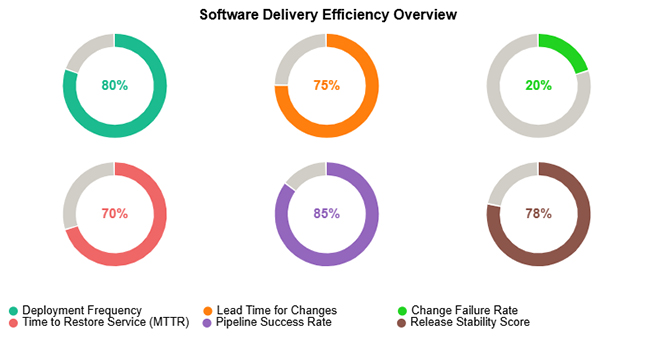
  • The final look of the Progress Circle Chart is shown below.
What are DORA Metrics

Key Insights

  • Pipeline Success Rate tops the chart at 85%, marking this team’s delivery pipeline as exceptionally stable and dependable.
  • Scores of 80% for Deployment Frequency and 75% for Lead Time confirm fast, sustainable code movement from commit to production.
  • A 20% Change Failure Rate alongside a 70% MTTR reading signals careful shipping discipline and rapid recovery from production disruptions.

Benefits of Implementing DORA Metrics

Teams that commit to structured delivery measurement see consistent gains across release quality, operational resilience, and cross-functional efficiency.

  • Increased delivery predictability: Deployment pattern data gives teams what they need to forecast release windows accurately and communicate timelines.
  • Reduced production failures: Continuous measurement surfaces quality gaps early so teams can intervene before defects reach end users.
  • Faster issue resolution: Recovery metric visibility shortens the path from incident detection to root cause identification and fix deployment.
  • Improved team collaboration: Shared performance indicators build common accountability and clearer communication across engineering and operations.
  • Better customer satisfaction: Stable, predictable releases reduce user-facing disruptions and support key customer service metrics over time.
  • Higher engineering productivity: Eliminating delivery friction frees engineers to focus on work that strengthens financial metrics and product outcomes.

Best Practices for Improving DORA Metrics Performance

Measurement reveals where to improve. Sustainable gains require consistent engineering discipline applied at the process level.

  • Automate testing and deployment: Removing manual handoffs from the release pipeline cuts errors and builds the cadence required for high deployment frequency.
  • Implement trunk-based development: Committing to a shared trunk reduces merge conflicts and keeps the delivery pipeline stable and predictable.
  • Reduce batch sizes: Smaller increments lower per-deployment risk and make root cause analysis faster when an incident occurs.
  • Improve monitoring and alerting: Fast anomaly detection narrows the gap between failure onset and team response, which directly improves MTTR.
  • Conduct regular retrospectives: Structured reflection sessions surface systemic failure causes and create space for teams to refine their processes.
  • Track continuous improvement trends: Watching metric trajectories over months confirms whether process changes produce lasting gains or temporary fluctuations.

FAQs

What are the 5 DORA Metrics?

The standard framework defines four core indicators: deployment frequency, lead time for changes, change failure rate, and MTTR. A fifth reliability-oriented measure appears in some extended interpretations, but the foundational DORA model is built on these four.

What is DORA in metrics?

DORA stands for DevOps Research and Assessment, a research initiative that studied thousands of software teams to identify which engineering practices most reliably predict high delivery performance and operational stability.

Can DORA Metrics be tracked in Excel?

Yes. Many teams start with spreadsheets by recording deployment events, commit timestamps, and incident data in structured columns, then scaling to dedicated tools as measurement needs grow.

Wrap Up

What are DORA Metrics in practice? They are the difference between engineering teams that improve by instinct and those that improve by design. Deployment frequency, lead time, change failure rate, and MTTR each expose a different pressure point in the delivery lifecycle, giving leaders the signal clarity needed to prioritize the right investments at the right time.

When paired with consistent analysis and strong visualization, the framework transforms raw pipeline data into decisions. Teams that track these indicators regularly ship with greater confidence, recover from failures faster, and build the operational discipline that compounds over time into a genuine competitive edge.

How much did you enjoy this article?

PBIAd1
Start Free Trial!
160155

Related articles

next previous
Data Analytics12 min read

Analytics in Insurance Industry: From Data to Clear Insights

Analytics in insurance industry turns claims, policy, and service data into decisions for pricing, fraud checks, and retention. Read on!

Data Analytics9 min read

Cost Per Hire: Analyzing Hiring Costs Easily

Cost Per Hire shows what each hire costs and where the money goes. Use the formula, examples, and Excel steps to track spend. Read on!

Data Analytics12 min read

Need Analysis Template: A Complete Guide

A need analysis template transforms scattered observations into structured, evidence-based decisions. Discover how to close performance gaps. Read on!

Data Analytics10 min read

Performance-Based Budgeting: Examples & Analysis

Performance-based budgeting links spending to measurable outcomes. Learn how it works, explore examples, benefits, challenges, and analyze PBB effectively in Excel.

Data Analytics9 min read

Remote Work Statistics: A Complete Visual Guide

Remote work statistics transform workforce activity into measurable insights that guide planning and policy. Discover how to analyze this data. Read on!

ChartExpo logo

Turn Data into Visual
Stories

CHARTEXPO

  • Home
  • Gallery
  • Videos
  • Services
  • Pricing
  • Contact us
  • FAQs
  • Privacy policy
  • Terms of Service
  • Sitemap

TOOLS

  • ChartExpo for Google Sheets
  • ChartExpo for Microsoft Excel
  • Power BI Custom Visuals by ChartExpo
  • Word Cloud

CATEGORIES

  • Bar Charts
  • Circle Graphs
  • Column Charts
  • Combo Charts
  • Comparison Charts
  • Line Graphs
  • PPC Charts
  • Sentiment Analysis Charts
  • Survey Charts

TOP CHARTS

  • Sankey Diagram
  • Likert Scale Chart
  • Comparison Bar Chart
  • Pareto Chart
  • Funnel Chart
  • Gauge Chart
  • Radar Chart
  • Radial Bar Chart
  • Sunburst Chart
  • see more
  • Scatter Plot Chart
  • CSAT Survey Bar Chart
  • CSAT Survey Chart
  • Dot Plot Chart
  • Double Bar Graph
  • Matrix Chart
  • Multi Axis Line Chart
  • Overlapping Bar Chart
  • Control Chart
  • Slope Chart
  • Clustered Bar Chart
  • Clustered Column Chart
  • Box and Whisker Plot
  • Tornado Chart
  • Waterfall Chart
  • Word Cloud
  • see less

RESOURCES

  • Blog
  • Resources
  • YouTube
SIGN UP FOR UPDATES

We wouldn't dream of spamming you or selling your info.

© 2026 ChartExpo, all rights reserved.