Categories

Budgets rarely fall apart in one big moment. They usually bleed out in small, avoidable charges. A cost breakdown worksheet puts a spotlight on where cash is going and what it’s buying. That kind of clarity keeps planning honest and accountability real.
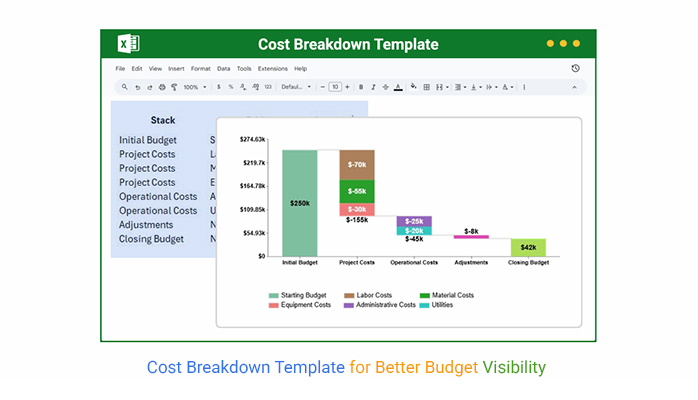


When expenses get sorted into clean buckets, the worksheet turns noise into a workable plan. Teams can see what’s driving spend, control the budget, and defend decisions without hand-waving. It fits projects, operations, and department planning, and it helps stop ugly surprises.
Definition: A Cost Breakdown template is a structured worksheet that lists every expected expense for a project, activity, or operation and groups each line into clear categories. It shows how money is split across direct and indirect costs, plus fixed and variable items, so costs don’t hide in the totals.
The goal is simple: build a budget that can stand up to real life. The template makes cost drivers obvious, supports approvals, and keeps scope and spending connected. It’s common in project work, construction, manufacturing, and corporate planning because it keeps financial conversations grounded.
Clear cost detail tightens decisions and keeps surprise spending off the agenda.
It pays off any time cost clarity is needed before money moves, while work is underway, or after results are reviewed. The format supports upfront planning and steady tracking.
A solid Cost Breakdown Template has a few non-negotiables that keep the numbers clean and comparable. These pieces make the layout easy to scale, even when the work gets complicated.
Put these elements together and Excel becomes a reliable home for the template, with totals that update quickly and issues that surface early.
Different teams need different layouts, yet the objective stays the same. A Cost Breakdown Template should make spending easy to explain and hard to misread.
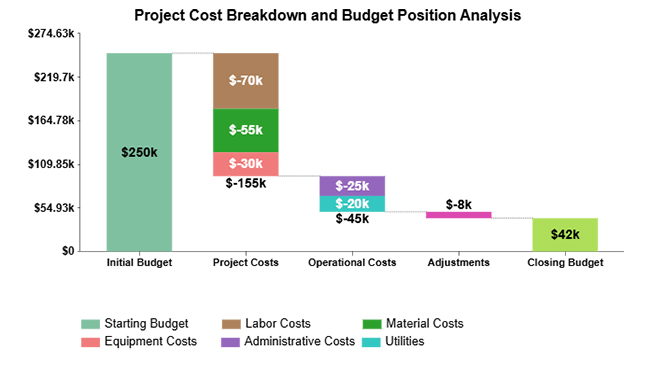
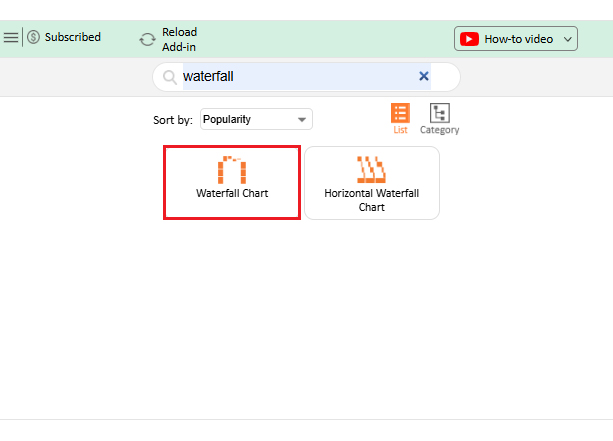
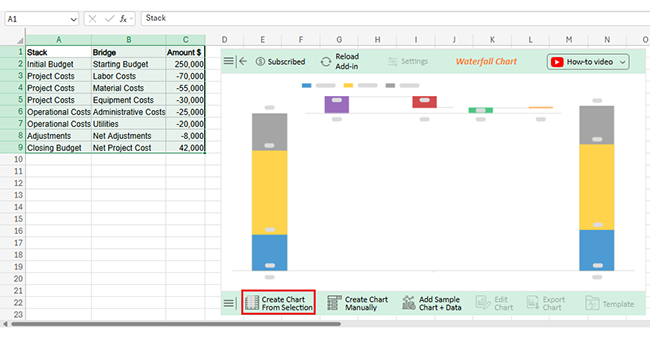
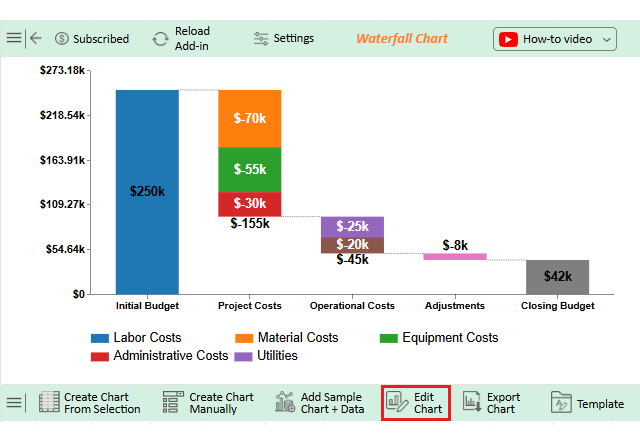
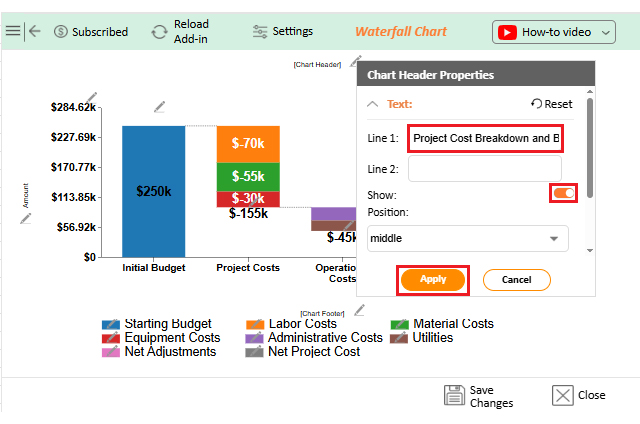
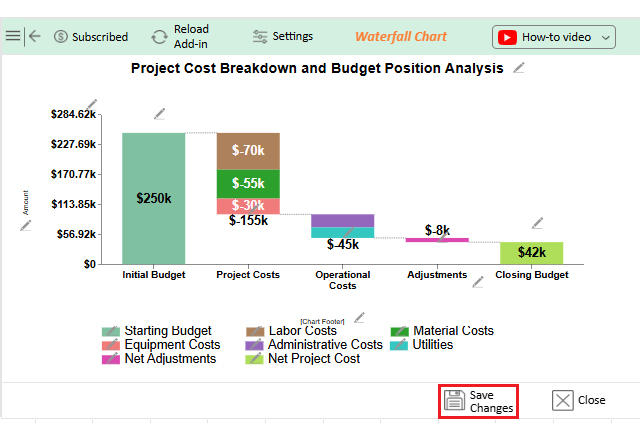
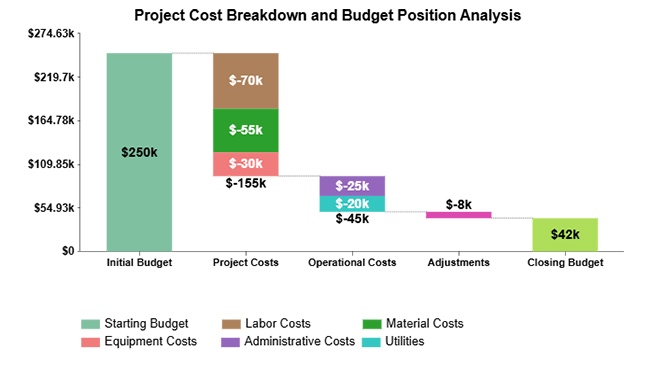
A stacked waterfall view shows how separate cost blocks pull down an opening budget and where the closing number finally lands. It’s a fast way to spot the biggest hits.
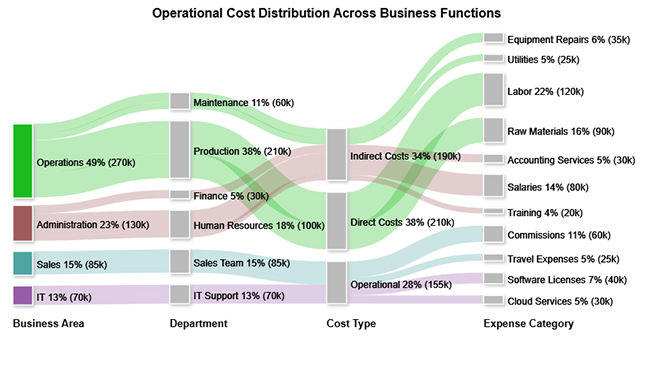
A Sankey Diagram shows how costs flow across departments, cost types, and categories, so concentration points stand out. It’s handy when operational spend keeps drifting.
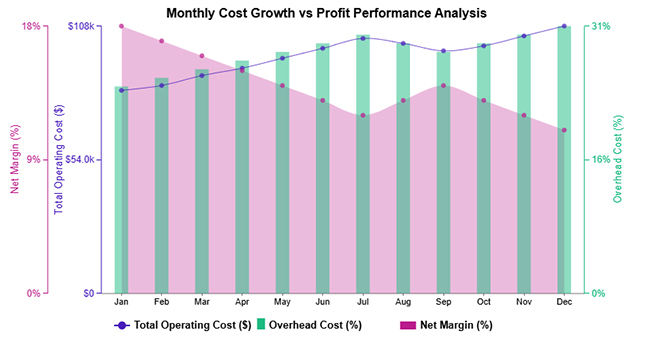
A multi-axis line view tracks operating costs alongside overhead rates so the impact on profit margins is easier to see. Trends don’t stay hidden.
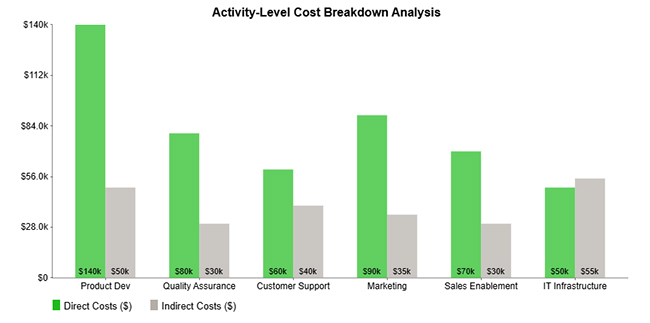
A clustered column view compares direct and indirect spending across activities, making the heavy consumers obvious. It answers the “where’s it going” question fast.
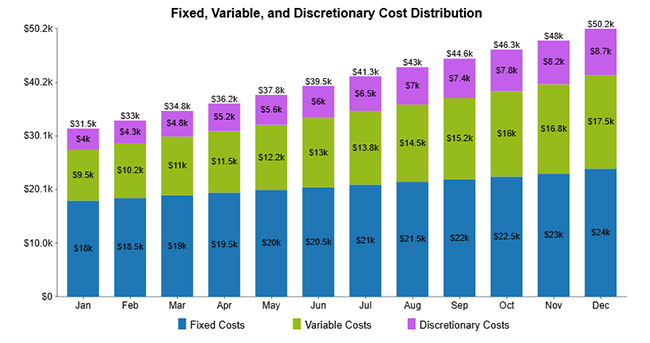
A stacked column view rolls fixed, variable, and discretionary costs into monthly totals so shifts in the cost mix are easy to compare over time. It’s useful when the structure changes month to month.
A structured template keeps cost tracking consistent, even when the work stream changes. An Excel cost breakdown template sets up a standard place to capture inputs, calculate totals, and review spending without manual rework. Fewer hand edits mean fewer quiet errors.
An Excel cost breakdown template isn’t just for totals. The real value comes from spotting what’s driving spend, where it’s drifting, and what needs a decision.
Why use ChartExpo?
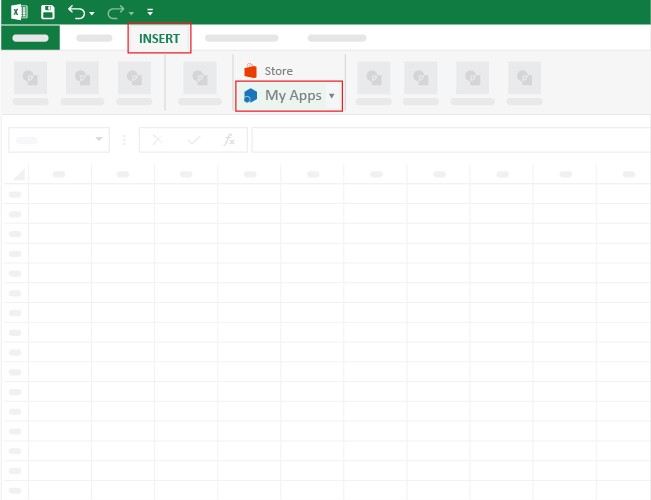
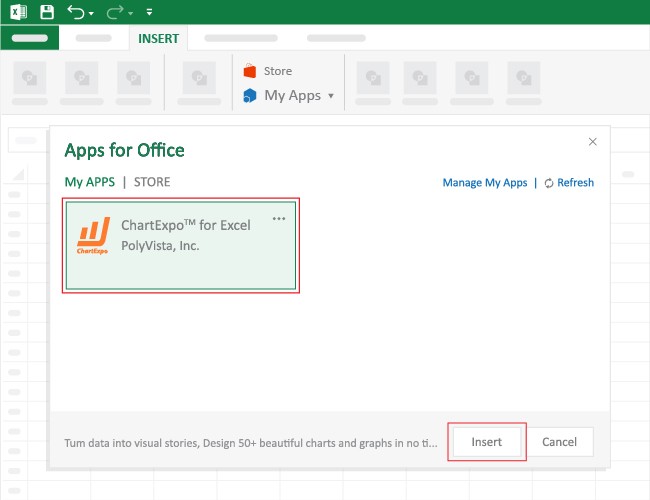
How to install ChartExpo in Excel?
Use the dataset below to build the Stacked Waterfall Chart example in Excel.
|
Stack |
Bridge |
Amount $ |
| Initial Budget | Starting Budget | 250,000 |
| Project Costs | Labor Costs | -70,000 |
| Project Costs | Material Costs | -55,000 |
| Project Costs | Equipment Costs | -30,000 |
| Operational Costs | Administrative Costs | -25,000 |
| Operational Costs | Utilities | -20,000 |
| Adjustments | Net Adjustments | -8,000 |
| Closing Budget | Net Project Cost | 42,000 |


A Cost Breakdown Template brings structure to planning and discipline to execution. It keeps discussions focused on drivers, not vague totals, and it supports both day-to-day control and bigger calls.
To get real value, the process has to stay consistent. Small lapses in structure turn into big messes later, so discipline pays off.
Pairing it with a business budget template in Excel improves consistency and makes reviews smoother.
Even a strong template has limits, and pretending otherwise causes problems.
To close these gaps, many teams pair the template with tools such as a cost-versus-value report. Tracking systems, such as a project tracker template in Excel, can also help monitor progress and keep costs under control.
It’s built by splitting total costs into logical categories and subcategories that match activities, deliverables, or operating needs. Each line should include a description, quantity, and rate so totals can be checked.
Yes. List cost items, quantities, and rates, then use formulas for totals so tracking stays consistent. Add subtotals by category and lock number formats to prevent math drift.
Any effort with a budget benefits, including construction, IT, marketing, and internal initiatives that need cost control. If vendors, labor, or materials are involved, the template keeps approvals and changes cleaner.
A well-built Cost Breakdown Template makes spending patterns easier to spot, control, and explain. When ChartExpo is used for visualization, cost tables become clearer for reviews and updates. The result is better transparency and steadier decisions across projects and operations.
How much did you enjoy this article?



Calculate accounts receivable turnover ratio to measure credit collection speed, improve cash flow, and strengthen your financial strategy. Read on!

Change Management KPIs are the key to tracking adoption, performance, and ROI during transitions. Find out which metrics matter. Read on!

Data collection methods and techniques determine the quality of every insight you act on. Explore key approaches for gathering reliable data. Read on!




