Categories

Financial surprises can unravel even the most carefully planned gathering. Without a structured approach to costs, spending on venues, catering, and promotions can escalate without warning.
A dedicated financial tracker gives organizers a clear way to monitor every dollar before the plan falls apart.
This guide covers what an event budget template is, why every organizer needs one, how to build it in a spreadsheet, and how to extract actionable insights from the data it captures.
Whether you are coordinating a corporate conference, a charity fundraiser, or a private celebration, the right template transforms fragmented cost figures into a clear, manageable financial overview.
Definition: An event budget template is a pre-structured spreadsheet designed to plan, record, and track every financial element of an event.
It separates income sources and expenditures into organized categories so planners can identify gaps, prevent overruns, and present clean financial data to sponsors or leadership.
Event managers, marketing teams, non-profit coordinators, and wedding planners all rely on this format to stay organized.
Its core function is to bring all financial activity into one accessible location while formulas handle the arithmetic. A tool of this type covers projected costs, confirmed spending, and revenue streams in parallel columns.
A corporate event planner, for example, can record venue fees, catering invoices, promotional costs, and ticket income side by side, keeping every figure visible and reconcilable.
A well-maintained event budget sheet gives planners financial visibility at every stage, from early cost estimates through final settlement with vendors.
Key reasons why it matters include:
A thorough event budget template accounts for every category of income and outlay to ensure nothing is overlooked during planning. Key components include:
Each event type carries a distinct financial profile. A specialized event budget template helps planners focus on the specific line items most relevant to their format rather than working from a generic layout.
Here are five common types used by organizers:
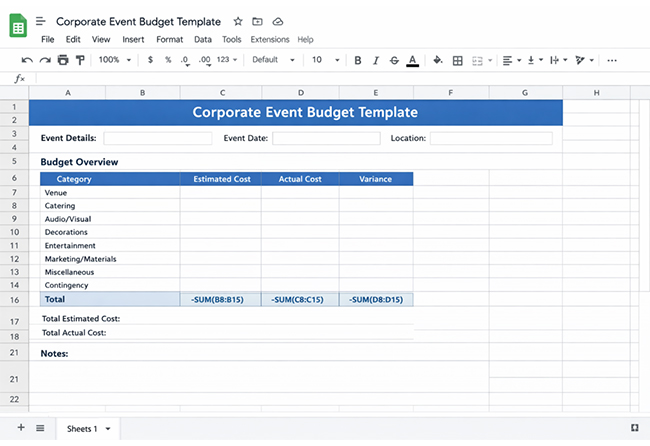
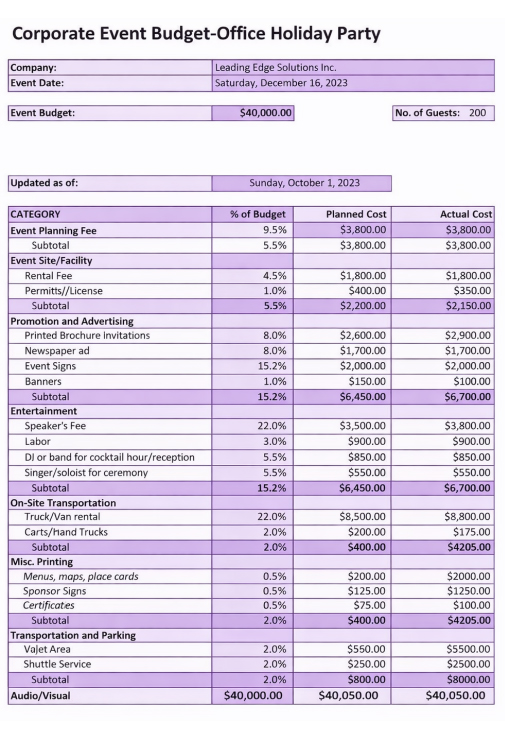
Designed for product launches, executive retreats, and company seminars. Emphasis falls on venue presentation, professional services, branded collateral, and staff travel reimbursements.
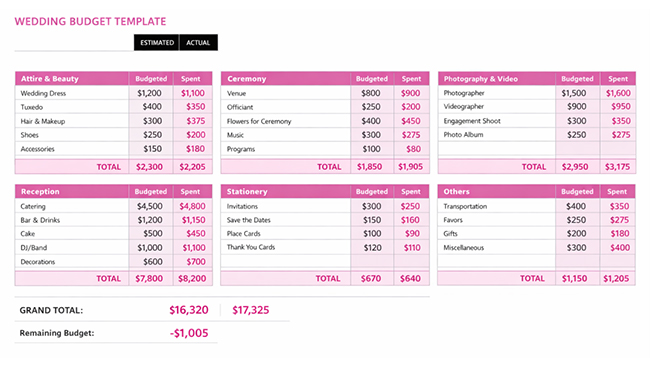
Built to track vendor contracts, floral arrangements, photography sessions, attire, and reception costs. Couples often create a wedding budget template in Google Sheets to give vendors shared access to payment schedules.
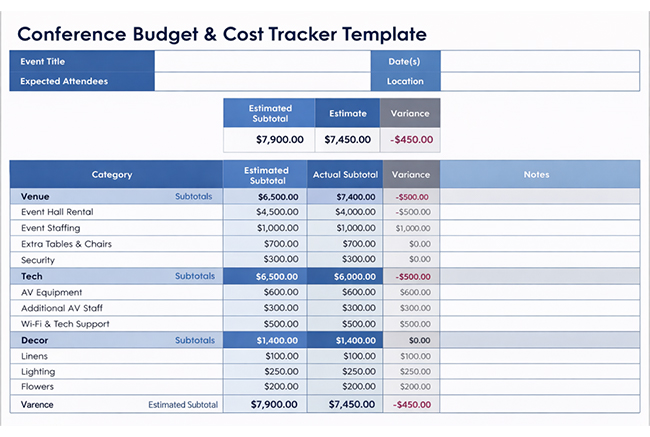
A conference budget template is a spreadsheet used to plan and track estimated and actual costs for organizing a conference.
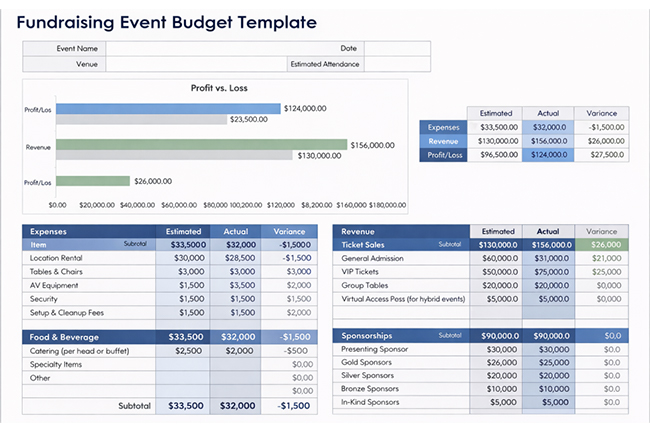
Applied by non-profits to monitor incoming donations, confirmed sponsorships, and promotional outlay relative to the campaign’s fundraising targets.
Suited to birthdays, anniversaries, and casual social gatherings, with primary focus on entertainment selection, venue setup, and catering choices.
Building an event budget template requires no specialized accounting software. A well-organized spreadsheet provides everything needed to log income, track costs, and compute balances in real time.
Follow these steps to create one:
Map out every spending area, including venue, catering, staffing, marketing, and equipment, before entering any figures into the spreadsheet.
Create paired columns for projected amounts and confirmed expenditures so financial variance is visible at every budget line.
Add sum and difference formulas so the running balance, surplus, or deficit recalculates automatically with each new entry.
Divide complex events into tabs covering areas such as vendor payments or departmental allocations to keep each section organized and easy to navigate.
Apply color-coding rules that flag any cell where confirmed spending crosses the projected ceiling for that category.
Match every confirmed payment against its corresponding budgeted figure to keep total expenditure tethered to the original financial plan.
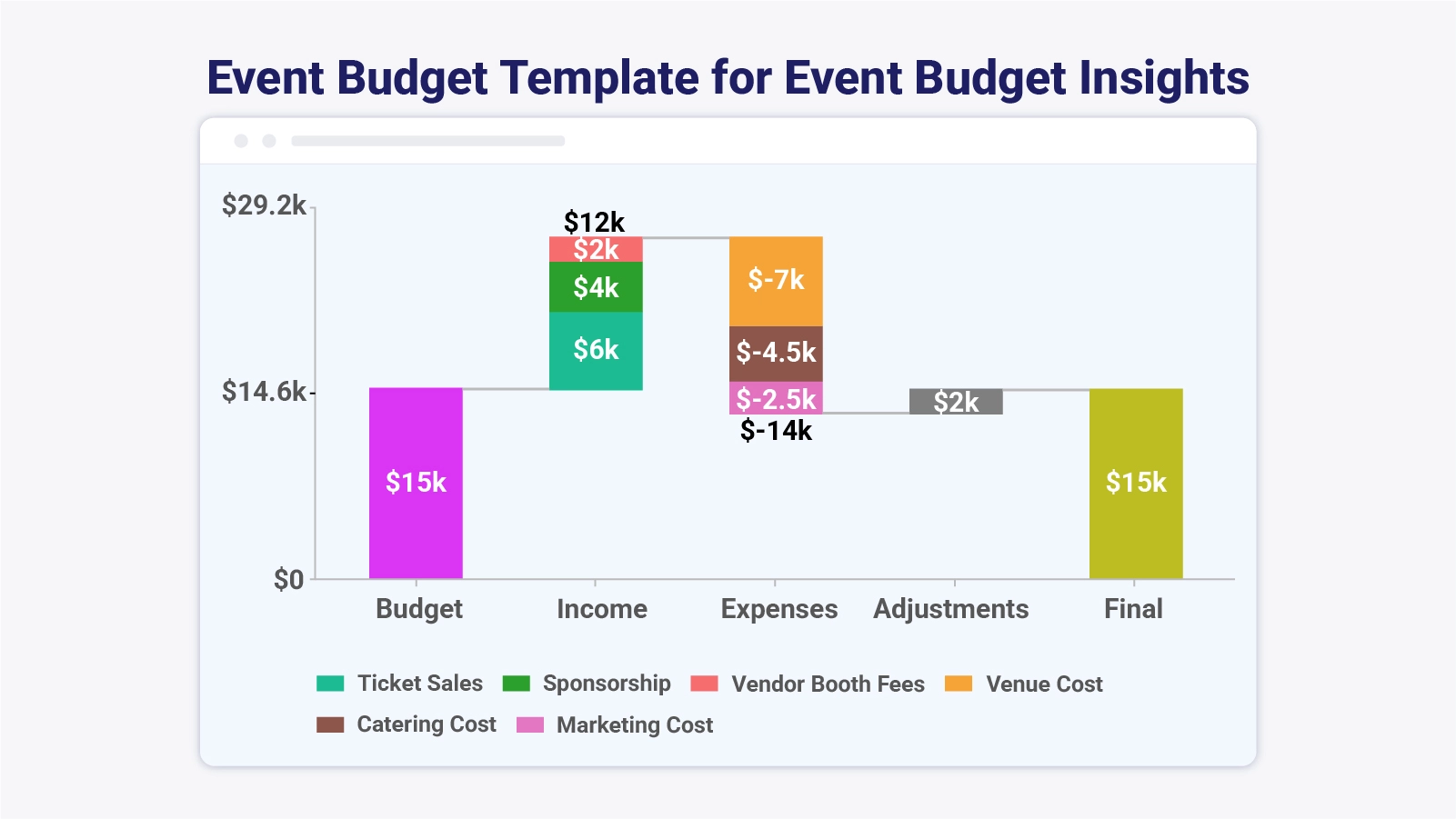
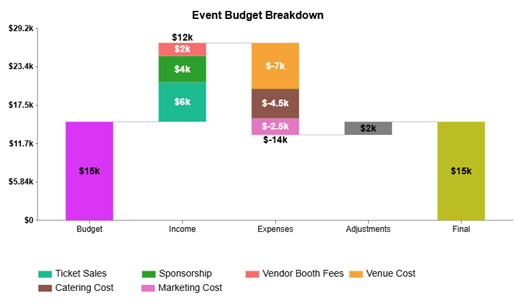
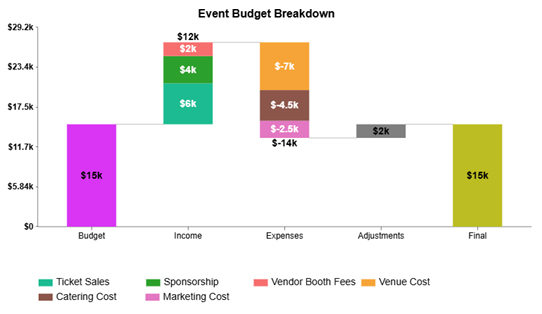
The event budget breakdown shows how the initial budget, income from multiple sources, and confirmed expenses combine with late adjustments to produce a balanced final figure without exceeding the planned amount.
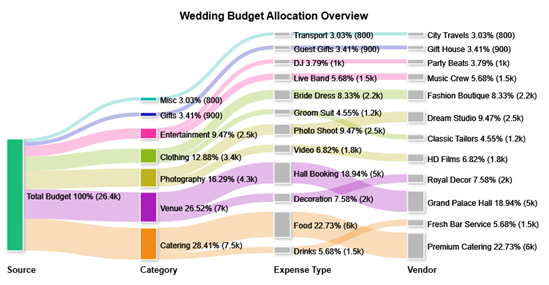
The wedding budget allocation overview example shows how the total budget is distributed across venue, catering, clothing, photography, and entertainment expenses.
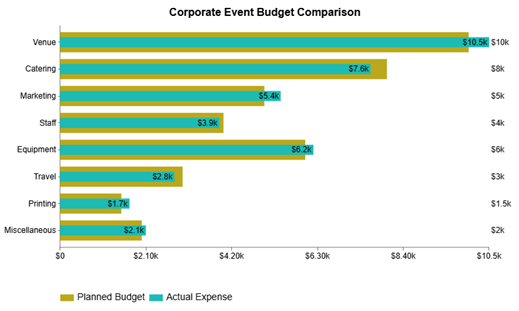
The corporate event budget comparison example highlights where the planned allocation diverges from confirmed spending across venue, catering, marketing, staffing, and other event cost categories.
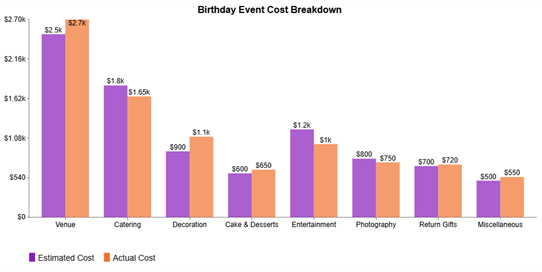
The birthday event cost breakdown example compares projected figures against confirmed payments for venue hire, catering, decoration, and additional birthday event line items.
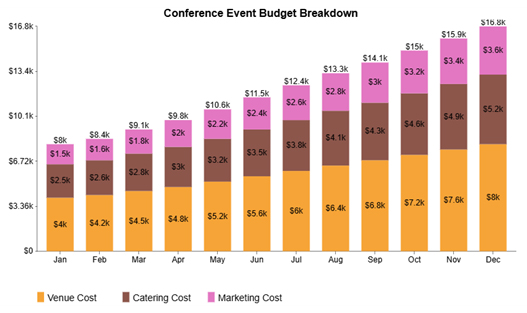
The conference event budget breakdown example tracks the cumulative rise in venue, catering, and marketing costs on a monthly basis, showing how each contributes to the total conference event budget over the year.
The full value of an event budget template in Google Sheets emerges when planners move beyond data entry and begin reading the financial patterns the numbers reveal.
Follow these steps to analyze your event budget effectively:
Confirm that every income and expense entry is complete, correctly assigned to a category, and clearly labeled before beginning any analysis.
Examine each budget line to pinpoint where real expenditure fell short of or exceeded the projected figure.
Determine the percentage of total spending that each category represents to identify which areas place the greatest financial demand on the event.
Convert tabular data into visual formats to surface spending trends quickly. Google Sheets charts provide a convenient way to compare category totals side by side.
Apply conditional formatting or review chart spikes to flag any category where costs exceeded projections or rose without a corresponding budget adjustment.
For deeper analysis, purpose-built tools can convert spreadsheet figures into specialized charts such as Waterfall Charts or cost-distribution graphs that make variances immediately clear.
The chart shows an event budget starting at $15k, increasing with $12k income from ticket sales, sponsorships, and vendor fees, then decreasing by $14k in expenses like venue, catering, and marketing.
After a $2k positive adjustment, the final budget remains balanced at $15k, indicating overall break-even performance.
Maintaining an event budget sheet throughout the planning process requires consistent data entry and proactive financial monitoring. Once the template is active, follow these steps to manage it effectively:
Recording event finances manually introduces calculation errors and missed entries at every stage. A dedicated event budget template eliminates that burden by automating arithmetic and imposing a consistent recording format.
Key benefits of an event budget template include:
An event budget template in Google Sheets only delivers ongoing value when it receives regular attention. Best practices include:
Keep an event budget template current by entering every expense as it occurs, reviewing projected versus actual figures on a set schedule, and ensuring all category totals reflect confirmed data. Consistent updates prevent small cost variances from developing into significant overruns.
Assign a dedicated row or line item to every expense category, record each confirmed payment in the correct section, and use sum formulas to maintain accurate running totals. Comparing projected amounts to real costs at regular intervals keeps the template reliable.
Common errors include overlooking indirect costs, letting the event budget template go unupdated between sessions, and recording income and expenses in shared columns. Maintaining distinct categories and reviewing entries on a regular basis prevents the data confusion that leads to budget miscalculations.
Consistent use of an event budget template changes how planners handle money across the full planning cycle. Organized categories, automated totals, and scheduled reviews replace guesswork with precise, decision-ready data that keeps the entire team aligned on financial goals.
Applying the practices covered in this guide, from building strong category structures at the outset to reconciling all figures once the event concludes, ensures the template remains a reliable tool rather than an abandoned spreadsheet.
With this financial foundation in place, every event has a measurably stronger chance of finishing within budget and meeting the expectations of planners, sponsors, and attendees.
How much did you enjoy this article?



Calculate accounts receivable turnover ratio to measure credit collection speed, improve cash flow, and strengthen your financial strategy. Read on!

Change Management KPIs are the key to tracking adoption, performance, and ROI during transitions. Find out which metrics matter. Read on!

Data collection methods and techniques determine the quality of every insight you act on. Explore key approaches for gathering reliable data. Read on!




