Categories

What is a wedding budget template in Google Sheets, and why are so many couples using it today?


Weddings are expensive. Venues, photographers, food—each piece adds pressure. No surprise that more couples are turning to the wedding budget template in Google Sheets to maintain control.
A spreadsheet may not sound exciting, but it works. Google Sheets is free, easy to share, and already familiar to most people. The template breaks down everything. You can track costs by category, including venue, dress, catering, and even tips. It shows what you planned to spend versus what you’ve spent. That clarity matters.
Over 70% of couples now use online tools for wedding planning. Many of them build out their budget inside Google Sheets. With a bit of customization, it can connect with tools like Google Finance in Google Sheets to even pull live currency conversions for destination weddings.
The wedding budget template in Google Sheets also plays well with other planning tools. For example, you can connect it to a broader operating budget spreadsheet. This comes in handy when your wedding is part of a larger event or celebration weekend.
It’s simple. It’s smart. And it reduces guesswork. Most importantly, it brings the numbers out into the open. That means fewer surprises—and fewer financial regrets—when the big day finally arrives.
Let me take you through this powerful wedding budget tool.
First…
Definition: The wedding budget template in Google Sheets is a pre-built spreadsheet to help plan and manage wedding expenses. It organizes costs by category and tracks actual spending. Couples can edit it in real time.
This template works well with Google Sheets time tracking for managing vendor hours. You can also link it to a broader budget on Google Sheets if needed. It’s simple to use, easy to share, and gives complete visibility over every dollar spent.
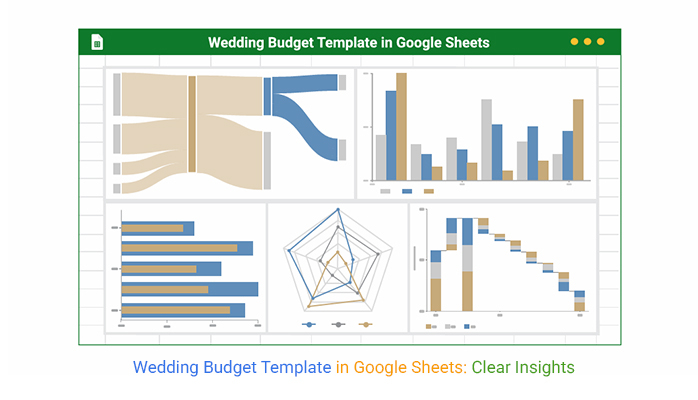
“Want your wedding budget to make sense at a glance? Discover the Top Five Charts below, as well as a Scatter plot in Google Sheets, that can bring your data to life. These charts were created using the powerful ChartExpo add-on.”
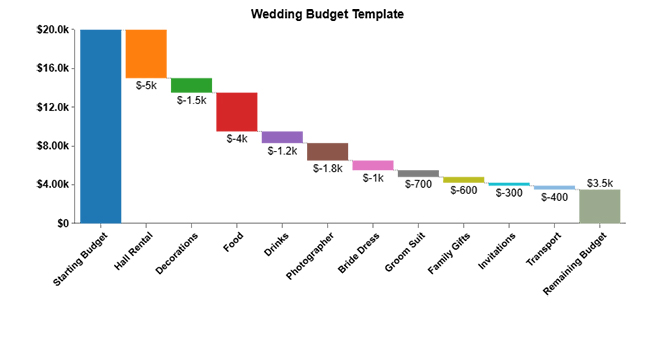
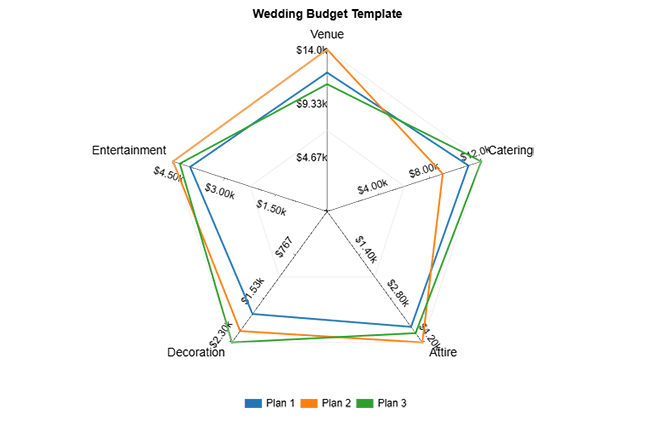
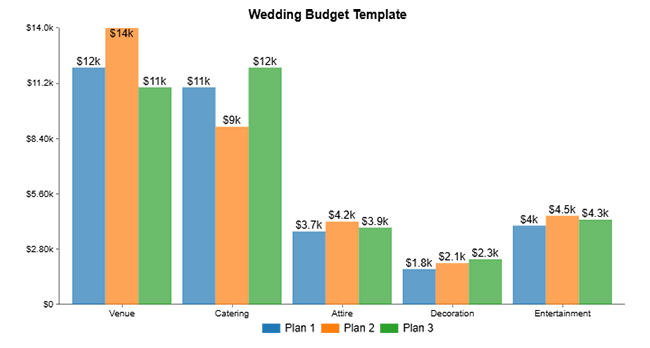
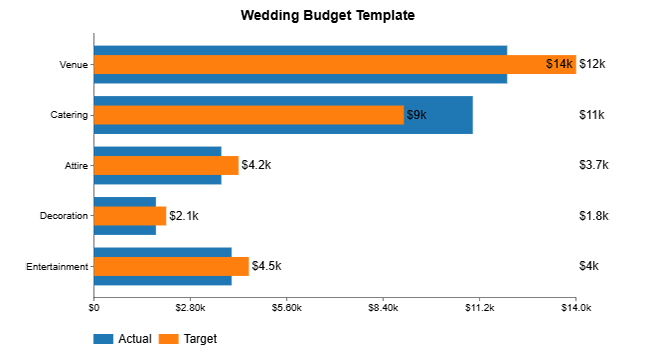
Planning a wedding is exciting, but finances can become complicated quickly. With so many moving parts, it’s easy to overspend or lose track of details. That’s where the wedding budget template in Google Sheets makes a big difference. It gives you structure, flexibility, and visibility—without the stress.
How?
The moment you say “yes”, the spending begins. From venues to cake tastings, money starts moving quickly. That’s why using the wedding budget template Google Sheets early—and often—is a smart move. It helps you stay calm, clear, and in control from day one to “I do”.
Here are some of the ideal scenarios where this template comes in handy:
You don’t need to be a spreadsheet expert to build a solid wedding budget. With Google Sheets, all it takes is a little structure and a few clicks. Building your wedding budget template in Google Sheets allows you to control the details from the start and visualize them with clear Google Sheets charts as your plans evolve.
How do you achieve this control?
Planning a wedding without a budget is like baking a cake without a recipe—messy and expensive. That’s where the wedding budget template in Google Sheets comes in. It keeps your spending organized and your sanity intact.
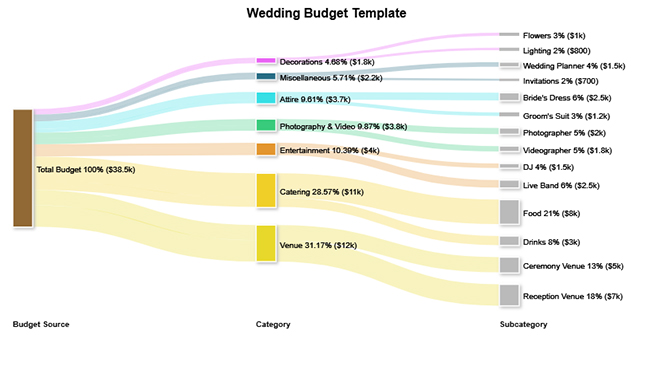
But here’s the catch: Data analysis needs clear visuals. Charts matter. Trends matter. While Sheets provides the basics, it falls short of being visually appealing. That’s where ChartExpo steps in. It transforms dull data into beautiful, easy-to-read visuals—like a Sankey diagram in Google Sheets—so your budget makes sense at a glance.
How to Install ChartExpo in Google Sheets?
ChartExpo charts are available both in Google Sheets and Microsoft Excel. Please use the following CTAs to install the tool of your choice and create beautiful visualizations in a few clicks in your favorite tool.
Let’s analyze this sample data in Google Sheets using a Sankey Diagram in ChartExpo.
| Budget Source | Category | Subcategory | Amount (USD) |
| Total Budget | Venue | Ceremony Venue | 5000 |
| Total Budget | Venue | Reception Venue | 7000 |
| Total Budget | Catering | Food | 8000 |
| Total Budget | Catering | Drinks | 3000 |
| Total Budget | Attire | Bride’s Dress | 2500 |
| Total Budget | Attire | Groom’s Suit | 1200 |
| Total Budget | Photography & Video | Photographer | 2000 |
| Total Budget | Photography & Video | Videographer | 1800 |
| Total Budget | Entertainment | DJ | 1500 |
| Total Budget | Entertainment | Live Band | 2500 |
| Total Budget | Decorations | Flowers | 1000 |
| Total Budget | Decorations | Lighting | 800 |
| Total Budget | Miscellaneous | Wedding Planner | 1500 |
| Total Budget | Miscellaneous | Invitations | 700 |
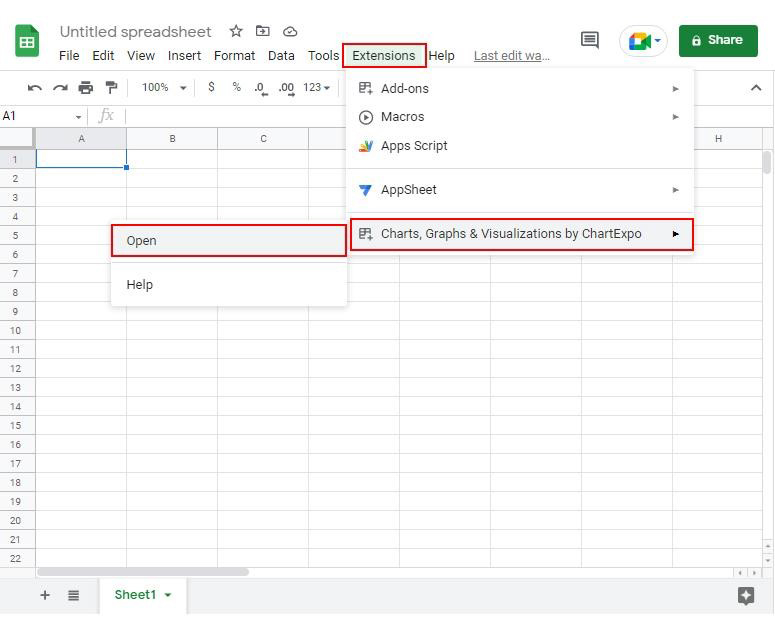
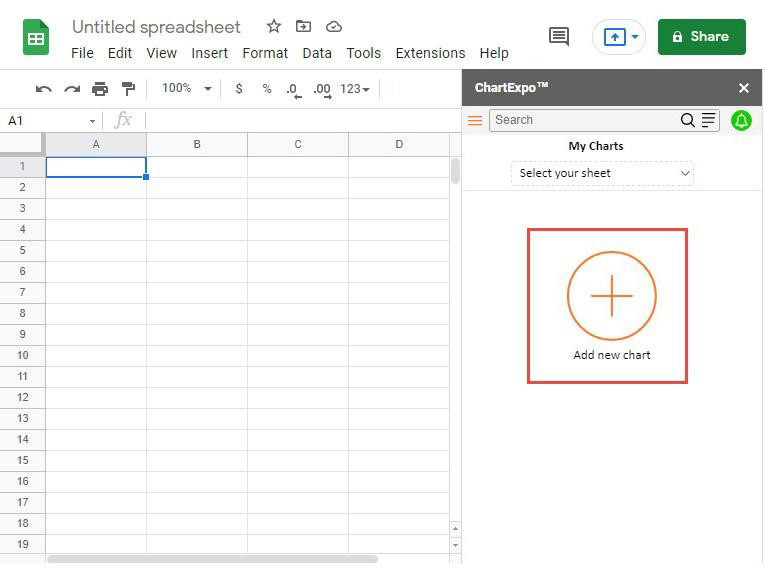
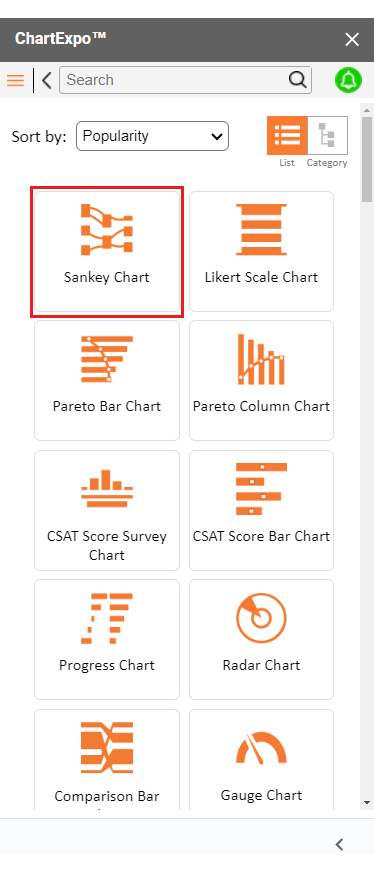
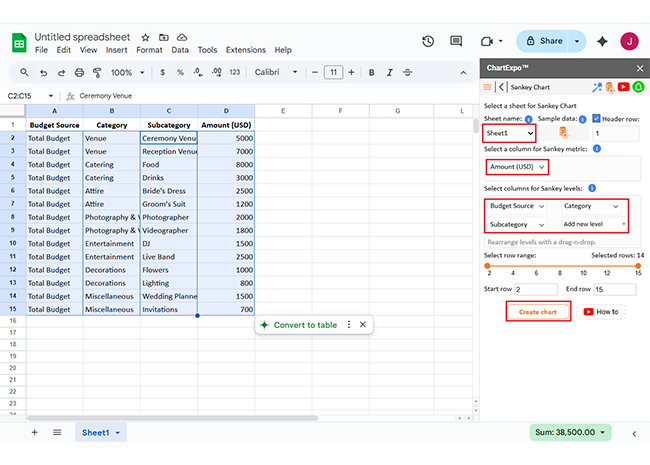
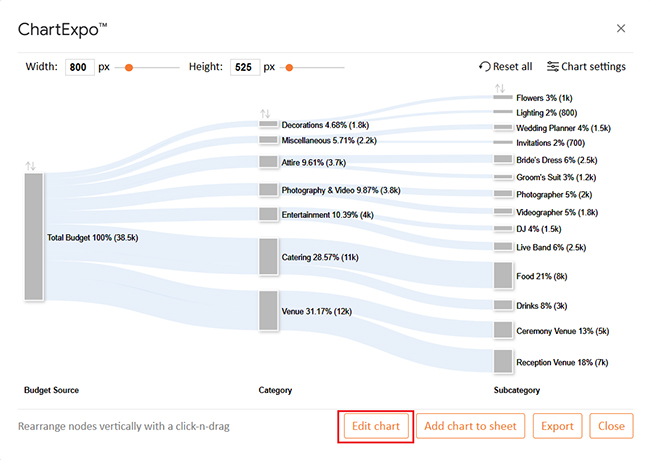
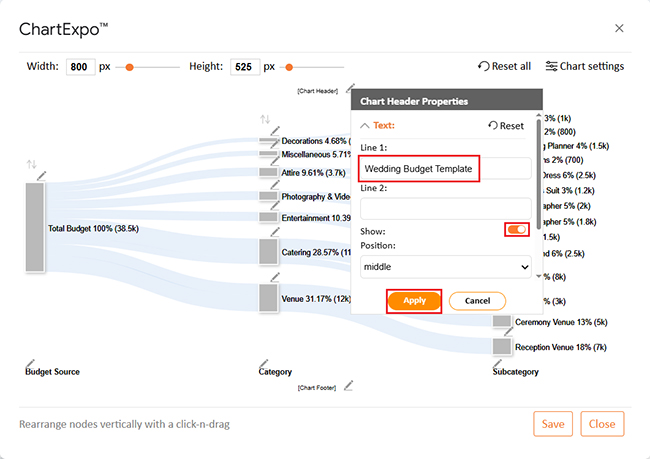
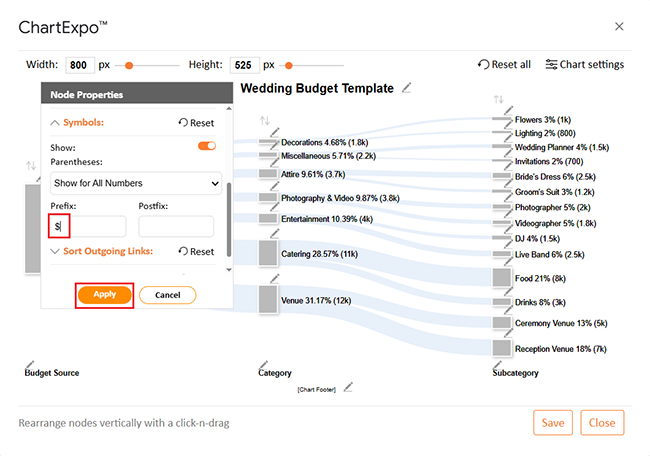
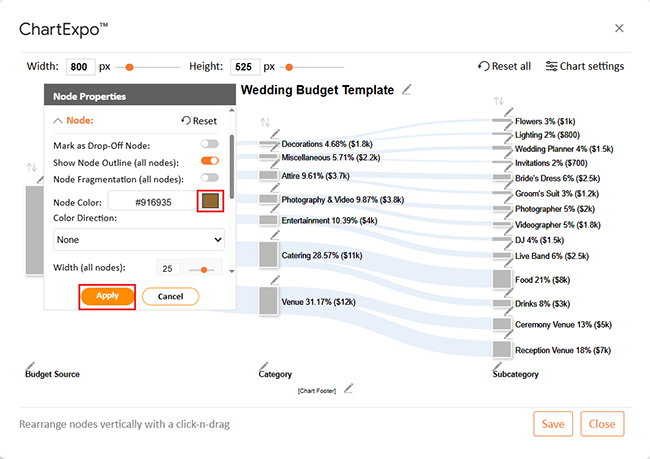
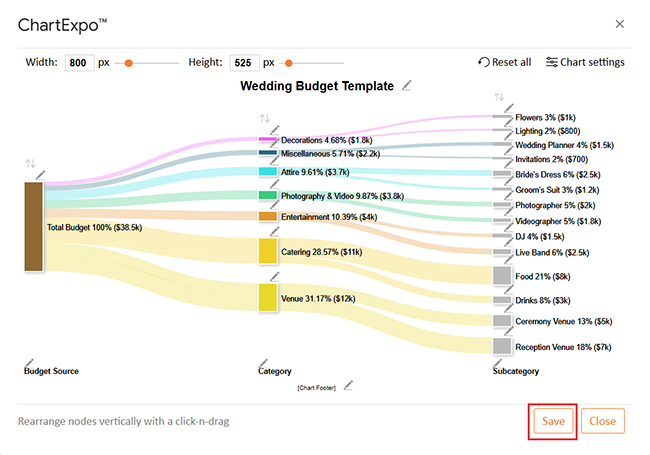
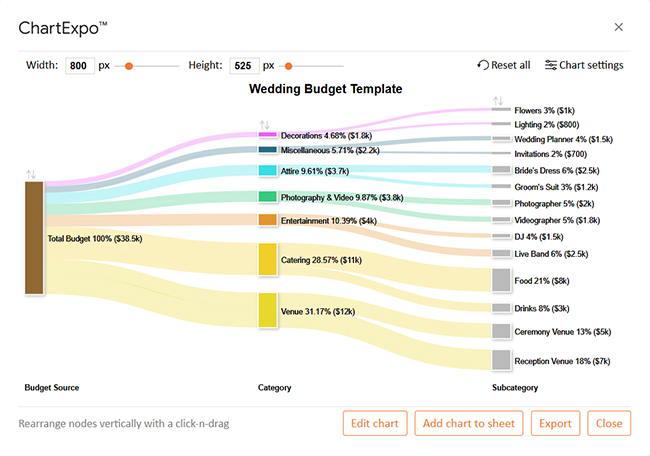
Spreadsheets might not scream romance, but they offer peace of mind. That’s priceless. Using a wedding budget template in Google Sheets doesn’t require hours of work or specialized technical skills. Once you’ve got your copy, it’s all about plugging in the correct details and watching the magic happen:
A wedding budget spreadsheet tracks estimated and actual costs. It covers categories like venue, food, attire, and décor. Includes payment dates and vendor details, helping you manage totals and stay on budget. This template keeps your wedding spending organized and visible.
Yes, Google Sheets is secure for budgeting. It uses encrypted cloud storage, so you control who can view or edit. Moreover, the activity history shows all changes. With good sharing settings, it’s a reliable tool for managing sensitive financial details.
The wedding budget template in Google Sheets is a powerful planning tool. It keeps your spending organized, giving you a clear overview of your finances. It helps prevent wedding overspending.
Everything is tracked in one place. You can plan, adjust, and share easily. The template updates as your wedding evolves. It grows in proportion to your budget and the size of your guest list.
Pair it with an operating budget spreadsheet for even more control. This is particularly helpful if your wedding spans multiple events. Rehearsal dinners, travel, and day-after brunches can also be tracked.
Planning a destination wedding? Use Google Finance in Google Sheets to handle currency conversions. It pulls live exchange rates to ensure accurate budgeting across borders.
You can also connect your budget to Google Sheets CRM templates. Use this to manage vendor contacts and payment timelines. It’s a smart way to keep all planning tools in sync.
In short, the wedding budget template is more than a spreadsheet. It’s a brilliant financial planner for your big day – simple, shareable, and stress-reducing. Pairing it with ChartExpo makes your wedding a win, from start to finish.
How much did you enjoy this article?


SUMPRODUCT in Google Sheets handles multi-condition calculations without extra columns. Master its syntax, uses, and errors. Read on!
An annual budget template in Google Sheets organizes your yearly finances, tracks every dollar, and reveals spending patterns. Read on!
Learn the best graph to show profit and loss with practical examples and use cases. Discover how to visualize your business data, track trends, and make smarter financial decisions.