Categories

Financial records scattered across folders and notebooks drain time and invite errors. A ledger template in Excel changes that by giving every transaction a fixed home, every balance an automatic calculation, and every account a consistent structure.
Whether the goal is personal budgeting or full business bookkeeping, this approach removes guesswork from recordkeeping.
Unlike dedicated accounting platforms, an Excel ledger demands no subscription, no steep learning curve, and no rigid configuration.
Users shape it to fit their needs, choosing the columns, formulas, and categories that matter most. This post covers what a ledger template is, its core components, types, setup steps, and how to draw insights from its data.
Definition: A ledger template in Excel is a pre-structured spreadsheet that records every financial transaction a business or individual makes, capturing debits, credits, and running balances in one place. It replicates the logic of a traditional accounting ledger while leveraging spreadsheet flexibility.
The template uses predefined columns for dates, reference numbers, account names, and monetary amounts. Embedded formulas handle the arithmetic, so balances refresh with every new entry, and the ledger format in Excel stays current without manual recalculation.
Most critically, an Excel ledger template pulls all financial movement into one searchable record, simplifying reconciliation, audit preparation, and summary reporting.
Without a standardized recording method, financial data becomes unreliable and hard to audit. A ledger format in Excel enforces consistency across every entry, giving businesses and individuals a dependable foundation for decision-making and compliance.
Every reliable ledger template in Excel depends on a core set of fields and formulas. Each element plays a defined role in capturing transactions accurately and maintaining balances with precision.
Financial tracking needs vary by user, industry, and reporting goal. Excel supports several distinct ledger configurations, each built around a specific accounting function.
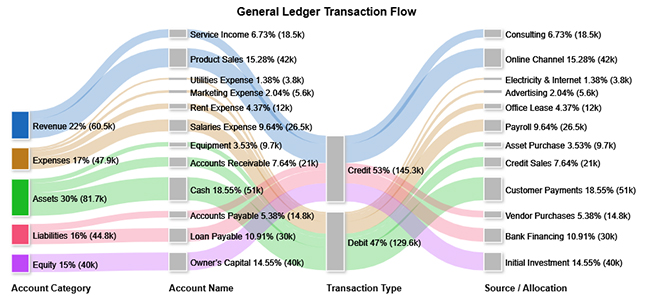
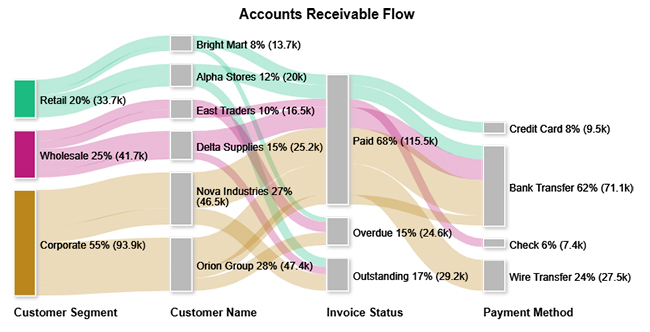
Visualizing how a ledger operates across different account types reinforces the concepts behind the template. The examples below use a Sankey Chart to map transaction flows, with each chart revealing a different dimension of ledger activity.
The general ledger flow chart shows how asset accounts hold the largest share of total ledger activity, while credit-side transactions drive the bulk of movement across all account categories.
The cash flow diagram by department shows that the Sales team generates the greatest share of inflows, while Payroll represents the most significant outflow category across the organization.
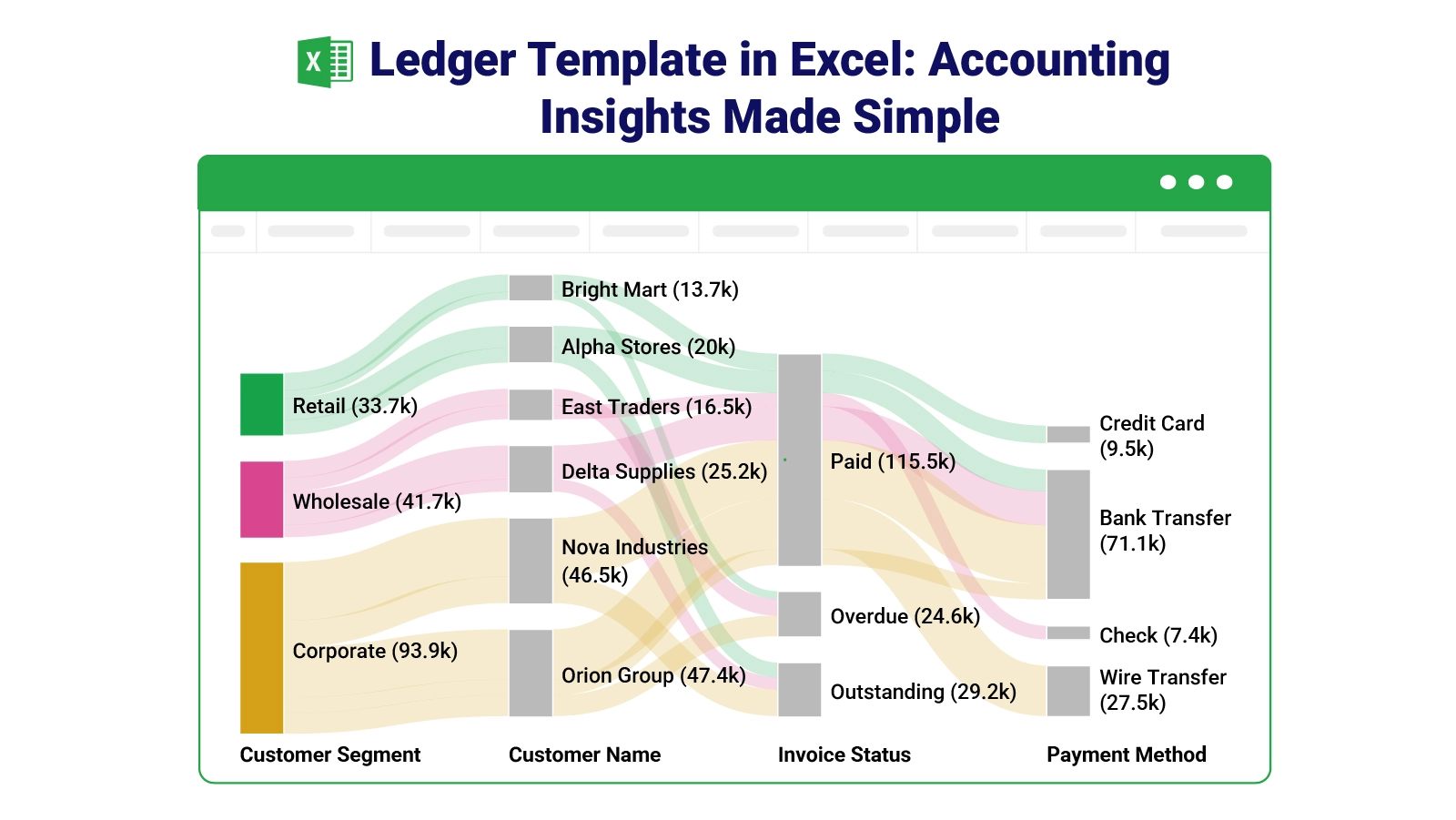
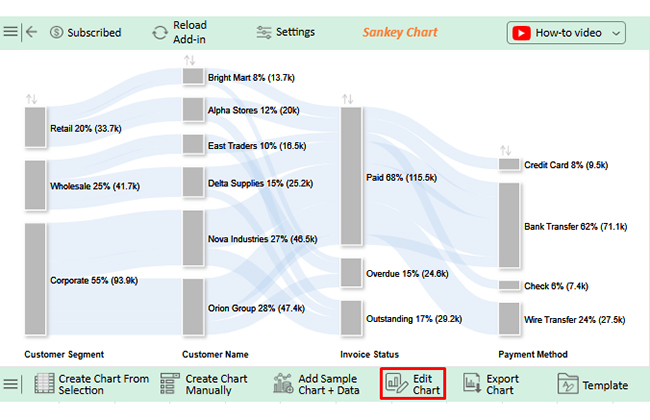
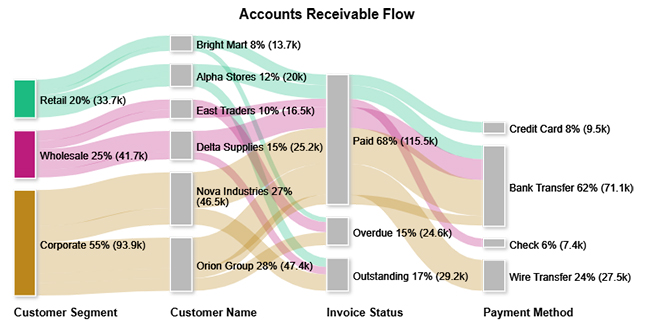
The accounts receivable chart shows that corporate clients account for the largest portion of outstanding invoices, with most of those balances moving into the paid category upon settlement.
Setting up an effective ledger does not require advanced spreadsheet expertise. A straightforward build process, applied in order, produces a template that stays accurate over months of use.
Raw ledger data only becomes useful when examined systematically. Applying a structured review process turns transaction records into insight about cash flow, accuracy, and financial trends.
Scan entries for missing dates, repeated transaction references, or accounts assigned to the wrong category, as these gaps distort totals.
Confirm that every debit and credit pair follows standard accounting rules and that the running balance reflects each entry correctly.
Flag entries where amounts deviate sharply from typical patterns, as these may signal data entry mistakes or one-off financial events.
Measuring month-over-month change surfaces spending trends and behavioral shifts, similar to what an income and expenditure tracker reveals over time.
Ledger data structured around debit and credit categories supports balance-tracking strategies like an Excel spreadsheet for debt snowball, where visualizing payment sequences accelerates the payoff plan. Charting tools convert the spreadsheet numbers into graphics that highlight patterns invisible in raw rows.
Why use ChartExpo?
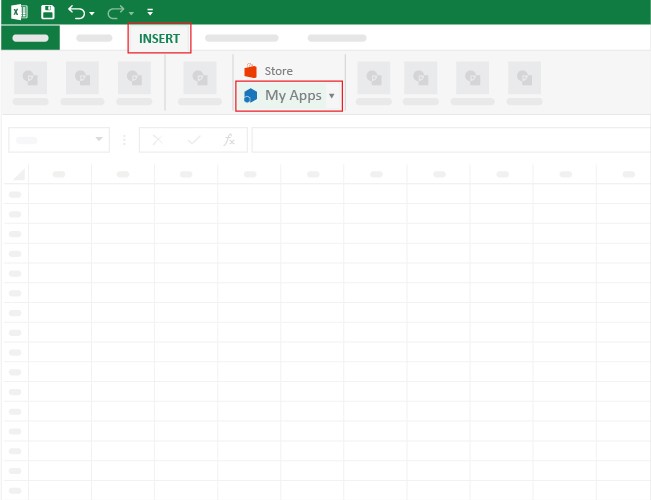
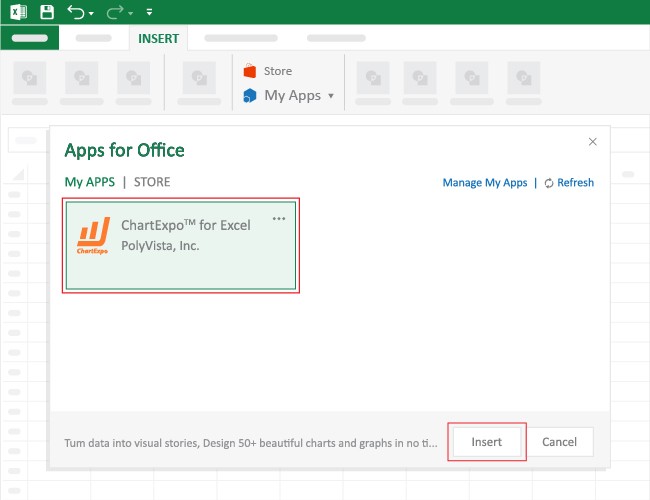
How to install ChartExpo in Excel?
ChartExpo works with both Google Sheets and Microsoft Excel. Follow the on-screen prompts after installation to start building charts directly inside your preferred platform.
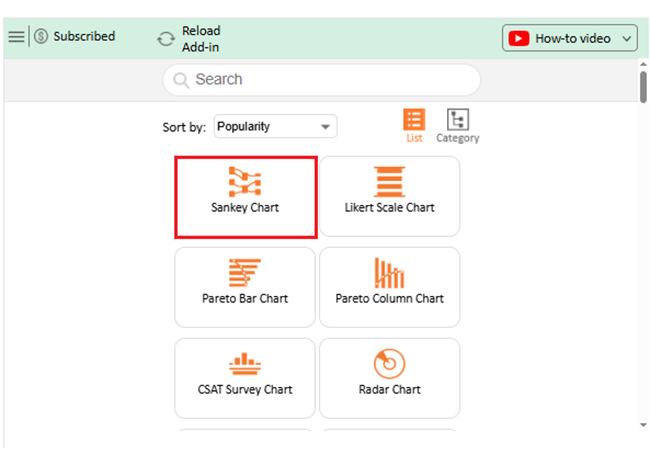
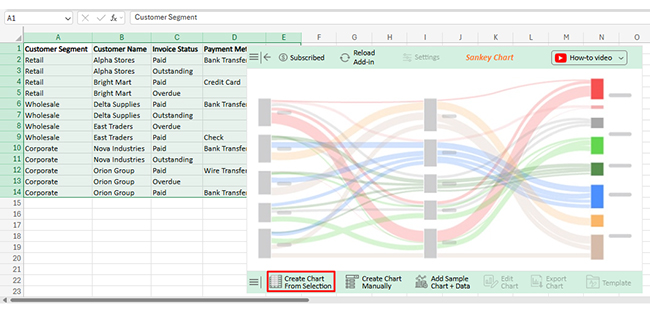
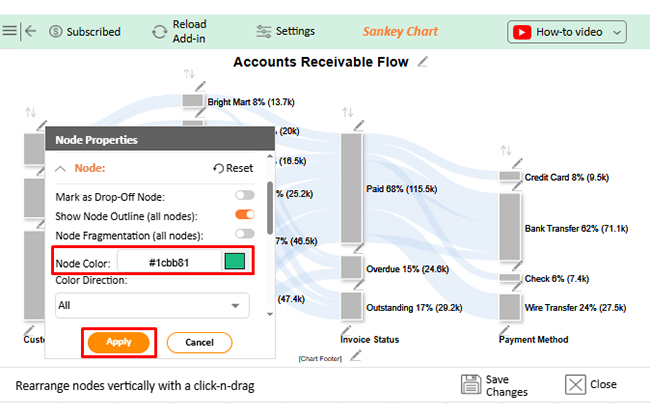
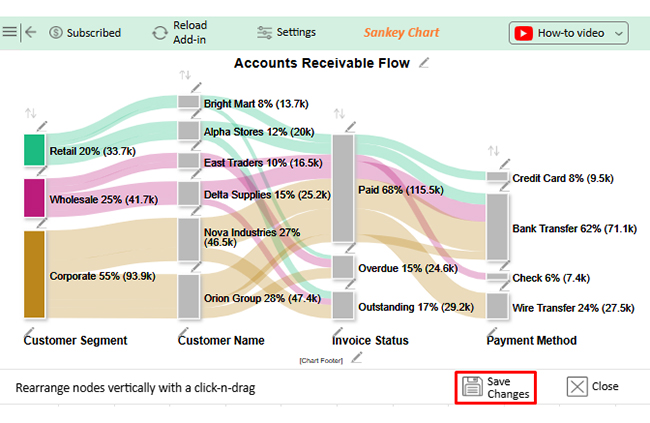
Consider we have the following data for a Sankey Chart.
| Customer Segment | Customer Name | Invoice Status | Payment Method | Amount |
| Retail | Alpha Stores | Paid | Bank Transfer | 12000 |
| Retail | Alpha Stores | Outstanding | 8000 | |
| Retail | Bright Mart | Paid | Credit Card | 9500 |
| Retail | Bright Mart | Overdue | 4200 | |
| Wholesale | Delta Supplies | Paid | Bank Transfer | 18500 |
| Wholesale | Delta Supplies | Outstanding | 6700 | |
| Wholesale | East Traders | Overdue | 9100 | |
| Wholesale | East Traders | Paid | Check | 7400 |
| Corporate | Nova Industries | Paid | Bank Transfer | 32000 |
| Corporate | Nova Industries | Outstanding | 14500 | |
| Corporate | Orion Group | Paid | Wire Transfer | 27500 |
| Corporate | Orion Group | Overdue | 11300 | |
| Corporate | Orion Group | Paid | Bank Transfer | 8600 |
Beyond recording transactions, an Excel ledger template delivers practical advantages that extend across day-to-day operations. Its adaptability makes it equally useful for solo freelancers and multi-department finance teams.
A ledger is only as reliable as the habits behind it. Consistent maintenance routines prevent the data drift and formula corruption that undermine an otherwise sound template.
Yes. Excel includes basic ledger-style templates accessible through the template gallery on startup. Third-party sources also offer more specialized designs, and users can build a fully custom version from a blank workbook.
Start with clearly labeled columns for date, description, debit, credit, and balance. Keep account names uniform across all entries, apply data validation to reduce input errors, and protect formula cells to prevent accidental changes.
A reconciliation layout typically shows the opening balance, a list of transactions for the period, any adjusting entries, and the closing balance. Comparing this closing figure to an external source, such as a bank statement, confirms accuracy.
Transaction records without structure become a liability rather than an asset. A ledger template in Excel transforms raw financial data into an organized, queryable record that supports every stage of financial management, from daily bookkeeping to year-end reporting. Its formula-driven design keeps balances accurate, and its flexible layout adapts as needs evolve.
Pairing ledger data with visualization tools adds another layer of clarity, converting rows of figures into charts that expose patterns, concentrations, and anomalies at a glance. Together, structured recordkeeping and strong analysis habits give individuals and businesses the financial visibility needed to plan, respond, and grow with confidence.
How much did you enjoy this article?


Learn how to use sparklines in Excel to quickly visualize trends inside cells. Discover types, creation steps, customization, use cases, benefits, and best practices.

Learn what a confidence interval graph is, how to create it in Excel, and how to interpret results to make more reliable, data-driven decisions.
A correlation matrix in Excel helps identify relationships between variables. Learn how to create, read, and use it for effective data analysis.