• Home
  • Tools dropdown img
    • Spreadsheet Charts

      • ChartExpo for Google Sheets
      • ChartExpo for Microsoft Excel
    • Power BI Charts

      • Power BI Custom Visuals by ChartExpo
    • Word Cloud

  • Charts dropdown img
    • Chart Category

      • Bar Charts
      • Circle Graphs
      • Column Charts
      • Combo Charts
      • Comparison Charts
      • Line Graphs
      • PPC Charts
      • Sentiment Analysis Charts
      • Survey Charts
    • Chart Type

      • Box and Whisker Plot
      • Clustered Bar Chart
      • Clustered Column Chart
      • Comparison Bar Chart
      • Control Chart
      • CSAT Survey Bar Chart
      • CSAT Survey Chart
      • Dot Plot Chart
      • Double Bar Graph
      • Funnel Chart
      • Gauge Chart
      • Likert Scale Chart
      • Matrix Chart
      • Multi Axis Line Chart
      • Overlapping Bar Chart
      • Pareto Chart
      • Radar Chart
      • Radial Bar Chart
      • Sankey Diagram
      • Scatter Plot Chart
      • Slope Chart
      • Sunburst Chart
      • Tornado Chart
      • Waterfall Chart
      • Word Cloud
    • Google Sheets
      Microsoft Excel
  • Services
  • Pricing
  • Contact us
  • Blog
  • Support dropdown img
      • Gallery
      • Videos
      • Contact us
      • FAQs
      • Resources
    • Please feel free to contact us

      atsupport@chartexpo.com

Categories
All Data Visualizations Data Analytics Surveys
Add-ons/
  • Google Sheets
  • Microsoft Excel
  • Power BI
All Data Visualizations Data Analytics Surveys
Add-ons
  • Google Sheets
  • Microsoft Excel
  • Power BI

We use cookies

This website uses cookies to provide better user experience and user's session management.
By continuing visiting this website you consent the use of these cookies.

Ok

ChartExpo Survey


Home > Blog > Data Analytics

Investment Performance Reporting: Insights for Better ROI

Tracking portfolio performance without a structured framework often leads to missed risks, poor timing, and costly financial surprises that could have been avoided.
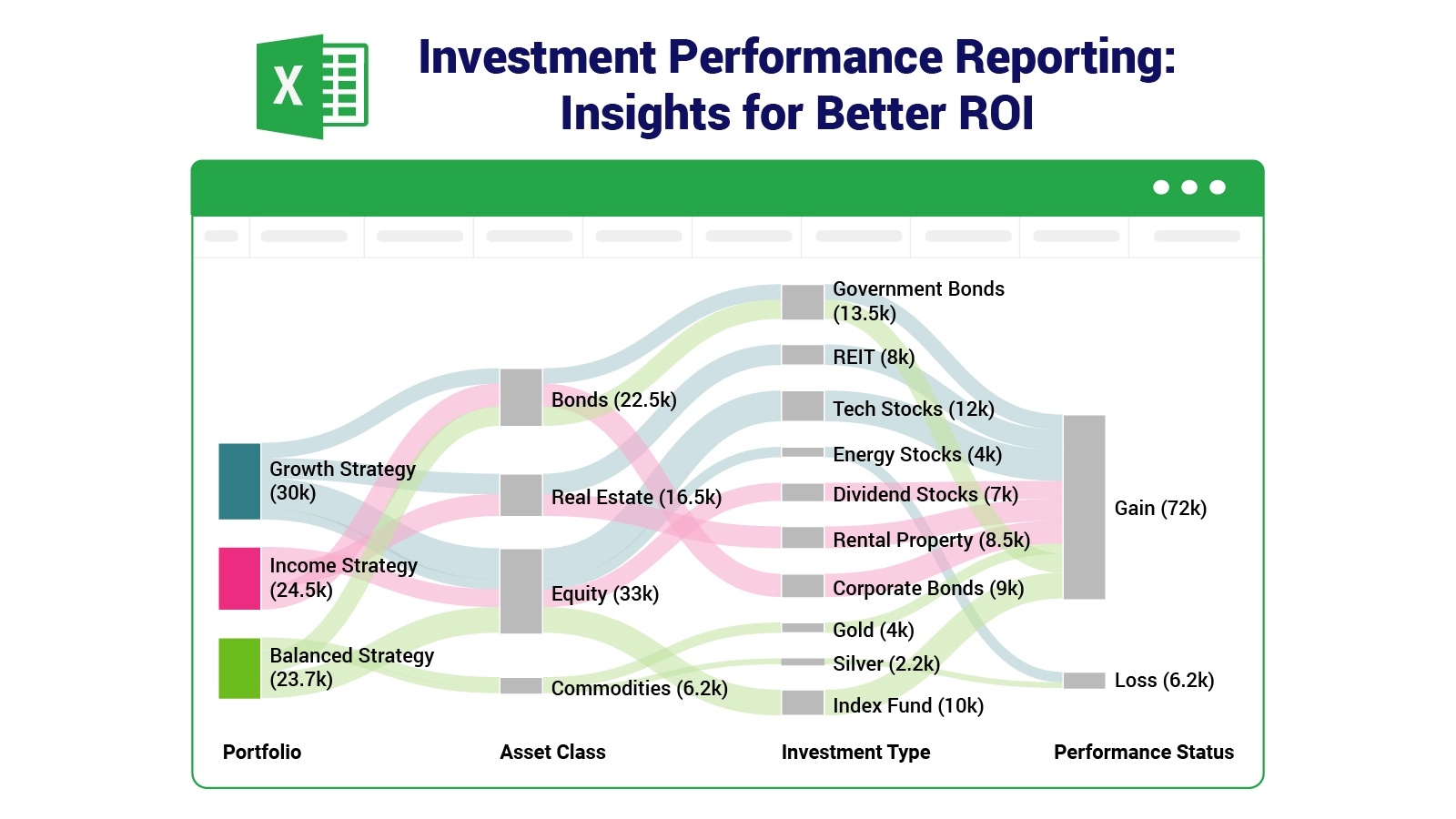
Investment Performance Reporting

Investment performance reporting gives investors, analysts, and fund managers a consistent, repeatable approach to measuring returns, assessing risk exposure, and evaluating progress against clearly defined financial goals.

This guide covers the core concepts: what investment performance reporting means, why it matters, the key components and metrics involved, common report types, step-by-step Excel examples, and best practices for analysis.

Whether you manage personal savings or institutional capital, the methods here will sharpen how you read and produce financial reports.

What is Investment Performance Reporting?

Definition: Investment performance reporting is a structured process for measuring, analyzing, and presenting investment results across a defined time period. It shows how assets perform, what return they generate, and how those results compare against established benchmarks.

The core purpose of investment reporting is to give investors, financial analysts, and portfolio managers the data they need to evaluate outcomes and make sound decisions. Individuals, asset managers, corporations, and financial institutions rely on these reports to monitor growth, control risk, and maintain accountability.

The scope of investment reporting and performance spans return tracking, asset allocation review, risk measurement, and compliance monitoring across relevant financial standards.

Why is Investment Performance Reporting Important?

Good financial management requires knowing exactly how your investments are performing, not just assuming they are on track. The following are the core reasons it matters:

  • Track portfolio performance: Records how investment value and overall returns evolve.
  • Identify risks: Evaluates volatility, probable losses, and total risk exposure.
  • Evaluate returns: Captures profit and loss data clearly and supports accurate ROI analysis.
  • Improve decision-making: Provides investors with reliable performance data for sound strategy decisions.
  • Ensure compliance: Maintains organized records and supports effective management reporting.
  • Support transparency: Gives stakeholders and clients clear, factual portfolio information.
  • Facilitate benchmarking: Compares portfolio returns against market indexes to gauge performance.

Key Components of Investment Performance Reporting

A well-designed investment performance report format draws together several key data points that, taken together, reveal the full state of a portfolio. Main components include:

  • Portfolio summary: Outlines total funds deployed, the current portfolio value, and overall net performance.
  • Asset allocation: Shows how funds are spread across asset classes such as equities, bonds, and property.
  • Performance metrics: Covers return rates, growth percentages, and indicators used to assess investment outcomes.
  • Benchmark comparison: Positions portfolio results alongside market indexes or defined targets.
  • Risk assessment: Evaluates volatility, probable losses, and total risk exposure.
  • Income and expenses: Logs dividends, interest earned, fees, and transaction records within an investment tracking spreadsheet.
  • Commentary/analysis: Explains what performance data means and flags areas worth revisiting.

Types of Investment Performance Reporting

The form of investment reporting used depends on who needs the data, the decisions being made, and the level of detail the situation calls for. Common report types include:

  • Summary reports: Offer a high-level snapshot of portfolio value, total returns, and overall performance in a layout similar to a progress report template.
  • Detailed reports: Include full transaction records, individual asset values, and calculations for deeper analysis.
  • Benchmark reports: Compare portfolio results against market indexes or set performance targets.
  • Risk-adjusted reports: Measure the level of return produced relative to the risk accepted to generate it.
  • Compliance reports: Confirm that investment activities align with financial rules and reporting standards.

Key Metrics of an Investment Performance Reporting

Reliable investment performance reports are built on a defined set of financial metrics. Important metrics include:

  • ROI (Return on Investment): Shows how much profit an investment yields relative to its cost and demonstrates how to calculate return on investment for evaluating results accurately.
  • Alpha & Beta: Alpha reflects how much a portfolio beats its benchmark; Beta measures portfolio risk relative to market indexes.
  • Sharpe Ratio: Rates the return produced per unit of risk taken in the investment.
  • Total Return: Combines price appreciation, dividends, and interest income and is used to measure ROI in business portfolio reviews.
  • Benchmark Comparison: Measures portfolio results against market indexes to determine whether performance is ahead or behind the average.

Explaining Investment Performance Report Examples

Real examples make investment performance reporting easier to absorb because they show how data types come together in a structured view. These examples focus on performance, risk, and portfolio comparison.

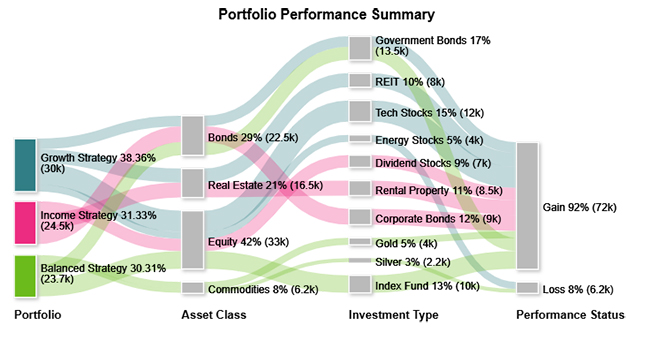
  • Portfolio Performance Summary

The Portfolio Performance Summary example shows how assets are spread across classes and investment types to represent the portfolio’s overall composition.
Investment Performance Reporting
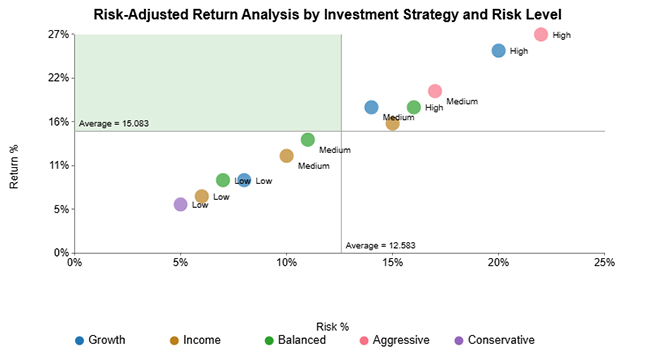
  • Risk-Adjusted Return Analysis

The Risk-Adjusted Return Analysis example illustrates the relationship between risk and return, showing that conservative positions carry lower risk alongside lower returns.
Investment Performance Reporting
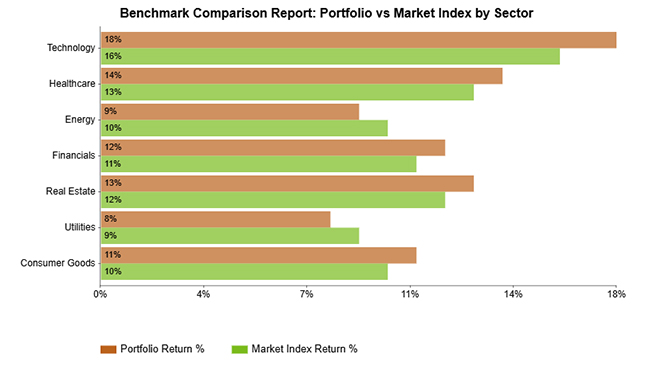
  • Benchmark Comparison Report

The Benchmark Comparison Report example provides a sector-level view comparing portfolio returns to a market index, revealing where the portfolio outperforms or falls short.
Investment Performance Reporting
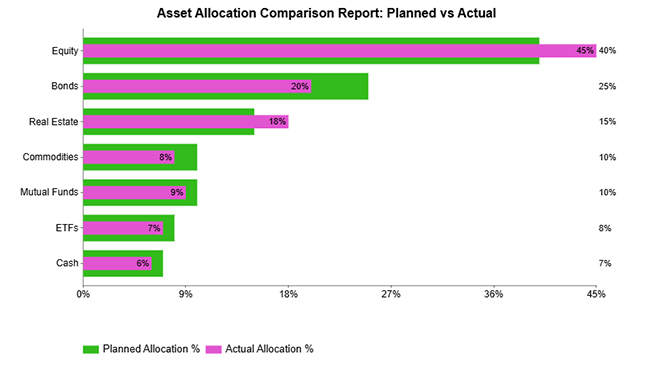
  • Asset Allocation Comparison Report

The Asset Allocation Comparison Report example sets planned allocation against actual allocation to show how the portfolio has shifted during the reporting period.
Investment Performance Reporting
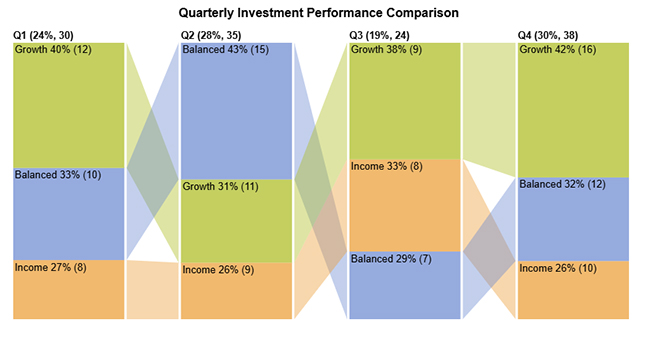
  • Quarterly Investment Performance Comparison

The Quarterly Investment Performance Comparison example tracks portfolio results across consecutive quarters to identify performance trends in investment reporting and performance over time.
Investment Performance Reporting

How to Create Investment Performance Reporting in Excel?

Building investment performance reports in Excel makes it straightforward to track portfolio holdings, compute returns, and present results in a repeatable, organized format. The following steps walk through the complete process:

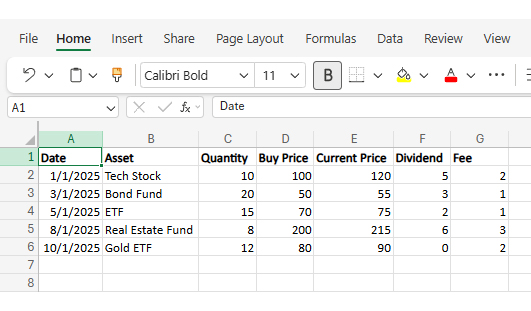
Step 1: Gather data

Collect transaction history, prices, dividends, and expenses to ensure the report includes complete investment performance records.
Investment Performance Reporting

Step 2: Set up template

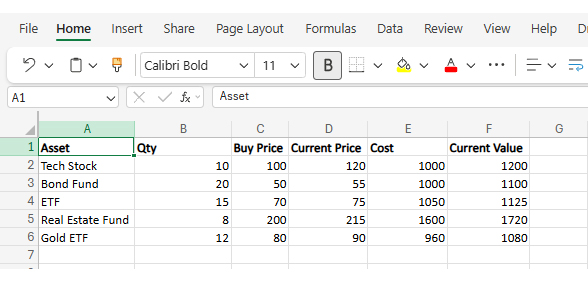
Create columns for date, asset name, quantity, cost, current value, and profit/loss to keep the data organized.

  • Formula for Cost

=Quantity * Buy Price

  • Formula for Current Value

=Quantity * Current Price

Step 3: Input transactions

Enter all buy, sell, income, and expense details carefully so the investment performance reporting remains accurate.
Investment Performance Reporting

Step 4: Calculate metrics

Use formulas to calculate ROI, total return, and other key performance indicators to evaluate results.

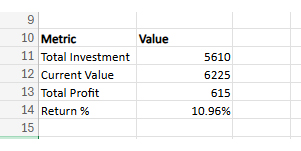
  • Total Investment

=SUM(E2:E6)

  • Total Value

=SUM(F2:F6)

  • Total Profit

=Total Value – Total Investment

  • Return %

=Profit / Total Investment

Investment Performance Reporting

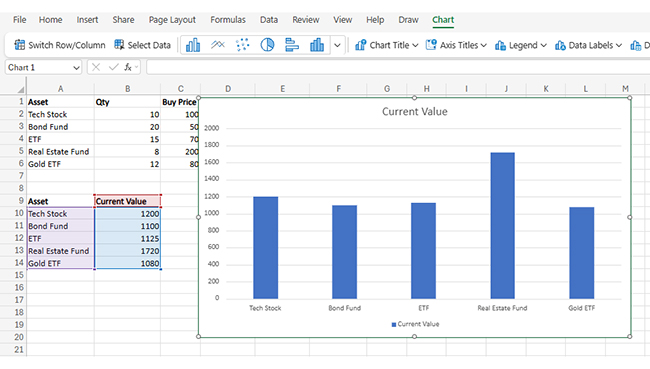
Step 5: Create charts

Insert charts to visualize growth, asset allocation, and return trends for better understanding. Select data, go to Insert > charts, and choose relevant charts.
Investment Performance Reporting

Step 6: Generate summary

Prepare a final summary showing total investment, total return, and key insights for quick analysis.

How to Analyze Investment Performance Reporting in Excel?

Analyzing investment performance reporting in Excel helps you evaluate returns, track portfolio allocation, and understand how different strategies contribute to overall growth. By organizing and visualizing your data effectively, you can make smarter financial decisions. Follow these steps to perform a comprehensive analysis:

Step 1: Organize Your Investment Data

Begin by structuring your dataset with key fields such as investment type, strategy, asset class, returns, and value. Ensure the data is clean, consistent, and properly labeled for accurate analysis.

Step 2: Classify Investment Categories

Group your data into meaningful categories like growth, income, or balanced strategies, and further into asset classes such as stocks, bonds, or real estate. This helps in comparing performance across segments.

Step 3: Calculate Performance Metrics

Use Excel formulas to compute returns, percentage contributions, and growth rates. These metrics provide a clear view of how each investment performs within the portfolio.

Step 4: Use Pivot Tables for Insights

Create Pivot Tables to summarize investment performance across strategies and asset classes. This allows you to identify top-performing areas and underperforming segments quickly.

Step 5: Create Visualizations

Use charts such as bar charts or flow-based visuals to represent investment distribution and performance. For more advanced and interactive visuals, you can use ChartExpo to simplify complex data visualization.

Step 6: Interpret Portfolio Trends

Analyze your visuals to understand how funds flow between strategies and assets, and identify which investments drive the most value or risk.

Step 7: Final Investment Flow Visualization

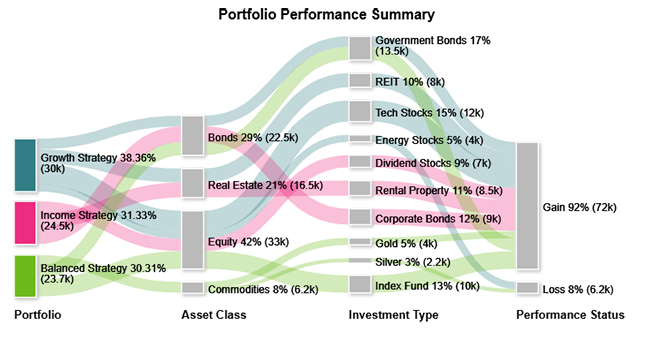
Include a final visualization, such as a flow-based investment chart that shows how funds move from strategies to asset classes and outcomes. This makes it easier to understand allocation patterns and communicate insights clearly.
Investment Performance Reporting

Key Insights

  • Growth Strategy accounts for the largest share, spread across bonds, REITs, and tech stocks.
  • Income Strategy targets dividend stocks, corporate bonds, and rental property for consistent, steady returns.
  • Balanced Strategy achieves diversification through equity, bonds, commodities, and index funds.

Benefits of Investment Reporting

Structured investment performance reporting delivers practical advantages for investors, portfolio managers, and businesses alike, grounding every financial decision in verified data rather than assumption or guesswork. Key benefits include:

  • Informed decisions: Supplies verified data that helps investors select stronger strategies and refine financial planning.
  • Performance tracking: Provides a clear view of portfolio growth, losses, and overall returns across each reporting period.
  • Risk management: Surfaces potential risk areas before they escalate, giving investors time to protect their holdings.
  • Transparency: Produces structured reports that stakeholders, clients, and management can read and act on.
  • Benchmarking: Allows portfolio returns to be compared against market indexes or stated targets for context.
  • Compliance assurance: Keeps financial records properly organized to satisfy audit requirements and reporting standards.

Best Practices for Effective Investment Performance Reporting

For investment performance reports to serve their purpose, they need to be consistent, readable, and grounded in accurate data. Best practices include:

  • Keep reports concise: Include only data that informs decisions so the report stays clear and useful.
  • Use consistent metrics: Apply the same performance indicators each period for accurate comparison.
  • Update regularly: Publish reports monthly or quarterly to keep the data current.
  • Include benchmarks: Weigh results against market indexes to put performance in perspective.
  • Visualize data clearly: Apply charts and graphs so that trends and outcomes are easy to read.
  • Provide actionable insights: Add brief commentary that helps investors interpret results and identify clear next steps.

Common Challenges of Investment Performance Reporting

Even with reliable tools in place, tracking financial data and portfolio outcomes can become challenging when information is complex, and market conditions shift frequently. Common issues include:

  • Data accuracy issues: Errors or gaps in transaction data can skew calculations and generate misleading results.
  • Complex calculations: Ratios like Sharpe, ROI, and risk-adjusted return require precise formulas that are easy to misapply.
  • Benchmark selection: Picking a mismatched market index distorts the view of how well investments are performing.
  • Inconsistent formats: Varying report layouts between periods make performance comparisons harder to draw.
  • Timely updates: Late reporting makes performance data less relevant when decisions need to be made.
  • Interpreting results: Raw performance figures need framing and context before they convey meaningful insight.

FAQs

What should be included in an investment report?

A solid investment report includes portfolio value, asset allocation, return metrics, benchmark comparisons, risk indicators, and a brief section of performance analysis.

At what point do I need to report investments?

Reporting frequency should be set at monthly, quarterly, or annual intervals to track shifts and keep portfolio performance data current and accurate.

What are the standards for investment reporting?

Investment performance reporting should use consistent calculation methods, appropriate benchmarks, and a clear layout so returns, risks, and comparisons can be properly evaluated.

Wrap Up

Consistent investment performance reporting is what separates reactive guesswork from disciplined, data-driven portfolio management.

Measuring returns systematically, benchmarking results against relevant indexes, and tracking risk at every stage gives investors the clarity they need to act on real evidence rather than assumptions or gut instinct.

The methods in this guide walk through each layer of the reporting process, from building an Excel tracker to reading portfolio charts.

Apply these practices on a regular schedule, monthly or quarterly at a minimum, and your financial decisions will reflect a far more accurate picture of where your investments currently stand and where they are realistically headed.

How much did you enjoy this article?

PBIAd1
Start Free Trial!
161112

Related articles

next previous
Data Analytics10 min read

Pay Equity Analysis: Smart Ways to Analyze Pay Gaps

Pay equity analysis uncovers hidden salary gaps. Learn how to measure compensation fairness, close pay disparities, and build trust. Read on!

Data Analytics10 min read

What Are Sales KPIs: Sales Metrics Made Easy

What are sales KPIs, and why should every business track them? Learn the top indicators, how to measure them, and improve results. Read on!

Data Analytics10 min read

Calculating Revenue Growth for Better Growth Analysis

Calculating revenue growth reveals where your business stands. Learn the formula, types, and steps to track performance accurately. Read on!

Data Analytics9 min read

Consulting Report Template: A Complete Guide

Consulting Report Template: structure insights, drive decisions, and deliver standout results. Discover how to build better reports now!

Data Analytics10 min read

Event Budget Template for Event Budget Insights

Event budget template keeps event finances clear and controlled. Use one to track costs, compare spending, and stay on budget. Learn more!

ChartExpo logo

Turn Data into Visual
Stories

CHARTEXPO

  • Home
  • Gallery
  • Videos
  • Services
  • Pricing
  • Contact us
  • FAQs
  • Privacy policy
  • Terms of Service
  • Sitemap

TOOLS

  • ChartExpo for Google Sheets
  • ChartExpo for Microsoft Excel
  • Power BI Custom Visuals by ChartExpo
  • Word Cloud

CATEGORIES

  • Bar Charts
  • Circle Graphs
  • Column Charts
  • Combo Charts
  • Comparison Charts
  • Line Graphs
  • PPC Charts
  • Sentiment Analysis Charts
  • Survey Charts

TOP CHARTS

  • Sankey Diagram
  • Likert Scale Chart
  • Comparison Bar Chart
  • Pareto Chart
  • Funnel Chart
  • Gauge Chart
  • Radar Chart
  • Radial Bar Chart
  • Sunburst Chart
  • see more
  • Scatter Plot Chart
  • CSAT Survey Bar Chart
  • CSAT Survey Chart
  • Dot Plot Chart
  • Double Bar Graph
  • Matrix Chart
  • Multi Axis Line Chart
  • Overlapping Bar Chart
  • Control Chart
  • Slope Chart
  • Clustered Bar Chart
  • Clustered Column Chart
  • Box and Whisker Plot
  • Tornado Chart
  • Waterfall Chart
  • Word Cloud
  • see less

RESOURCES

  • Blog
  • Resources
  • YouTube
SIGN UP FOR UPDATES

We wouldn't dream of spamming you or selling your info.

© 2026 ChartExpo, all rights reserved.