• Home
  • Tools dropdown img
    • Spreadsheet Charts

      • ChartExpo for Google Sheets
      • ChartExpo for Microsoft Excel
    • Power BI Charts

      • Power BI Custom Visuals by ChartExpo
    • Word Cloud

  • Charts dropdown img
    • Chart Category

      • Bar Charts
      • Circle Graphs
      • Column Charts
      • Combo Charts
      • Comparison Charts
      • Line Graphs
      • PPC Charts
      • Sentiment Analysis Charts
      • Survey Charts
    • Chart Type

      • Box and Whisker Plot
      • Clustered Bar Chart
      • Clustered Column Chart
      • Comparison Bar Chart
      • Control Chart
      • CSAT Survey Bar Chart
      • CSAT Survey Chart
      • Dot Plot Chart
      • Double Bar Graph
      • Funnel Chart
      • Gauge Chart
      • Likert Scale Chart
      • Matrix Chart
      • Multi Axis Line Chart
      • Overlapping Bar Chart
      • Pareto Chart
      • Radar Chart
      • Radial Bar Chart
      • Sankey Diagram
      • Scatter Plot Chart
      • Slope Chart
      • Sunburst Chart
      • Tornado Chart
      • Waterfall Chart
      • Word Cloud
    • Google Sheets
      Microsoft Excel
  • Services
  • Pricing
  • Contact us
  • Blog
  • Support dropdown img
      • Gallery
      • Videos
      • Contact us
      • FAQs
      • Resources
    • Please feel free to contact us

      atsupport@chartexpo.com

Categories
All Data Visualizations Data Analytics Surveys
Add-ons/
  • Google Sheets
  • Microsoft Excel
  • Power BI
All Data Visualizations Data Analytics Surveys
Add-ons
  • Google Sheets
  • Microsoft Excel
  • Power BI

We use cookies

This website uses cookies to provide better user experience and user's session management.
By continuing visiting this website you consent the use of these cookies.

Ok

ChartExpo Survey


Home > Blog > Data Analytics

Online Retailer Demand Forecasting and Price Optimization

Online retail runs on thin margins and fast mood swings. A week of bad inventory calls can pile up holding costs or empty shelves.
Online Retailer Demand Forecasting and Price Optimization

The fix isn’t a bigger spreadsheet; it’s tighter business analytics that ties demand signals to pricing moves. When seasons flip and ads land, the numbers change before the team finishes coffee.

This guide breaks down how modern retailers forecast demand, tune prices, and sanity-check results with simple models and clear charts.

It also shows how to set up the workflow in Google Sheets without turning analysis into a full-time job. Expect practical checks, not theory dumps. The goal is fewer surprises and cleaner decisions.

Table of Contents:

  1. What is Analytics for an Online Retailer Demand Forecasting and Price Optimization?
  2. Why Demand Forecasting and Price Optimization Matter for Online Retailers?
  3. Core Demand Forecasting Methodology Used in Online Retail Analytics
  4. How Price Optimization Works in Online Retail?
  5. Demand Forecasting and Price Optimization Examples for Online Retailers
  6. How to Analyze Retail Demand Forecasting and Price Optimization in Google Sheets?
  7. Benefits of Analytics-Driven Demand Forecasting for Online Retailers
  8. FAQs
  9. Wrap Up

What is Analytics for an Online Retailer Demand Forecasting and Price Optimization?

Definition: Analytics for an Online Retailer Demand Forecasting and Price Optimization is a disciplined way to turn click, cart, and order history into decisions.

It uses data analytics to estimate near-term demand and to set prices that protect margin without choking volume. The result is a repeatable loop for inventory, promos, and pricing.

Forecasting answers the quantity and timing question; optimization answers the price question. Put together, Analytics for an Online Retailer Demand Forecasting and Price Optimization lets a team test scenarios before money is spent.

Most analytics tools for business can run the math, but the value comes from consistent inputs and tight feedback.

Why Demand Forecasting and Price Optimization Matter for Online Retailers?

On a live storefront, Analytics for an Online Retailer Demand Forecasting and Price Optimization decides whether shoppers see the item they want and whether the margin survives the week.

  • Too much stock ties up cash; too little stock sends shoppers to a competitor.
  • Solid forecasts keep inventory close to real demand, cutting waste and stockouts.
  • Smart pricing finds the edge between conversion and margin, not a race to the bottom.
  • Shoppers compare prices in seconds, so even tiny mistakes can lead to lost carts.
  • With retail industry KPIs in view, teams can react fast to promos, season swings, and market shocks.

Core Demand Forecasting Methodology Used in Online Retail Analytics

Online shops can’t pick one model and hope. A demand forecasting methodology stacks baselines and driver-based models, then tunes them as new data arrives. Analytics for an Online Retailer Demand Forecasting and Price Optimization works best when the process is repeatable and measured.

1. Historical Sales Analysis

A retail demand forecast starts with yesterday’s orders and the calendar. It reads seasonality and trend, then turns them into next period expectations. For Analytics for an Online Retailer Demand Forecasting and Price Optimization, clean history beats fancy math.

2. Time-Series Forecasting Models

Time series models like moving averages, exponential smoothing, and ARIMA project trends forward. They give Analytics for an Online Retailer Demand Forecasting and Price Optimization a baseline.

3. Causal and Regression Models

Driver-based models add context such as holidays, discounts, shipping delays, and launches. With those signals, Analytics for an Online Retailer Demand Forecasting and Price Optimization explains changes instead of reacting late.

4. Machine Learning Forecasting

Modern models update from fresh clicks and orders. That keeps business forecasting stable when promos or supply shifts occur. In Analytics for an Online Retailer Demand Forecasting and Price Optimization, that flexibility matters.

Mixing methods shrinks blind spots. It gives Analytics for an Online Retailer Demand Forecasting and Price Optimization a steadier view across products, regions, and channels.

How Price Optimization Works in Online Retail?

Pricing isn’t just ‘add a markup’. Analytics for an Online Retailer Demand Forecasting and Price Optimization sets a price that matches willingness to pay, competitor pressure, and inventory reality. The sweet spot shifts by day, not by season.

Key Components of Price Optimization Include:

  • Price Elasticity Analysis: Shows how unit demand moves when the price moves.
  • Competitive Pricing Intelligence: Captures competitor moves fast, so prices don’t drift.
  • Customer Segmentation: Splits shoppers by willingness to pay, not by guesswork.
  • Dynamic Pricing Models: Automates price updates from demand and inventory signals.

Pair the forecast with pricing, and the forecast gets sharper. Analytics for an Online Retailer Demand Forecasting and Price Optimization can estimate how a price change shifts volume and margin. Many teams rely on data and analytics services to keep feeds fresh.

Demand Forecasting and Price Optimization Examples for Online Retailers

1. Seasonal Apparel Retailer

Winter jackets are a classic trap. Analytics for an Online Retailer Demand Forecasting and Price Optimization spots the ramp early, supports higher prices when selection is full, then flags the cutoff date when markdowns clear the last sizes.

2. Electronics E-Commerce Store

Electronics swing with holidays and competitor promos. With Analytics for an Online Retailer Demand Forecasting and Price Optimization, pricing can react to competitor drops while the forecast checks whether demand is real or just bargain hunters.

3. Subscription-Based Retail Model

Subscriptions behave like inventory with a heartbeat. Analytics for an Online Retailer Demand Forecasting and Price Optimization uses renewal and churn patterns to project volume, then tests tiers and bundles on a marketing analytics platform to protect lifetime value.

Spreadsheets still run plenty of commerce teams. Google Sheets can hold the inputs for Analytics for an Online Retailer Demand Forecasting and Price Optimization, but raw tables hide patterns. ChartExpo adds visual analytics so trends and gaps are read fast.

Top 10 ChartExpo Visuals in Google Sheets to Show Demand Forecasting and Price Optimization

Example # 1:

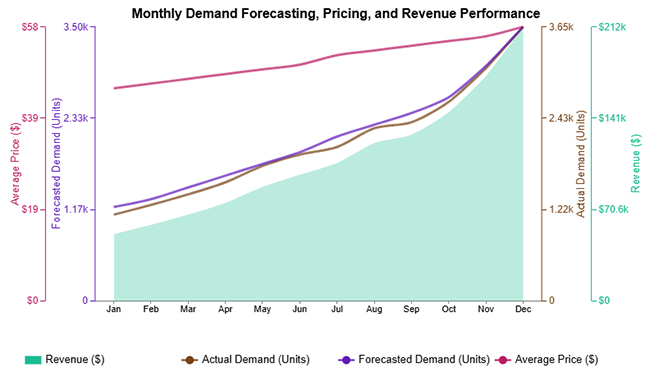
Multi Axis Line Chart puts two or more metrics on separate scales, so a percent and a dollar value can share one view. Use it to see whether price moves track demand moves. Great for spotting lag, not for exact totals.
Online Retailer Demand Forecasting and Price Optimization

Example # 2:

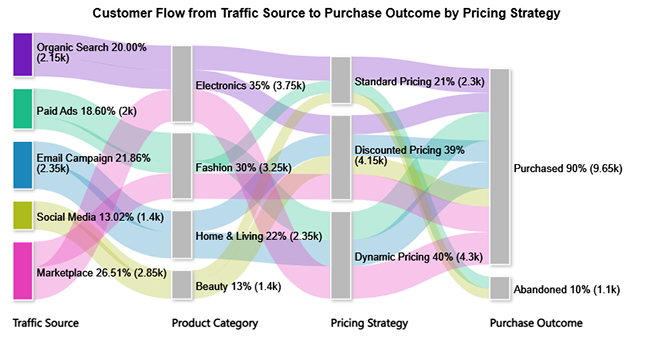
Sankey Chart maps flow from one stage to the next, like traffic source to product view to checkout. It’s useful for showing where demand leaks after a pricing change. Big drops jump out fast.
Online Retailer Demand Forecasting and Price Optimization

Example # 3:

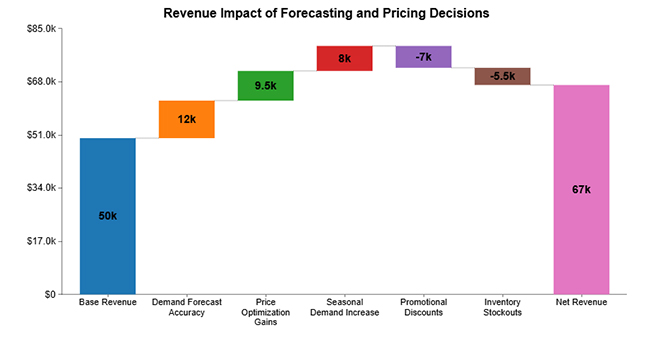
Waterfall Chart breaks a revenue change into the drivers behind it. It can show how volume, price, discounts, and returns stack into the final number. Perfect for explaining ‘what changed’ to leadership.
Online Retailer Demand Forecasting and Price Optimization

Example # 4:

Multi Axis Spider Chart compares several metrics around one center point. It works well when a category has many KPIs, and the question is about balance, not rank. One weird spike usually means one KPI is out of line.
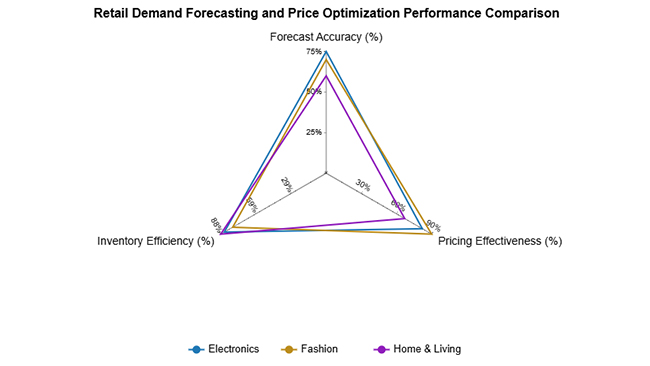
Online Retailer Demand Forecasting and Price Optimization

Example # 5:

A stacked column chart shows how parts add up to a total across categories or time. Use it to split revenue by channel or demand by region while still seeing the overall trend. It answers ‘what is driving the total’.
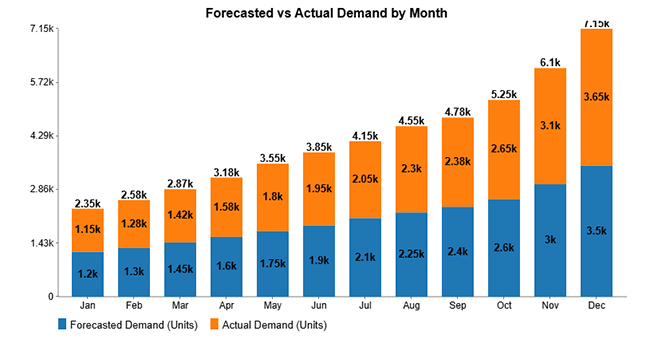
Online Retailer Demand Forecasting and Price Optimization

Example # 6:

Clustered Bar Chart lines up bars side by side, making comparisons straightforward. It’s handy for comparing forecast error across products or margin across price tiers. If the chart looks crowded, pick fewer categories.
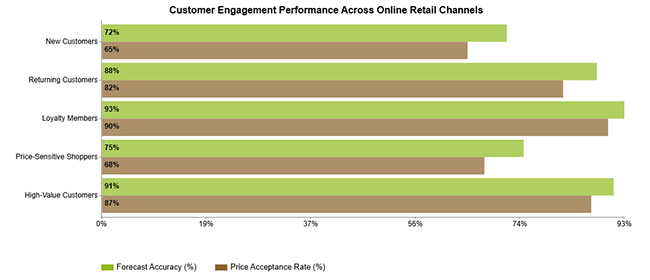
Online Retailer Demand Forecasting and Price Optimization

Example # 7:

Pareto Bar Chart ranks contributors from largest to smallest, then shows the cumulative share. It’s the go-to view for finding the handful of SKUs or issues causing most of the pain. Fix the left side first.
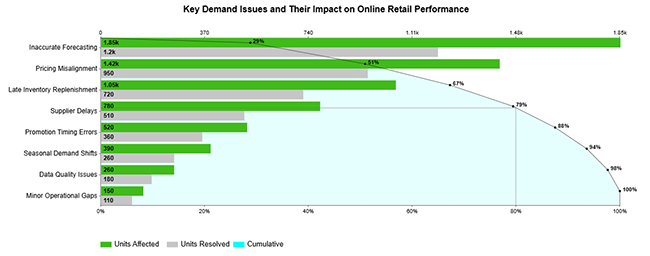
Online Retailer Demand Forecasting and Price Optimization

Example # 8:

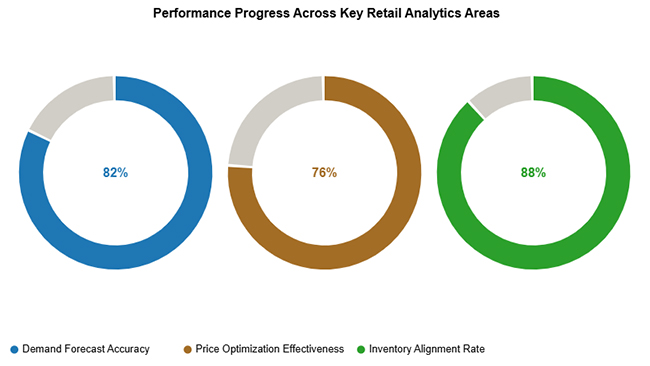
Progress Circle Chart turns a target into a simple percent complete view. It works for headline tracking like sell-through, revenue to goal, or forecast coverage. The visual is blunt, which is the point.
Online Retailer Demand Forecasting and Price Optimization

Example # 9:

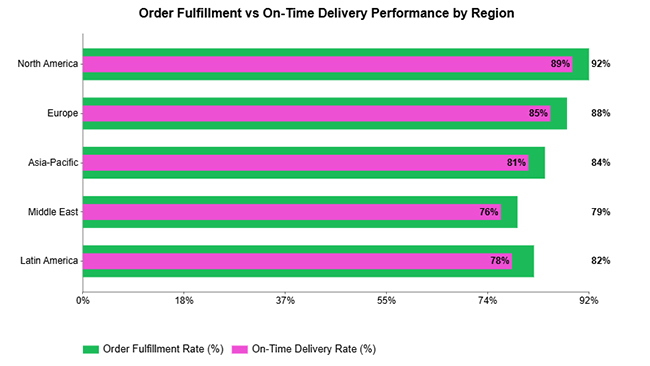
Overlapping Bar Chart is built for planned versus actual comparisons. When bars sit on top of each other, gaps are obvious without extra math. Use it to spot where pricing or inventory decisions were missed.
Online Retailer Demand Forecasting and Price Optimization

Example # 10:

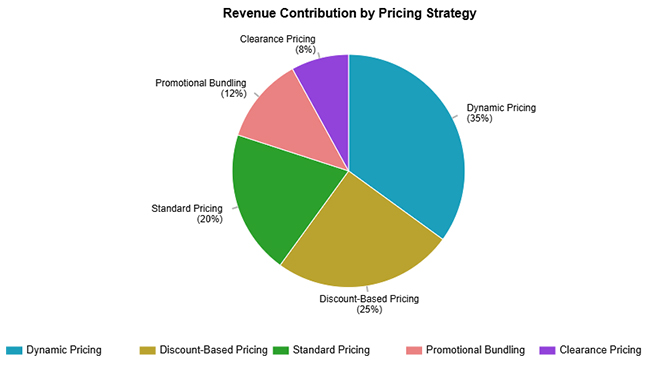
A pie chart is fine for a few categories and a single snapshot. Use it to show the share of demand or share of revenue by a small set of groups. If there are more than five slices, pick a different chart.
Online Retailer Demand Forecasting and Price Optimization

How to Analyze Retail Demand Forecasting and Price Optimization in Google Sheets?

Teams that live in spreadsheets can still run a clean workflow. Forecasting in Google Sheets keeps the setup light, and the data can come from exports, APIs, or a warehouse dump. The key is keeping inputs consistent and charting results so errors are obvious.

Why use ChartExpo?

  • Turns messy tables into charts that surface demand swings, seasonality, and price moves.
  • Makes forecast misses visible, so corrections happen sooner.
  • Shows the price to demand relationship clearly, which helps elasticity conversations.
  • Delivers charts that can go straight to a deck, no extra tooling.
  • Includes a 7-day free trial and a $10/month plan for the add-on.

How to install ChartExpo in Google Sheets?

  • Go to Google Sheets and open the file you are interested in. Then click on the Extensions tab in the upper menu.
  • Click on the Add-ons and enter “Get add-ons.”
  • Go to the Google Workspace Marketplace and search for ChartExpo.
  • Explore “Charts, Graphs & Visualizations by ChartExpo, and click the “Install” button.
  • Allow the necessary access and confirm your Google account when asked.

ChartExpo runs in both Google Sheets and Microsoft Excel. Pick the tool already in the workflow, install the add-on, then build charts in minutes. No extra exports.

Example:

Consider we have the following data for a Multi Axis Line Chart.

Month

Forecasted Demand (Units) Actual Demand (Units) Average Price ($)

Revenue ($)

Jan 1,200 1,150 45 51,750
Feb 1,300 1,280 46 58,880
Mar 1,450 1,420 47 66,740
Apr 1,600 1,580 48 75,840
May 1,750 1,800 49 88,200
Jun 1,900 1,950 50 97,500
Jul 2,100 2,050 52 106,600
Aug 2,250 2,300 53 121,900
Sep 2,400 2,380 54 128,520
Oct 2,600 2,650 55 145,750
Nov 3,000 3,100 56 173,600
Dec 3,500 3,650 58 211,700
  • To get started with ChartExpo, install ChartExpo in Google Sheets.
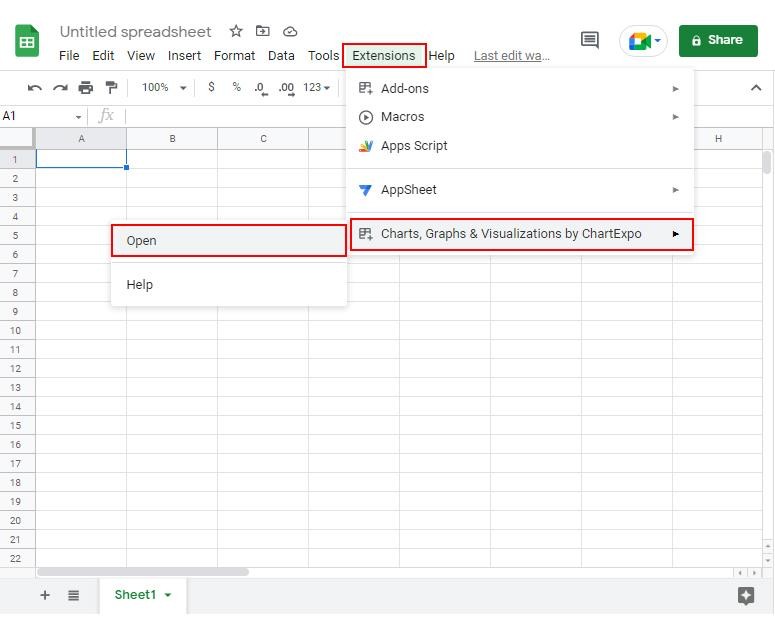
  • Go to Extensions > Charts, Graphs & Visualizations by ChartExpo > Open.
Online Retailer Demand Forecasting and Price Optimization
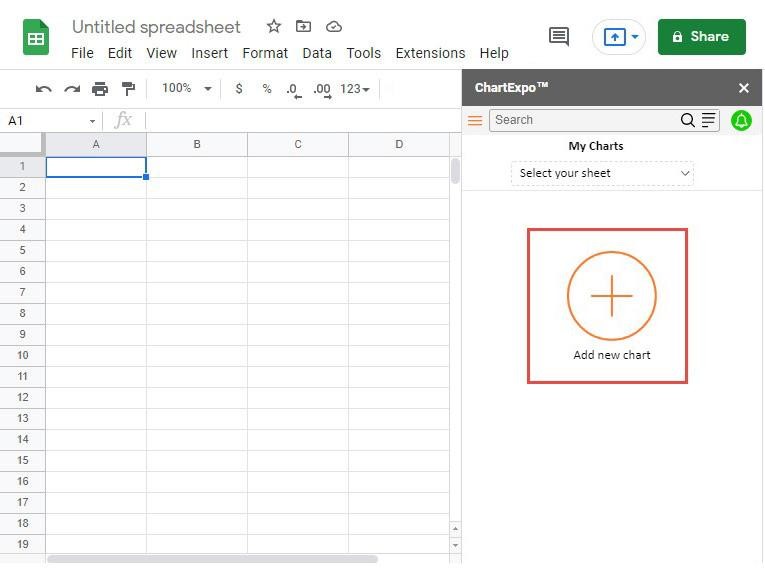
  • Once ChartExpo is installed in Google Sheets, click on the “Add new chart” button.
Online Retailer Demand Forecasting and Price Optimization


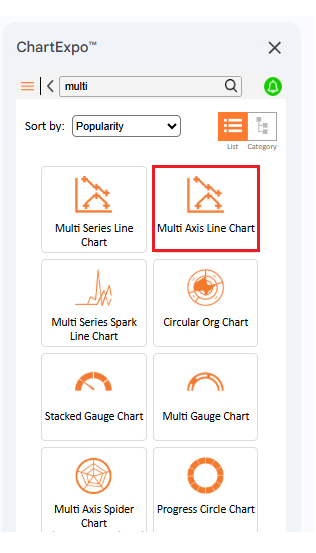
  • Once ChartExpo is loaded into your sheet, you need to search or select the “Multi Axis Line Chart” in the chart options, and you are off to a good start to render your data.
Online Retailer Demand Forecasting and Price Optimization
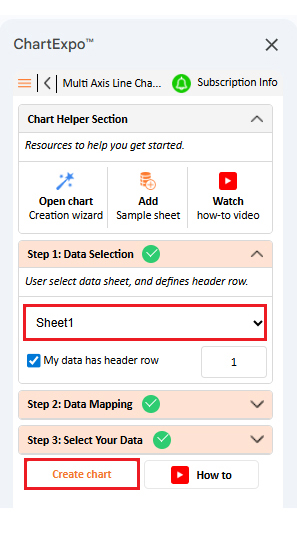
  • Then, select your worksheet and confirm the data range; your data is automatically mapped, and with a click on the Create button, your chart is generated in seconds.
Online Retailer Demand Forecasting and Price Optimization
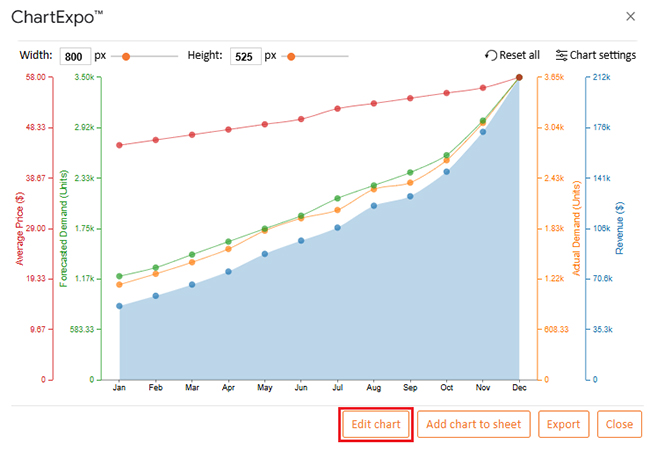
  • If you want to customize your chart, select the ‘Edit Chart’ option and design it to your specifications.
Online Retailer Demand Forecasting and Price Optimization
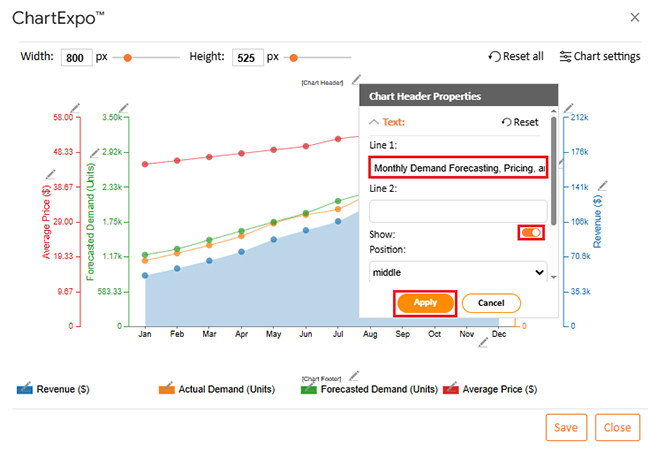
  • To change the chart’s title, select the pencil icon on the header. Then, enter the text you want and select “Apply”. This will change the chart’s title immediately.
Online Retailer Demand Forecasting and Price Optimization
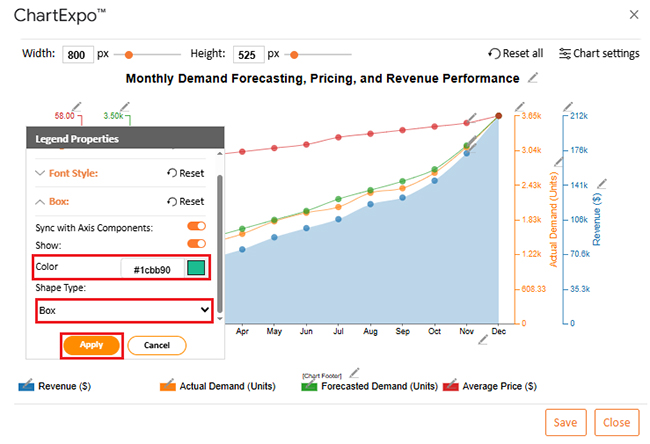
  • You can also change the legend shape type and color, select the pencil icon from the chart footer menu. After the Legend Properties window appears, click in the “Box” and select the shape type; you can change color as well.
Online Retailer Demand Forecasting and Price Optimization
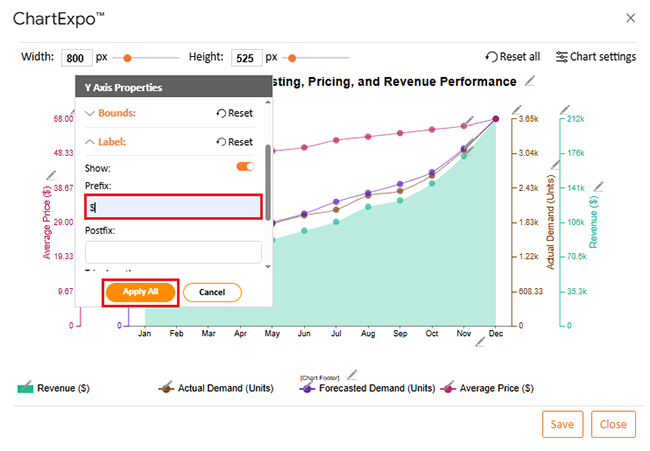
  • If you want to add a prefix sign as well.
Online Retailer Demand Forecasting and Price Optimization
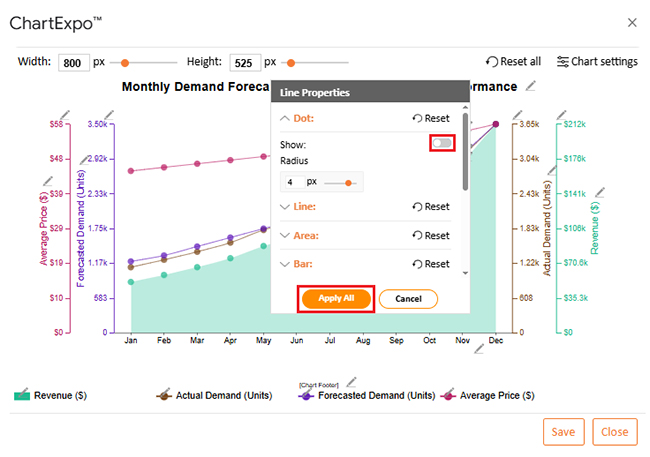
  • You can hide dots from “Line Properties”.
Online Retailer Demand Forecasting and Price Optimization
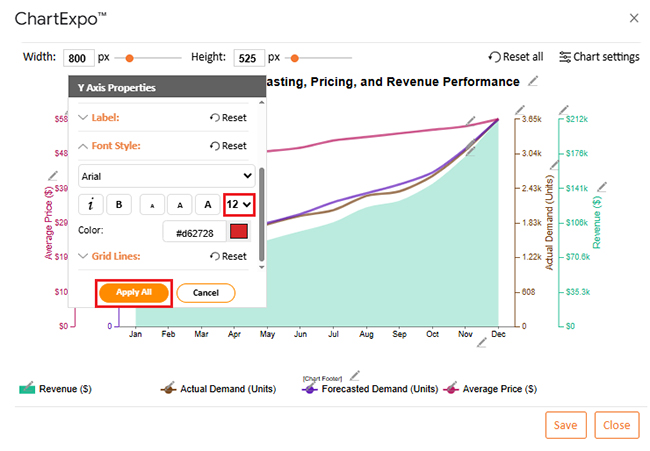
  • You can also increase font size for better readability.
Online Retailer Demand Forecasting and Price Optimization
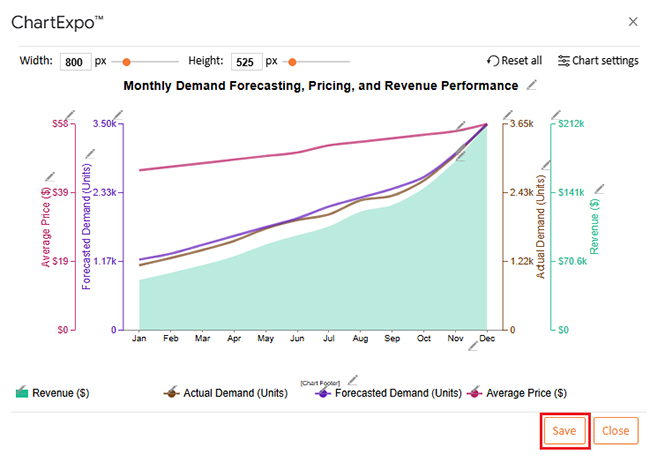
  • When you are done with all the changes, click the “Save” button to save them.
Online Retailer Demand Forecasting and Price Optimization
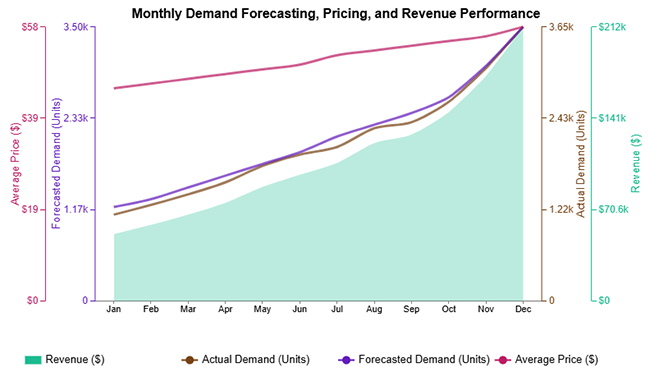
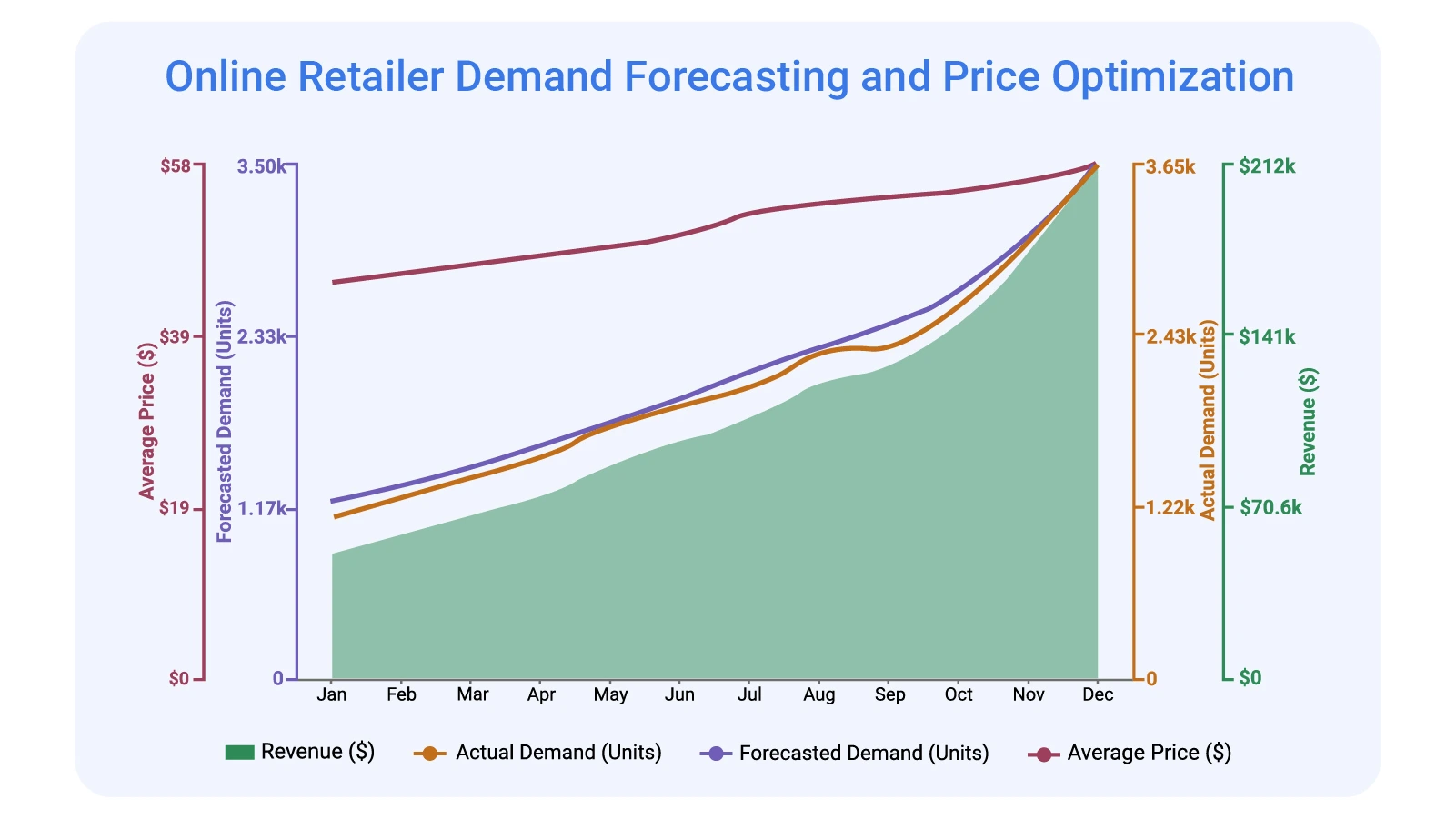
  • The final look of the Multi Axis Line Chart is shown below.
Online Retailer Demand Forecasting and Price Optimization

Key Insights

  • Actual demand stays close to the forecast most months, with small gaps around peak periods.
  • Average price rises alongside demand, suggesting prices increased without crushing volume.
  • Revenue accelerates late in the year, driven by higher demand plus higher realized prices.

Benefits of Analytics-Driven Demand Forecasting for Online Retailers

Once the loop is running, the wins show up quickly, not just on dashboards:

  • Fewer stockouts and fewer dead piles of inventory.
  • Pricing that follows demand signals instead of gut feel.
  • More reliable availability paired with consistent prices.
  • Less manual reporting and fewer spreadsheet errors.
  • A repeatable playbook that scales across categories and markets.

Handled with discipline, the approach becomes a real edge, because the business reacts before the market forces it.

FAQs

What techniques are used in retail product demand forecasting?

Retail product demand forecasting usually starts with historical patterns, then adds time-series models, driver-based regression, and machine learning where it fits. The strongest setups blend methods and validate results against real sales so the forecast doesn’t drift.

What is the difference between retail demand planning and retail demand forecasting?

Forecasting estimates future demand. Demand planning takes that estimate and turns it into actions: buy quantities, production, allocation, and shipping. Forecasting informs; planning executes.

Wrap Up

Analytics for an Online Retailer Demand Forecasting and Price Optimization ties inventory and pricing to the same facts, so teams stop fighting the spreadsheet. Forecasts guide buys and replenishment, while pricing rules protect margin when demand surges or stalls. Run it weekly, not quarterly. That’s when bad assumptions get caught.

Google Sheets is enough to start, as long as inputs stay clean and results get charted. Use visuals to spot misses, fix drivers, then repeat. A small team can run the loop, but the rules must be written and tracked. The work shouldn’t feel fancy. It should feel dependable, because profit depends on it.

How much did you enjoy this article?

ExcelAd1
Start Free Trial!
159472

Related articles

next previous
Data Analytics7 min read

Brand Awareness Metrics for Better Brand Insights

Brand Awareness Metrics show what people notice, remember, and repeat. Track search, reach, share of voice, and surveys. Read on, then act!

Data Analytics10 min read

Charts Templates for PowerPoint for Improved Presentations

Charts Templates for PowerPoint set chart layout, labels, and colors in slides, and reuse charts across decks and reports. Read on!

Data Analytics7 min read

How to Measure Energy Use: Simple Visual Guide

Track energy consumption with precision. Learn practical methods to measure energy use, calculate costs, and optimize efficiency. Read on!

Data Analytics9 min read

Insert Chart in PowerPoint: Easy Steps

Master how to insert a chart in PowerPoint and turn spreadsheet numbers into persuasive slides. From built-in graphs to Excel imports, learn it all. Read on!

Data Analytics10 min read

Reporting vs Analytics: Everything You Need to Know

Reporting tracks past performance, while analytics uncovers why results happened and what comes next. Learn how each method strengthens decisions.

ChartExpo logo

Turn Data into Visual
Stories

CHARTEXPO

  • Home
  • Gallery
  • Videos
  • Services
  • Pricing
  • Contact us
  • FAQs
  • Privacy policy
  • Terms of Service
  • Sitemap

TOOLS

  • ChartExpo for Google Sheets
  • ChartExpo for Microsoft Excel
  • Power BI Custom Visuals by ChartExpo
  • Word Cloud

CATEGORIES

  • Bar Charts
  • Circle Graphs
  • Column Charts
  • Combo Charts
  • Comparison Charts
  • Line Graphs
  • PPC Charts
  • Sentiment Analysis Charts
  • Survey Charts

TOP CHARTS

  • Sankey Diagram
  • Likert Scale Chart
  • Comparison Bar Chart
  • Pareto Chart
  • Funnel Chart
  • Gauge Chart
  • Radar Chart
  • Radial Bar Chart
  • Sunburst Chart
  • see more
  • Scatter Plot Chart
  • CSAT Survey Bar Chart
  • CSAT Survey Chart
  • Dot Plot Chart
  • Double Bar Graph
  • Matrix Chart
  • Multi Axis Line Chart
  • Overlapping Bar Chart
  • Control Chart
  • Slope Chart
  • Clustered Bar Chart
  • Clustered Column Chart
  • Box and Whisker Plot
  • Tornado Chart
  • Waterfall Chart
  • Word Cloud
  • see less

RESOURCES

  • Blog
  • Resources
  • YouTube
SIGN UP FOR UPDATES

We wouldn't dream of spamming you or selling your info.

© 2026 ChartExpo, all rights reserved.