• Home
  • Tools dropdown img
    • Spreadsheet Charts

      • ChartExpo for Google Sheets
      • ChartExpo for Microsoft Excel
    • Power BI Charts

      • Power BI Custom Visuals by ChartExpo
    • Word Cloud

  • Charts dropdown img
    • Chart Category

      • Bar Charts
      • Circle Graphs
      • Column Charts
      • Combo Charts
      • Comparison Charts
      • Line Graphs
      • PPC Charts
      • Sentiment Analysis Charts
      • Survey Charts
    • Chart Type

      • Box and Whisker Plot
      • Clustered Bar Chart
      • Clustered Column Chart
      • Comparison Bar Chart
      • Control Chart
      • CSAT Survey Bar Chart
      • CSAT Survey Chart
      • Dot Plot Chart
      • Double Bar Graph
      • Funnel Chart
      • Gauge Chart
      • Likert Scale Chart
      • Matrix Chart
      • Multi Axis Line Chart
      • Overlapping Bar Chart
      • Pareto Chart
      • Radar Chart
      • Radial Bar Chart
      • Sankey Diagram
      • Scatter Plot Chart
      • Slope Chart
      • Sunburst Chart
      • Tornado Chart
      • Waterfall Chart
      • Word Cloud
    • Google Sheets
      Microsoft Excel
  • Services
  • Pricing
  • Contact us
  • Blog
  • Support dropdown img
      • Gallery
      • Videos
      • Contact us
      • FAQs
      • Resources
    • Please feel free to contact us

      atsupport@chartexpo.com

Categories
All Data Visualizations Data Analytics Surveys
Add-ons/
  • Google Sheets
  • Microsoft Excel
  • Power BI
All Data Visualizations Data Analytics Surveys
Add-ons
  • Google Sheets
  • Microsoft Excel
  • Power BI

We use cookies

This website uses cookies to provide better user experience and user's session management.
By continuing visiting this website you consent the use of these cookies.

Ok

ChartExpo Survey


Home > Blog > Data Analytics

Staff Onboarding Template: Insights for HR Decisions

Structured hiring processes separate thriving organizations from those that struggle to retain talent. A staff onboarding template turns the chaotic first days of employment into a guided, repeatable experience that benefits both the organization and the new hire.
Staff Onboarding Template

When employees receive clear direction from the start, they reach full productivity faster and feel connected to the team.

This post covers what a staff onboarding template is, why it matters, what components define an effective one, and how to build and evaluate it using modern spreadsheet tools. Read on to see how a simple framework can become one of your most valuable HR assets.

Table of Contents:

  1. What is a Staff Onboarding Template?
  2. Why is a Staff Onboarding Template Important?
  3. Key Components of an Effective Staff Onboarding Template
  4. Top 5 Staff Onboarding Templates
  5. Staff Onboarding Template Examples
  6. How to Create a Staff Onboarding Template in Google Sheets?
  7. How to Analyze a Staff Onboarding Template in Google Sheets?
  8. Benefits of Using a Structured Staff Onboarding Template
  9. Best Practices for Designing a Staff Onboarding Template
  10. FAQs
  11. Wrap Up

What is a Staff Onboarding Template?

Definition: A staff onboarding template is a pre-built framework that guides HR teams and managers through every step required to integrate a new hire into the organization. It consolidates tasks, timelines, documentation requirements, training schedules, and role-specific expectations into a single reference point.

Rather than managing onboarding ad hoc, teams use these templates to deliver a consistent experience for every person who joins.

A well-designed new employee onboarding template removes ambiguity for both managers and employees. It provides operational clarity by mapping what needs to happen, when it needs to happen, and who is responsible.

This reduces administrative friction, supports compliance, and ensures that strategic priorities are communicated to new team members from their first day on the job.

Why is a Staff Onboarding Template Important?

Without a defined process, onboarding varies widely from one hire to the next. A structured framework closes that gap and delivers measurable results across the organization.

  • Improves new hire productivity timeline: Gives employees a structured path forward so they reach operational effectiveness without unnecessary delays.
  • Standardizes onboarding processes: Delivers a uniform experience to every incoming employee, removing the variability that leads to inconsistent starts.
  • Reduces compliance and documentation gaps: Tracks required paperwork and policy acknowledgments systematically, making it harder for critical items to fall through.
  • Enhances employee engagement: Signals investment in the new hire’s success from day one, which builds trust and long-term commitment.
  • Clarifies roles and expectations: Sets concrete boundaries for what the employee owns and what success looks like, reducing early-stage friction.
  • Aligns onboarding with company goals: Frames individual tasks within the larger mission so employees understand how their role contributes to business outcomes.
  • Tracks onboarding progress effectively: Gives managers visibility into completion rates and timelines, supporting better decisions through HR analytics.

Key Components of an Effective Staff Onboarding Template

A useful template covers more than just a task checklist. The components below define what separates a template that drives results from one that collects dust.

  • Employee information section: Stores the personal, professional, and contact details needed to set up accounts, assign equipment, and maintain accurate records.
  • Onboarding task checklist: Breaks the full onboarding process into actionable items so nothing important is missed, and progress can be tracked at a glance.
  • Training schedule tracker: Maps out learning sessions, product walkthroughs, and compliance training across the first days and weeks of employment.
  • Document submission tracker: Monitors the collection of signed contracts, policy acknowledgments, and required forms so compliance obligations stay current.
  • Role-specific milestones: Establishes checkpoints tied directly to the position so the employee knows what mastery looks like at each stage.
  • Manager approval section: Builds accountability into the process by requiring sign-off on completed phases before the employee advances.
  • Feedback and evaluation section: Gathers input from new hires to surface friction points, creating a loop of continuous improvement through meaningful onboarding insights.

Top 5 Staff Onboarding Templates

Organizations differ in size, structure, and workforce makeup, so a single template design rarely fits every context. Choosing a format that maps to the stages of the hiring process specific to your team makes adoption far more likely and outcomes more measurable.

  • Employee onboarding checklist template: Walks managers and HR teams through every required action in sequence, creating a clear audit trail from offer acceptance to full integration.
  • 30-60-90 day onboarding template: Divides the first quarter of employment into distinct phases, each with its own goals and performance signals, so both manager and employee track progress against a shared timeline.
  • Department-specific onboarding template: Tailors tasks and training to the requirements of a particular team, ensuring that role-relevant skills and workflows are covered without adding irrelevant steps.
  • Remote employee onboarding template: Addresses the unique logistics of distributed teams, including virtual introductions, software access, and asynchronous communication setup, so remote hires feel as connected as in-office staff.
  • Compliance-focused onboarding template: Prioritizes the collection and acknowledgment of regulatory documents, putting legal and procedural requirements at the center of the process to limit organizational risk.

Staff Onboarding Template Examples

Seeing real workforce data organized within a staff orientation template makes the abstract concept concrete. The examples below illustrate how common HR metrics appear when captured and visualized through a well-built onboarding process.

  • Staff Onboarding Task Completion Progress

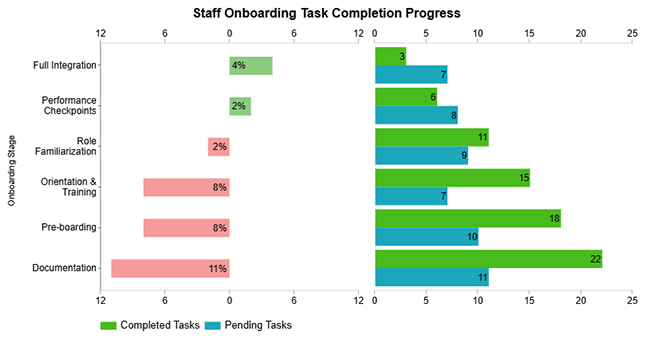
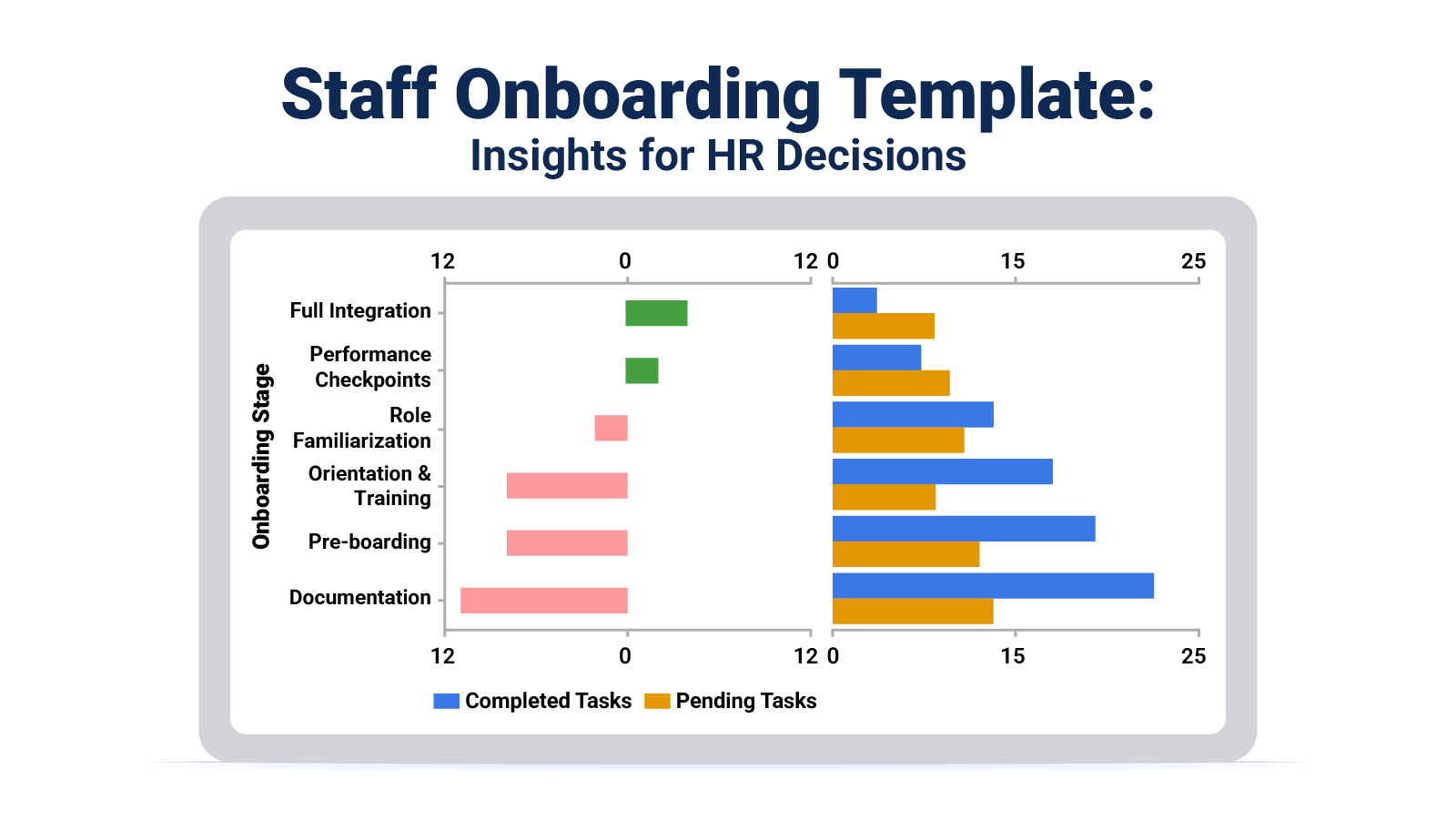
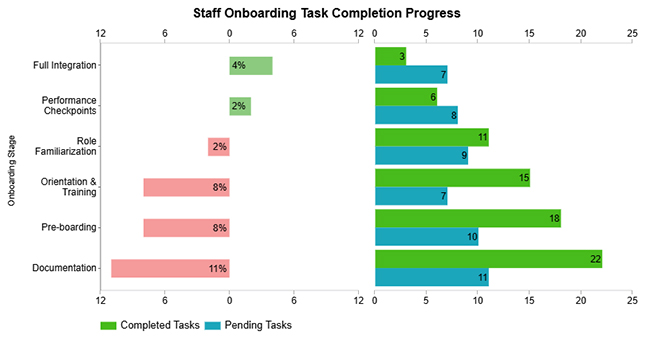
This example tracks task completion versus pending items across each onboarding phase. Strong early-phase results give way to a growing backlog in later stages, signaling where manager attention or resource reallocation may be needed.
Staff Onboarding Template
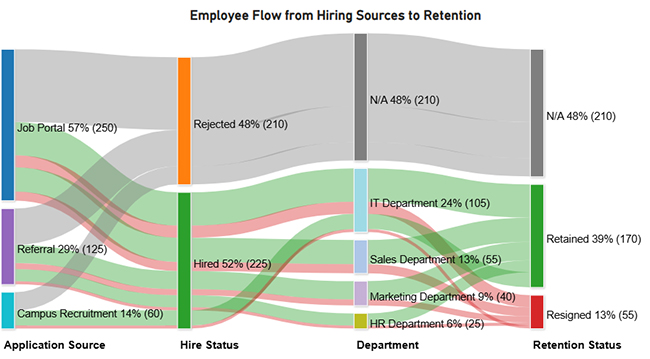
  • Employee Flow from Hiring Sources to Retention

This example traces candidates from their initial hiring source through each employment stage and into either retention or attrition. It reveals which acquisition channels produce the most durable hires and identifies where the greatest drop-off in the pipeline occurs.
Staff Onboarding Template
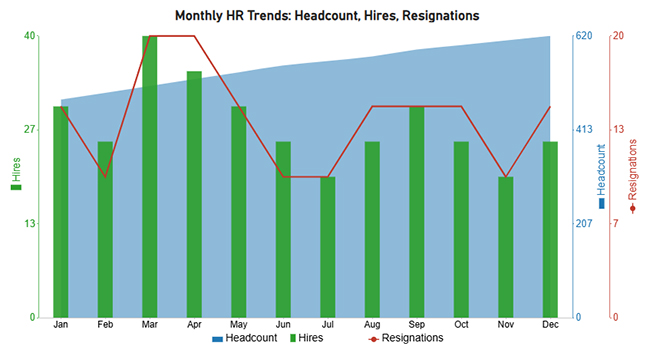
  • Monthly Headcount, Hires, and Resignations Analysis

This example shows monthly movement in total headcount alongside new hire volume and resignations. The pattern reveals whether the organization is net-growing over time and highlights seasonal swings that can inform future recruiting and staffing budget decisions.
Staff Onboarding Template
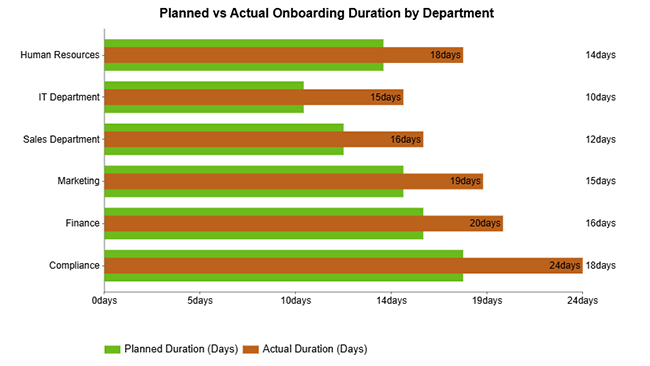
  • Planned vs Actual Onboarding Duration by Department

This example compares how long onboarding was planned to take against its actual duration across departments. Most teams exceed their projected schedule, pointing to a need to reassess time estimates, staffing capacity, or the depth of role-specific training.
Staff Onboarding Template
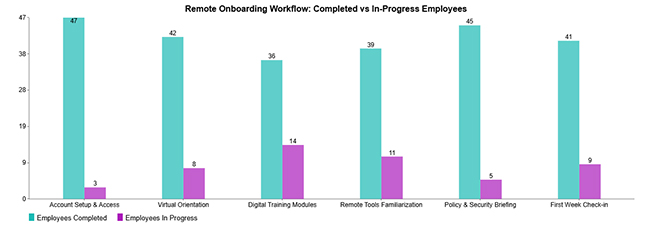
  • Remote Onboarding Workflow

This example measures completion rates across core activities in a remote onboarding workflow, including device setup, system access, and virtual introductions. Most tasks reach completion, but a remaining subset in progress indicates where digital follow-through processes need reinforcement.
Staff Onboarding Template

How to Create a Staff Onboarding Template in Google Sheets?

Spreadsheet tools make it practical to build, share, and update your onboarding framework without specialized software. This approach also enables data analysis in Google Sheets so teams can monitor completion patterns and timing trends as they accumulate.

  • Define onboarding stages and timeline: Map the full journey from pre-boarding through the probationary period, assigning realistic deadlines to each phase.
  • Create task categories and milestones: Group related activities under clear headings so every stakeholder can identify what they own and what completion looks like.
  • Add employee information fields: Build a dedicated section to capture the details needed for IT setup, payroll, and ongoing communications.
  • Insert status tracking columns: Add dropdown-driven status fields for each task, similar to those used in a Google Spreadsheet timesheet template, to make pending and completed items visible at a glance.
  • Apply conditional formatting for progress: Configure color-coded rules so overdue items surface immediately, and managers can prioritize without scanning every row.
  • Share and assign access permissions: Set role-based editing rights so managers can update their tasks while sensitive HR fields remain protected from unintended changes.

How to Analyze a Staff Onboarding Template in Google Sheets?

When treated purely as a task list, a staff onboarding template delivers limited value. The real potential surfaces when teams analyze the data it generates, approaching the output more like a consulting report template and less like a static checklist.

Patterns in completion rates, duration variances, and engagement signals reveal exactly where the process breaks down. Treating a new employee onboarding template this way turns it from a one-time administrative exercise into a continuous improvement engine.

  • Review completion timelines: Identifies which tasks are consistently finished on schedule and which ones generate recurring delays that push back subsequent steps.
  • Measure onboarding duration: Surfaces the gap between how long onboarding was expected to take and how long it actually runs for each new employee.
  • Evaluate bottlenecks: Pinpoint stages where work accumulates due to approval delays, unclear ownership, or resource constraints that stall progress.
  • Track engagement signals: Monitors how actively new hires participate in scheduled activities, giving managers an early indicator of connection and commitment.
  • Visualize onboarding metrics: Converts rows of completion data into charts that communicate onboarding health at a glance, making it easy to share findings with leadership.

Visualization tools turn raw template data into presentation-ready charts that reveal patterns without requiring manual interpretation. ChartExpo integrates directly with Google Sheets, letting teams generate charts from their existing onboarding datasets with minimal setup.

Why use ChartExpo?

  • Converts spreadsheet data into charts automatically, eliminating the need for manual formatting or external tools.
  • Surfaces completion trends and duration patterns that would otherwise require custom formulas to calculate.
  • Works natively inside Google Sheets so teams can generate visuals without exporting files or switching between applications.
  • Available with a trial period and priced at a low monthly rate, making adoption feasible for teams across budget levels.

How to install ChartExpo in Google Sheets?

  • Go to Google Sheets and open the file you are interested in. Then click on the Extensions tab in the upper menu.
  • Click on the Add-ons and enter “Get add-ons.”
  • Go to the Google Workspace Marketplace and search for ChartExpo.
  • Explore “Charts, Graphs & Visualizations by ChartExpo, and click the “Install” button.
  • Allow the necessary access and confirm your Google account when asked.

Example:

Consider we have the following data for the Progress Chart.

Onboarding Stage Completed Tasks Pending Tasks
Pre-boarding 18 10
Documentation 22 11
Orientation & Training 15 7
Role Familiarization 11 9
Performance Checkpoints 6 8
Full Integration 3 7
  • To get started with ChartExpo, install ChartExpo.
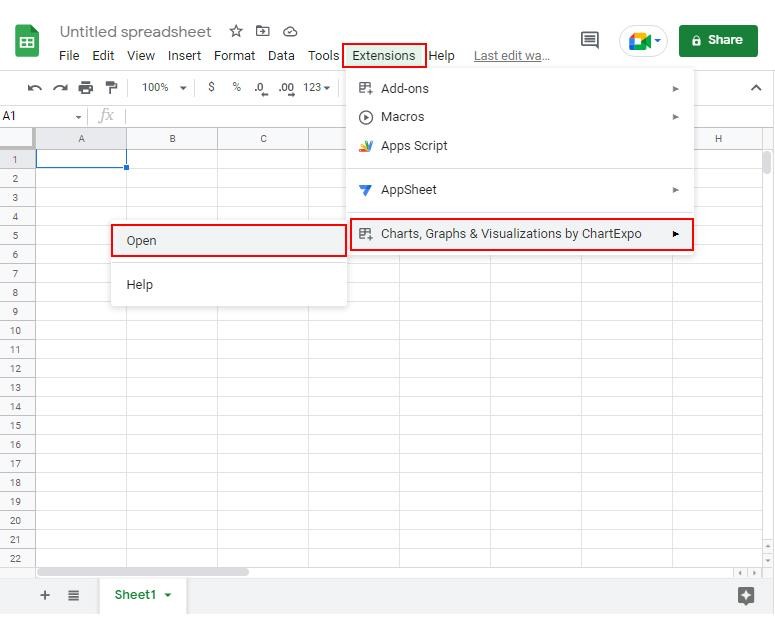
  • Go to Extensions > Charts, Graphs & Visualizations by ChartExpo > Open.
Staff Onboarding Template
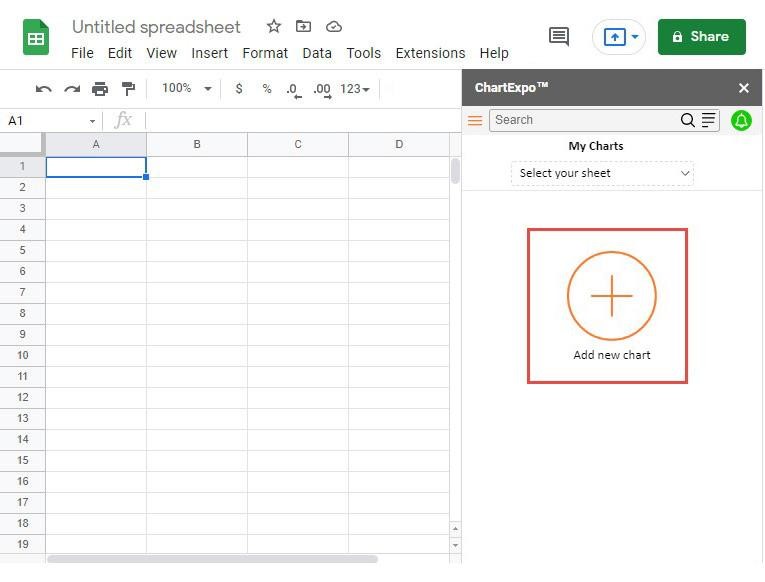
  • Once ChartExpo is installed, click on the “Add new chart” button.
Staff Onboarding Template
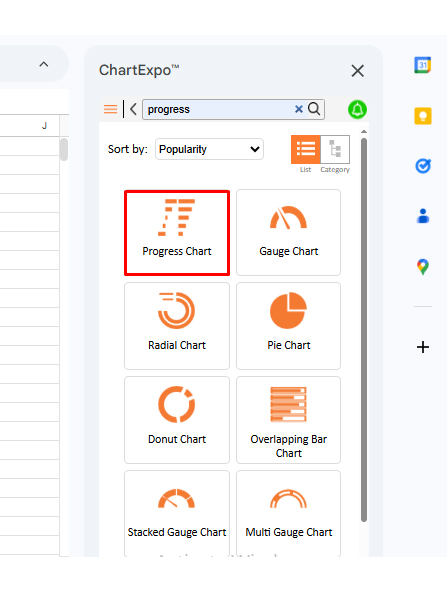
  • Once it loads, scroll through the charts list to locate and choose the “Progress Chart”.
Staff Onboarding Template
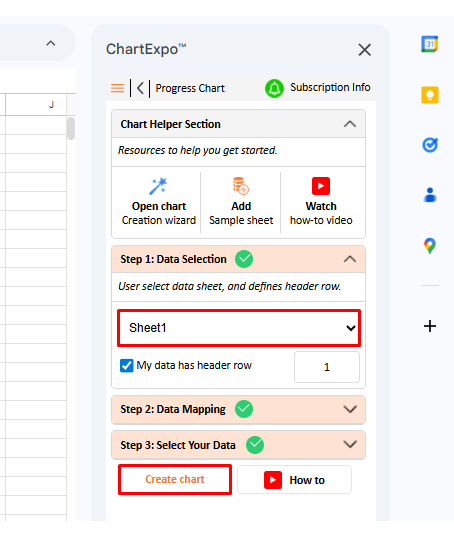
  • Then, select your worksheet and confirm the data range; your data is automatically mapped, click on the “Create chart”
Staff Onboarding Template
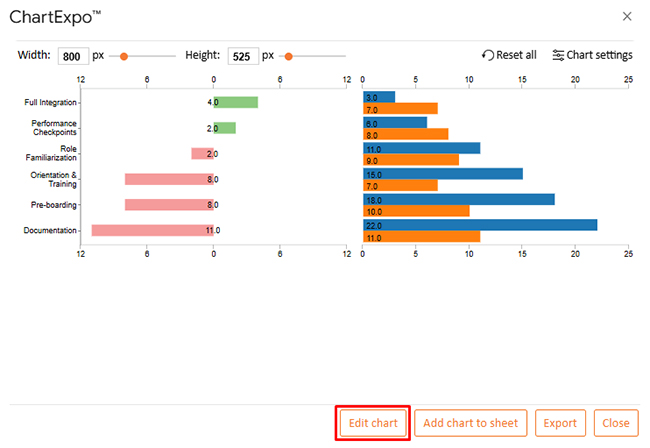
  • If you want to customize your chart, select the ‘Edit Chart’ option and design it to your specifications.
Staff Onboarding Template
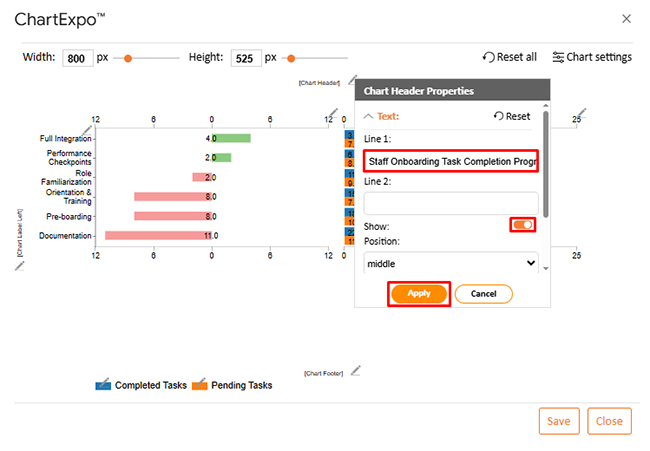
  • To change the chart’s title, select the pencil icon on the header. Then, enter the text you want and select “Apply”.
Staff Onboarding Template
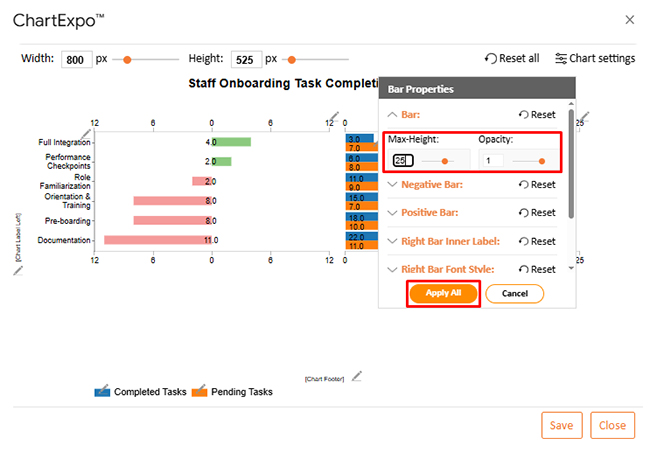
  • You can change bar height and opacity from “Bar Properties”.
Staff Onboarding Template
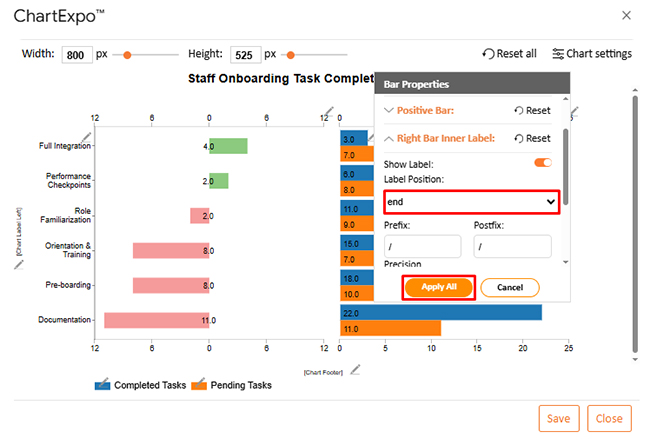
  • You can change the bar label position.
Staff Onboarding Template
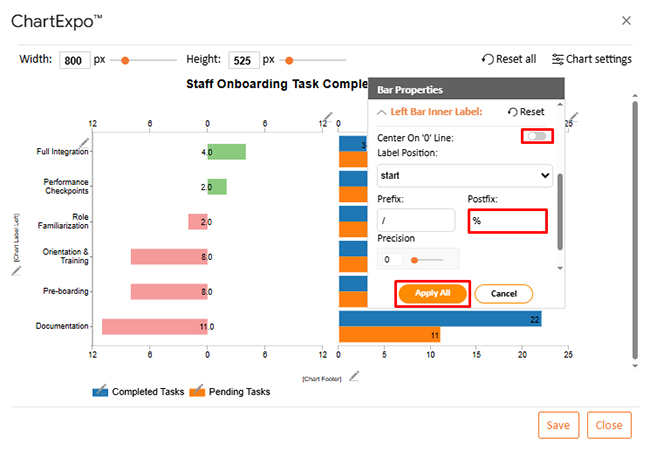
  • You can change the left bar properties as well.
Staff Onboarding Template
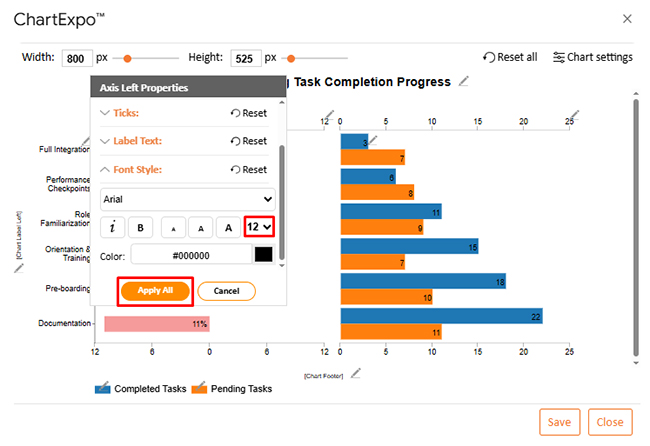
  • You can increase font size for better readability.
Staff Onboarding Template
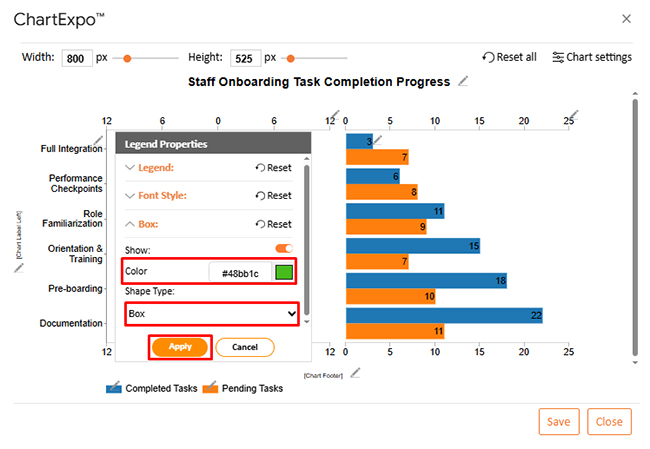
  • You can change bar colors from “Legend Properties”.
Staff Onboarding Template
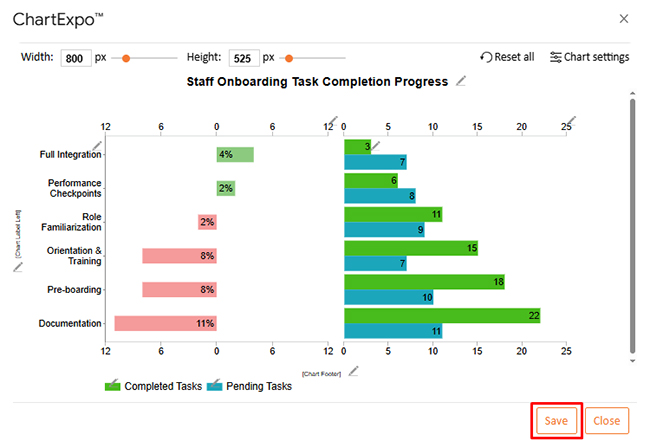
  • When you are done with all the changes, click the “Save” button or follow the steps to save a Google Sheet to save the changes.
Staff Onboarding Template
  • The final look of the Progress Chart is shown below.
Staff Onboarding Template

Key Insights

  • Pre-boarding and documentation phases reach completion at higher rates than any other part of the onboarding process.
  • Role familiarization and performance checkpoints accumulate a larger share of unfinished work relative to the phases that precede them.
  • Full integration carries outstanding tasks for some employees despite the comparatively low total number of activities assigned at that stage.

Benefits of Using a Structured Staff Onboarding Template

Formalizing the integration process pays dividends that extend well beyond the first week of employment. A structured staff onboarding template reduces uncertainty at every organizational level and lays the groundwork for performance gains that are trackable over time.

  • Ensures consistent onboarding experience: Gives every new hire access to the same structured introduction regardless of which manager or department is running the process.
  • Reduces administrative workload: Replaces scattered emails and verbal follow-ups with a single tracked system that manages task completion without constant manual coordination.
  • Improves compliance documentation: Guarantees that required forms and policy acknowledgments are collected and stored before they become liabilities.
  • Enhances employee retention rates: Reduces early-tenure frustration by making expectations clear and support readily available, contributing to stronger long-term retention.
  • Speeds up time-to-productivity: Shortens the window between a new hire’s first day and the point of independent contribution by removing guesswork from the ramp-up period.
  • Enables measurable onboarding performance: Produces the structured data needed to evaluate onboarding effectiveness in the same way teams use Google Sheets CRM templates to track pipeline health.

Best Practices for Designing a Staff Onboarding Template

A template that goes unused is just a document. Design choices around structure, relevance, and adaptability determine whether your framework embeds itself into daily operations or gets bypassed after the first few months.

  • Keep layout simple and structured: A clean, logical flow encourages adoption; overly complex templates with excessive fields or nested categories tend to be bypassed.
  • Align tasks with job responsibilities: Generic checklists lose credibility quickly; tasks should reflect what genuinely matters for each role so the template stays relevant.
  • Include measurable onboarding goals: Define what progress looks like at specific intervals so both managers and new hires have objective benchmarks to reference.
  • Automate status tracking where possible: Use conditional logic or dropdown fields to surface pending items automatically rather than relying on manual review.
  • Review and update template regularly: Onboarding requirements shift as policies evolve, and organizations grow; build scheduled reviews into your HR calendar.
  • Collect feedback from new hires: The employees who have just finished onboarding are your best source of improvement intelligence; their responses reveal blind spots and close gaps.

FAQs

What should be included in a Staff Onboarding Template?

An effective template covers employee information, task checklists, training schedules, document trackers, role-specific milestones, manager approval checkpoints, and a feedback section. Together, these elements deliver a structured, accountable, and measurable experience for every new hire.

Can a Staff Onboarding Template improve employee retention?

Yes. Employees who receive a structured, supported start are more likely to feel valued and stay with the organization. A formal process reduces early-stage confusion and disconnection, two of the most common drivers of voluntary turnover within the first six months.

How often should a Staff Onboarding Template be updated?

At a minimum, review the template after any significant policy change, role restructuring, or platform shift that affects the onboarding flow. A scheduled annual review also helps ensure the framework stays aligned with how the organization actually operates.

Wrap Up

Building an effective staff onboarding template is one of the highest-leverage decisions an HR team can make. When new employees receive structured guidance, clear expectations, and the right resources from their first day, they contribute faster, make fewer errors, and develop a stronger connection to the organization. The template makes that outcome repeatable at any scale.

A well-designed staff orientation template transforms what is often a reactive, inconsistent process into a strategic system. Pair it with data visualization to measure outcomes continuously, and onboarding shifts from a cost center into a competitive advantage. Start with a solid framework, track the results, and improve from there.

How much did you enjoy this article?

GSAd1
Start Free Trial!
160177

Related articles

next previous
Data Analytics10 min read

What are DORA Metrics: A Complete Guide

What are DORA Metrics? Discover the four KPIs every engineering team needs to track delivery speed, stability, and reliability. Read on!

Data Analytics12 min read

Analytics in Insurance Industry: From Data to Clear Insights

Analytics in insurance industry turns claims, policy, and service data into decisions for pricing, fraud checks, and retention. Read on!

Data Analytics9 min read

Cost Per Hire: Analyzing Hiring Costs Easily

Cost Per Hire shows what each hire costs and where the money goes. Use the formula, examples, and Excel steps to track spend. Read on!

Data Analytics12 min read

Need Analysis Template: A Complete Guide

A need analysis template transforms scattered observations into structured, evidence-based decisions. Discover how to close performance gaps. Read on!

Data Analytics10 min read

Performance-Based Budgeting: Examples & Analysis

Performance-based budgeting links spending to measurable outcomes. Learn how it works, explore examples, benefits, challenges, and analyze PBB effectively in Excel.

ChartExpo logo

Turn Data into Visual
Stories

CHARTEXPO

  • Home
  • Gallery
  • Videos
  • Services
  • Pricing
  • Contact us
  • FAQs
  • Privacy policy
  • Terms of Service
  • Sitemap

TOOLS

  • ChartExpo for Google Sheets
  • ChartExpo for Microsoft Excel
  • Power BI Custom Visuals by ChartExpo
  • Word Cloud

CATEGORIES

  • Bar Charts
  • Circle Graphs
  • Column Charts
  • Combo Charts
  • Comparison Charts
  • Line Graphs
  • PPC Charts
  • Sentiment Analysis Charts
  • Survey Charts

TOP CHARTS

  • Sankey Diagram
  • Likert Scale Chart
  • Comparison Bar Chart
  • Pareto Chart
  • Funnel Chart
  • Gauge Chart
  • Radar Chart
  • Radial Bar Chart
  • Sunburst Chart
  • see more
  • Scatter Plot Chart
  • CSAT Survey Bar Chart
  • CSAT Survey Chart
  • Dot Plot Chart
  • Double Bar Graph
  • Matrix Chart
  • Multi Axis Line Chart
  • Overlapping Bar Chart
  • Control Chart
  • Slope Chart
  • Clustered Bar Chart
  • Clustered Column Chart
  • Box and Whisker Plot
  • Tornado Chart
  • Waterfall Chart
  • Word Cloud
  • see less

RESOURCES

  • Blog
  • Resources
  • YouTube
SIGN UP FOR UPDATES

We wouldn't dream of spamming you or selling your info.

© 2026 ChartExpo, all rights reserved.