Categories

A pizza shop in New York once lost $50,000 in a year because its owner underestimated demand for Friday nights. That’s strange, right? But it’s exactly what poor forecasting does.


Have you ever thought about how a single spreadsheet could prevent that kind of loss? Try a sales projection template. Why? Numbers tell stories. And in business, the story is survival or growth.
Research shows 82% of small businesses fail due to cash flow problems. That’s not bad luck. It’s avoidable with better planning. A sales projection template in Google Sheets gives structure to those plans. It’s simple, collaborative, and it turns uncertainty into clarity.
Think about what happens when you add sales analytics into the mix. Suddenly, trends become visible, and future revenue feels less like guesswork. A spreadsheet for sales tracking then adds real-time accountability. Pair it with a sales pipeline report, and you can pinpoint where opportunities leak away. Together, these insights drive decisions that actually work.
Here’s the kicker: McKinsey reports companies using advanced forecasting achieve 10% higher revenue growth on average. That’s the edge strong projections deliver.
So, are you planning next month’s budget or shaping next year’s strategy? Try a sales projection template. It’s the difference between guessing and growing.
Don’t know where to begin? This is the guide for you…
Definition: A sales projection template in Google Sheets is a tool that helps businesses predict future revenue. It organizes data into clear rows and columns, where managers can adjust numbers to see possible outcomes.
This template allows easy collaboration since Google Sheets updates in real time. It reduces the guesswork in planning.
A sales forecast example can guide decisions on hiring or budgeting. Moreover, adding sales analytics and sales follow-up statistics makes projections more accurate. The template is flexible for small teams or large companies.
It is simple to use yet powerful for long-term growth. In short, a sales projection template in Google Sheets turns raw numbers into actionable insights.
Ever wondered why some businesses always seem prepared for the future? The truth is, they rely on smart tools to plan. A sales forecast template in Google Sheets is one of those tools. It keeps things simple, clear, and actionable.
Here is why it matters:
Choosing the right template can make sales planning easier than ever. Google Sheets makes it flexible, accessible, and free with templates that serve unique purposes. Whether you are planning for a single day or mapping out an entire year, using the right tool saves time and brings clarity.
Here are five popular options worth exploring:
This template breaks down revenue month by month. It’s excellent for identifying seasonal shifts and comparing one period against another. With this, you can build monthly sales report templates that show growth or highlight weak spots. Businesses use it to set realistic goals and keep a steady rhythm.
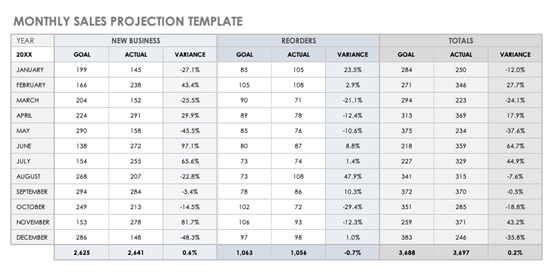
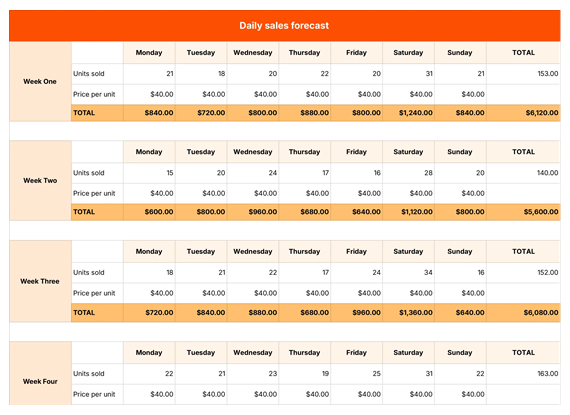
Fast-moving businesses need sharper detail. A daily sheet tracks patterns by the hour or day, making it valuable for restaurants, retail, and e-commerce. It helps teams react quickly if sales dip or spike unexpectedly. This keeps planning practical and precise.
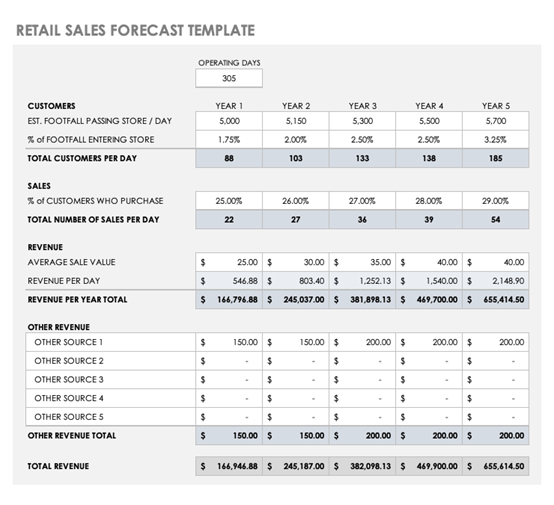
Retail depends on inventory, foot traffic, and promotions. This template connects product sales to stock levels, helping avoid shortages or overstock. Pairing it with the sales dashboard makes performance even more visual. Retailers gain both clarity and control.
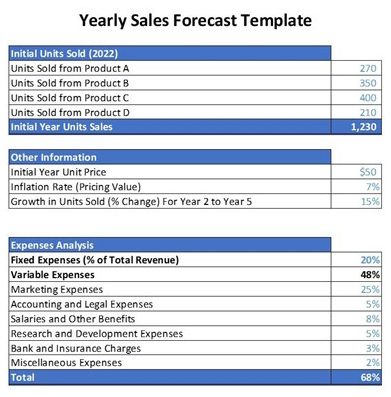
For a long-term strategy, a yearly sheet is essential. It maps the bigger picture, showing how short-term wins contribute to long-term goals. Businesses can prepare for holidays, budget cycles, and investment rounds with confidence.
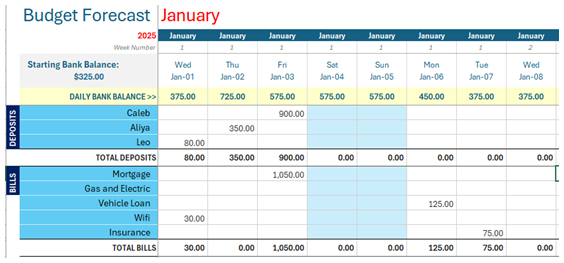
Sales only make sense when tied to costs. This template combines income and expenses, showing how spending affects projections. It’s useful for balancing growth plans against financial limits. Managers use it to keep projections realistic and sustainable.
Every strong sales plan starts with structure. A sales projection template is not just a table of numbers. It organizes information so decisions become clear and purposeful. By focusing on the right components, businesses can see both the present and the future more confidently. Here are the key elements that make a projection work:
Building a forecast does not need to feel overwhelming. Google Sheets makes it simple, flexible, and collaborative. A projected sales forecast template is more than numbers on a page. It is a living document that grows with your business.
Follow these steps to create one that works:
Spreadsheets are great until they start looking like a maze of endless rows and numbers. Sure, Google Sheets helps you manage a sales forecast template, but staring at raw data can feel more confusing than helpful.
Data analysis thrives on visualization. Why? Because patterns jump out when numbers turn into charts. Google Sheets’ built-in graphs are basic and sometimes miss the bigger picture.
Enter ChartExpo. This tool transforms dull spreadsheets into engaging visuals that make insights clear. With ChartExpo, analyzing forecasts becomes faster, sharper, and far more effective—especially when you use a Waterfall chart to show how each change impacts the final outcome.
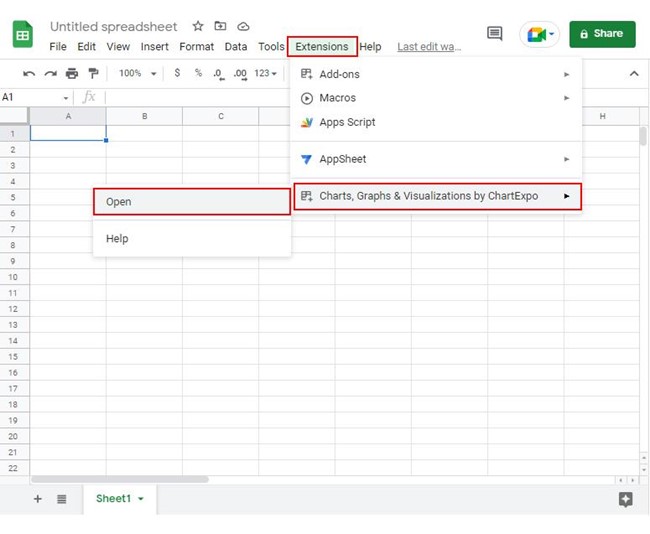
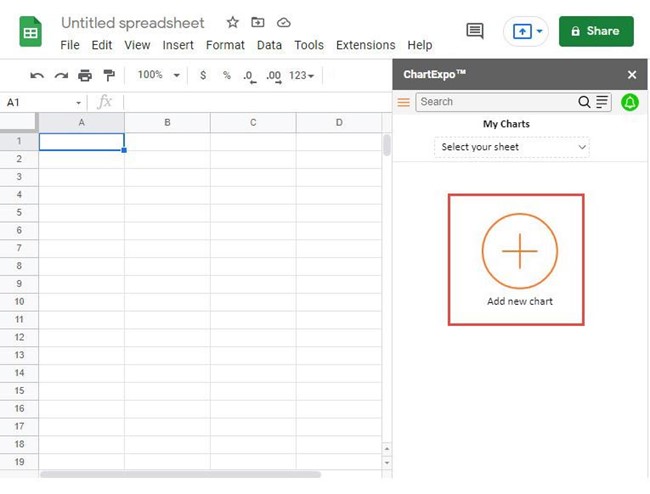
How to Install ChartExpo in Google Sheets?
ChartExpo charts are available both in Google Sheets and Microsoft Excel. Please use the following CTAs to install the tool of your choice and create beautiful visualizations in a few clicks in your favorite tool.
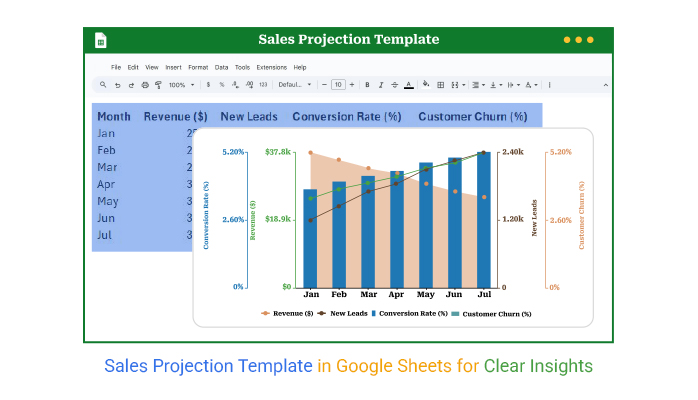
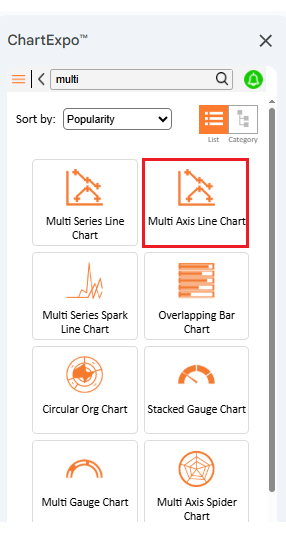
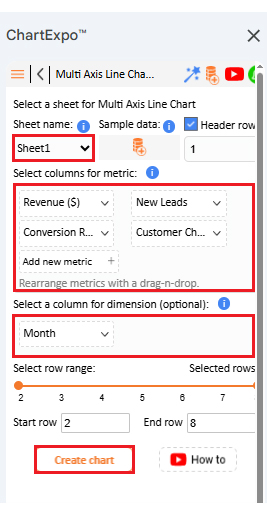
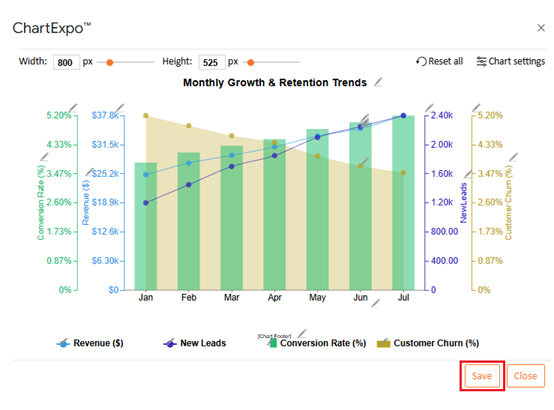
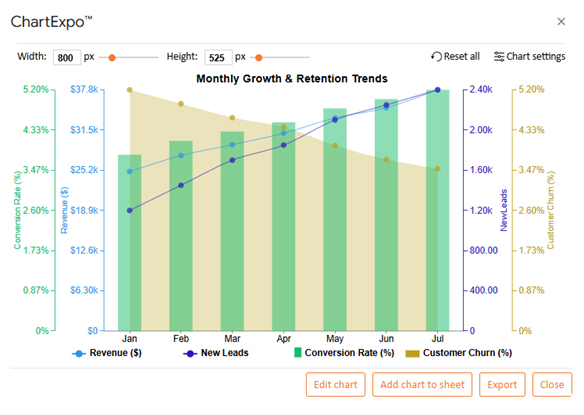
Let’s create a Multi Axis Line Chart from the data below in Google Sheets using ChartExpo and analyze the visualization.
|
Month |
Revenue ($) | New Leads | Conversion Rate (%) |
Customer Churn (%) |
| Jan | 25,000 | 1,200 | 3.8 | 5.2 |
| Feb | 27,500 | 1,450 | 4.1 | 4.9 |
| Mar | 29,200 | 1,700 | 4.3 | 4.6 |
| Apr | 31,000 | 1,850 | 4.5 | 4.4 |
| May | 33,400 | 2,100 | 4.8 | 4 |
| Jun | 35,000 | 2,250 | 5 | 3.7 |
| Jul | 37,800 | 2,400 | 5.2 | 3.5 |
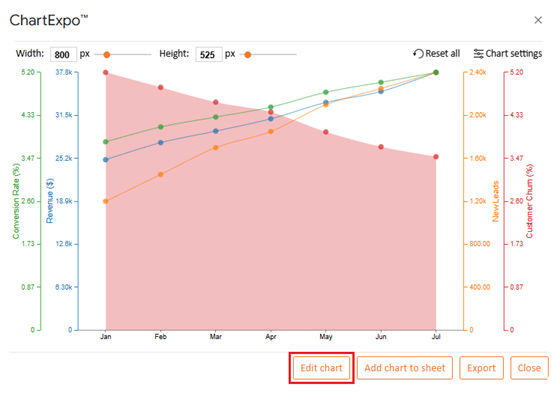
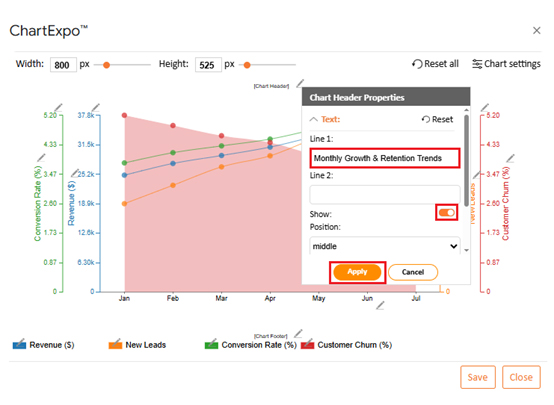
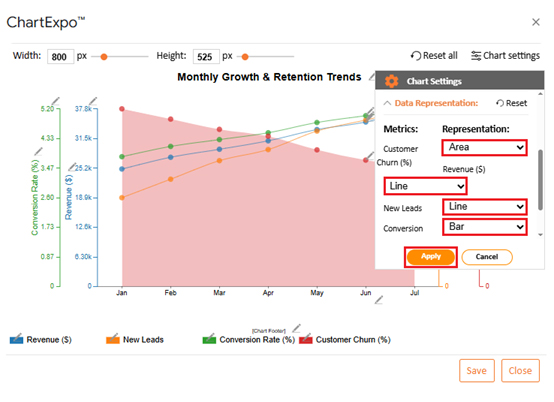
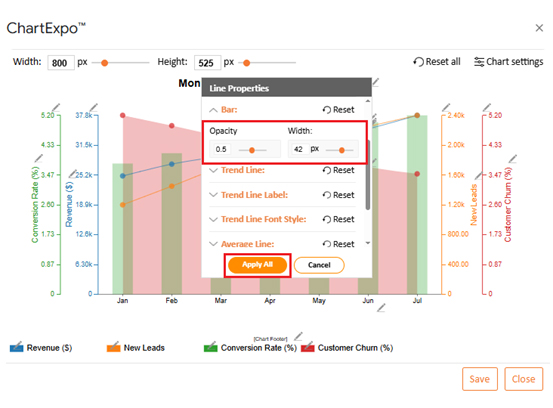
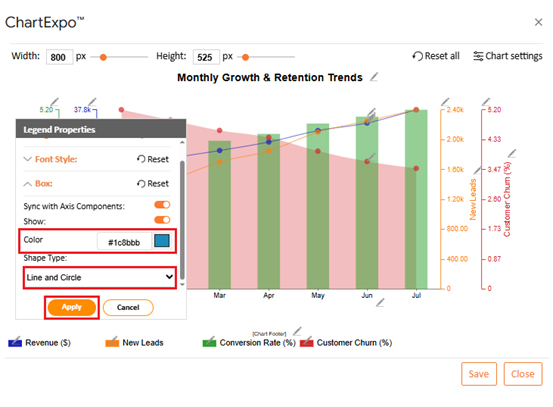
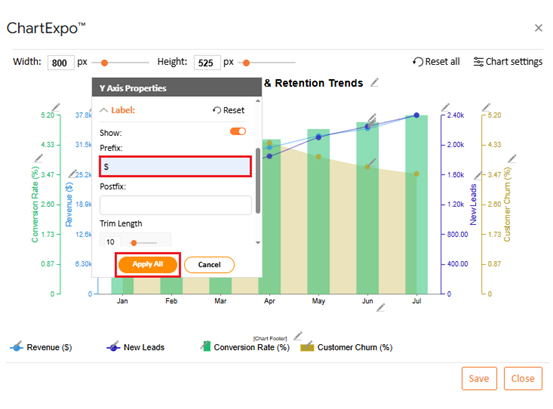
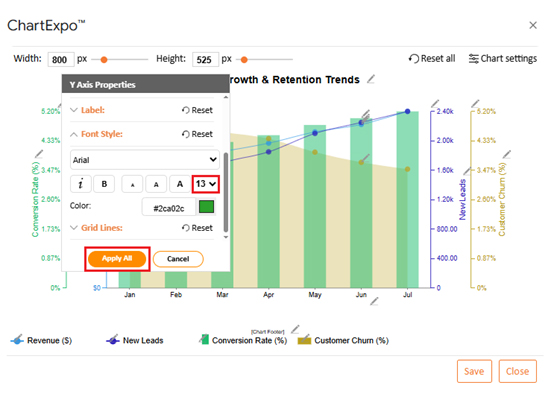
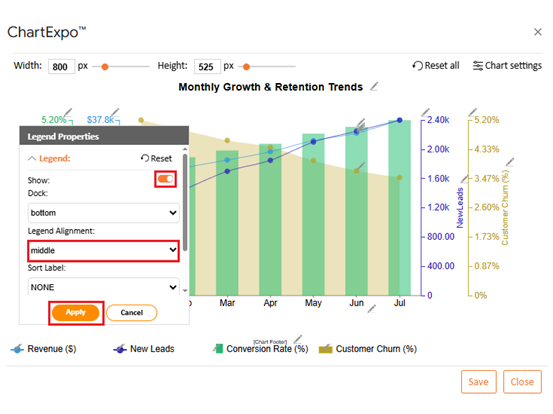
Planning future sales feels less like guesswork when you have structure. A sales projection template in Google Sheets makes that possible. Let’s use the example of a retailer to understand this. For them, it means knowing how much stock to order, when to run promotions, and how to balance expenses with incoming revenue.
Here is how you can use the template effectively:
Guessing sales numbers can leave a business blind to risks and opportunities. A sales projection template in Google Sheets makes that change. It makes forecasting simple, collaborative, and more accurate.
How?
A forecast is only as good as the way it is built. Many businesses create a sales projection template but fail to use it effectively. The difference comes from following a few simple best practices. These practices keep the numbers accurate, the sheet organized, and the insights actionable:
Sales forecasting is not guesswork. It is a structured process that shapes business decisions. A sales projection template in Google Sheets gives you that structure. It turns raw numbers into meaningful insights that guide growth.
When used consistently, the template becomes more than a spreadsheet. It is a planning tool that helps you spot risks before they hurt profits. It also highlights opportunities that may otherwise go unnoticed. Accuracy improves as you feed it better data.
One clear benefit is control. Businesses can compare revenue against costs and adjust quickly. Adding insights from monthly sales reports templates makes the process even sharper. Decisions then move from reactive to proactive.
Another advantage is visibility across teams. Sharing the template ensures sales and finance work in sync. This collaboration builds confidence. Everyone knows the numbers and works toward the same goals.
To go deeper, businesses can track performance metrics. You can even calculate Days Sales Outstanding to measure how fast payments come in. Pairing projections with a sales dashboard adds a visual layer that makes trends clear at a glance.
Still, Google Sheets has its limits. Its charts are basic and often lack depth. That is why installing ChartExpo is the next smart step. It transforms your forecasts into powerful visuals that tell a story.
So, start using ChartExpo today. It will make your sales projection template truly effective.
How much did you enjoy this article?


SUMPRODUCT in Google Sheets handles multi-condition calculations without extra columns. Master its syntax, uses, and errors. Read on!
An annual budget template in Google Sheets organizes your yearly finances, tracks every dollar, and reveals spending patterns. Read on!
Learn the best graph to show profit and loss with practical examples and use cases. Discover how to visualize your business data, track trends, and make smarter financial decisions.