• Home
  • Tools dropdown img
    • Spreadsheet Charts

      • ChartExpo for Google Sheets
      • ChartExpo for Microsoft Excel
    • Power BI Charts

      • Power BI Custom Visuals by ChartExpo
    • Word Cloud

  • Charts dropdown img
    • Chart Category

      • Bar Charts
      • Circle Graphs
      • Column Charts
      • Combo Charts
      • Comparison Charts
      • Line Graphs
      • PPC Charts
      • Sentiment Analysis Charts
      • Survey Charts
    • Chart Type

      • Box and Whisker Plot
      • Clustered Bar Chart
      • Clustered Column Chart
      • Comparison Bar Chart
      • Control Chart
      • CSAT Survey Bar Chart
      • CSAT Survey Chart
      • Dot Plot Chart
      • Double Bar Graph
      • Funnel Chart
      • Gauge Chart
      • Likert Scale Chart
      • Matrix Chart
      • Multi Axis Line Chart
      • Overlapping Bar Chart
      • Pareto Chart
      • Radar Chart
      • Radial Bar Chart
      • Sankey Diagram
      • Scatter Plot Chart
      • Slope Chart
      • Sunburst Chart
      • Tornado Chart
      • Waterfall Chart
      • Word Cloud
    • Google Sheets
      Microsoft Excel
  • Services
  • Pricing
  • Contact us
  • Blog
  • Support dropdown img
      • Gallery
      • Videos
      • Contact us
      • FAQs
      • Resources
    • Please feel free to contact us

      atsupport@chartexpo.com

Categories
All Data Visualizations Data Analytics Surveys
Add-ons/
  • Google Sheets
  • Microsoft Excel
  • Power BI
All Data Visualizations Data Analytics Surveys
Add-ons
  • Google Sheets
  • Microsoft Excel
  • Power BI

We use cookies

This website uses cookies to provide better user experience and user's session management.
By continuing visiting this website you consent the use of these cookies.

Ok

ChartExpo Survey


Home > Blog > Data Analytics

Remote Work Statistics: A Complete Visual Guide

Every organization operating in a distributed environment needs reliable data to guide workforce decisions. Remote work statistics translate employee behavior into measurable patterns, giving leaders the clarity to act on evidence rather than intuition.
Remote Work Statistics

From productivity shifts to communication trends, these figures capture dimensions of work that are otherwise invisible to managers and difficult to evaluate without a structured approach.

In this guide, you will discover how to interpret, analyze, and present remote work data effectively. You will also explore practical tools that transform raw numbers into visual insights, making complex findings far easier to communicate, share, and act on across any organization.

Table of Contents:

  1. What are Remote Work Statistics?
  2. Why are Remote Work Statistics Important?
  3. Key Concepts and Types of Remote Work Data
  4. Remote Work Statistics by Industry and Job Roles
  5. Remote Work Statistics Examples
  6. How to Analyze Remote Work Statistics Using Google Sheets?
  7. Benefits of Using Remote Work Statistics
  8. Best Practices for Presenting Remote Work Statistics
  9. FAQs
  10. Wrap Up

What are Remote Work Statistics?

Definition: Remote work statistics are measurable data points that describe how employees function, communicate, and deliver results outside a conventional office setting.

These figures convert daily workforce activities into quantifiable signals that reveal operational patterns and behavioral tendencies. Companies use them to track efficiency, gauge engagement, and determine whether distributed work models are producing their intended outcomes.

Unlike basic attendance logs, work-from-home statistics examine deeper indicators such as output volume, schedule consistency, and the rhythm of team communication.

When these metrics are analyzed carefully, they expose productivity shifts, uncover hidden friction points, and provide the evidence organizations need to build smarter, more adaptive workforce policies.

Why are Remote Work Statistics Important?

Any leader managing a distributed workforce depends on dependable performance data. Remote work statistics provide that clarity, particularly when findings are translated into statistical graphs that make complex trends accessible at a glance.

  • Workforce trend measurement: Tracks how remote and hybrid adoption patterns shift across departments and roles over time.
  • Productivity impact tracking: Compares employee output and efficiency across remote, hybrid, and in-office work setups.
  • Cost reduction insights: Reveals savings tied to reduced infrastructure, travel, and physical workplace expenses.
  • Employee satisfaction analysis: Measures engagement, morale, and work-life balance factors that affect employee retention.
  • Policy and compliance decisions: Guides evidence-based updates to remote work policies and shifting regulatory requirements.
  • Technology adoption evaluation: Gauges how effectively teams are applying the collaboration and productivity tools available.
  • Long-term workforce planning: Informs hiring, resource allocation, and organizational design decisions at a strategic level.

Key Concepts and Types of Remote Work Data

Building an accurate understanding of work-from-home statistics begins with knowing what each data type actually measures. Every category illuminates a different aspect of distributed work and plays a distinct role in effective data analysis in Google Sheets.

  • Fully remote workforce data: Captures the size, composition, and behavior of employees working entirely outside office locations.
  • Hybrid work distribution: Measures how working hours are allocated between remote and on-site environments across teams.
  • Remote productivity metrics: Evaluate efficiency by tracking task outputs, completion rates, and consistency of performance.
  • Employee engagement indicators: Reflect involvement through participation rates, feedback frequency, and communication patterns.
  • Work hour flexibility data: Examines scheduling autonomy, availability trends, and variations in hours worked, often recorded through Google Sheets time tracking systems.
  • Collaboration and communication usage: Monitors how frequently teams interact via meetings, direct messages, and digital platforms.
  • Performance outcome metrics: Assess work quality, deadlines, and goal completion to gauge overall distributed work effectiveness.

Remote Work Statistics by Industry and Job Roles

Remote work compatibility varies considerably across professions, with certain fields naturally suited to distributed arrangements and others requiring some level of in-person coordination, especially when teams rely on strong Google Sheets functionality for reporting.

  • Information technology roles: Show strong remote compatibility due to digital workflows, asynchronous task management, and tool-based collaboration.
  • Marketing and creative teams: Thrive in flexible environments that encourage collaboration, ideation, and project-driven output.
  • Customer support operations: Operate efficiently through virtual communication channels and centralized service delivery platforms.
  • Finance and accounting jobs: Adapt well to remote setups because tasks are data-driven, independently structured, and system-based.
  • Education and training roles: Increasingly leverage digital tools for course delivery, broadening accessibility, and enabling scheduling flexibility.
  • Healthcare administrative roles: Suit remote delivery well for scheduling, documentation, and operational coordination functions.

Remote Work Statistics Examples

Data becomes most actionable when converted to visual form. Turning distributed workforce metrics into charts exposes performance patterns that raw numbers alone fail to communicate clearly to decision-makers.

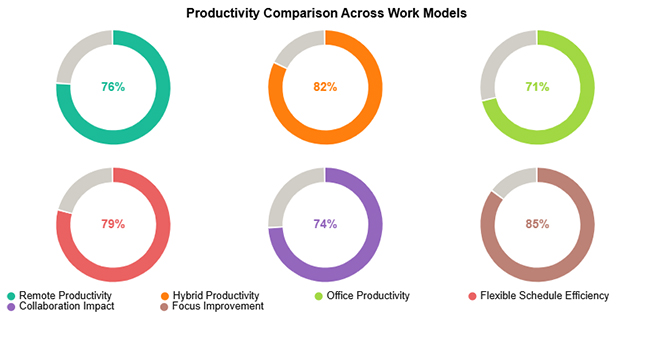
  • Productivity Comparison Across Work Models

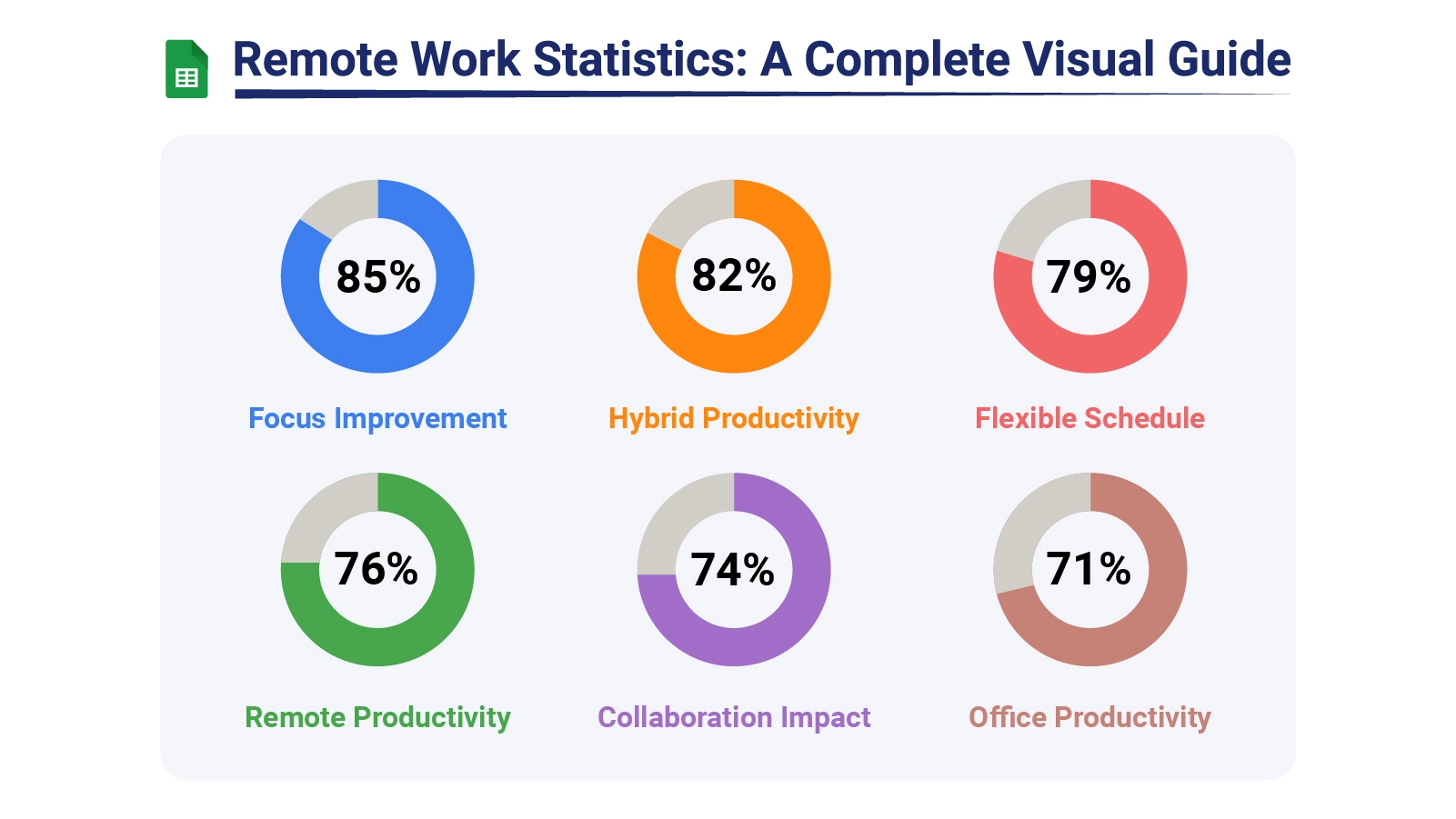
The Productivity Comparison Across Work Models chart shows that hybrid arrangements deliver the strongest productivity outcomes, with schedule flexibility and reduced-distraction focus time contributing most significantly.
Remote Work Statistics
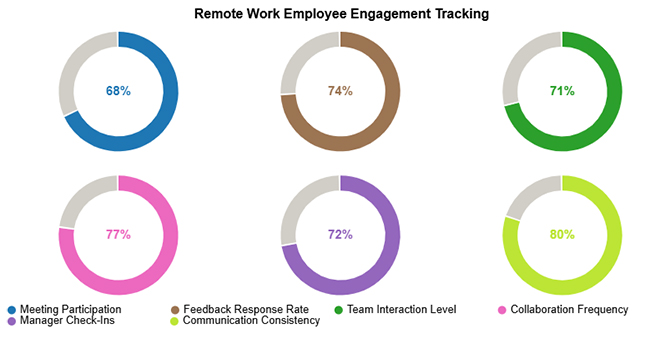
  • Remote Work Employee Engagement Tracking

The Remote Work Employee Engagement Tracking chart shows that communication consistency and collaboration frequency drive the highest engagement, while attendance at regular meetings contributes comparatively less.
Remote Work Statistics
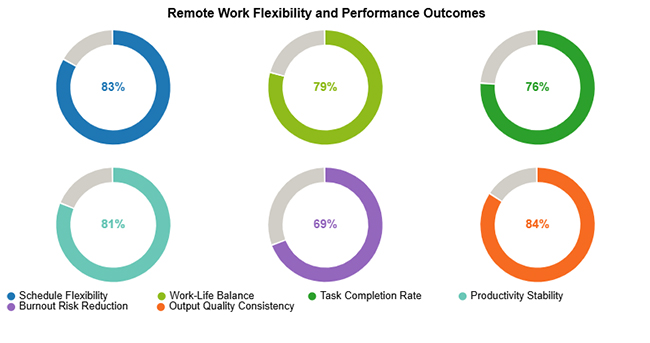
  • Remote Work Flexibility and Performance Outcomes

The Remote Work Flexibility and Performance Outcomes chart shows that schedule control and output quality are the top performance drivers, while reducing burnout risk scores lower overall.
Remote Work Statistics

How to Analyze Remote Work Statistics Using Google Sheets?

Analyzing remote work stats effectively with a spreadsheet tool becomes far more manageable when a clear, structured workflow guides the process from start to finish.

  • Consolidate datasets: Bring attendance, productivity, and engagement records into one structured spreadsheet to maintain data consistency.
  • Normalize information: Remove errors, standardize formats, and ensure uniform data types throughout the sheet to improve accuracy.
  • Group variables: Categorize metrics into logical clusters such as behavioral, operational, and performance-related indicators.
  • Apply calculations: Run formulas and functions to derive comparisons, identify trends, and calculate efficiency ratios.
  • Generate visuals: Turn processed data into charts that clarify findings and surface actionable patterns, with added capabilities available through a Google Sheets extension.

ChartExpo deepens this analysis by converting complex metric sets into interactive, easy-to-navigate visualizations. Applying Google Sheets tips and tricks alongside ChartExpo streamlines the reporting process and sharpens analytical output.

Why use ChartExpo?

  • Transforms distributed workforce data into visual formats that are easy to interpret at a glance.
  • Reduces reporting time by removing the need for manual chart configuration.
  • Helps teams quickly identify patterns, trends, and performance gaps in remote work data.
  • Offers a 7-day free trial and costs just $10/month.

How to install ChartExpo in Google Sheets?

  • Go to Google Sheets and open the file you are interested in. Then click on the Extensions tab in the upper menu.
  • Click on the Add-ons and enter “Get add-ons.”
  • Go to the Google Workspace Marketplace and search for ChartExpo.
  • Explore “Charts, Graphs & Visualizations by ChartExpo, and click the “Install” button.
  • Allow the necessary access and confirm your Google account when asked.

Example:

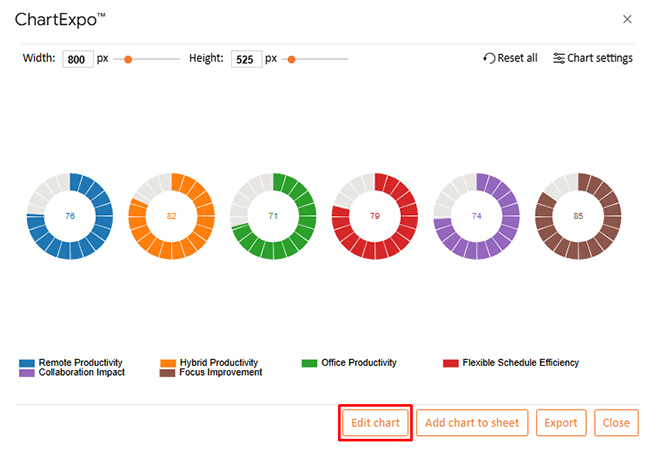
Consider the following data for the Progress Circle Chart.

Productivity Metric Performance (%)
Remote Productivity 76
Hybrid Productivity 82
Office Productivity 71
Flexible Schedule Efficiency 79
Collaboration Impact 74
Focus Improvement 85
  • To get started with ChartExpo, install ChartExpo.
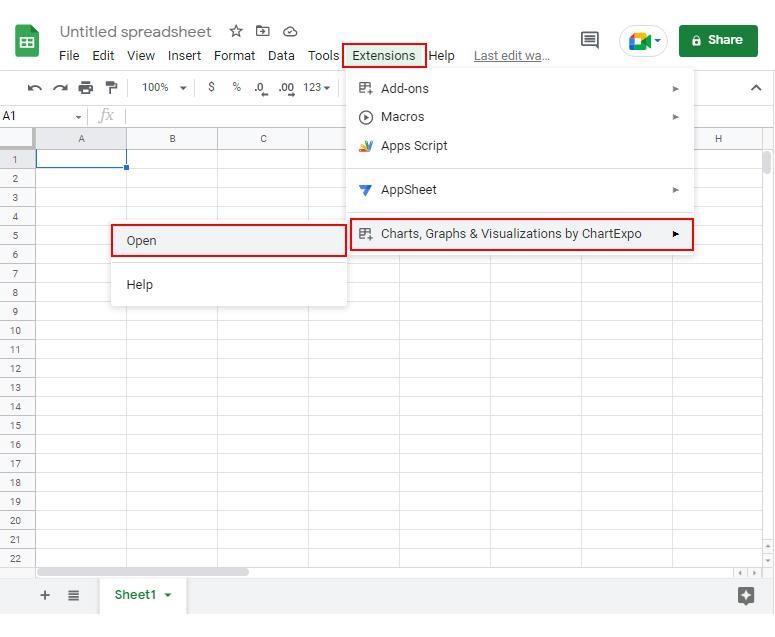
  • Go to Extensions > Charts, Graphs & Visualizations by ChartExpo > Open.
Remote Work Statistics
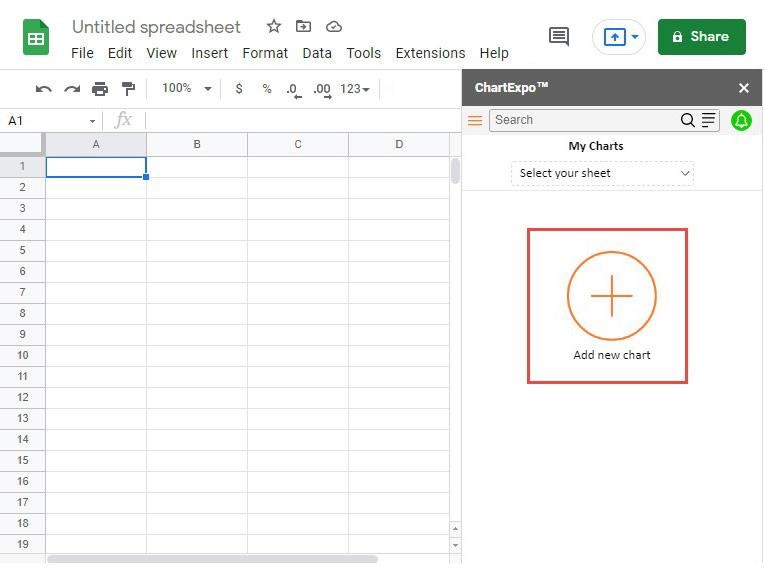
  • Once ChartExpo is installed, click on the “Add new chart” button.
Remote Work Statistics
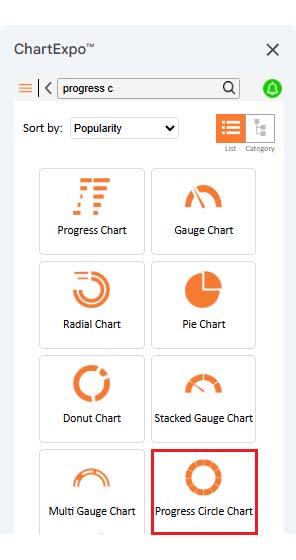
  • Once it loads, scroll through the charts list to locate and choose the “Progress Circle Chart”.
Remote Work Statistics
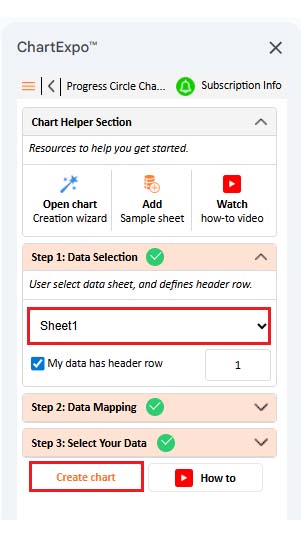
  • Then, select your worksheet and confirm the data range; your data is automatically mapped, and click on the Create button.
Remote Work Statistics
  • If you want to customize your chart, select the ‘Edit Chart’ option and design it to your specifications.
Remote Work Statistics
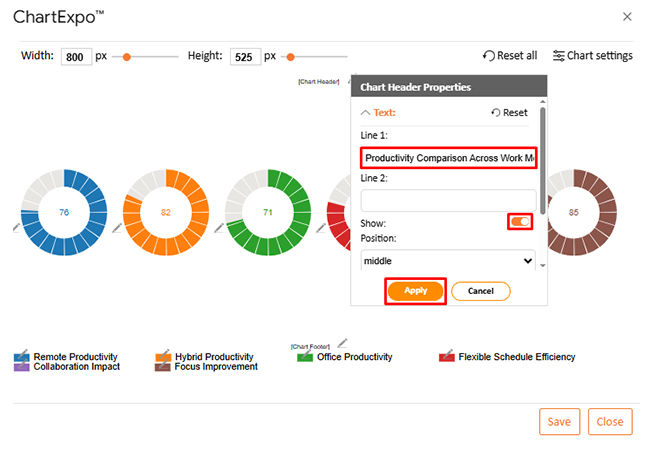
  • To change the chart’s title, select the pencil icon on the header. Enter the text you want and select “Apply”.
Remote Work Statistics
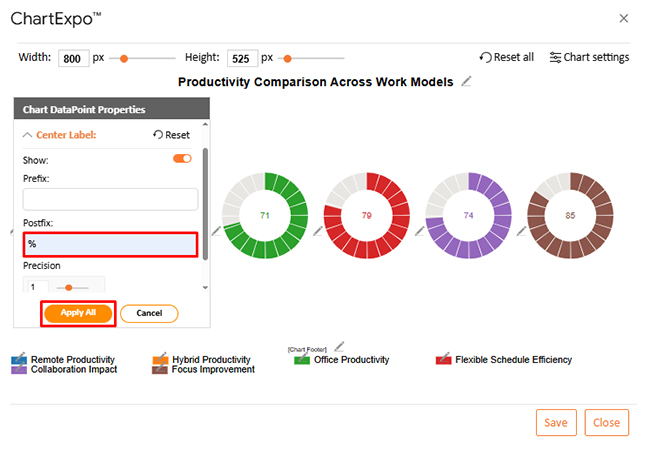
  • You can add a percentage sign to the center label from “Chart DataPoint Properties”.
Remote Work Statistics
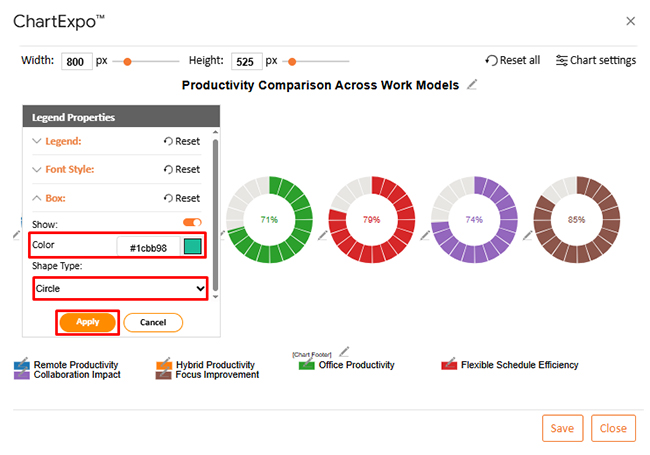
  • You can change the color or shape of the legend from the “Legend Properties”.
Remote Work Statistics
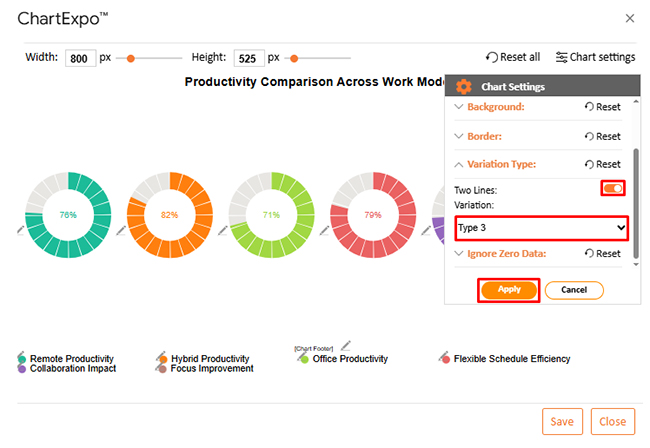
  • Next, we can change the Variation type from “Chart Settings” to make the chart look more presentable.
Remote Work Statistics
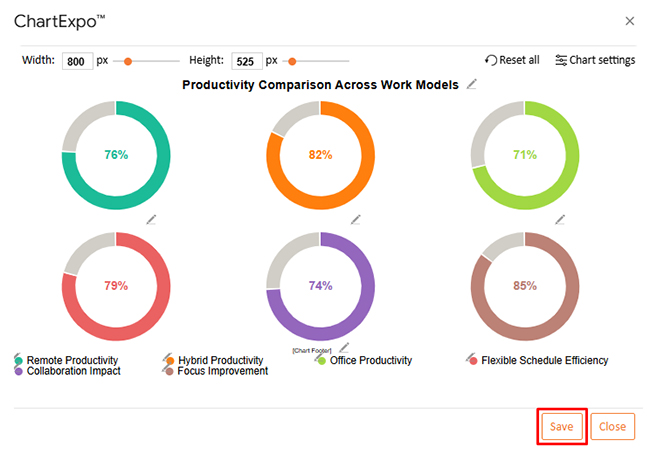
  • When you are done with all the changes, click the “Save” button to save them.
Remote Work Statistics
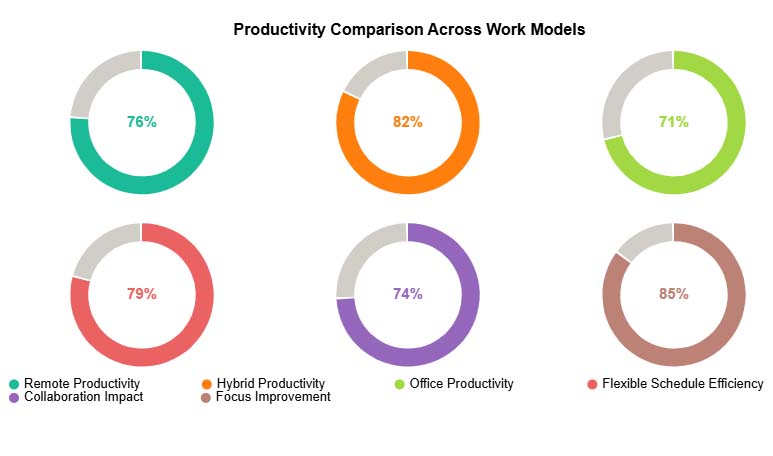
  • The final look of the Progress Circle Chart is shown below.
Remote Work Statistics

Key Insights

  • At 82%, hybrid work leads all models, showing that combining flexibility with structure drives stronger output than either approach alone.
  • Focus improvement ranks highest at 85%, confirming that cutting distractions is one of the most reliable productivity gains remote work delivers.
  • Fully remote workers at 76% outpace office workers at 71%, indicating that distributed teams perform better than traditional setups when properly supported.

Benefits of Using Remote Work Statistics

Organizations that track these metrics regularly gain concrete, measurable advantages. Evidence-based monitoring supports stronger planning, sharper management decisions, and more reliable performance evaluation.

  • Data-driven workforce planning: Enables resource allocation and staffing decisions anchored in measurable workforce patterns and operational needs.
  • Improved employee retention strategies: Pinpoints the satisfaction and engagement factors most influential in determining long-term employee commitment.
  • Better productivity monitoring: Supports early detection of efficiency changes and performance variation across distributed teams.
  • Optimized remote work policies: Drives evidence-based refinement of remote guidelines to improve both effectiveness and organizational fairness.
  • Enhanced operational efficiency: Exposes workflow gaps and surfaces opportunities for process improvement across distributed work settings.
  • Stronger leadership decision-making: Gives leaders consistent data-based insights to replace guesswork with more reliable strategic choices.

Best Practices for Presenting Remote Work Statistics

Even accurate remote work statistics lose their impact when presented carelessly. Clear communication of findings improves comprehension and speeds up the adoption of data-based decisions.

  • Use clear visualizations: Keep charts and graphics easy to read, applying the same standard when displaying complex comparisons such as electric vehicle sales statistics.
  • Focus on actionable metrics: Surface data points that directly support decisions and avoid loading the audience with information they cannot apply.
  • Segment data by role or industry: Separate statistics into relevant groups to prevent misleading generalizations that distort what the numbers show.
  • Highlight trends over time: Show how metrics evolve across consecutive intervals to reveal the performance shifts that matter most.
  • Keep charts simple and readable: Cut visual elements that compete with the core message and distract audiences from key findings.
  • Align visuals with business goals: Frame presentations so that data findings connect directly to strategic priorities and measurable outcomes.

FAQs

What are the current remote work statistics?

Hybrid and flexible arrangements remain prevalent across industries, with organizations continuing to balance efficiency targets, collaboration demands, and individual employee preferences.

What are the statistics on WFH productivity?

Research into distributed work shows that productivity outcomes depend more on management approach, digital tool quality, and role type than on physical location.

Which industries rely most on Remote Work Statistics?

Remote work stats show that technology, finance, marketing, and administrative sectors rely most heavily on distributed performance tracking to guide operational decisions.

Wrap Up

Fluency with remote work statistics gives organizations a clear edge in workforce planning, policy design, and day-to-day management. The ability to move from raw data to structured insight separates reactive operations from those driven by deliberate strategy. Consistent tracking builds the foundation for sound decisions at every level.

Visualization tools make that translation faster and more accessible. Converting distributed workforce data into clear, interactive charts reduces interpretation time and allows every stakeholder to engage more meaningfully with the findings. With sound analytical habits in place, workforce data becomes a genuine strategic asset rather than a routine reporting burden.

How much did you enjoy this article?

PBIAd1
Start Free Trial!
159927

Related articles

next previous
Data Analytics13 min read

Total Cost of Ownership Analysis for TCO Insights

Total cost of ownership analysis reveals every lifecycle cost behind any major decision. Stop guessing what investments truly cost. Read on!

Data Analytics10 min read

Value Stream Mapping Template: A Complete Guide

A value stream mapping template helps teams cut waste and improve flow. Learn how to design, analyze, and optimize your processes. Learn more!

Data Analytics9 min read

Sales Follow-Up Statistics: Insights That Improve Follow-Ups

Track and analyze sales follow-up statistics, response speed, outreach frequency, and conversions to improve your sales outcomes.

Data Analytics9 min read

Nominal vs. Ordinal Data: Key Differences Explained

Explore the differences between nominal vs. ordinal data types and learn when to use each for accurate analysis. Discover now!

Data Analytics10 min read

Fleet Management Dashboard: Features, Metrics, and Tips

Fleet Management Dashboard tracks vehicles, drivers, and fuel usage in real time. Build actionable insights using Power BI visuals. Learn more now!

ChartExpo logo

Turn Data into Visual
Stories

CHARTEXPO

  • Home
  • Gallery
  • Videos
  • Services
  • Pricing
  • Contact us
  • FAQs
  • Privacy policy
  • Terms of Service
  • Sitemap

TOOLS

  • ChartExpo for Google Sheets
  • ChartExpo for Microsoft Excel
  • Power BI Custom Visuals by ChartExpo
  • Word Cloud

CATEGORIES

  • Bar Charts
  • Circle Graphs
  • Column Charts
  • Combo Charts
  • Comparison Charts
  • Line Graphs
  • PPC Charts
  • Sentiment Analysis Charts
  • Survey Charts

TOP CHARTS

  • Sankey Diagram
  • Likert Scale Chart
  • Comparison Bar Chart
  • Pareto Chart
  • Funnel Chart
  • Gauge Chart
  • Radar Chart
  • Radial Bar Chart
  • Sunburst Chart
  • see more
  • Scatter Plot Chart
  • CSAT Survey Bar Chart
  • CSAT Survey Chart
  • Dot Plot Chart
  • Double Bar Graph
  • Matrix Chart
  • Multi Axis Line Chart
  • Overlapping Bar Chart
  • Control Chart
  • Slope Chart
  • Clustered Bar Chart
  • Clustered Column Chart
  • Box and Whisker Plot
  • Tornado Chart
  • Waterfall Chart
  • Word Cloud
  • see less

RESOURCES

  • Blog
  • Resources
  • YouTube
SIGN UP FOR UPDATES

We wouldn't dream of spamming you or selling your info.

© 2026 ChartExpo, all rights reserved.