Categories

To run a profitable business, you’ve got to analyze the processes impacting your bottom line.


Why?
This form of analysis ensures you’re operating efficiently and profitably. While there’re multiple ways of analyzing your business, one of the tested and proven methods is to conduct a SWOT analysis.
Strengths, Weaknesses, Opportunities, and Threats (SWOT) analysis can help you achieve two KEY goals:
This methodology is designed to help you assess internal and external factors likely to create a stumbling block.
Yes, you read that right.
Also, the SWOT analysis provides a data-driven look at the strengths, weaknesses, opportunities, and threats facing your business.
Get this straight.
A SWOT analysis is a mere guide. It’s not a prescription for all the problems facing your business.
Let’s assume you’ve gathered the data for SWOT analysis. What’s the go-to chart if you take the visualization route?
Sankey is one of the tested and proven charts for the task. And this is because it highlights key variables using flows.
In SWOT analysis, this chart can help you narrow down all the variables that constitute strengths, weaknesses, opportunities, and threats.
How?
It segments the critical variables in SWOT using percentages. And this means you can easily segment the variables based on their urgency.
Let’s say opportunities account for 45% and threats account for 12%.
It makes sense to double down on the opportunities.
Excel does not have ready-made and visually stunning Sankey Diagrams for SWOT analysis.
So, what’s the solution?
Download and install a particular third-party application (add-in) if your goal is to get ready-to-use and visually stunning Sankey Charts.
Keep reading to discover more about this add-in.
In this blog, you’ll learn:
Before jumping into the blog’s core, we’ll address the following question: what is SWOT analysis?
Definition: The Strengths, Weaknesses, Opportunities, and Threats (SWOT), is a methodology you can use to assess the following variables, namely:
You can leverage the tool to analyze your current successes to devise strategies for the future.

SWOT can help you uncover areas holding your business back. Also, it can showcase insights into the actions of your close competitors.
This game-changing tool examines both internal and external factors. In other words, what’s going on inside and outside your business?
Here’s the twist.
Some of the aforementioned factors can be within your control, and some will not.
SWOT methodology can help you to challenge risky assumptions and to uncover disastrous blind spots.
If you use the SWOT analysis example carefully, it can deliver new insights into your current situation. More so, you develop strategies to respond to changes in both internal and external landscapes.
Check out the example below.
You may be aware of your business’s strengths. But until you record them alongside threats and weaknesses, you might not realize the impact of those strengths.
On the other hand, you’ll likely have reasonable concerns about your business’ weaknesses and threats.
But by investigating further, you could find a hidden opportunity previously overlooked.
We recommend you use SWOT analysis examples before committing strategic actions, such as:
The methodology can show you the key areas in your business are performing optimally and abysmally. And segments that are consuming a lot of resources and generating cringe-worthy returns.
By investing your time in conducting a SWOT analysis, you can get the macro view of your business.
And from there, you’re likely to discover ways to eliminate your company’s weaknesses and soften threats while doubling down on strengths and opportunities.
We recommend you include other team members for more insights you may have missed. Sometimes, a fresh pair of eyes can help you uncover insights you may have missed.
The primary objective of the SWOT analysis example is to help you develop data-driven awareness of all the factors influencing your business’ bottom line.
Excel is one of the popular tools of visualization among micro and small business owners. However, it lacks ready-made Sankey Diagrams for visualizing the SWOT table (SWOT analysis diagram).
We’re not recommending you dump Microsoft Excel.
There’s an amazingly affordable visualization tool that comes as an add-in you can easily install in Excel to access an insightful and easy-to-customize SWOT Analysis Diagram (Sankey Chart).
The application is called ChartExpo.
So, what is ChartExpo?
ChartExpo is an add-in you can easily install in your Excel to access ready-made and visually appealing SWOT Analysis Diagrams (Sankey Diagram in Excel).
In the coming section, we’ll address SWOT examples.
You don’t want to miss this.

Below is a table with SWOT data for a hypothetical company called E-store.
It’s segmented into:
In this section, we’ll use a SWOT Analysis Diagram (Sankey) to visualize the table below.
Let’s dive in.
| Company | SWOT | Measures |
| E-Store | Strengths | Brand identity |
| E-Store | Strengths | Pioneer advantage |
| E-Store | Strengths | Cost advantage |
| E-Store | Strengths | Continuous business improvement |
| E-Store | Weakness | Low-profit margins |
| E-Store | Weakness | Seasonality |
| E-Store | Opportunity | Diversification of e-commerce business |
| E-Store | Opportunity | Continuous to increase awareness |
| E-Store | Opportunity | Expansion of local businesses |
| E-Store | Opportunity | Promotion with affiliated industries |
| E-Store | Threats | Loss of profits due to low-profit margins |
| E-Store | Threats | Patent infringement |
| E-Store | Threats | E-commerce industry barriers |
| E-Store | Threats | Cybersecurity issues |
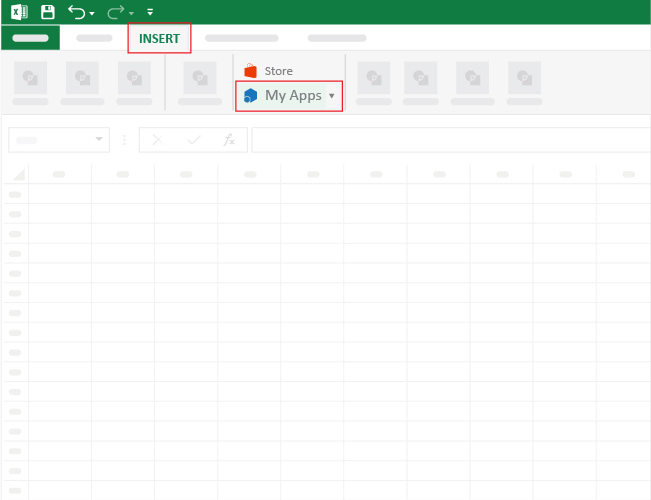
To get started with ChartExpo in Excel, follow the steps below:
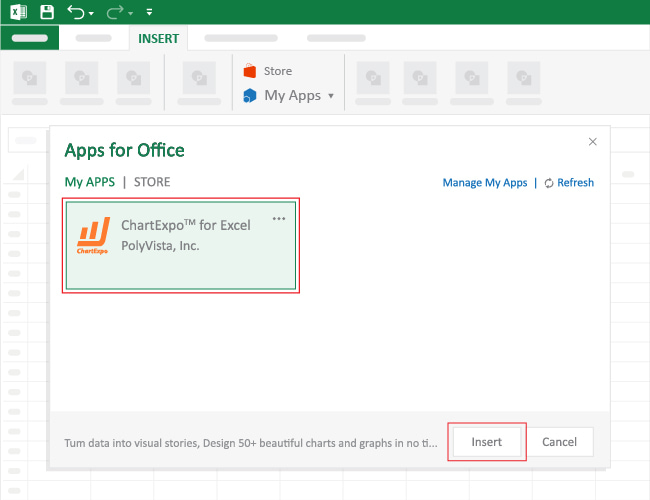


Let’s edit the Chart to add more details, such as titles and legends.

Let’s add percentages to our Sankey Chart.

Let’s add some color to our SWOT analysis example (Sankey Diagram).

Check out the final chart below.

The table below has SWOT data for a hypothetical company called E-store.
And it’s segmented into Strengths, Weaknesses, Opportunities, and Threats.
In this section, we’ll use a SWOT Analysis Diagram (Sankey) to visualize the table below.
| Company | SWOT | Measures | Metrics |
| E-Store | Strengths | Brand identity | 14 |
| E-Store | Strengths | Pioneer advantage | 37 |
| E-Store | Strengths | Cost advantage | 32 |
| E-Store | Strengths | Continuous business improvement | 17 |
| E-Store | Weakness | Low-profit margins | 37 |
| E-Store | Weakness | Seasonality | 63 |
| E-Store | Opportunity | Diversification of e-commerce business | 24 |
| E-Store | Opportunity | Continuous to increase awareness | 38 |
| E-Store | Opportunity | Expansion of local businesses | 31 |
| E-Store | Opportunity | Promotion with affiliated industries | 7 |
| E-Store | Threats | Loss of profits due to low-profit margins | 34 |
| E-Store | Threats | Patent infringement | 26 |
| E-Store | Threats | E-commerce industry barriers | 29 |
| E-Store | Threats | Cybersecurity issues | 11 |


Let’s edit the Chart to add more details, such as titles and legends.


| Company | SWOT | Measures | Metrics |
| E-Store | Strengths | Brand identity | 108 |
| E-Store | Strengths | Pioneer advantage | 163 |
| E-Store | Strengths | Cost advantage | 122 |
| E-Store | Strengths | Continuous business improvement | 137 |
| E-Store | Weakness | Low profit margins | 106 |
| E-Store | Weakness | Seasonality | 193 |
| E-Store | Opportunity | Diversification of e-commerce business | 109 |
| E-Store | Opportunity | Continuous to increase awareness | 156 |
| E-Store | Opportunity | Expansion of local businesses | 125 |
| E-Store | Opportunity | Promotion with affiliated industries | 114 |
| E-Store | Threats | Loss of profits due to low-profit margins | 124 |
| E-Store | Threats | Patent infringement | 151 |
| E-Store | Threats | E-commerce industry barriers | 144 |
| E-Store | Threats | Cybersecurity issues | 133 |

In the following video, you will learn how to do SWOT Analysis for E-Store in Excel using Sankey Diagram.
You can leverage the tool to best analyze your current successes to devise future strategies.
Besides, SWOT can help you uncover areas holding your business back. Also, it can showcase insights into the actions of the competitors.
The game-changing tool examines both internal and external factors.
The Strengths, Weaknesses, Opportunities, and Threats (SWOT) is a methodology you can use to assess the following variables affecting your business, namely:
And it can show you the key areas your business is performing optimally and abysmally.

To run a profitable business, you’ve got to analyze the processes impacting your bottom line.
This form of analysis ensures you’re operating efficiently and profitably. While there’re multiple ways of analyzing your business, one of the tested and proven methods is to conduct a SWOT analysis.
This methodology is designed to help you assess internal and external factors likely to create a stumbling block.
Yes, you read that right.
Also, the SWOT analysis provides a data-driven look at the strengths, weaknesses, opportunities, and threats facing your business.
Get this straight.
A SWOT analysis is a mere guide. It’s not a prescription for all the problems facing your business.
Let’s assume you’ve gathered the data for SWOT analysis. What’s the go-to chart if you take the visualization route?
Sankey is one of the tested and proven charts for the task. And this is because it highlights key variables using flows.
In SWOT analysis, this chart can help you narrow down all the variables that constitute strengths, weaknesses, opportunities, and threats.
It segments the key variables in SWOT using percentages. And this means you can easily segment the variables based on their urgency.
Excel does not have ready-made and visually stunning Sankey Diagrams for SWOT analysis.
We recommend you install third-party apps, such as ChartExpo, to access ready-to-go SWOT Analysis Diagrams, such as Sankey.
ChartExpo is an Excel add-in loaded with insightful and ready-to-SWOT Analysis example charts, such as Sankey Diagram.
Sign up for a 7-day free trial today to access ready-made Sankey Charts for analyzing Sankey Table.
How much did you enjoy this article?


What is a workout tracking spreadsheet? It’s a tool for tracking progress, monitoring goals, and optimizing your fitness routine. A workout tracking spreadsheet helps you organize your exercises and provides clear insights into your performance.

Are you tired of feeling like you got ripped off every time you make a purchase? Do you wish there was an easy way to compare prices and find the best deals?

What is dynamic graph Excel? Dynamic graphs automatically update as your data changes, saving time and ensuring accuracy. 81% of businesses use Excel for financial reporting.